
So, you know visitors want your site to be secure, you know Google provides a small ranking boost for sites that have SSL, but how to you migrate without affecting your SEO?

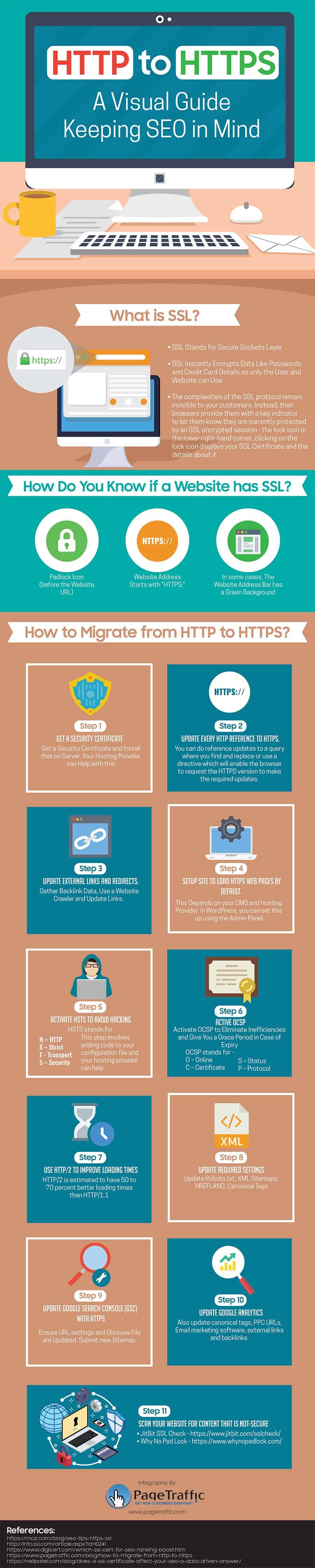
PageTraffic share their guide to switching to HTTPS in this infographic.

Here’s a quick summary:

  • Get a security certificate
  • Update every HTTP reference to HTTPS
  • Update external links and redirects
  • Make sure your site loads HTTPS by default
  • Activate HSTS
  • Activate OCSP
  • Use HTTP/2
  • Update required settings
  • Update Google Search Console
  • Update Google Analytics
  • Scan your site for unsecure content

Check out the infographic for more detail.
Mark Walker-Ford

Author:
Mark Ford

Categories: Web Design
  • 5 Website Design Principles That Keep Visitors Coming Back (1)

    5 Website Design Principles That Keep Visitors Coming Back

    Are you trying to create a website that keeps visitors engaged and encourages them to return? Want to discover the key design principles that make websites both effective and memorable? […]

  • No Website, No Growth_ Why Being Online Is Non-Negotiable (1)

    No Website, No Growth: Why Being Online Is Non-Negotiable

    Are you wondering why having a website is now essential for small business growth? Want to discover the key reasons being online is no longer optional for success? […]

  • How to Build a B2B Website Homepage That Wins Clients in Seconds (1)

    How to Build a B2B Website Homepage That Wins Clients in Seconds

    Are you struggling to make your B2B homepage capture attention and win over potential clients? Want to learn the essential features that turn a homepage into a powerful client-converting tool? […]

  • How to Align Your Website with Proven UX Best Practices (1)

    How to Align Your Website with Proven UX Best Practices

    Are you ready to make your website easier and more enjoyable for visitors to use? Want to discover the proven UX best practices that top-performing sites follow? […]

