

In the digital age, your website’s home page is often the first point of contact between your business and potential customers. It’s like the front door to your online presence, and just as you wouldn’t want a messy, disorganized front entrance to your physical store, you shouldn’t settle for a subpar website home page either.
A well-designed home page is crucial for making a positive first impression and guiding visitors toward their desired actions.
But what should your website home page include to be effective? The answer depends on your specific business and goals, but there are certain elements that can help any website home page shine.
In this blog post, we’ll explore 10 essential things to include on your website’s home page, along with tips and best practices to make them work for you.
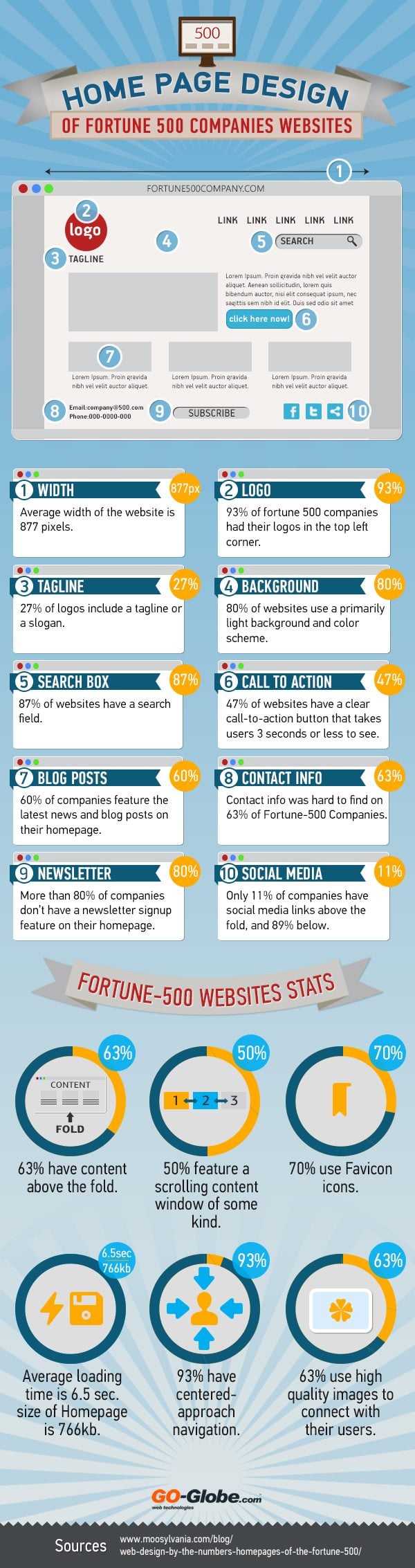
Infographic by Go Globe.
1. Clear and Compelling Headline
Your website’s headline is often the first thing visitors see, so it needs to be both attention-grabbing and informative. It should succinctly convey what your website is about and why visitors should stick around. Here are some tips for crafting a great headline:
- Keep it short and to the point.
- Use action words to encourage engagement.
- Highlight the main benefit or value proposition of your website.
- Make it visually appealing with the right font, size, and color.
For example, if you run a photography business, your headline could be something like, “Capturing Life’s Beautiful Moments Through Photography.”
2. Compelling Visuals
Humans are highly visual creatures, and a well-chosen image or video can instantly convey the essence of your brand and content. Use high-quality visuals that are relevant to your business or industry. Here are some guidelines:
- Invest in professional photography or videography if possible.
- Choose visuals that evoke emotion or tell a story.
- Ensure your visuals are consistent with your brand’s style and tone.
- Optimize images for fast loading times to prevent user frustration.
Consider creating a visually appealing banner or hero section that incorporates your headline and a striking image or video.
3. Clear Navigation Menu
A user-friendly navigation menu is crucial for helping visitors find their way around your website. Keep it simple, organized, and easy to understand. Here’s what you can do:
- Use clear and concise labels for each menu item.
- Limit the number of menu items to avoid overwhelming visitors.
- Include essential sections like “Home,” “About Us,” “Services,” and “Contact.”
- Consider dropdown menus for subcategories or additional options.
A well-structured navigation menu ensures that visitors can quickly access the information they’re looking for.
4. Value Proposition
Your website’s home page should communicate the unique value you offer to your audience. What makes your products, services, or content special? Your value proposition should answer this question clearly and concisely.
- Use a brief statement or a few bullet points to highlight what sets you apart.
- Focus on the benefits customers will receive from your offerings.
- Keep it customer-centric; explain how you can solve their problems or meet their needs.
For instance, if you run an e-commerce store selling handmade jewelry, your value proposition might be, “Unique, handcrafted jewelry that adds elegance and charm to your style.”
5. Call-to-Action (CTA)
A website without clear calls-to-action is like a ship without a rudder. Your CTA is the prompt that tells visitors what action to take next. Whether it’s signing up for a newsletter, making a purchase, or requesting a quote, your CTA should be prominently displayed and visually striking. Here’s how to create effective CTAs:
- Use action-oriented language (e.g., “Shop Now,” “Get Started,” “Contact Us”).
- Make them visually stand out with contrasting colors.
- Place CTAs strategically throughout your home page, especially near valuable content.
- Ensure CTAs are mobile-friendly and easily clickable.
6. Trust Signals
Building trust with your audience is essential for online success. Include trust signals on your home page to reassure visitors that your website is credible and secure. Some common trust signals include:
- Customer testimonials and reviews.
- Trust badges, such as SSL certification logos.
- Industry awards and certifications.
- Partnerships or affiliations with reputable organizations.
- A clear privacy policy and terms of service.
The presence of trust signals can help ease any concerns visitors may have about engaging with your website.
7. Featured Content
Highlighting your best or most important content on the home page is an effective way to engage visitors and keep them on your site. This could include blog posts, product listings, case studies, or any other content that’s relevant to your audience.
- Use catchy headlines and visuals to draw attention to featured content.
- Update featured content regularly to keep your home page fresh.
- Provide links or buttons that lead visitors to explore more of your content.
By showcasing your top content, you can pique visitors’ interest and encourage them to delve deeper into your website.
8. Contact Information
Make it easy for visitors to get in touch with you. Include clear and accessible contact information, such as a contact form, email address, phone number, and physical address if applicable.
- Consider placing contact information in both the header and footer for easy access.
- Use a visually appealing contact form that’s easy to fill out.
- Ensure that contact information is up to date and accurate.
Being reachable and responsive to inquiries can build trust and encourage potential customers to reach out.
9. Responsive Design
With a significant portion of web traffic coming from mobile devices, it’s crucial to ensure that your website is responsive. A responsive website design adapts to different screen sizes and devices, providing a seamless experience for all users.
- Test your website on various devices and browsers to ensure compatibility.
- Prioritize mobile optimization for fast loading times and easy navigation.
- Consider using a responsive website builder or hiring a professional web designer if needed.
A responsive design not only enhances user experience but also positively impacts your search engine rankings.
10. Performance Optimization
Slow-loading websites can deter visitors and negatively affect your search engine rankings. Ensure that your website’s home page is optimized for performance. Here are some tips:
- Compress images and use appropriate formats (e.g., JPEG for photos, PNG for transparent images).
- Minimize the use of large media files that can slow down loading times.
- Use a content delivery network (CDN) to distribute your content and reduce server response times.
- Regularly monitor and optimize your website’s performance using tools like Google PageSpeed Insights.
A fast and responsive website not only keeps visitors engaged but also improves your SEO, making it easier for potential customers to find you online.
Conclusion
Your website’s home page plays a pivotal role in shaping visitors’ first impressions and guiding them toward their desired actions. By incorporating these 10 essential elements—clear and compelling headlines, compelling visuals, a user-friendly navigation menu, a strong value proposition, effective calls-to-action, trust signals, featured content, contact information, responsive design, and performance optimization—you can create a home page that captivates your audience and drives meaningful engagement.
Remember that your website is a dynamic entity, and it’s essential to regularly review and update your home page to align with your evolving business goals and the changing needs of your audience. Keep testing and refining to ensure that your website continues to deliver a positive experience and achieve your desired outcomes.

Author:
Mark Ford



