

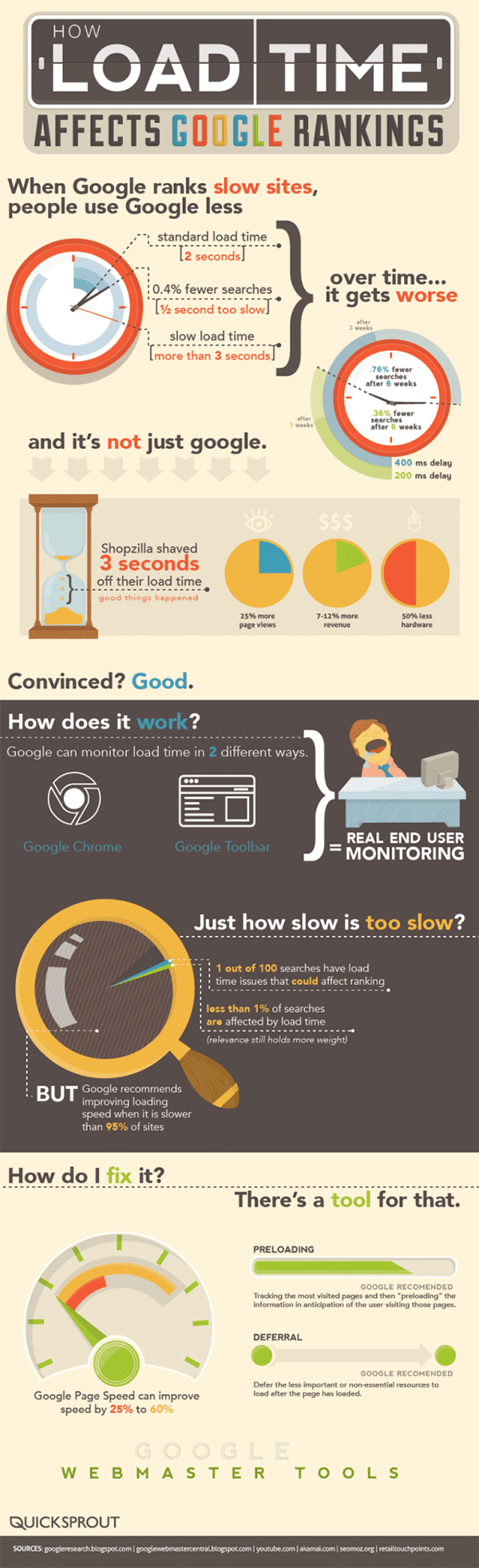
How fast is your website? Did you know that having a slow website could negatively affect your position in Google search?
The infographic below from Quicksprout shows you just how your page load time affects your Google rankings.
When Google ranks slow sites people use Google less so If your site takes longer than 3 seconds to load you need to be taking a look at the info below and figuring out ways to make your site faster.
In today’s digital age, having a strong online presence is crucial for businesses of all sizes. A well-designed website is often the first point of contact between potential customers and your brand. However, there’s one major website issue that could be costing you money, and it’s more common than you might think. In this blog post, we will delve into this issue, explore its implications, and provide actionable solutions to ensure that your website is not inadvertently driving potential customers away and, consequently, affecting your bottom line.
The Problem: Slow Loading Times
The major website issue we’re addressing here is slow loading times. You might wonder why this seemingly minor detail is such a big deal. Well, the truth is that website loading speed can make or break your online business. Let’s delve into the reasons why slow loading times can be detrimental and costly.
- User Experience Matters
First impressions are crucial, especially in the digital realm. When a user visits your website, they expect a seamless and swift browsing experience. Slow loading times frustrate visitors, leading to a poor user experience. Research indicates that 53% of mobile site visitors will leave a page that takes longer than three seconds to load. As users abandon your site due to slow loading times, you lose potential customers and revenue.
- Negative Impact on SEO
Search engines, particularly Google, consider website loading speed as a ranking factor. A slow website can lead to lower search engine rankings, making it harder for potential customers to find your site. When your site doesn’t rank well, you miss out on valuable organic traffic, which can result in decreased visibility and fewer conversions.
- Reduced Conversions
Every second counts in the online world. Slow loading times can significantly reduce your conversion rates. Whether you’re running an e-commerce store or trying to capture leads, potential customers are less likely to complete their desired actions if your website is sluggish. According to Google, as page load time goes from one second to three seconds, the probability of bounce increases by 32%.
- Increased Bounce Rates
A high bounce rate indicates that visitors are leaving your website shortly after arriving, often because they’re dissatisfied with the experience. Slow loading times are a major contributor to high bounce rates. This not only means that potential customers aren’t engaging with your content but also that you’re losing the opportunity to retain and convert them into loyal customers.
- Negative Impact on Mobile Users
With the increasing use of mobile devices for internet browsing, having a mobile-responsive and fast-loading website is crucial. Slow-loading pages on mobile devices can be even more frustrating for users due to limited data connections and smaller screens. If your website doesn’t perform well on mobile, you risk losing a significant portion of your audience.
- Reputation Damage
A slow website can damage your brand’s reputation. Visitors who have a poor experience on your site are likely to share their frustrations with others. Negative reviews and comments can spread quickly across social media and review platforms, tarnishing your brand’s image. This can result in lost trust, and once trust is lost, it can be challenging to regain.
- Increased Operational Costs
While it might not be immediately obvious, slow loading times can increase your operational costs. Websites that take longer to load often require more server resources to handle incoming traffic. This means you may need to invest in more expensive hosting solutions or additional infrastructure to maintain a satisfactory user experience, which can significantly impact your bottom line.
Solutions: Speeding Up Your Website
Now that we’ve discussed the various ways slow loading times can be detrimental to your online business let’s explore some effective solutions to address this major website issue and improve your website’s performance.
- Optimize Images
Large, unoptimized images are a common culprit behind slow-loading websites. To address this issue, make sure to compress and resize images before uploading them to your site. Additionally, consider using responsive images that adjust to the user’s screen size, reducing unnecessary data transfer.
- Minimize HTTP Requests
Every element on a webpage, including images, stylesheets, and scripts, requires a separate HTTP request to load. Minimize these requests by combining multiple files into one and reducing the number of third-party scripts and plugins on your site. Fewer HTTP requests lead to faster loading times.
- Use Browser Caching
Leverage browser caching to store static resources, such as images and stylesheets, locally on the user’s device. When a user revisits your website, these resources can be loaded from their cache, reducing load times. Implementing browser caching can have a significant impact on website speed.
- Enable Content Compression
Content compression techniques like GZIP can significantly reduce the size of files transferred between your server and the user’s browser. This results in faster loading times and reduced server load. Most web hosting providers support content compression, so enable it in your server settings.
- Upgrade Your Hosting
If you’re experiencing consistently slow loading times, it may be time to upgrade your hosting plan. Shared hosting can be slow and unreliable, especially for websites with high traffic. Consider switching to a virtual private server (VPS) or a dedicated server to ensure better performance.
- Implement Content Delivery Networks (CDNs)
Content Delivery Networks distribute your website’s content across multiple servers located in various geographic regions. When a user accesses your site, the CDN delivers content from the server closest to their location. This reduces latency and speeds up loading times. Many CDNs also offer caching and optimization features to further enhance performance.
- Prioritize Critical Content
Load critical content, such as text and essential images, first, and defer the loading of non-essential elements. This technique, known as lazy loading, ensures that users see the most important parts of your site quickly while non-essential content loads in the background.
- Reduce Redirects
Excessive redirects can increase the time it takes for a page to load. Minimize the use of redirects, especially chain redirects, which involve multiple consecutive redirections. Each redirect adds extra HTTP requests and can slow down your site.
- Regularly Update Your CMS and Plugins
Outdated content management systems (CMS) and plugins can contain vulnerabilities and negatively impact website performance. Keep your CMS and all plugins up to date to ensure optimal security and performance.
- Monitor and Test
Regularly monitor your website’s performance using tools like Google PageSpeed Insights, GTmetrix, or Pingdom. These tools can provide insights into what’s slowing down your site and offer suggestions for improvement. Perform regular speed tests and address any issues promptly.
Conclusion
In the digital age, a slow-loading website can be a major roadblock to your online success. It not only frustrates visitors but also affects your search engine rankings, conversions, and brand reputation. Slow loading times can be a costly issue, but with the right strategies and optimizations, you can ensure that your website loads quickly and efficiently, providing a positive user experience and ultimately boosting your bottom line. Don’t let this major website issue continue to cost you money; take action today to speed up your site and reap the benefits of a faster, more user-friendly online presence.

Author:
Mark Ford



