

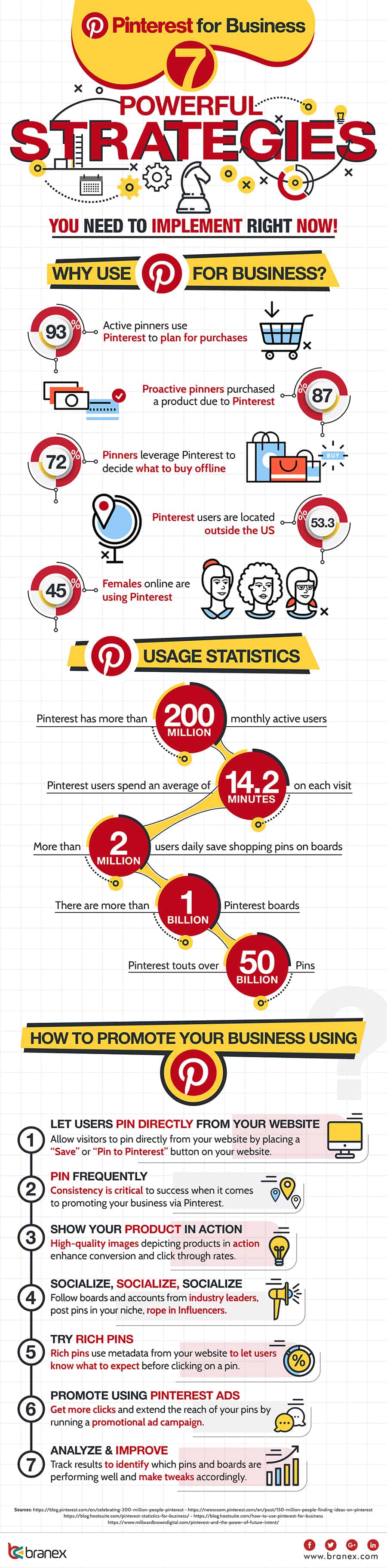
Are you considering investing time and money into a Pinterest marketing campaign? Want to know the key strategies that can lead you towards success?
Branex share their tips for success in this infographic.
Here’s a quick summary:
- Let visitors pin from your website
- Pin frequently
- Show your products in action
- Be social
- Rich pins
- Pinterest Ads
- Analyse and improve
Check out the infographic for more detail.
Pinterest is more than just a platform for wedding planning and DIY crafts; it’s a powerful tool for businesses to drive traffic, increase brand awareness, and boost sales. With over 400 million active users, Pinterest offers unique opportunities for businesses to connect with a highly engaged audience. Here are seven powerful strategies you can implement right now to harness the full potential of Pinterest for your business.
Let Visitors Pin from Your Website
One of the most effective ways to harness the power of Pinterest for your business is by making it easy for visitors to pin your content directly from your website. This strategy not only extends your reach but also encourages organic sharing, driving more traffic back to your site. Here’s an in-depth guide on how small businesses can implement and optimize this approach.
- Add Pinterest Save Buttons
The first step to enabling visitors to pin from your website is to add Pinterest Save buttons to your site. These buttons allow users to save your content to their Pinterest boards with a single click.
How to Add Save Buttons:
- Pinterest Widget Builder: Pinterest offers a widget builder that generates code snippets you can add to your website. This tool allows you to customize the appearance and functionality of the Save button.
- Website Platforms: If you’re using website platforms like WordPress, Shopify, or Squarespace, there are plugins and built-in options to add Pinterest Save buttons easily. For example, the “Pinterest Pin It Button” plugin for WordPress simplifies the process.
- Manual Integration: For those comfortable with coding, you can manually add the Save button code to your website’s HTML. This involves placing the generated code snippet within the image tags or in strategic places on your website.
- Optimize Images for Pinterest
Pinterest is a highly visual platform, so the quality and format of your images are crucial for attracting attention and encouraging pins.
Tips for Optimizing Images:
- High-Quality Images: Use high-resolution images that are clear and visually appealing. Grainy or low-quality images are less likely to be pinned and shared.
- Vertical Orientation: Pinterest favors vertical images, ideally with a 2:3 aspect ratio (e.g., 1000 x 1500 pixels). These images take up more space in the Pinterest feed and are more likely to be noticed.
- Text Overlays: Adding text overlays to your images can make them more informative and engaging. For instance, a compelling title or a brief description of the content can attract more pins.
- Consistent Branding: Use consistent colors, fonts, and logos in your images to reinforce your brand identity. This consistency helps users recognize your pins and associate them with your brand.
- Include Pin Descriptions
Compelling descriptions are essential for making your pins discoverable and engaging. When visitors pin your content, ensure that the pin descriptions are informative and keyword-rich.
Writing Effective Pin Descriptions:
- Use Relevant Keywords: Incorporate keywords that your target audience is likely to search for on Pinterest. This improves the chances of your pins appearing in search results.
- Add Value: Describe what makes your content unique and why it’s valuable. Highlight the benefits or key points that users will gain from clicking through to your website.
- Call to Action: Include a call to action in your descriptions to encourage users to engage further. Phrases like “Learn more,” “Discover how,” or “Get inspired” can prompt users to click on your pins.
- Leverage Rich Pins
Rich Pins provide additional information directly on the pin, making them more useful and engaging for users. There are several types of Rich Pins, including product, article, and recipe pins, each offering unique benefits.
Enabling Rich Pins:
- Add Meta Tags: To use Rich Pins, you need to add specific meta tags to your website’s HTML. Pinterest provides guidelines on how to do this for each type of Rich Pin.
- Validate Pins: Once you’ve added the meta tags, you need to validate your Rich Pins using Pinterest’s Rich Pin Validator. Simply enter a URL from your site, and Pinterest will check if the pins are set up correctly.
- Automatic Updates: Rich Pins pull information directly from your website, ensuring that details like pricing, availability, and descriptions are always up to date.
- Create Pinnable Content
To encourage visitors to pin from your website, you need to create content that is inherently pinnable. This involves producing high-quality, engaging, and valuable content that resonates with your audience.
Types of Pinnable Content:
- Infographics: Infographics are highly shareable on Pinterest because they provide valuable information in a visually appealing format.
- How-to Guides and Tutorials: Step-by-step guides and tutorials that solve problems or teach new skills are popular on Pinterest. Use images or videos to illustrate each step.
- Inspirational Quotes and Stories: Content that inspires or tells a compelling story can be very effective. Use attractive designs and relatable messages to capture attention.
- Encourage User-Generated Content
User-generated content (UGC) is a powerful way to build community and credibility. Encouraging your customers to pin their own experiences with your products can amplify your reach.
How to Encourage UGC:
- Create a Branded Hashtag: Develop a unique hashtag for your brand and encourage customers to use it when they pin content related to your products.
- Feature Customer Pins: Highlight and repin content from your customers on your own boards. This not only provides social proof but also incentivizes others to share their experiences.
- Run Contests: Organize Pinterest contests where users create boards or pins related to your brand. Offer prizes or incentives to increase participation.
- Analyze and Improve
Finally, continuously monitor the performance of your Pinterest strategy and make improvements based on data and insights.
Analyzing Performance:
- Pinterest Analytics: Use Pinterest Analytics to track metrics such as impressions, saves, clicks, and engagement rates. Identify which pins and boards are performing well.
- Google Analytics: Track the referral traffic from Pinterest to your website using Google Analytics. This will help you understand how Pinterest contributes to your overall web traffic and conversions.
- A/B Testing: Experiment with different types of images, descriptions, and pinning times to see what works best. Use the data to refine your strategy.
Conclusion
By enabling visitors to pin from your website, you tap into the vast potential of Pinterest’s user base to increase your brand’s visibility and drive traffic. Integrate Pinterest Save buttons, optimize your images, craft compelling descriptions, leverage Rich Pins, create pinnable content, encourage user-generated content, and continuously analyze and improve your strategy. These steps will help you create a seamless and effective Pinterest presence that benefits your business.
Pin Frequently
Consistency and frequency are crucial when it comes to maximizing your presence on Pinterest. Unlike other social media platforms where over-posting can be a concern, Pinterest rewards frequent pinning by increasing your visibility and engagement. For small businesses, developing a strategic pinning schedule can lead to greater reach, higher engagement, and ultimately more traffic and sales. Here’s an in-depth guide on how to pin frequently and effectively on Pinterest.
- Create a Pinning Schedule
A well-structured pinning schedule ensures that your content is consistently shared, keeping your profile active and visible. Planning your pins in advance allows you to maintain a steady flow of content without overwhelming your audience or yourself.
How to Develop a Pinning Schedule:
- Determine Optimal Times: Research shows that certain times of day and days of the week are more effective for pinning. For most niches, evenings and weekends tend to see higher engagement on Pinterest. Use Pinterest Analytics to find out when your audience is most active.
- Plan Content Themes: Assign specific themes or topics to each day of the week. For example, Mondays could be dedicated to motivational content, Tuesdays to tips and tutorials, and so on. This approach keeps your content varied and interesting.
- Balance Original and Curated Pins: While pinning your own content is essential, it’s also important to curate and pin content from others. Aim for a mix of 60% your own content and 40% curated content to keep your boards fresh and diverse.
- Use Scheduling Tools
Scheduling tools are invaluable for maintaining a consistent pinning frequency without having to be online all the time. These tools allow you to plan and schedule pins in advance, ensuring that your content is posted at optimal times.
Recommended Scheduling Tools:
- Tailwind: Tailwind is one of the most popular Pinterest scheduling tools. It offers smart scheduling, allowing you to queue up pins for the best times to reach your audience. Tailwind also provides valuable analytics and insights to help you refine your strategy.
- Buffer: Buffer is another excellent scheduling tool that supports Pinterest. It lets you schedule pins in bulk and provides analytics to track performance.
- Hootsuite: Hootsuite supports multiple social media platforms, including Pinterest. It allows you to schedule pins, monitor engagement, and analyze results from one dashboard.
- Pin High-Quality Content
Frequent pinning only works if the content you share is high quality. Each pin should be visually appealing, informative, and relevant to your audience.
Tips for Creating High-Quality Pins:
- Eye-Catching Images: Use high-resolution, bright, and clear images. Vertical images with a 2:3 aspect ratio tend to perform best on Pinterest.
- Engaging Descriptions: Write compelling descriptions that include relevant keywords. These descriptions should tell users what they can expect if they click through to your site.
- Consistency in Branding: Maintain a consistent brand aesthetic across your pins. Use the same color schemes, fonts, and logos to create a cohesive look.
- Mix Up Your Pin Types
Pinterest offers various pin formats that you can leverage to keep your content diverse and engaging. Mixing up your pin types can attract different segments of your audience and keep your boards dynamic.
Types of Pins to Use:
- Standard Pins: These are the most common type of pins, featuring a single image. They are straightforward and effective for most content types.
- Video Pins: Video pins can be incredibly engaging and are great for tutorials, product demos, and behind-the-scenes content. They autoplay in the feed, grabbing attention quickly.
- Carousel Pins: Carousel pins allow you to include multiple images in a single pin, which users can swipe through. This format is perfect for showcasing multiple products, features, or steps in a process.
- Story Pins: Story pins (also known as Idea Pins) let you create a multi-page story. They are excellent for tutorials, recipes, and step-by-step guides.
- Engage with Your Audience
Frequent pinning should be complemented by active engagement with your audience. Responding to comments, thanking users for repinning your content, and engaging with other users’ pins can build a community around your brand.
How to Engage Effectively:
- Respond to Comments: Take the time to reply to comments on your pins. This shows that you value your audience’s input and are active on the platform.
- Thank Users: When users repin your content, thank them with a quick comment or a like. This small gesture can encourage more interactions and build loyalty.
- Engage with Others: Repin, like, and comment on other users’ content, especially if it’s relevant to your niche. This can increase your visibility and foster relationships with other pinners.
- Monitor and Adjust Your Strategy
Regularly monitoring the performance of your pins allows you to identify what works and what doesn’t. Use this data to refine your strategy and improve your results over time.
Key Metrics to Track:
- Impressions: The number of times your pins are shown to users. High impressions indicate good visibility.
- Saves: The number of times users save your pins to their boards. High saves suggest that your content is resonating with your audience.
- Clicks: The number of clicks through to your website from your pins. This metric is crucial for understanding how effective your pins are at driving traffic.
- Engagement Rate: The ratio of interactions (saves, clicks, comments) to impressions. A high engagement rate indicates that your pins are not only being seen but also acted upon.
- Participate in Group Boards
Group boards are collaborative boards where multiple users can contribute pins. Joining relevant group boards can expand your reach and increase your exposure to a broader audience.
How to Leverage Group Boards:
- Find Relevant Boards: Use Pinterest search and tools like PinGroupie to find group boards in your niche. Look for boards with a good number of followers and active contributors.
- Request to Join: Follow the instructions in the board’s description to request to join. Some boards require you to follow the owner or send a direct message.
- Contribute Regularly: Once you’re a member, contribute high-quality pins regularly. Follow the board’s rules and engage with other members’ content to build rapport.
Conclusion
Pinning frequently is a vital strategy for growing your presence on Pinterest. By creating a structured pinning schedule, utilizing scheduling tools, maintaining high-quality content, mixing up your pin types, engaging with your audience, monitoring performance, and participating in group boards, you can ensure a consistent and effective Pinterest presence. For small businesses, these practices not only increase visibility and engagement but also drive traffic and sales, helping you make the most of this powerful platform.
Show Your Products in Action
Demonstrating how your products can be used in real life is one of the most effective ways to engage your audience on Pinterest. By showing your products in action, you help potential customers visualize the benefits and applications of what you offer, making your pins more relatable and compelling. Here’s an in-depth guide on how small businesses can showcase their products effectively on Pinterest.
- Use Lifestyle Images
Lifestyle images show your products being used in real-world scenarios, helping customers see how they can fit into their own lives. These images tend to be more engaging and can evoke emotional responses that drive purchasing decisions.
Tips for Creating Effective Lifestyle Images:
- Contextual Relevance: Place your products in settings that are relevant to your target audience. For example, if you sell outdoor gear, show your products being used on a hiking trip or camping adventure.
- Professional Photography: Invest in high-quality photography. Clear, well-lit, and aesthetically pleasing images are more likely to be pinned and shared.
- Authenticity: Ensure that the scenes look natural and authentic. Avoid overly staged setups that can come across as insincere. Use real people, genuine settings, and natural lighting whenever possible.
- Create Tutorials and Guides
Tutorials and guides are highly popular on Pinterest, as users often look for actionable tips and how-to content. By creating step-by-step guides that feature your products, you provide value while subtly promoting your offerings.
How to Create Engaging Tutorials:
- Step-by-Step Instructions: Break down the process into easy-to-follow steps. Each step should be clear and concise, with accompanying images or videos.
- Highlight Product Benefits: Demonstrate how your products make the process easier, faster, or better. Highlight unique features and advantages at each step.
- Visual Appeal: Use high-quality visuals to illustrate each step. Infographics, images with text overlays, and short video clips can make your tutorials more engaging.
- Leverage User-Generated Content
User-generated content (UGC) is a powerful way to show your products in action from the perspective of your customers. Encouraging your customers to share their experiences can provide authentic and relatable content that resonates with your audience.
Strategies for Encouraging UGC:
- Create a Branded Hashtag: Develop a unique and memorable hashtag for your brand and encourage customers to use it when they post about your products on social media.
- Feature Customer Content: Regularly showcase user-generated content on your Pinterest boards. This not only provides fresh content but also incentivizes other customers to share their experiences.
- Run Contests and Campaigns: Organize contests where customers submit photos or videos of your products in action. Offer prizes or incentives to encourage participation and engagement.
- Produce Video Content
Video content is incredibly engaging and can effectively show your products in use. Pinterest supports video pins, which autoplay in the feed, capturing attention quickly and driving higher engagement rates.
Tips for Creating Compelling Video Content:
- Short and Sweet: Keep your videos concise and to the point. Aim for 30 to 60 seconds to maintain viewer interest.
- Focus on Benefits: Highlight the benefits and features of your products. Show how they solve a problem or improve the user’s life.
- High Production Value: Invest in good production quality. Clear visuals, good lighting, and professional editing make a significant difference in the effectiveness of your video pins.
- Use Before-and-After Comparisons
Before-and-after comparisons are a powerful way to demonstrate the effectiveness of your products. This format works particularly well for products related to beauty, fitness, home improvement, and cleaning.
How to Create Effective Before-and-After Pins:
- Clear Contrast: Ensure that the before-and-after images show a clear and impactful difference. The transformation should be evident and impressive.
- Realistic Results: Be honest and realistic about what your products can achieve. Overly exaggerated results can lead to disappointment and mistrust.
- Include Details: Provide context and details about the transformation. Explain what was done, how long it took, and which products were used.
- Highlight Customer Testimonials
Customer testimonials and reviews add credibility and trust to your products. Featuring testimonials in your pins can provide social proof and influence potential customers’ purchasing decisions.
Tips for Showcasing Testimonials:
- Use Real Customers: Feature genuine testimonials from real customers. Include their names, photos, and any other relevant details to add authenticity.
- Visual Format: Combine testimonials with images or videos of the customers using your products. This makes the testimonials more engaging and relatable.
- Highlight Key Benefits: Focus on specific benefits and results mentioned by customers. Use quotes and snippets that emphasize how your products have made a positive impact.
- Collaborate with Influencers
Influencer collaborations can help you reach a wider audience and show your products in action through trusted voices. Influencers can create authentic content that highlights the benefits and applications of your products.
How to Collaborate with Influencers:
- Identify Relevant Influencers: Look for influencers whose audience aligns with your target market. Consider their engagement rates, content quality, and authenticity.
- Develop Clear Agreements: Establish clear expectations and agreements regarding the type of content, posting schedules, and compensation. Ensure that both parties are aligned on the goals and deliverables.
- Provide Creative Freedom: Allow influencers creative freedom to showcase your products in a way that resonates with their audience. Authenticity is key to successful influencer collaborations.
- Create Shoppable Pins
Shoppable pins make it easy for users to purchase your products directly from Pinterest. By enabling shopping features, you can turn your pins into a direct sales channel.
Setting Up Shoppable Pins:
- Set Up a Pinterest Shop: Connect your product catalog to Pinterest to create shoppable pins. Platforms like Shopify and WooCommerce offer integrations to simplify this process.
- Tag Products in Pins: Use product tags to link your pins to specific products in your catalog. Ensure that the product information is accurate and up to date.
- Create Compelling Product Pins: Design visually appealing pins that highlight your products. Include clear images, prices, and descriptions to attract and inform potential customers.
Conclusion
Showing your products in action on Pinterest is an effective way to engage your audience and drive sales. By using lifestyle images, creating tutorials, leveraging user-generated content, producing video content, using before-and-after comparisons, highlighting customer testimonials, collaborating with influencers, and creating shoppable pins, small businesses can effectively showcase their products and connect with their target audience. These strategies not only make your pins more relatable and engaging but also help potential customers visualize the benefits of your products, leading to higher engagement and conversion rates. Start implementing these tips today to maximize your Pinterest presence and drive business growth.
Be Social
Engaging with your audience and building a community is essential for a successful Pinterest strategy. Being social on Pinterest involves more than just pinning your own content; it’s about interacting with your followers, joining group boards, hosting contests, and actively participating in the Pinterest community. Here’s an in-depth guide on how small businesses can be social on Pinterest to foster connections, increase engagement, and grow their presence on the platform.
- Engage with Followers
Actively engaging with your followers is crucial for building a loyal community on Pinterest. Responding to comments, liking, and repinning user content shows that you value their interaction and encourages further engagement.
How to Engage Effectively:
- Respond to Comments: Take the time to reply to comments on your pins. Whether it’s answering a question, acknowledging a compliment, or addressing a concern, responding promptly fosters a positive relationship with your audience.
- Thank Users: When users repin your content or mention your brand, thank them. A simple thank you message can go a long way in building goodwill.
- Ask Questions: Encourage interaction by asking questions in your pin descriptions. Questions related to your content can spark conversations and increase engagement.
- Join Group Boards
Group boards are collaborative boards where multiple pinners can contribute content. Joining and actively participating in group boards can expand your reach and expose your brand to a broader audience.
Strategies for Utilizing Group Boards:
- Find Relevant Group Boards: Use Pinterest search and tools like PinGroupie to find group boards that are relevant to your niche. Look for boards with a high number of followers and active contributors.
- Follow the Rules: Each group board has its own set of rules. Make sure you understand and adhere to these guidelines to maintain a good standing with the board owner and other contributors.
- Contribute Regularly: Regularly pin high-quality content to group boards. This keeps the boards active and increases your visibility among the board’s followers.
- Engage with Other Contributors: Interact with other contributors by repinning their content, leaving comments, and liking their pins. Building relationships with fellow pinners can lead to more collaboration opportunities.
- Host Contests and Giveaways
Contests and giveaways are a great way to boost engagement, increase followers, and generate excitement around your brand. They encourage users to interact with your content and share it with their own networks.
Tips for Running Successful Contests:
- Set Clear Goals: Define what you want to achieve with your contest. Goals might include increasing followers, driving traffic to your website, or promoting a new product.
- Choose a Relevant Theme: Create a contest theme that resonates with your audience and aligns with your brand. For example, a fashion brand might host a “Best Summer Outfit” contest.
- Define Entry Requirements: Clearly outline what participants need to do to enter. Common requirements include following your Pinterest account, repinning a specific pin, or creating a board with your products.
- Promote Your Contest: Use your other social media channels, email newsletters, and website to promote your contest. The more exposure, the higher the participation.
- Offer Attractive Prizes: Choose prizes that are appealing to your target audience. They could be your products, gift cards, or exclusive experiences.
- Collaborate with Influencers
Influencer collaborations can significantly boost your brand’s visibility on Pinterest. Influencers have dedicated followers who trust their recommendations, making them valuable partners for promoting your products.
How to Collaborate with Influencers:
- Identify Suitable Influencers: Look for influencers who have a following that matches your target audience. Check their engagement rates, content quality, and authenticity.
- Develop Mutually Beneficial Relationships: Offer something of value to the influencer, whether it’s free products, exclusive access, or monetary compensation. Ensure the collaboration benefits both parties.
- Co-Create Content: Work with influencers to create content that highlights your products in an authentic and engaging way. This could be through pin collaborations, sponsored boards, or exclusive product reviews.
- Track and Measure Results: Monitor the performance of influencer collaborations to understand their impact. Use metrics like impressions, engagement, and referral traffic to evaluate success.
- Participate in Pinterest Communities
Pinterest communities are niche groups focused on specific interests or topics. Participating in these communities can help you connect with like-minded users and establish your brand as a thought leader in your industry.
How to Engage in Pinterest Communities:
- Join Relevant Communities: Search for communities that align with your brand’s niche. Join groups where your target audience is likely to be active.
- Share Valuable Content: Contribute high-quality, relevant content to the community. This could be your own pins, curated content, or helpful resources.
- Engage in Discussions: Actively participate in community discussions. Answer questions, provide insights, and share your expertise.
- Follow Community Guidelines: Each community will have its own rules and guidelines. Respect these to maintain a positive presence and avoid being removed.
- Create Collaborative Boards
Collaborative boards, or shared boards, are boards where you and other pinners can contribute pins. Creating or joining these boards can help you engage with other users and increase your reach.
How to Create and Manage Collaborative Boards:
- Invite Contributors: Start by inviting relevant and active pinners to contribute to your board. Look for users who create high-quality content in your niche.
- Set Clear Guidelines: Establish rules for what kind of content can be pinned to the board. Communicate these guidelines clearly to all contributors.
- Engage with Contributors: Regularly interact with the pins added by contributors. Comment, like, and repin their content to show appreciation and encourage ongoing participation.
- Monitor Activity: Keep an eye on the board to ensure that all contributions adhere to your guidelines and maintain the board’s quality.
- Utilize Pinterest Messaging
Pinterest messaging allows you to communicate directly with other users. This feature can be used to build relationships, provide customer support, and collaborate with other pinners.
How to Use Pinterest Messaging Effectively:
- Reach Out to Followers: Send personalized messages to followers to thank them for their support, share exclusive content, or invite them to participate in contests.
- Provide Customer Support: Use messaging to address customer inquiries and provide assistance. Prompt and helpful responses can enhance customer satisfaction.
- Collaborate with Other Pinners: Connect with influencers, group board owners, and other relevant users to discuss collaboration opportunities.
- Share Content: Use messaging to share pins and boards directly with users who might find them valuable. This can drive engagement and build relationships.
Conclusion
Being social on Pinterest is about more than just posting content; it’s about building a community, fostering engagement, and actively participating in the platform’s ecosystem. By engaging with followers, joining group boards, hosting contests, collaborating with influencers, participating in communities, creating collaborative boards, and utilizing Pinterest messaging, small businesses can create meaningful connections and enhance their presence on Pinterest. These strategies not only increase visibility and engagement but also help build a loyal and active community around your brand, driving long-term growth and success. Start implementing these tips today to make the most of your Pinterest social interactions and take your business to the next level.
Rich Pins
Rich Pins are a powerful feature on Pinterest that provides additional information directly on the pin itself, making them more useful and engaging for users. They pull data from your website and update automatically, ensuring that the information is always current. There are four types of Rich Pins: product, article, recipe, and app pins. Here’s an in-depth guide on how small businesses can effectively utilize Rich Pins to enhance their Pinterest strategy.
- Understanding Rich Pins
Rich Pins add extra details to your pins, making them more informative and interactive. Each type of Rich Pin serves a different purpose and offers unique benefits:
- Product Pins: Show real-time pricing, availability, and where to buy. Ideal for e-commerce businesses.
- Article Pins: Include the headline, author, and a description of the article. Perfect for bloggers and publishers.
- Recipe Pins: Provide ingredients, cooking times, and serving sizes. Great for food bloggers and brands.
- App Pins: Feature an install button so users can download your app directly from Pinterest. Currently available only on iOS.
- Enabling Rich Pins
To get started with Rich Pins, you need to prepare your website and apply for them through Pinterest.
Steps to Enable Rich Pins:
- Add Meta Tags to Your Website: You need to add specific meta tags to your website’s HTML. These tags provide Pinterest with the information needed to create Rich Pins.
- For product pins, use Open Graph tags to specify product details.
- For article pins, add meta tags for the article title, description, and author.
- For recipe pins, include meta tags for ingredients, cook time, and serving size.
- For app pins, ensure your app information is properly formatted.
- Validate Your Pins: Use Pinterest’s Rich Pin Validator to ensure your meta tags are correctly implemented. Simply enter a URL from your website, and Pinterest will check if your Rich Pins are set up correctly.
- Apply for Rich Pins: Once your pins are validated, click the “Apply” button in the validator to submit your request to Pinterest. The approval process usually takes a few days.
- Optimizing Product Pins
Product Pins are particularly beneficial for e-commerce businesses as they provide users with crucial information right on the pin, making it easier for them to make purchasing decisions.
Tips for Optimizing Product Pins:
- Accurate Pricing and Availability: Ensure that the pricing and availability information on your website is up-to-date. Rich Pins pull this data directly, so accurate details are crucial.
- Compelling Descriptions: Write engaging product descriptions that highlight the benefits and features of your products. Include keywords that your target audience might use when searching on Pinterest.
- High-Quality Images: Use clear, high-resolution images that showcase your products effectively. Images should be visually appealing and represent the product accurately.
- Enhancing Article Pins
Article Pins are ideal for bloggers and publishers looking to drive traffic to their websites. These pins make it easy for users to find and save articles they are interested in.
Tips for Enhancing Article Pins:
- Eye-Catching Headlines: Craft compelling headlines that capture attention and encourage clicks. Use action words and address the reader’s needs or interests.
- Engaging Descriptions: Provide a brief summary of the article that entices users to read more. Highlight the key points or benefits the reader will gain.
- Author Information: Include the author’s name and a brief bio if possible. This adds credibility and helps build a connection with the audience.
- Making the Most of Recipe Pins
Recipe Pins are a boon for food bloggers and brands, providing users with all the information they need to recreate the dish at home.
Tips for Making the Most of Recipe Pins:
- Detailed Ingredients List: Ensure the ingredients are listed clearly and accurately. This helps users quickly assess if they have the necessary items to make the recipe.
- Cooking Times and Serving Sizes: Include preparation and cooking times as well as the number of servings. This information helps users plan their meals better.
- Appetizing Images: Use high-quality, mouth-watering images of the finished dish. Step-by-step photos can also be helpful for users following the recipe.
- Utilizing App Pins
App Pins allow users to install your app directly from Pinterest, streamlining the download process. This type of pin is particularly useful for app developers and businesses offering mobile applications.
Tips for Utilizing App Pins:
- Clear Call-to-Action: Use a strong call-to-action in your pin description to encourage users to download the app. Highlight the benefits and unique features of your app.
- Positive Reviews: Include snippets of positive reviews or testimonials from users to build trust and credibility.
- Visually Appealing Icons: Use a clear and attractive app icon to catch the eye of potential users. Ensure the icon accurately represents your app’s brand and functionality.
- Analyzing Performance
To make the most of Rich Pins, it’s essential to analyze their performance and make adjustments based on the data.
How to Analyze Rich Pin Performance:
- Pinterest Analytics: Use Pinterest Analytics to track key metrics such as impressions, saves, clicks, and engagement rates. This data helps you understand how users are interacting with your Rich Pins.
- A/B Testing: Experiment with different headlines, descriptions, and images to see what resonates best with your audience. Compare the performance of different versions to determine the most effective elements.
- Adjust Strategies: Based on your analysis, refine your content and pinning strategies. Focus on what works best and continuously optimize your Rich Pins for better results.
- Leveraging Rich Pins for SEO
Rich Pins can also enhance your search engine optimization (SEO) efforts by providing additional context and metadata for your content.
Tips for Leveraging Rich Pins for SEO:
- Keyword Optimization: Use relevant keywords in your pin descriptions, titles, and meta tags. This increases the likelihood of your pins appearing in search results both on Pinterest and search engines like Google.
- Consistent Branding: Maintain consistent branding across your pins to build recognition and trust. Use the same logo, color scheme, and tone of voice.
- Quality Content: Ensure that the content linked to your Rich Pins is high-quality and valuable to your audience. This not only improves user experience but also boosts your SEO rankings.
Conclusion
Rich Pins offer a valuable opportunity for small businesses to enhance their Pinterest presence and drive more engagement, traffic, and sales. By understanding the different types of Rich Pins, enabling them on your website, optimizing your pins for better performance, and continuously analyzing and refining your strategy, you can make the most of this powerful feature. Start leveraging Rich Pins today to provide a richer, more informative experience for your Pinterest audience and achieve your business goals more effectively.
Pinterest Ads
Pinterest Ads can be a powerful tool for small businesses to increase visibility, drive traffic, and boost sales. By targeting specific audiences and promoting your pins, you can significantly enhance your reach on this visually-driven platform. Here’s an in-depth guide on how small businesses can effectively use Pinterest Ads to achieve their marketing goals.
- Understanding Pinterest Ads
Pinterest offers several types of ad formats to suit different business objectives. Each format has unique features and benefits, making it essential to choose the right one for your goals.
Types of Pinterest Ads:
- Promoted Pins: These are regular pins that you pay to promote. They appear in users’ home feeds, category feeds, and search results. Promoted Pins are ideal for increasing visibility and driving traffic.
- Carousel Ads: Carousel Ads feature multiple images that users can swipe through. They are perfect for showcasing a range of products, telling a story, or highlighting different features of a product.
- Video Ads: Video Ads autoplay in users’ feeds, capturing attention quickly. They are excellent for demonstrating products, sharing tutorials, or telling your brand’s story.
- Shopping Ads: Shopping Ads are designed for e-commerce businesses. They pull product information directly from your catalog and present it to users in a shoppable format.
- Collection Ads: Collection Ads combine a large hero image or video with smaller, related images underneath. They are great for creating a visually appealing showcase of products or collections.
- Setting Up Pinterest Ads
Setting up Pinterest Ads involves a few key steps, from creating a business account to launching your first campaign.
Steps to Set Up Pinterest Ads:
- Create a Business Account: If you haven’t already, create a Pinterest Business account. This gives you access to Pinterest Analytics and Ads Manager.
- Set Up Your Profile: Optimize your business profile with a clear profile picture, a compelling bio, and a link to your website.
- Install the Pinterest Tag: The Pinterest Tag is a piece of code that you add to your website to track conversions and gather data on how users interact with your site. This helps you measure the effectiveness of your ads and optimize your campaigns.
- Access Ads Manager: Go to the Pinterest Ads Manager to start creating your ads. The Ads Manager provides tools to design, target, and launch your ad campaigns.
- Defining Your Campaign Goals
Before creating your ad campaign, it’s crucial to define your goals. Your objectives will guide your ad format selection, targeting, and budgeting.
Common Campaign Goals:
- Brand Awareness: If your goal is to increase brand visibility, focus on metrics like impressions and reach. Promoted Pins and Video Ads are suitable for this objective.
- Traffic: To drive more traffic to your website, optimize your campaign for clicks. Promoted Pins and Carousel Ads work well for this goal.
- Engagement: If you want to boost engagement on Pinterest, target metrics like saves and repins. Engaging visuals and compelling calls to action are key.
- Sales and Conversions: For driving sales and conversions, Shopping Ads and Collection Ads are ideal. Use the Pinterest Tag to track and optimize conversions.
- Targeting Your Audience
Effective targeting ensures that your ads are shown to users who are most likely to be interested in your products or services.
Targeting Options on Pinterest:
- Demographics: Target users based on age, gender, location, and language.
- Interests: Pinterest allows you to target users based on their interests and behaviors, such as home décor, fashion, or food and drink.
- Keywords: Use keyword targeting to show your ads to users who are searching for specific terms. This is particularly useful for promoting products or content related to popular search queries.
- Custom Audiences: Create custom audiences by uploading your customer list, engaging users who have interacted with your content, or targeting visitors to your website using the Pinterest Tag.
- Actalike Audiences: Similar to lookalike audiences on other platforms, actalike audiences allow you to target users who have similar behaviors and interests as your existing customers.
- Creating Compelling Ad Content
The success of your Pinterest Ads largely depends on the quality and appeal of your ad content. High-quality visuals, engaging text, and clear calls to action are essential.
Tips for Creating Effective Ads:
- High-Quality Images and Videos: Use clear, high-resolution images and videos that capture attention. Ensure your visuals are aligned with your brand aesthetic.
- Compelling Descriptions: Write engaging and informative descriptions that highlight the benefits of your product or service. Include relevant keywords to enhance discoverability.
- Strong Calls to Action: Include clear calls to action (CTAs) that prompt users to take the desired action, whether it’s visiting your website, signing up for a newsletter, or making a purchase.
- Consistent Branding: Maintain consistent branding across all your ads to build recognition and trust. Use your logo, brand colors, and fonts consistently.
- Budgeting and Bidding
Setting a budget and bid strategy is crucial for controlling your ad spend and maximizing your return on investment (ROI).
Budgeting Tips:
- Daily vs. Lifetime Budget: Choose between setting a daily budget or a lifetime budget for your campaign. A daily budget limits your spend per day, while a lifetime budget sets a cap for the entire campaign duration.
- Bidding Strategy: Decide on a bidding strategy that aligns with your campaign goals. You can choose from automatic bidding, where Pinterest sets your bids to get the most clicks at the best price, or manual bidding, where you set your own bids.
- Monitor and Adjust: Regularly monitor your ad spend and adjust your budget and bids as needed to optimize performance.
- Measuring and Optimizing Performance
To ensure your Pinterest Ads are effective, continuously measure and optimize your campaign performance.
Key Metrics to Track:
- Impressions: The number of times your ad is shown. High impressions indicate good visibility.
- Clicks: The number of clicks on your ad. This metric helps you understand how well your ad drives traffic.
- Engagements: The number of saves, repins, and other interactions. Engagement metrics show how well your ad resonates with users.
- Conversions: The number of desired actions taken, such as purchases or sign-ups. Use the Pinterest Tag to track conversions accurately.
Optimization Tips:
- A/B Testing: Experiment with different images, descriptions, and targeting options to see what performs best. A/B testing helps you identify the most effective elements of your ads.
- Refine Targeting: Use the data from your campaigns to refine your audience targeting. Focus on the segments that deliver the best results.
- Adjust Bids and Budgets: Based on your performance data, adjust your bids and budgets to optimize your ad spend. Increase your budget for high-performing campaigns and decrease it for underperforming ones.
- Update Creative Regularly: Refresh your ad creative periodically to prevent ad fatigue and keep your audience engaged.
- Leveraging Pinterest Analytics
Pinterest Analytics provides valuable insights into the performance of your organic and paid content. Use this data to inform your ad strategy and make data-driven decisions.
Using Pinterest Analytics:
- Track Key Metrics: Monitor metrics such as impressions, clicks, saves, and engagement rates to understand how users are interacting with your content.
- Analyze Audience Insights: Use audience insights to learn more about your followers’ demographics, interests, and behaviors. This information can help you refine your targeting.
- Measure Conversion Performance: Use the conversion insights from the Pinterest Tag to track and optimize your campaign’s ROI.
Conclusion
Pinterest Ads offer a powerful way for small businesses to increase visibility, drive traffic, and boost sales on this visually-driven platform. By understanding the different ad formats, setting up effective campaigns, defining clear goals, targeting the right audience, creating compelling ad content, managing your budget and bids, measuring performance, and leveraging Pinterest Analytics, you can create successful ad campaigns that deliver significant results. Start experimenting with Pinterest Ads today to take your business to the next level and achieve your marketing objectives.
Analyse and Improve
To make the most out of your Pinterest marketing efforts, it’s crucial to continuously analyze your performance and make improvements based on your findings. Pinterest Analytics provides valuable insights into how your pins are performing and what resonates with your audience. This data-driven approach helps you refine your strategy, optimize your content, and achieve better results over time. Here’s an in-depth guide on how small businesses can effectively analyze and improve their Pinterest efforts.
- Understanding Pinterest Analytics
Pinterest Analytics is a powerful tool that offers insights into the performance of your pins, boards, and overall profile. It provides detailed data on impressions, engagement, audience demographics, and more.
Key Metrics to Track:
- Impressions: The number of times your pins are shown to users. High impressions indicate good visibility.
- Saves: The number of times users save your pins to their boards. High saves suggest that your content is resonating with your audience.
- Clicks: The number of clicks through to your website from your pins. This metric is crucial for understanding how effective your pins are at driving traffic.
- Engagement Rate: The ratio of interactions (saves, clicks, comments) to impressions. A high engagement rate indicates that your pins are not only being seen but also acted upon.
- Audience Insights: Information about the demographics, interests, and behaviors of your followers. This helps you understand who your audience is and what they are interested in.
- Setting Up Pinterest Analytics
Before you can analyze your performance, you need to ensure that Pinterest Analytics is properly set up and connected to your business account.
Steps to Set Up Pinterest Analytics:
- Create a Business Account: If you haven’t already, convert your personal Pinterest account to a business account or create a new business account. This gives you access to Pinterest Analytics and other business tools.
- Claim Your Website: Claiming your website on Pinterest allows you to see analytics for all the content you create, including pins saved from your site. To claim your website, add a meta tag or upload an HTML file to your website as instructed by Pinterest.
- Install the Pinterest Tag: The Pinterest Tag is a piece of code that you add to your website to track conversions and gather data on how users interact with your site. This helps you measure the effectiveness of your pins and optimize your campaigns.
- Analyzing Pin Performance
Regularly analyzing the performance of your pins helps you understand what content resonates with your audience and drives the most engagement.
Tips for Analyzing Pin Performance:
- Track Top Performing Pins: Identify which pins are getting the most impressions, saves, and clicks. Analyze the common characteristics of these top-performing pins, such as visuals, descriptions, and keywords.
- Evaluate Engagement Rates: Compare the engagement rates of your pins to understand which types of content are most engaging. Focus on creating more content that drives high engagement.
- Monitor Click-Through Rates (CTR): A high CTR indicates that your pins are effective at driving traffic to your website. Analyze the pins with the highest CTR to determine what makes them successful.
- Assessing Board Performance
Your Pinterest boards play a crucial role in organizing your content and attracting followers. Regularly assessing board performance helps you optimize your content strategy.
Tips for Assessing Board Performance:
- Analyze Board Engagement: Look at the engagement metrics for each board, including impressions, saves, and clicks. Identify which boards are performing well and which ones need improvement.
- Optimize Board Titles and Descriptions: Use relevant keywords in your board titles and descriptions to make them more discoverable. Ensure that your board names are clear and descriptive.
- Curate High-Quality Content: Regularly update your boards with high-quality, relevant pins. Remove outdated or low-performing pins to maintain the quality of your boards.
- Understanding Audience Insights
Pinterest Audience Insights provides valuable information about the demographics, interests, and behaviors of your followers. This data helps you tailor your content to better meet the needs and preferences of your audience.
Tips for Leveraging Audience Insights:
- Analyze Demographics: Look at the age, gender, and location of your audience. Use this information to create content that appeals to your primary demographic groups.
- Identify Interests: Pinterest shows you the top interests of your audience. Create content that aligns with these interests to increase engagement.
- Monitor Audience Growth: Track the growth of your followers over time. A steady increase in followers indicates that your content strategy is effective.
- Conducting A/B Testing
A/B testing involves experimenting with different versions of your pins to see which performs better. This method helps you optimize your content for maximum engagement and effectiveness.
Steps for Conducting A/B Testing:
- Choose Variables to Test: Decide which elements of your pins you want to test, such as images, descriptions, keywords, or calls to action.
- Create Variations: Create two or more versions of the same pin with different variations of the chosen element.
- Monitor Performance: Track the performance of each variation over a set period. Compare metrics like impressions, saves, clicks, and engagement rates.
- Analyze Results: Determine which variation performed best and use the insights to inform your future content strategy.
- Refining Your Content Strategy
Based on the data and insights gathered from Pinterest Analytics, refine your content strategy to improve performance and achieve your business goals.
Tips for Refining Your Content Strategy:
- Focus on High-Performing Content: Identify the types of content that consistently perform well and create more of it. This could include specific topics, formats, or styles.
- Optimize Underperforming Content: Analyze the reasons behind low-performing pins and make necessary adjustments. This could involve improving the visuals, rewriting descriptions, or adding relevant keywords.
- Diversify Your Content: Experiment with different types of content, such as videos, infographics, and tutorials. Diversifying your content keeps your audience engaged and attracts new followers.
- Setting Goals and Measuring Success
Setting clear, measurable goals is essential for tracking your progress and evaluating the success of your Pinterest strategy.
Steps for Setting Goals and Measuring Success:
- Define Clear Objectives: Set specific, achievable goals for your Pinterest efforts. These could include increasing followers, driving traffic to your website, or boosting sales.
- Track Key Metrics: Regularly monitor the key metrics that align with your goals, such as impressions, engagement rates, and conversions.
- Evaluate Progress: Compare your performance against your goals to assess your progress. Identify areas where you are succeeding and areas that need improvement.
- Adjust Strategies as Needed: Based on your evaluation, adjust your strategies to better align with your goals. Continuously optimize your content and campaigns for improved results.
Conclusion
Regularly analyzing and improving your Pinterest strategy is crucial for achieving long-term success on the platform. By understanding Pinterest Analytics, assessing pin and board performance, leveraging audience insights, conducting A/B testing, refining your content strategy, and setting measurable goals, you can make data-driven decisions that enhance your Pinterest presence. These practices not only help you create more engaging and effective content but also drive traffic, increase brand visibility, and boost sales for your small business. Start implementing these tips today to take your Pinterest marketing efforts to the next level.
Conclusion
Pinterest offers a unique and powerful platform for businesses to connect with a highly engaged audience, drive traffic, and increase sales. By implementing these seven strategies – letting visitors pin from your website, pinning frequently, showing your products in action, being social, using Rich Pins, investing in Pinterest Ads, and continuously analyzing and improving your efforts – you can maximize your presence on Pinterest and achieve significant business growth.
Start leveraging these strategies today to harness the full potential of Pinterest for your business. With consistency, creativity, and a data-driven approach, Pinterest can become a cornerstone of your digital marketing strategy.

Author:
Mark Ford

How to Create Engaging Instagram Reels Without Ever Showing Your Face
Are you looking for creative ways to make engaging Instagram Reels without stepping in front of the camera? Want to discover proven content ideas that help your brand stand out on social media while keeping your privacy intact? […]


