

Are you just getting started with an SEO strategy for your business? Want to know the online platforms people use to find what they are looking for?
Visual Capitalist share a breakdown of search platforms in this infographic.
Here’s who makes the list:
- Yahoo
- Amazon
- Bing
Check out the infographic for more detail.
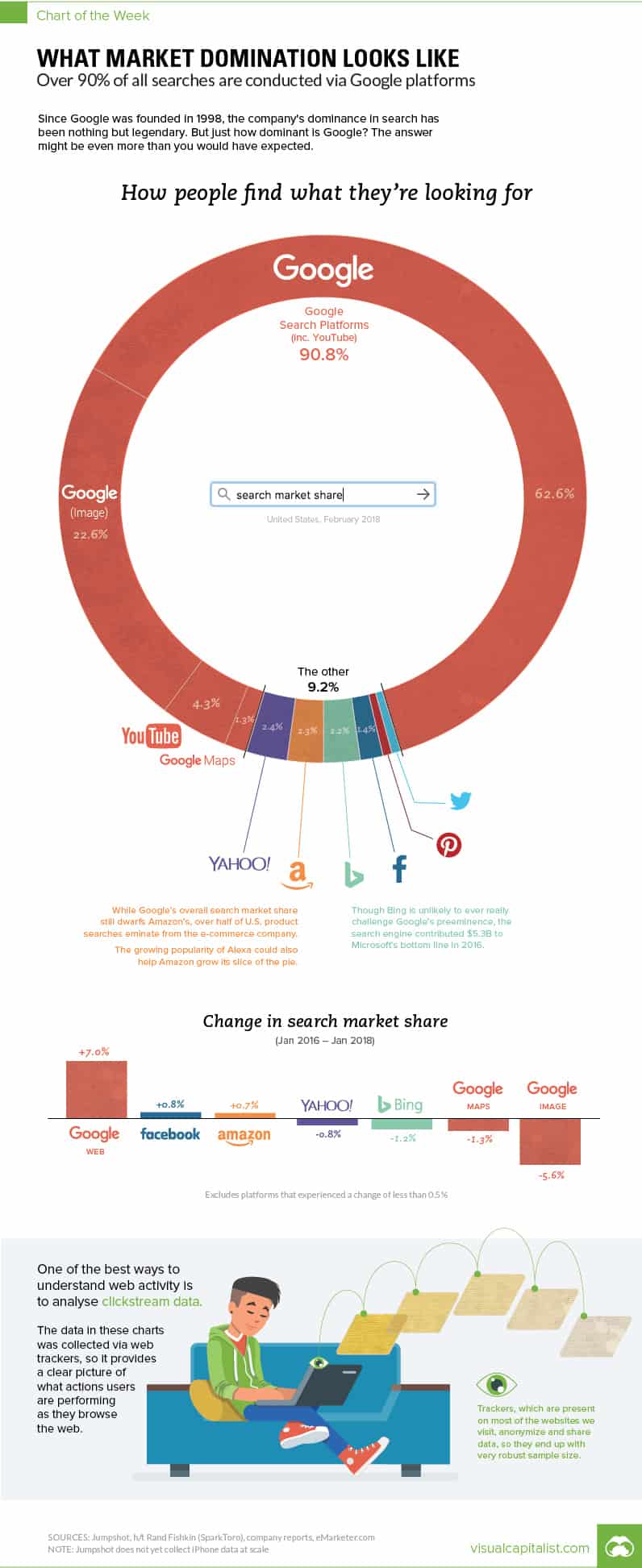
Search Engine Optimization (SEO) has become a critical element for businesses and websites aiming to gain visibility in an increasingly competitive digital environment. Understanding the platforms people use to search for information, products, or services is essential for effective SEO. While Google dominates the search engine landscape, there are several other platforms where search plays a vital role in the discovery process. In this post, we’ll explore the main platforms people use to find what they’re looking for, each with unique SEO strategies.
Google remains the cornerstone of most SEO strategies, with over 90% of the global search engine market share. Its influence stretches across almost every industry, making it an essential tool for businesses aiming to attract online traffic. For small businesses, optimizing for Google is critical not only for driving website traffic but also for building brand awareness and driving sales. Here, we’ll dive deeper into specific strategies, tips, and guidance for small businesses looking to optimize their presence on Google.
Understanding Google’s Search Algorithm
Google’s search algorithm is a constantly evolving system designed to deliver the most relevant and valuable content to its users. Over the years, major algorithm updates like Penguin, Panda, Hummingbird, RankBrain, and BERT have refined how Google evaluates content and ranks websites. The primary focus of these updates is to improve user experience by promoting high-quality, relevant content while penalizing poor SEO practices such as keyword stuffing and manipulative backlinks.
For small businesses, understanding Google’s core ranking factors is crucial:
- Content Relevance: Google favors content that thoroughly addresses a user’s search intent.
- Mobile Friendliness: With the rise of mobile searches, Google has prioritized websites that are optimized for mobile.
- Page Speed: Fast-loading websites are given preference, especially for mobile users.
- Backlinks: Quality backlinks from authoritative sites help boost a page’s ranking.
- User Engagement Metrics: Factors like dwell time, click-through rate (CTR), and bounce rate can influence rankings.
Google SEO Basics for Small Businesses
To effectively rank on Google, small businesses should focus on the following key SEO strategies:
- Conduct In-Depth Keyword Research
Keyword research is foundational to any successful Google SEO strategy. For small businesses, the goal is to target keywords that your customers are likely to use when searching for your products or services. The challenge is often competing with larger businesses for high-volume keywords, but small businesses can gain an edge by focusing on more specific, niche search terms, also known as long-tail keywords.
Tips for Effective Keyword Research:
- Use Tools: Utilize tools like Google Keyword Planner, Ubersuggest, or Ahrefs to find relevant keywords.
- Target Long-Tail Keywords: These are longer, more specific phrases (e.g., “best organic coffee shops in Brooklyn”) that typically have lower search volumes but higher conversion rates because they match user intent more closely.
- Think Local: If you are a local business, target keywords that include your location (e.g., “plumber in Houston”). Google’s local search features, including Google My Business and local pack results, give preference to businesses that target location-based searches.
- Optimize for Google My Business
One of the most powerful tools for small businesses is Google My Business (GMB). Optimizing your GMB profile can dramatically improve your visibility in local searches and even help you appear in the local 3-pack (the top three local businesses shown on Google Maps for a query).
Tips for Optimizing Google My Business:
- Complete Your Profile: Ensure that all fields in your GMB profile are filled out accurately, including your business name, address, phone number, website, and business hours.
- Add High-Quality Photos: Uploading photos of your business, products, or services increases engagement and builds trust.
- Encourage Reviews: Positive reviews play a significant role in local rankings. Encourage satisfied customers to leave reviews and respond to them professionally.
- Post Regular Updates: GMB allows you to post updates such as special offers or events. Regularly updating your profile keeps your business fresh and relevant in Google’s eyes.
- Focus on On-Page SEO
On-page SEO refers to the practice of optimizing individual web pages to rank higher on search engines. This involves both the content on the page and the HTML source code.
Key On-Page SEO Elements:
- Title Tags: Your title tag should include your main keyword and should be compelling to encourage clicks.
- Meta Descriptions: While not a direct ranking factor, meta descriptions can significantly impact your CTR, which indirectly affects rankings. Write clear, concise, and engaging descriptions that include your primary keywords.
- Headings (H1, H2, H3): Properly structuring your headings with relevant keywords helps both Google and users understand your content’s structure.
- Internal Linking: Linking to other relevant pages on your website helps Google understand the relationship between your content and distributes page authority.
- Keyword Usage: Incorporate your keywords naturally throughout your content, avoiding keyword stuffing. Aim for a keyword density of around 1-2% per page.
- Mobile Optimization
With Google moving to a mobile-first indexing model, the mobile experience of your site is now one of the most important ranking factors. This means Google predominantly uses the mobile version of your site when determining your rankings.
Tips for Mobile Optimization:
- Responsive Design: Your website should automatically adjust to fit the screen of any device. Test your site using Google’s Mobile-Friendly Test tool.
- Reduce Load Times: Optimize images, leverage browser caching, and use content delivery networks (CDNs) to ensure your site loads quickly on mobile devices.
- Simplify Navigation: Mobile users prefer easy-to-use navigation, so ensure your menus are simple and your calls to action are clear and clickable.
- Build High-Quality Backlinks
Backlinks from authoritative websites signal to Google that your content is credible and valuable. However, not all backlinks are created equal. Google favors natural, high-quality links from relevant, authoritative sources over a large number of low-quality links.
Tips for Building Backlinks:
- Create Shareable Content: Producing high-quality, shareable content like blog posts, infographics, or videos can naturally attract backlinks from other sites.
- Guest Blogging: Writing guest posts for reputable blogs in your industry can provide valuable backlinks to your site.
- Reach Out: If you create a piece of content that others in your industry may find valuable, reach out to them and suggest they share or link to it.
- Check for Broken Links: Use tools like Ahrefs or SEMrush to find broken links on other websites. Reach out to the site owner and suggest they replace the broken link with a link to your content.
- Optimize for User Experience (UX)
Google’s algorithm is increasingly favoring websites that provide an excellent user experience. A key metric for this is Core Web Vitals, a set of factors that measure how users experience the speed, responsiveness, and visual stability of a page.
Factors Affecting UX:
- Page Speed: Faster websites lead to better user satisfaction. Use Google’s PageSpeed Insights to identify areas for improvement.
- Mobile Usability: Make sure that buttons, forms, and other interactive elements are easily clickable and usable on mobile devices.
- Readability: Break up your content with headings, subheadings, bullet points, and short paragraphs to make it easier to read.
- Engagement Signals: Metrics like dwell time (how long a user stays on your site) and bounce rate (how quickly users leave) impact your ranking. Keep visitors engaged with high-quality content, videos, and other interactive elements.
- Leverage Structured Data (Schema Markup)
Structured data, also known as schema markup, helps Google better understand your content. By adding structured data to your website’s HTML, you can enhance how your content appears in Google search results through rich snippets (e.g., star ratings, product prices, FAQs). These snippets improve your CTR by making your search listing more attractive and informative.
How to Implement Structured Data:
- Use Google’s Structured Data Markup Helper: Google offers a tool that helps you add schema markup to your pages without needing to code.
- Common Schema Markup Types: For small businesses, useful schema types include LocalBusiness, Product, Review, and FAQ.
- Test Your Markup: Use the Rich Results Test Tool provided by Google to ensure your structured data is correctly implemented.
- Utilize Google Search Console
Google Search Console is an invaluable tool for small businesses to monitor and improve their SEO performance. It provides insights into how Google indexes your site, what keywords drive traffic, and any technical issues affecting your site’s performance.
Key Features to Monitor in Search Console:
- Performance Reports: Analyze which keywords and pages are generating the most traffic, and identify areas for improvement.
- Crawl Errors: Google notifies you if there are issues with crawling or indexing your site. Fixing these errors promptly helps maintain your ranking.
- Mobile Usability: The Mobile Usability report highlights issues users might encounter on mobile devices.
- Submit Sitemaps: Ensure that your website’s sitemap is submitted to Google Search Console so that all your important pages are indexed.
Conclusion
For small businesses, ranking on Google is essential for reaching potential customers and building brand recognition. By understanding the intricacies of Google’s search algorithms and focusing on optimizing your site for mobile, local searches, and user experience, you can effectively compete with larger businesses. From mastering keyword research and on-page SEO to building quality backlinks and leveraging structured data, small businesses have the tools to succeed in Google’s complex ecosystem. Regularly monitoring performance through Google Search Console and staying updated with algorithm changes ensures long-term SEO success on the world’s largest search engine.
Yahoo
While Yahoo may no longer dominate the search engine market like it did in the early 2000s, it still remains a key platform, particularly in certain regions and demographics. As of 2024, Yahoo holds around 1-2% of the global search engine market share, and while this may seem small compared to Google’s dominance, it still represents millions of searches per day. For small businesses, optimizing for Yahoo can provide an additional avenue to capture potential customers who are using less competitive platforms.
Why Optimize for Yahoo?
Although Yahoo now operates through a search partnership with Bing—meaning that the results on Yahoo Search are largely powered by Bing’s algorithm—there are still distinctions in the user base, interface, and how Yahoo integrates its search results with its other services, such as Yahoo News, Yahoo Mail, and Yahoo Finance. For small businesses, Yahoo offers specific opportunities that could lead to increased visibility.
- Demographic Reach: Yahoo is often popular among older generations and users who have stuck with the platform for years. If your business targets this demographic, Yahoo SEO can be valuable.
- Less Competition: Since fewer businesses focus on optimizing for Yahoo, there is less competition, which could make it easier for small businesses to rank well.
Key Tips for Small Businesses Optimizing for Yahoo
Since Yahoo is powered by Bing, optimizing for Yahoo largely involves the same strategies as optimizing for Bing. However, there are specific steps you can take to increase your visibility on the platform.
- Register on Bing Places for Business
Just as Google has Google My Business, Yahoo relies on Bing Places for Business for local search listings. By ensuring your business is accurately listed and optimized on Bing Places, you can automatically improve your chances of appearing in Yahoo’s local search results.
Steps to Optimize on Bing Places for Yahoo:
- Claim Your Business: If your business is already listed on Bing Places, claim it to take control of the information displayed in local searches.
- Provide Complete and Accurate Information: Make sure your business name, address, phone number (NAP), website, business hours, and service areas are correctly listed.
- Add Photos: Upload professional and high-quality images of your business. Visual content is important to attract attention in local search results.
- Encourage Reviews: Just as Google values customer reviews, Bing (and consequently Yahoo) favors businesses with a strong review profile. Encourage satisfied customers to leave positive reviews and respond to them professionally.
- Focus on On-Page SEO for Bing and Yahoo
Although Google dominates the search engine market, Bing and Yahoo’s algorithms place importance on slightly different ranking factors. To rank well on Yahoo, your on-page SEO needs to align with Bing’s guidelines.
Key On-Page SEO Factors for Yahoo:
- Keyword Usage: Like Google, Yahoo values keyword relevance, but it may put more emphasis on exact-match keywords. Be strategic in placing primary keywords within your title tags, meta descriptions, headers, and throughout your content.
- Meta Keywords: While Google has long since abandoned meta keywords as a ranking factor, Yahoo (via Bing) still recognizes and indexes them. Use meta keywords thoughtfully by including 5-10 of the most relevant terms.
- Content Length: Yahoo often rewards longer, in-depth content over shorter articles. Ensure your content is comprehensive and well-researched.
- Multimedia Content: Bing, and by extension Yahoo, favors websites that incorporate images, videos, and other multimedia elements. These enrich the user experience and signal that your content is engaging and valuable.
- Build High-Quality Backlinks
Backlinks continue to play an important role in Yahoo’s search rankings. However, Yahoo’s algorithm differs slightly from Google’s in that it sometimes places more weight on domain age and site authority when evaluating backlinks.
Tips for Building Backlinks for Yahoo:
- Focus on Quality Over Quantity: Like with Google, Yahoo prefers backlinks from authoritative, relevant sources. A few high-quality backlinks from industry-specific websites can significantly boost your rankings.
- Guest Posting: Publishing guest posts on reputable blogs in your industry is an effective way to gain valuable backlinks. Make sure the blog is relevant to your niche and has a good domain authority.
- Use Directories: Submitting your business to reputable online directories such as Yahoo Directory, Bing Places, and Yelp can help improve your backlink profile and enhance local SEO.
- Press Releases: Issuing press releases can help generate backlinks from authoritative news outlets. This is particularly useful for small businesses when launching new products, services, or hosting events.
- Leverage Yahoo’s Integration with Other Services
Yahoo’s ecosystem extends beyond search and includes popular services such as Yahoo Finance, Yahoo News, and Yahoo Mail. Each of these platforms offers additional visibility opportunities that small businesses can take advantage of.
Tips for Yahoo Service Integration:
- Yahoo News: If your business frequently releases newsworthy content, getting it featured on Yahoo News could significantly boost your brand visibility. Use press releases or contribute as a guest author to increase your chances.
- Yahoo Finance: For businesses in the financial, insurance, or investment sectors, getting mentioned or featured on Yahoo Finance can drive traffic from highly engaged audiences.
- Yahoo Mail Ads: Consider running native ads within Yahoo Mail. Yahoo Mail has a significant user base, and native ads appear seamlessly within users’ inboxes, offering another touchpoint for potential customers.
- Local SEO on Yahoo
Local search is an important component of Yahoo’s search platform, and as a small business, focusing on local SEO can help you gain a competitive edge. Just as Google emphasizes local search results, Yahoo does too, though it uses Bing’s local listings data.
Local SEO Tips for Yahoo:
- NAP Consistency: Ensure that your business name, address, and phone number are consistent across your website, social media, and any directories where your business is listed. Inconsistencies can hurt your local rankings.
- Use Location-Specific Keywords: Incorporate location-specific keywords into your website’s content, including in title tags, meta descriptions, and body content (e.g., “best pizza shop in Austin”).
- Optimize for Reviews: Positive reviews can improve your visibility in local search results. Encourage satisfied customers to leave reviews on platforms like Bing Places, Yelp, or directly on your website.
- User Experience (UX) and Page Speed
Like Google, Yahoo (via Bing) prioritizes user experience. Websites that provide a seamless, enjoyable user experience are more likely to rank well. Page speed is also a critical factor that affects user experience, so optimizing your site for faster load times is essential.
User Experience and Page Speed Optimization Tips:
- Fast-Loading Pages: Use Google PageSpeed Insights or Bing’s Webmaster Tools to identify areas where your site’s speed can be improved. Compress images, enable browser caching, and minimize CSS and JavaScript to boost performance.
- Mobile-Friendly Design: Ensure your website is fully optimized for mobile devices. A responsive design will not only improve user experience but also help with rankings on both Yahoo and Bing, as mobile compatibility is a ranking factor.
- Clean Navigation: Make sure your website’s navigation is simple and intuitive, allowing users to find what they’re looking for quickly.
- Paid Search Advertising on Yahoo
If you’re looking to complement your SEO strategy with paid search, Yahoo’s Gemini advertising platform allows you to run native ads and search ads across Yahoo’s network, including its popular email service, news platforms, and search engine.
Benefits of Yahoo Search Ads:
- Lower Cost-Per-Click (CPC): Because Yahoo’s search advertising ecosystem is less competitive than Google Ads, you might find that the cost-per-click for Yahoo ads is lower, providing a cost-effective way to target potential customers.
- Native Advertising: Yahoo Gemini allows businesses to run native ads, which blend seamlessly into the content across Yahoo properties, such as Yahoo News and Yahoo Mail. This can lead to higher engagement rates as users are less likely to perceive native ads as intrusive.
- Monitor Performance with Bing Webmaster Tools
Since Yahoo is powered by Bing’s search algorithm, using Bing Webmaster Tools is essential for monitoring your performance on Yahoo. Bing Webmaster Tools offers insights into your website’s SEO performance, indexing issues, and keyword rankings.
How to Use Bing Webmaster Tools for Yahoo SEO:
- Submit Sitemaps: Ensure that your XML sitemap is submitted to Bing Webmaster Tools to help Yahoo crawl and index your pages efficiently.
- Track Search Queries: Use the search performance reports to see which keywords are driving traffic to your website via Yahoo, and adjust your content strategy accordingly.
- Fix Crawl Errors: Regularly check for crawl errors and ensure they are fixed promptly. Yahoo, like Bing, favors websites that are easily crawlable and free of technical errors.
Conclusion
While Yahoo may not be the powerhouse it once was, it still holds a significant role in the search engine landscape, particularly among specific demographics. For small businesses, optimizing for Yahoo offers an opportunity to capture untapped search traffic with less competition. By focusing on Bing Places, on-page SEO, backlinks, local SEO, and leveraging Yahoo’s broader ecosystem of services like Yahoo News and Yahoo Finance, you can enhance your business’s visibility on this platform. With consistent monitoring and optimization through Bing Webmaster Tools, small businesses can make the most of Yahoo’s search potential in 2024 and beyond.
Amazon
Amazon has evolved from an online bookstore to the world’s largest e-commerce platform, commanding nearly 40% of the U.S. e-commerce market. What many small businesses may not realize is that Amazon is not just a shopping platform, but also a major search engine for product-related queries. With millions of daily searches, Amazon’s search algorithm, known as A9, operates much like Google’s but is tailored specifically for e-commerce. For small businesses, mastering Amazon SEO can be critical to standing out among millions of sellers and maximizing product visibility.
Why Optimize for Amazon?
With over 2.7 billion visits per month, Amazon has become the go-to search engine for product searches, often overtaking Google when consumers are specifically looking to buy. Amazon optimization offers distinct advantages for small businesses:
- Direct Consumer Intent: Shoppers on Amazon are typically ready to make a purchase, unlike Google users who may still be in the research phase.
- Brand Visibility: Even if you sell on your own website or through other retailers, having a presence on Amazon significantly enhances your brand’s visibility.
- Trust Factor: Customers are more likely to trust businesses that sell on Amazon due to its buyer protection policies and established reputation.
Key Tips for Small Businesses Optimizing for Amazon
While Amazon’s A9 algorithm focuses on relevancy and conversion rates, getting to the top of search results involves a combination of keyword optimization, listing optimization, product reviews, and pricing strategies. Below are key steps to effectively optimize your small business presence on Amazon.
- Master Amazon’s Keyword Optimization
Just like Google, Amazon’s A9 algorithm relies heavily on keywords to determine product relevancy in search results. However, on Amazon, keyword placement is crucial as the platform is focused on transactional searches, not informational.
How to Find the Right Keywords:
- Use Amazon’s Search Bar: Start by typing keywords related to your product into the Amazon search bar to see what autofill suggestions appear. These represent real-time searches from Amazon users and are a great way to discover long-tail keywords.
- Third-Party Tools: Tools like Helium 10, JungleScout, or AMZ Tracker can help identify high-volume keywords specifically for Amazon.
- Competitor Research: Analyze the keywords that top-performing competitors use in their titles, bullet points, and descriptions.
Where to Place Keywords:
- Product Title: This is the most important element for Amazon’s search algorithm. Include the most relevant keywords at the beginning of the title, followed by secondary keywords.
- Example: “Organic Arabica Coffee Beans, 100% Whole Bean Coffee, 1 lb Bag – Fair Trade, Medium Roast”
- Bullet Points: Amazon allows up to five bullet points for product features. Use these to include more keywords while describing the key benefits of your product.
- Product Description: Though not as heavily weighted as the title and bullet points, the description is still important. Write a compelling, keyword-optimized description that focuses on benefits and use cases.
- Backend Search Terms: Amazon provides a hidden section where sellers can input additional search terms. Use this space to include misspellings, alternate names, and other relevant keywords that didn’t fit into your public-facing content.
- Optimize Product Listings for Conversions
While keywords help you get discovered, a well-optimized listing converts browsers into buyers. The quality of your product listing directly impacts your conversion rate, which Amazon’s A9 algorithm uses as a ranking signal.
How to Create High-Converting Listings:
- High-Quality Images: Use high-resolution images with white backgrounds (Amazon’s requirement). Include multiple angles and close-up shots, and make sure your images highlight key features or benefits. Adding lifestyle images, such as people using your product, can also enhance appeal.
- Detailed Bullet Points: Focus on benefits over features. Customers are more likely to purchase when they understand how your product will solve their problems or make their lives easier. Use bullet points to clearly communicate your product’s value proposition.
- Clear and Compelling Description: In addition to being keyword-rich, your description should be engaging and easy to read. Include details that may not fit in the bullet points, such as usage instructions or ingredients.
- A+ Content (Enhanced Brand Content): If your brand is registered with Amazon, you can use A+ Content to create a visually rich product description page. This feature allows you to include comparison charts, additional images, and customized formatting, which can improve conversion rates.
- Leverage Customer Reviews and Ratings
Amazon’s A9 algorithm places significant weight on customer reviews. Products with higher ratings and more reviews are not only more likely to rank higher but also build trust with potential buyers.
Strategies for Gaining and Managing Reviews:
- Request Reviews: After a customer makes a purchase, you can request a review through Amazon’s built-in messaging system. While it’s important to follow Amazon’s guidelines and avoid offering incentives, simply asking for reviews can lead to more feedback.
- Amazon Vine: If your business is new to Amazon, you can enroll in the Amazon Vine program, which allows top reviewers (known as “Vine Voices”) to receive free products in exchange for their honest reviews.
- Respond to Negative Reviews: Responding to negative reviews professionally and addressing the customer’s concerns can help protect your brand’s reputation. If you resolve an issue, kindly ask the reviewer if they’d consider updating their rating.
- High-Quality Customer Service: Providing excellent customer service, ensuring timely deliveries, and minimizing product defects will naturally lead to more positive reviews.
- Optimize Pricing Strategies
Amazon is highly competitive, and price plays a critical role in determining which products get featured. If your product is overpriced compared to similar items, it’s likely to get buried in the search results.
Tips for Competitive Pricing:
- Monitor Competitors: Keep an eye on the pricing strategies of your top competitors using tools like Keepa or CamelCamelCamel. These platforms track pricing trends, allowing you to adjust your prices strategically.
- Consider Amazon’s Buy Box: The Buy Box is the section on the product page that allows customers to quickly add an item to their cart. Winning the Buy Box is crucial, especially if you’re selling products in a competitive category. Factors influencing the Buy Box include price, seller rating, and fulfillment method (Amazon FBA vs. merchant-fulfilled).
- Discounts and Coupons: Running promotional campaigns, offering discounts, or providing coupons can temporarily boost your rankings by increasing your conversion rates. Amazon loves products that sell quickly, and a promotion can help increase your visibility.
- Understand Amazon FBA vs. Merchant Fulfillment
When selling on Amazon, you can choose between Fulfillment by Amazon (FBA) or Merchant Fulfillment. Each has its own advantages, but for most small businesses, FBA tends to offer more visibility and customer trust.
Pros of FBA:
- Prime Eligibility: Products fulfilled by Amazon are eligible for Amazon Prime, which is a huge selling point for many customers. Prime users prioritize items with fast, free shipping, and Amazon’s algorithm tends to favor Prime-eligible products in search results.
- Better Buy Box Odds: FBA products often have an advantage in winning the Buy Box because Amazon handles fulfillment, ensuring fast and reliable shipping.
- Customer Service and Returns: With FBA, Amazon handles customer service inquiries and returns, saving your business time and effort.
Pros of Merchant Fulfillment:
- Cost Control: While FBA provides a range of benefits, it comes with fees for storage, shipping, and handling. If you have the capacity to fulfill orders efficiently yourself, merchant fulfillment may be a more cost-effective option.
- Inventory Flexibility: Merchant-fulfilled sellers maintain complete control over their inventory, which can be advantageous if you want to avoid long-term storage fees.
- Advertise with Amazon Sponsored Products
Even with great SEO, it’s challenging to break into Amazon’s first page organically, especially for competitive product categories. To increase visibility, small businesses can use Amazon Sponsored Products, a pay-per-click (PPC) advertising program that allows sellers to promote their listings.
How to Use Amazon Sponsored Products Effectively:
- Target the Right Keywords: Use the same keyword research strategies for Amazon SEO to target high-intent keywords for your ads. Start with broad match keywords and refine your targeting as you gather data on what converts best.
- Set a Competitive Bid: Sponsored product ads operate on an auction system. Monitor your competitors’ bidding strategies and set a competitive bid that balances visibility with cost-effectiveness.
- Monitor and Adjust Campaigns: Regularly monitor your ad performance using Amazon’s campaign manager. Analyze which keywords drive the most sales and adjust your bids accordingly. Pause any underperforming ads to avoid wasting your budget.
- Use Negative Keywords: Just like with Google Ads, negative keywords prevent your ad from showing for irrelevant searches. This can help you save money by avoiding clicks that are unlikely to convert into sales.
- Track Your Performance with Amazon Seller Central
Amazon provides sellers with an extensive range of analytics tools via Amazon Seller Central. Monitoring your performance through this platform is key to optimizing your listings and adjusting your strategy over time.
Key Metrics to Track:
- Conversion Rate: This metric shows the percentage of shoppers who purchase your product after viewing it. A higher conversion rate signals to Amazon that your product is relevant and appealing, which can improve your rankings.
- Sessions: The number of visits to your product page, indicating how much traffic you’re driving through organic search and paid ads.
- Buy Box Percentage: The percentage of time your product is featured in the Buy Box. Winning the Buy Box is crucial for increasing sales and visibility.
- Customer Feedback and Ratings: Regularly review customer feedback to identify areas for improvement in your product or customer service.
By following these steps, small businesses can significantly improve their Amazon visibility, increase sales, and establish a solid presence on one of the world’s largest e-commerce platforms.
Bing
Though Google dominates the search engine market, Bing holds significant potential, especially for small businesses looking to diversify their SEO strategy. As of 2023, Bing holds about 9% of the global search engine market share and 30% of the U.S. desktop search engine market. It’s also the default search engine for Microsoft’s Edge browser and Cortana, as well as powering searches for Yahoo and AOL. These factors give Bing unique advantages and make it an important platform for businesses that want to expand their reach.
For small businesses, leveraging Bing can provide access to a distinct audience, lower competition for keywords, and generally lower advertising costs than Google. This section will explore how to optimize your small business for Bing Search and the specific opportunities Bing provides.
Why Optimize for Bing?
While Google often gets all the attention in SEO conversations, Bing offers several unique advantages:
- Less Competition: With fewer businesses focusing on Bing, there’s less competition for rankings, meaning your business can achieve higher visibility more easily.
- Older Demographics: Bing users tend to skew older, with 46% of users aged 35 or above. If your small business targets an older demographic, Bing is an ideal platform to focus on.
- Higher Desktop Use: Bing has a stronger foothold in desktop searches, largely due to its integration with Microsoft products. For businesses that cater to desktop users, this can offer a competitive edge.
- Cost-Effective Advertising: Bing Ads (now Microsoft Advertising) typically cost less than Google Ads, offering a more affordable way to reach potential customers through paid search.
Key Tips for Small Businesses Optimizing for Bing
Bing’s search algorithm differs from Google’s in some ways, but there’s plenty of overlap when it comes to basic SEO principles. Here’s how you can ensure your small business gets the most out of Bing SEO.
- Focus on On-Page SEO
Much like Google, on-page SEO is essential for Bing’s ranking algorithm. Bing values keyword relevance, metadata, and a well-structured website. However, there are some specific nuances to keep in mind when optimizing for Bing.
How to Optimize On-Page Elements for Bing:
- Exact Match Keywords: Unlike Google, which places heavy emphasis on semantic search and user intent, Bing’s algorithm tends to favor exact keyword matches. This means you should incorporate your target keywords more explicitly in titles, meta descriptions, and body content.
- Title Tags and Meta Descriptions: Bing pays close attention to title tags and meta descriptions, making them crucial ranking factors. Ensure your title tags are clear, concise, and contain your primary keyword. Meta descriptions should be compelling and keyword-optimized, but keep in mind that Bing prefers natural language over keyword stuffing.
- Example Title: “Affordable Office Supplies for Small Businesses | Free Shipping”
- Example Meta Description: “Discover a wide range of office supplies perfect for small businesses. From paper to furniture, enjoy free shipping and unbeatable prices.”
- Headings: Use H1, H2, and H3 tags effectively to structure your content. Bing’s algorithm gives weight to heading tags, so be sure your primary keywords are present in your headings to boost relevance.
- Content Quality: Bing is known to prioritize authoritative, detailed content over short, surface-level material. Make sure your pages contain in-depth information that answers user queries effectively.
- Images and Multimedia: Bing favors websites that include a variety of media types, such as images, videos, and infographics. Be sure to optimize image alt text and file names with relevant keywords to improve your chances of appearing in Bing’s image and video search results.
- Build Authority with Backlinks
While backlinks are important for both Google and Bing, Bing places a higher emphasis on the quality and age of the backlinks. Bing looks for backlinks from trusted, authoritative websites. However, it doesn’t just count the number of backlinks—quality matters more.
How to Build High-Quality Backlinks for Bing:
- Focus on Established Websites: Bing places higher importance on links from older, reputable websites. Focus on getting backlinks from well-established sources in your industry.
- Content Syndication: Bing rewards content syndication more than Google. This means you can republish your blog posts or articles on other reputable sites without worrying about duplicate content penalties as long as it’s done correctly (with proper canonical links or syndication disclaimers).
- Leverage Local Directories: For small businesses, especially local businesses, submitting your site to reputable directories (like Yelp, Yellow Pages, and local business associations) can provide valuable backlinks and improve your local SEO on Bing.
- Engage in Guest Blogging: Contribute guest posts to relevant industry websites. Make sure these sites have strong domain authority, as Bing values backlinks from authoritative domains.
- Utilize Social Media Signals
Bing’s search algorithm weighs social media signals more heavily than Google’s. This means that if your small business has a strong presence on platforms like Facebook, Twitter, and LinkedIn, it can positively impact your rankings on Bing.
How to Boost Social Media Signals:
- Engage Regularly on Social Media: The more engagement (likes, shares, retweets) your business content receives on social media, the more authority your website gains in Bing’s eyes. Make sure to regularly post valuable content on platforms relevant to your audience.
- Link Your Website and Social Profiles: Ensure that your website is linked to your social media profiles and vice versa. This not only drives traffic but also boosts your site’s authority in Bing’s algorithm.
- Optimize Social Content: Treat your social media content like mini SEO efforts. Include relevant keywords in your social media posts and profiles, as Bing will crawl and index this content.
- Encourage Social Sharing: Create content that’s shareable on social media. The more your content is shared, the more visibility it gains across social platforms, which can enhance your rankings on Bing.
- Improve Local SEO with Bing Places for Business
Local search is a key aspect of Bing, and for small businesses, optimizing for local SEO can significantly enhance visibility. Bing Places for Business is Bing’s equivalent of Google My Business and allows local businesses to manage their online presence, making it easier for local customers to find them.
How to Optimize for Bing Places for Business:
- Claim and Verify Your Listing: Just like with Google, claiming your Bing Places for Business listing is the first step. Ensure all of your business information (name, address, phone number) is accurate and up-to-date.
- Fill Out Every Section: Make sure you complete every field in your listing, including your business category, hours of operation, website, and photos. A complete listing increases your chances of ranking in local search results.
- Optimize for Local Keywords: Incorporate local keywords (e.g., “coffee shop in Seattle”) into your Bing Places profile, as Bing gives priority to businesses that include relevant, location-based keywords in their descriptions.
- Encourage Reviews: Bing values user reviews, and a higher number of positive reviews can give you an edge in local search rankings. Encourage happy customers to leave reviews on your Bing Places listing and other local platforms like Yelp.
- Mobile Optimization: Ensure your website is optimized for mobile, as many local searches happen on mobile devices. A mobile-friendly website enhances user experience and can improve your local SEO ranking on Bing.
- Utilize Microsoft Advertising
Bing is integrated with Microsoft Advertising (formerly Bing Ads), which is a pay-per-click (PPC) advertising platform similar to Google Ads but often more cost-effective. For small businesses looking to supplement their organic efforts with paid search, Microsoft Advertising offers a great opportunity with generally lower CPCs (cost per click).
Key Tips for Using Microsoft Advertising:
- Start with Keyword Research: Just like with organic search, thorough keyword research is essential for a successful Microsoft Advertising campaign. Use tools like the Microsoft Advertising Keyword Planner to discover relevant keywords for your business.
- Bid on Branded Keywords: If you’re a small business, bidding on branded keywords can help ensure your business appears at the top of the results page when someone searches for your company specifically.
- Use Demographic Targeting: Microsoft Advertising offers advanced demographic targeting options that allow you to narrow down your audience based on age, gender, location, and device. This is especially useful if you know your target audience well and want to maximize ad spend.
- Leverage Ad Extensions: Ad extensions (such as call buttons, site links, and location information) make your ads more interactive and useful to searchers. Use them to add more value and increase click-through rates.
- Monitor Your Campaigns: Keep a close eye on your ad performance, and make adjustments as necessary. Microsoft Advertising’s interface provides detailed insights into which keywords, ads, and demographics are driving conversions.
- Focus on Mobile Optimization and Voice Search
With the growth of mobile and voice search, optimizing for these technologies is critical, especially for Bing users. As Bing powers Microsoft’s Cortana and many Windows devices, ensuring your website is mobile-friendly and optimized for voice queries can enhance your rankings and reach.
Mobile and Voice Search Optimization Tips:
- Mobile-Friendly Website: Ensure that your website is responsive and loads quickly on mobile devices. Use tools like Bing’s Mobile Friendliness Test to check your site’s mobile compatibility.
- Voice Search Keywords: Voice searches tend to be longer and more conversational, so focus on long-tail keywords that mirror how people speak when asking questions. Incorporating FAQ sections into your website can help capture voice search traffic.
- Structured Data: Use structured data (schema markup) to help Bing better understand your content. This can improve your chances of appearing in rich snippets, which are more likely to be pulled for voice searches.
Conclusion
While Bing may not command the same market share as Google, it provides small businesses with a valuable opportunity to diversify their search engine optimization efforts. By focusing on on-page SEO, backlinks, social signals, local SEO, and leveraging Microsoft Advertising, small businesses can increase their visibility on Bing, reach a different audience, and potentially see better returns with less competition.
Facebook As the largest social media platform in the world, Facebook is more than just a place to connect with friends; it has evolved into a crucial search platform for businesses. With over 2.8 billion active users, Facebook’s search capabilities and business tools provide a unique opportunity for small businesses to enhance their visibility, engage with customers, and drive conversions.
Facebook is especially useful for businesses that rely on building relationships with their audience and providing personalized experiences. By tapping into Facebook’s ecosystem, small businesses can leverage its organic search features, advertising tools, and social engagement to grow their brand.
Why Use Facebook as a Search Platform?
Many people turn to Facebook to find businesses, products, services, and even customer reviews. In fact, over 1.8 billion people use Facebook Groups, and Facebook Marketplace is becoming an essential tool for local and e-commerce businesses alike.
Here are some compelling reasons to focus on Facebook for search and business growth:
- Trust and Social Proof: People tend to trust recommendations from their social networks. Facebook provides a platform where users can leave reviews, tag businesses, and recommend services to others.
- Discoverability: Facebook’s search algorithm surfaces content and pages relevant to a user’s interests, making it easy for new audiences to discover your business.
- Customer Engagement: Facebook allows direct interaction between businesses and customers, making it easier to respond to inquiries, resolve concerns, and engage with potential buyers.
- Advanced Targeting: Facebook’s advertising platform allows small businesses to reach highly specific audiences based on interests, behaviors, and demographics, helping you get in front of the right people.
Key Tips for Small Businesses Optimizing for Facebook Search
To get the most out of Facebook’s search capabilities, small businesses should focus on optimizing their business page, posting engaging content, leveraging Facebook Ads, and utilizing Facebook Groups and Marketplace.
- Optimize Your Facebook Business Page
Your Facebook Business Page is the cornerstone of your presence on the platform. It acts as your main hub where users can find important details about your business, interact with your content, and contact you directly. A well-optimized page improves your chances of appearing in Facebook search results and boosts your credibility.
How to Optimize Your Facebook Business Page:
- Choose the Right Page Category: Select a relevant category for your business (e.g., local business, e-commerce, service) so Facebook knows how to categorize and display your page in searches.
- Complete All Business Information: Make sure every section of your business profile is complete. This includes your business name, address, contact information, hours of operation, website URL, and a clear business description. The more information you provide, the more likely Facebook’s algorithm will recommend your page to searchers.
- Tip: Include your primary keyword in the business description to increase your search visibility.
- Choose a Strong Profile Picture and Cover Photo: Use high-quality images for your profile picture and cover photo, as these are the first things potential customers will see when they land on your page.
- Create a Custom Facebook URL: A custom URL (e.g., facebook.com/yourbusinessname) makes it easier for people to find your page and improves your SEO within Facebook and on search engines like Google.
- Enable Messaging: Make sure users can easily contact your business via Facebook Messenger. Quick response times help build trust and improve user experience.
- Post Engaging Content Regularly
Facebook’s search algorithm favors active, engaging pages that regularly post valuable content. To stay relevant and keep your audience engaged, it’s important to post a variety of content types, including images, videos, links, and updates.
How to Post Effectively on Facebook:
- Post Consistently: Consistency is key on Facebook. Try to post at least a few times a week to keep your business in front of your followers. Use Facebook’s scheduling tools to plan and automate posts in advance.
- Share High-Quality Visuals: Facebook users engage more with visual content. High-quality images and videos that showcase your products, services, or behind-the-scenes activities are more likely to get likes, shares, and comments, which helps boost your visibility in searches.
- Use Facebook Stories: Stories appear at the top of users’ feeds and offer a quick, engaging way to share updates. These disappear after 24 hours, encouraging users to engage before the content vanishes. Stories are also highly engaging and can boost your presence in the Facebook ecosystem.
- Engage with Followers: Respond to comments and messages as soon as possible. Facebook rewards engagement, and your page will rank higher in searches if you consistently interact with your audience.
- Utilize Hashtags: Although hashtags aren’t as prominent on Facebook as they are on platforms like Twitter and Instagram, they can still help users discover your content. Use relevant hashtags that align with your business and industry to increase the visibility of your posts.
- Example: If you own a bakery, using hashtags like #bakery, #freshbread, or #localtreats can make your posts more discoverable.
- Leverage Facebook Ads
Facebook Ads offer a powerful and cost-effective way to get your business in front of more potential customers. Unlike Google Ads, which focuses on search intent, Facebook Ads excel at targeting users based on their behaviors, demographics, and interests. For small businesses, this means you can fine-tune your audience and maximize your ad spend by reaching the right people.
How to Get Started with Facebook Ads:
- Define Your Goals: Before creating an ad campaign, define your marketing goals. Are you looking to increase brand awareness, generate leads, or drive traffic to your website? Facebook’s advertising platform offers various ad formats that cater to different objectives.
- Use Targeted Audiences: One of the most significant advantages of Facebook Ads is the ability to target specific audiences. You can create custom audiences based on age, location, gender, interests, behaviors, and even past interactions with your business.
- Tip: Use Lookalike Audiences to find people who resemble your existing customers. Facebook analyzes your customer data and shows your ads to users with similar characteristics.
- Create Compelling Ad Copy and Visuals: The success of your ads depends on the quality of your visuals and messaging. Use high-quality images or videos that align with your brand’s aesthetic, and write ad copy that speaks directly to your target audience.
- Example: If you’re running an ad for a local coffee shop, highlight unique selling points like “locally roasted beans” or “fresh pastries made daily,” and include a call to action like “Visit Us Today” or “Order Online.”
- Use Retargeting Ads: Facebook’s Pixel lets you track visitors to your website and retarget them with ads on Facebook. This is an effective way to reach users who have already shown interest in your business but haven’t converted yet.
- Monitor Your Campaigns: Keep an eye on key performance indicators (KPIs) like click-through rates (CTR), engagement rates, and conversions. Facebook’s Ads Manager provides detailed insights into your campaign’s performance, allowing you to make data-driven adjustments.
- Join and Create Facebook Groups
Facebook Groups are communities where users with similar interests gather to share information, ask questions, and engage in discussions. For small businesses, groups offer a unique opportunity to build a community around your brand, connect with potential customers, and increase your search visibility.
How to Use Facebook Groups for Your Business:
- Join Relevant Industry Groups: Start by joining groups related to your industry or niche. Engage in conversations, provide value, and subtly promote your business by sharing helpful content or answering questions.
- Create Your Own Group: If you want more control over the conversation, consider creating a Facebook Group for your business. For example, if you run a fitness studio, create a group where members can discuss workouts, ask for advice, and share their fitness journeys. This positions your business as an authority and creates an engaged community around your brand.
- Encourage Group Participation: Encourage customers to join your group by promoting it on your business page, in emails, and on other social platforms. Regularly post content in the group, such as tips, exclusive offers, and polls, to keep members engaged.
- Use Group Insights: Facebook Groups provide insights that show you how engaged your members are, when they are most active, and which content performs best. Use this data to refine your approach and maximize the impact of your group.
- Sell Through Facebook Marketplace
Facebook Marketplace is a powerful tool for small businesses selling physical products. It’s a localized platform that allows users to buy and sell items in their area, similar to Craigslist but with the trust and functionality of Facebook. For small businesses, it’s an excellent way to reach a broader audience without spending on ads.
How to Use Facebook Marketplace Effectively:
- List Your Products: Create listings for your products with clear, high-quality images, and include detailed descriptions, pricing, and location information. Make sure your descriptions are concise yet informative, highlighting key features and benefits.
- Tip: Use relevant keywords in your product descriptions to improve your chances of appearing in Facebook’s search results when users search for items similar to yours.
- Offer Discounts and Deals: Entice buyers by offering exclusive discounts or promotions on Marketplace listings. Highlighting a deal in your product description can make your listing stand out among others.
- Engage with Buyers: Respond quickly to inquiries and engage with potential customers. Positive communication increases your chances of making a sale and building a relationship with customers.
- Utilize Product Categories: Choose the most appropriate category for your products to ensure they appear in the correct searches.
Conclusion
For small businesses, Facebook is a multifaceted platform that offers immense potential beyond just social networking. By optimizing your Facebook Business Page, posting engaging content, utilizing Facebook Ads, participating in Groups, and selling on Marketplace, you can harness the platform’s vast search capabilities to grow your business, build strong customer relationships, and increase conversions.
Pinterest is not just a social media platform; it’s a powerful visual search engine that allows users to discover, save, and share ideas. With over 450 million monthly active users, Pinterest is an essential platform for businesses, particularly those in industries such as fashion, home decor, food, and wellness. The unique nature of Pinterest—where users actively seek inspiration—makes it an ideal platform for small businesses to showcase their products, generate traffic, and drive sales.
Why Use Pinterest for Business?
- High Purchase Intent: Users come to Pinterest with a purpose—whether it’s planning a wedding, decorating a home, or seeking new recipes. This makes Pinterest a unique platform where users are often ready to make purchasing decisions.
- Visual Discovery: Pinterest is driven by visuals, and eye-catching images are more likely to capture attention. Engaging visuals can lead to increased repins and shares, expanding your reach.
- Longevity of Content: Unlike other social media platforms where posts have a short lifespan, Pinterest pins can continue to drive traffic for months or even years. This means that a well-crafted pin can provide long-term benefits.
- Diverse Audience: Pinterest attracts a broad demographic, with a significant portion of users being women aged 25-54. However, the platform is increasingly gaining traction among men and younger audiences, making it valuable for various businesses.
Key Tips for Small Businesses Optimizing for Pinterest
To harness Pinterest effectively, small businesses should focus on creating high-quality visual content, optimizing their profiles, and utilizing Pinterest’s features to engage their audience.
- Set Up a Business Account
Creating a Pinterest Business account is the first step to leveraging the platform effectively. A business account provides access to valuable analytics and advertising options that are not available with a personal account.
How to Set Up Your Business Account:
- Sign Up for a Business Account: If you already have a personal account, you can convert it to a business account. This will allow you to take advantage of Pinterest’s marketing tools and analytics.
- Complete Your Profile: Ensure that your business name, profile picture (usually your logo), and bio clearly reflect your brand. Include relevant keywords in your bio to improve search visibility.
- Claim Your Website: Claiming your website verifies your account and allows you to see analytics for your domain. This also enables your logo to appear on any pins saved from your site, increasing brand recognition.
- Create Engaging Visual Content
Visual appeal is crucial on Pinterest. Pins with attractive images and engaging descriptions are more likely to be shared, increasing your reach and driving traffic to your website.
Tips for Creating Eye-Catching Pins:
- Use High-Quality Images: Ensure that all images are high-resolution and well-lit. Vertical images (2:3 aspect ratio) tend to perform better on Pinterest, as they take up more space and are more visually appealing.
- Incorporate Text Overlay: Adding text overlay to your images can help convey the message quickly. Use clear, bold fonts that are easy to read, and ensure the text complements the overall design.
- Maintain Brand Consistency: Use a consistent color palette and style across your pins to enhance brand recognition. This can include using specific fonts, colors, and logos in your visuals.
- Utilize Video Pins: Video pins are becoming increasingly popular on Pinterest. These can showcase product demonstrations, tutorials, or behind-the-scenes content, providing dynamic engagement opportunities.
- Optimize Pin Descriptions and Keywords
Effective pin descriptions and strategic keyword usage are vital for maximizing discoverability on Pinterest. By optimizing your content for search, you can increase your chances of being found by users.
How to Optimize Your Pins:
- Use Relevant Keywords: Conduct keyword research to identify terms related to your business and target audience. Include these keywords naturally in your pin titles and descriptions to enhance searchability.
- Craft Compelling Descriptions: Write clear, informative descriptions that explain what users can expect from the pin. Aim to include keywords while keeping the content engaging and helpful.
- Add Hashtags: While not as crucial as on other platforms, using a few relevant hashtags can help categorize your content and improve visibility.
- Organize Boards Strategically
Pinterest boards act as folders for your pins and help users discover content more easily. Organizing your boards thoughtfully can enhance user experience and improve your visibility.
Tips for Creating Effective Boards:
- Create Relevant Boards: Organize your boards around specific themes or topics that align with your business. For example, if you run a home decor business, create boards for different styles (e.g., modern, rustic, minimalism).
- Use Descriptive Titles: Name your boards with clear, descriptive titles that include relevant keywords. This helps improve searchability and lets users know what to expect.
- Pin Regularly: Keep your boards active by consistently adding new pins. Regularly updating your boards with fresh content keeps your audience engaged and increases your visibility.
- Leverage Pinterest Analytics
Utilizing Pinterest Analytics is essential for tracking your performance and understanding your audience. Analytics provide insights into which pins and boards are performing well and help you adjust your strategy accordingly.
How to Use Pinterest Analytics Effectively:
- Track Impressions and Engagement: Monitor which pins receive the most impressions and engagement (repins, clicks, and close-ups). This information helps you identify what resonates with your audience.
- Analyze Audience Insights: Use audience insights to understand demographics, interests, and behaviors. This can guide your content creation and targeting efforts.
- Adjust Your Strategy: Use the data from your analytics to tweak your pinning strategy. Focus on creating more of the content that drives engagement and traffic, while adjusting or removing underperforming pins.
- Use Pinterest Ads
If you want to amplify your reach on Pinterest, consider utilizing Pinterest Ads. Paid advertising can help you target specific audiences and increase visibility for your most important content.
How to Get Started with Pinterest Ads:
- Choose Your Campaign Objective: Determine what you want to achieve with your ad campaign, whether it’s increasing website traffic, brand awareness, or generating leads.
- Define Your Target Audience: Use Pinterest’s targeting options to reach specific demographics based on interests, location, and behaviors.
- Create Eye-Catching Ads: Similar to organic pins, ensure that your ad visuals are high-quality and engaging. Use text overlay and compelling descriptions to encourage clicks.
- Monitor Performance: Track the performance of your ads using Pinterest Analytics to see which campaigns drive the best results, allowing for data-driven adjustments.
Conclusion
Pinterest is a valuable platform for small businesses looking to boost their visibility, drive traffic, and connect with their audience. By optimizing your profile, creating engaging visual content, leveraging Pinterest’s features, and utilizing analytics, you can harness the power of this unique visual search engine. With the right strategies in place, Pinterest can become a significant driver of growth for your business.
Twitter is another social platform with a powerful internal search engine. People use Twitter to find real-time information on trending topics, news, and conversations, making it a valuable search tool for specific, time-sensitive queries.
Twitter’s Unique Search Function
Twitter is a dynamic social media platform that thrives on real-time communication. With over 450 million monthly active users, it serves as a powerful tool for businesses to connect with their audience, share updates, and engage in conversations. The platform’s brevity—limited to 280 characters per tweet—promotes quick exchanges of ideas and information, making it essential for small businesses to leverage effectively.
Why Use Twitter for Business?
- Real-Time Engagement: Twitter allows businesses to engage with their audience instantly. Whether responding to customer inquiries, participating in trending conversations, or sharing live updates, the immediacy of Twitter can foster a sense of community.
- Brand Awareness: With the right strategies, small businesses can significantly increase their brand visibility. By sharing valuable content and participating in relevant conversations, businesses can reach new audiences and promote brand recognition.
- Customer Service: Many consumers use Twitter as a channel for customer service. Responding promptly to inquiries or complaints can enhance customer satisfaction and demonstrate your commitment to customer care.
- Networking Opportunities: Twitter is an excellent platform for networking with industry professionals, influencers, and potential partners. Building relationships on Twitter can lead to collaboration opportunities and greater brand exposure.
Key Tips for Small Businesses Optimizing for Twitter
To make the most of Twitter, small businesses should focus on creating engaging content, participating in conversations, and optimizing their profiles for discoverability.
- Set Up an Engaging Profile
Creating a professional and visually appealing Twitter profile is crucial for attracting followers and establishing your brand presence.
How to Optimize Your Twitter Profile:
- Profile and Header Images: Use a high-resolution logo for your profile picture and a visually appealing header image that reflects your brand. This creates a cohesive look and helps with brand recognition.
- Bio: Write a concise and informative bio that explains what your business does. Use relevant keywords and include a touch of personality to make your bio relatable.
- Website Link: Include a link to your website in your profile, making it easy for followers to learn more about your business.
- Create Valuable and Engaging Content
Content on Twitter should be engaging, informative, and relevant to your target audience. Utilize a mix of content types to keep your feed interesting.
Tips for Creating Engaging Tweets:
- Use Visuals: Tweets with images, GIFs, or videos tend to get more engagement. Incorporate visuals that align with your message to grab attention and increase shares.
- Keep It Concise: While you have up to 280 characters, aim to be succinct. Clear, impactful messages resonate more effectively with followers.
- Share Valuable Information: Provide tips, insights, or industry news that can benefit your audience. Establishing yourself as a thought leader can help build credibility.
- Use Hashtags Wisely: Incorporate relevant hashtags to enhance discoverability. However, limit yourself to one or two per tweet to avoid clutter. Research trending hashtags in your industry to reach a broader audience.
- Engage with Your Audience
Twitter thrives on engagement and conversation. Interacting with your audience fosters a sense of community and encourages loyalty.
Strategies for Engagement:
- Respond Promptly: Acknowledge mentions, comments, and direct messages quickly. This demonstrates excellent customer service and builds rapport with your audience.
- Ask Questions: Encourage conversation by posing questions related to your industry or audience interests. This can generate responses and increase engagement on your tweets.
- Participate in Twitter Chats: Join industry-related Twitter chats to connect with like-minded individuals, share insights, and grow your network. This is a great way to establish your presence in your niche.
- Utilize Twitter Lists
Twitter Lists are a powerful feature that allows users to categorize and organize accounts. This can help you stay updated on industry trends and engage more effectively with your audience.
How to Use Twitter Lists:
- Create Lists: Set up lists for customers, competitors, influencers, and industry news sources. This organization can help you monitor relevant conversations and engage with specific groups.
- Follow Industry Influencers: Keep tabs on thought leaders and influencers in your field. Engaging with their content can increase your visibility and foster relationships.
- Monitor Trends and Participate in Conversations
Twitter is known for its trending topics and hashtags. Participating in relevant conversations can significantly boost your visibility and engagement.
How to Stay Informed:
- Use Twitter Trends: Regularly check the trending section to identify topics relevant to your audience. Engaging in these conversations can expose your brand to a wider audience.
- Create Timely Content: When appropriate, create tweets that tie into current events or trending topics. This can position your brand as timely and relatable.
- Engage with Influencers: Retweet and respond to industry influencers or participate in conversations on their posts. This can help you connect with a broader audience.
- Analyze Performance with Twitter Analytics
Using Twitter Analytics is essential for understanding your performance and optimizing your strategy. Analyzing your engagement metrics will help you identify what works and what doesn’t.
How to Leverage Twitter Analytics:
- Track Engagement Metrics: Monitor retweets, likes, replies, and mentions to see which tweets resonate most with your audience. Use this information to guide future content creation.
- Identify Audience Demographics: Twitter Analytics provides insights into your followers’ demographics, helping you tailor your content to better meet their interests.
- Adjust Your Strategy: Regularly review your analytics to identify trends and adjust your posting strategy accordingly. Focus on what generates the most engagement and refine your content based on audience preferences.
- Explore Twitter Ads
If you’re looking to amplify your reach, consider using Twitter Ads to promote your tweets, gain followers, or drive traffic to your website.
Getting Started with Twitter Ads:
- Choose Your Ad Type: Twitter offers various ad formats, including promoted tweets, promoted accounts, and trends. Determine your goal and select the appropriate ad type.
- Define Your Target Audience: Use Twitter’s targeting options to reach specific demographics based on interests, geography, and behaviors.
- Monitor Ad Performance: Use Twitter Analytics to track the performance of your ads and make necessary adjustments to improve effectiveness.
Conclusion
Twitter is an invaluable platform for small businesses aiming to engage with their audience in real time, promote brand awareness, and foster community connections. By optimizing your profile, creating engaging content, actively participating in conversations, and utilizing Twitter’s analytics, your business can harness the full potential of this vibrant social media platform. With the right strategies, Twitter can become a powerful tool for driving growth and building meaningful relationships with your audience.
Conclusion
Understanding how search works on different platforms is critical for a well-rounded SEO strategy. While Google dominates the search landscape, other platforms like Amazon, Bing, Facebook, Pinterest, and Twitter each play a vital role in helping users find what they’re looking for. Optimizing for these platforms requires a tailored approach that takes into account the specific algorithms, user behavior, and content formats unique to each platform. By diversifying your SEO efforts, you can enhance your online visibility and reach a broader audience across various digital ecosystems.

Author:
Mark Ford



