

Are you just getting started in the world of social media marketing? Need help creating a posting schedule to help get you noticed online?
CoSchedule share their tips for success in this infographic.
You’ll find tips for scheduling posts to the following networks:
Check out the infographic for more detail.
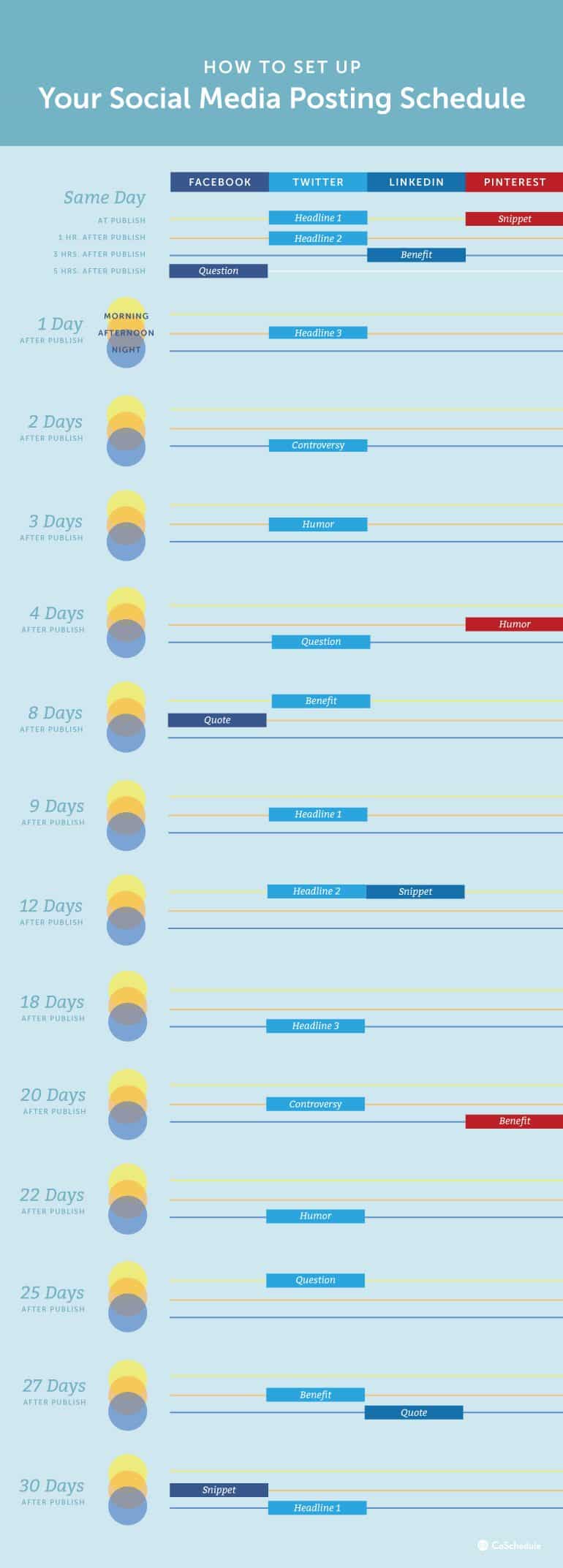
Social media can be a powerful tool for building your brand, connecting with your audience, and driving traffic to your website. However, knowing when and what to post can be daunting for newcomers. This guide will outline an effective posting schedule for Facebook, Twitter, LinkedIn, and Pinterest, tailored to maximize engagement and reach. Let’s dive in!
Facebook remains a cornerstone of social media marketing for small businesses due to its vast user base and sophisticated advertising tools. To fully leverage Facebook’s potential, it’s important to understand the platform’s nuances and tailor your strategy accordingly.
Understanding Facebook’s Algorithm
Facebook’s algorithm, known as EdgeRank, prioritizes content that fosters meaningful interactions. It considers several factors:
- Engagement: Posts with higher engagement (likes, comments, shares) are more likely to appear in users’ feeds.
- Relevance: Content that resonates with a user’s interests and past behavior.
- Recency: Newer posts are favored over older content.
- Content Type: Videos, especially live videos, tend to receive more engagement and thus more visibility.
To take full advantage of these factors, focus on creating engaging, relevant, and timely content.
Ideal Posting Times
While general peak times (morning, afternoon, and evening) are a good starting point, small businesses should also consider their specific audience. Use Facebook Insights to identify when your followers are most active. Typically, the best times are:
- Morning (7-9 AM): Catch users during their morning routine.
- Afternoon (12-2 PM): Lunchtime is a prime period for social media checks.
- Evening (5-7 PM): Users unwind and catch up on their feeds after work.
Optimal Frequency
Consistency is key, but over-posting can be detrimental. Aim to post 1-2 times per day:
- Quality over quantity: Focus on high-quality, engaging posts rather than flooding your feed with content.
- Schedule posts: Use Facebook’s scheduling tool to plan posts in advance, ensuring consistent activity even during busy periods.
Content Strategy
A diverse content strategy keeps your audience engaged and prevents monotony. Here’s a more detailed weekly plan:
- Monday: Motivational Quotes or Stories Start the week with inspiration. Post a motivational quote relevant to your industry or share an inspiring story about a customer or team member. This sets a positive tone and encourages engagement.
- Tuesday: Educational Content Share links to blog posts, articles, or industry news. Providing valuable information positions your business as an authority in your field. Use attention-grabbing headlines and include a call-to-action to read more.
- Wednesday: Video Content Post a tutorial, demonstration, or behind-the-scenes video. Video content is highly engaging and often gets prioritized by Facebook’s algorithm. Consider using Facebook Live for real-time interaction and higher engagement rates.
- Thursday: Behind-the-Scenes Look Give your audience a glimpse into your business operations. Share photos or stories about your team, workspace, or production process. This humanizes your brand and builds a personal connection with your audience.
- Friday: Fun Facts or Stats Share interesting facts, trivia, or statistics about your industry. Make it visually appealing with infographics or well-designed images. This type of content is shareable and encourages engagement.
- Saturday: Personal Stories or Community Spotlights Highlight a customer’s success story, a community event, or a personal story related to your business. This builds a sense of community and shows your audience that you value them.
- Sunday: User-Generated Content or Weekly Round-Up Share content created by your customers or a summary of your week’s activities. User-generated content is highly engaging and shows appreciation for your audience. A weekly round-up helps those who missed your posts catch up.
Tips for Engagement
- Ask Questions: Directly ask your audience questions to encourage comments. For example, “What’s your favorite product from our store?” or “How do you use our product in your daily life?”
- Use Visuals: Posts with high-quality images or videos receive significantly more engagement. Ensure your visuals are professional, relevant, and eye-catching.
- Engage with Comments: Responding to comments shows that you value your audience’s input. This not only fosters a sense of community but also boosts your post’s visibility due to increased engagement.
- Utilize Facebook Stories: Stories appear at the top of the news feed and are a great way to share timely content. Use them to promote limited-time offers, behind-the-scenes glimpses, or quick updates.
- Promote Events: If your business is hosting an event, create a Facebook event page. This helps to build anticipation and allows users to RSVP, ensuring they receive reminders and updates.
- Leverage Facebook Groups: Creating or participating in groups related to your industry can help you engage with a highly targeted audience. Share valuable content, answer questions, and build relationships within the community.
- Run Contests and Giveaways: Contests and giveaways are excellent for boosting engagement. Ensure that your contest rules encourage sharing and interaction, such as tagging friends or sharing the post to enter.
Utilizing Facebook Ads
While organic reach is valuable, Facebook Ads can significantly amplify your efforts. Here’s how to make the most of them:
- Targeting: Use Facebook’s advanced targeting options to reach your ideal audience. You can target based on demographics, interests, behaviors, and more. Custom Audiences allow you to retarget existing customers or website visitors.
- Budgeting: Start with a small budget and test different ad formats and targeting options. Monitor performance and adjust your strategy based on what works best.
- Ad Formats: Experiment with various ad formats such as carousel ads, video ads, and sponsored posts. Each format has its strengths, and different types of content may perform better in different formats.
- A/B Testing: Run A/B tests to compare different versions of your ads. This helps you identify which elements (such as headlines, images, or calls-to-action) are most effective.
Measuring Success
Track your performance using Facebook Insights and adjust your strategy based on the data:
- Engagement Metrics: Monitor likes, comments, shares, and post reach to gauge how well your content is performing.
- Website Traffic: Use tools like Google Analytics to track traffic from Facebook to your website. This helps you understand which posts drive the most traffic.
- Conversion Rates: If you’re running ads or promoting products, track conversion rates to measure the effectiveness of your campaigns.
Continuous Improvement
Social media is dynamic, and what works today may not work tomorrow. Regularly review your strategy and stay updated on the latest trends and algorithm changes. Don’t be afraid to experiment with new content types, posting times, and engagement tactics.
By following this in-depth guide and continuously refining your approach, small businesses can effectively leverage Facebook to build a strong online presence, engage with their audience, and drive growth.
Twitter is a fast-paced social media platform that allows small businesses to engage with their audience in real time. With its character limit and emphasis on concise, timely updates, Twitter is perfect for businesses looking to share quick updates, industry news, and engage in conversations with customers. Here’s how to create an effective Twitter strategy for your small business.
Understanding Twitter’s Algorithm
Twitter’s algorithm prioritizes recent and relevant content, making it essential to post frequently and engage actively. The algorithm takes into account:
- Recency: Newer tweets are given more visibility.
- Engagement: Tweets with higher engagement (retweets, likes, replies) are shown to more people.
- Relevance: Content that aligns with a user’s interests and interactions.
- Rich Media: Tweets with images, videos, and GIFs tend to perform better.
Ideal Posting Times
While your specific audience may vary, these general peak times are a good starting point:
- Morning (8-10 AM): Users check Twitter for news and updates as they start their day.
- Midday (12-2 PM): People often catch up on Twitter during their lunch break.
- Late Afternoon (5-6 PM): Many users check Twitter as they wind down from their workday.
Optimal Frequency
Twitter’s fast-moving nature means frequent posting is beneficial. Aim to tweet 3-7 times per day:
- Consistency: Maintain a steady flow of tweets to stay relevant.
- Variety: Mix up your content to keep your feed interesting.
Content Strategy
A well-rounded content strategy ensures your tweets are engaging and varied. Here’s a more detailed weekly plan:
- Monday: Trending Topics or Industry News Start the week by sharing or commenting on trending topics and industry news. Use relevant hashtags to increase visibility and join broader conversations.
- Tuesday: Blog Posts or Articles Share links to your latest blog posts or industry articles. Use compelling headlines and include a call-to-action to read more.
- Wednesday: Tips and Advice Post helpful tips, tricks, or advice related to your industry. Use bullet points or numbered lists to make the information easily digestible.
- Thursday: Retweets and Shares Retweet relevant content from industry leaders, partners, or customers. Adding a comment or perspective can further engage your audience.
- Friday: Light-hearted Content Post something fun or humorous, such as a meme, GIF, or a light-hearted poll. This can boost engagement as people are in a more relaxed mood.
- Saturday: Engagement Posts Ask questions or run polls to encourage interaction. Questions like “What’s your favorite product from our store?” or “How do you use our product in your daily life?” can drive engagement.
- Sunday: Weekly Round-Up Share a summary of the week’s top content or a preview of what’s coming up. This helps keep your followers informed and engaged.
Tips for Engagement
- Use Hashtags: Incorporate relevant hashtags to increase the discoverability of your tweets. Tools like Hashtagify can help identify trending and relevant hashtags.
- Engage with Followers: Respond to mentions, comments, and direct messages promptly. Engaging with your followers builds relationships and encourages more interaction.
- Visual Content: Tweets with images, videos, and GIFs tend to get more engagement. Ensure your visuals are high-quality and relevant to your content.
- Run Contests and Giveaways: Contests and giveaways can significantly boost engagement. Ensure the rules encourage sharing and interaction, such as retweeting or tagging friends.
- Twitter Polls: Use Twitter polls to gather opinions and increase interaction. Polls are a fun way to engage your audience and get insights into their preferences.
Utilizing Twitter Ads
Twitter Ads can amplify your reach and target specific audiences effectively. Here’s how to leverage them:
- Targeting: Use Twitter’s targeting options to reach your ideal audience. You can target based on demographics, interests, behaviors, and even specific keywords or followers.
- Budgeting: Start with a small budget and experiment with different ad formats and targeting options. Monitor performance and adjust your strategy based on what works best.
- Ad Formats: Experiment with various ad formats such as promoted tweets, promoted accounts, and promoted trends. Each format has its strengths and can be used for different campaign goals.
- A/B Testing: Run A/B tests to compare different versions of your ads. This helps identify which elements (headlines, images, calls-to-action) are most effective.
Measuring Success
Tracking performance on Twitter is crucial to understand what works and what doesn’t. Use Twitter Analytics to monitor:
- Engagement Metrics: Track likes, retweets, replies, and overall engagement to gauge the effectiveness of your tweets.
- Follower Growth: Monitor changes in your follower count to see how your content impacts your audience growth.
- Website Traffic: Use tools like Google Analytics to track traffic from Twitter to your website. This helps you understand which tweets drive the most traffic.
- Conversion Rates: If you’re running ads or promoting products, track conversion rates to measure the effectiveness of your campaigns.
Continuous Improvement
Social media trends and user behaviors evolve, so regularly review and adjust your Twitter strategy. Stay updated with the latest Twitter trends and best practices, and don’t be afraid to experiment with new content types and engagement tactics.
By following these in-depth tips and continuously refining your approach, small businesses can effectively leverage Twitter to build a strong online presence, engage with their audience, and drive growth. Twitter’s real-time nature offers a unique opportunity to connect with customers and stay relevant in your industry.
LinkedIn is the premier social media platform for professionals and businesses. It provides an excellent opportunity for small businesses to build their brand, network with industry peers, and attract potential customers or clients. Here’s how to develop an effective LinkedIn strategy tailored for small businesses.
Understanding LinkedIn’s Algorithm
LinkedIn’s algorithm focuses on content that drives meaningful professional interactions. It considers:
- Engagement: Posts that receive more likes, comments, and shares are shown to more people.
- Relevance: Content relevant to the user’s interests and professional network.
- Content Type: Articles, videos, and posts that stimulate conversation tend to perform well.
Ideal Posting Times
To maximize visibility and engagement, consider these peak times:
- Morning (7-9 AM): Professionals check LinkedIn before starting their workday.
- Midday (12-1 PM): Lunchtime is a popular time for checking updates.
- Evening (5-6 PM): Users catch up on LinkedIn after work.
Optimal Frequency
Posting 1-2 times per day is ideal for LinkedIn. Consistency is important, but it’s crucial to prioritize quality over quantity.
Content Strategy
A diverse content strategy keeps your LinkedIn presence dynamic and engaging. Here’s a detailed weekly plan:
- Monday: Motivational Quotes or Industry News Start the week with a motivational quote relevant to your industry or share the latest industry news. This can set a positive tone and encourage engagement.
- Tuesday: Case Studies or Success Stories Post a case study or success story highlighting your business’s achievements. This not only showcases your expertise but also builds credibility and trust.
- Wednesday: Thought Leadership or Insights Share an insightful article or a thought leadership piece. Offering valuable insights positions your business as an authority in your field.
- Thursday: Event Promotions or Webinars Promote upcoming events, webinars, or workshops. Use eye-catching visuals and a clear call-to-action to drive registrations and participation.
- Friday: Professional Tips or Advice Share professional tips, advice, or best practices related to your industry. This can help your audience solve problems and improve their own practices.
- Saturday: Company Culture or Team Highlights Showcase your company culture by highlighting team members, sharing behind-the-scenes content, or celebrating milestones. This humanizes your brand and fosters a personal connection with your audience.
- Sunday: Weekly Round-Up or Future Plans Post a round-up of the week’s top content or share what’s coming up in the following week. This helps keep your followers informed and engaged.
Tips for Engagement
- Share Valuable Content: Focus on providing value through your posts. Share content that educates, informs, or inspires your audience.
- Encourage Interaction: Ask questions, seek opinions, or start discussions to encourage comments and interactions. For example, “What are your thoughts on the latest industry trend?”
- Use Visuals: Posts with images, infographics, or videos tend to get more engagement. Ensure your visuals are high-quality and relevant to the content.
- Engage with Your Network: Like, comment, and share posts from your connections. Engaging with others’ content can increase your visibility and foster relationships within your network.
- Join and Participate in Groups: LinkedIn groups are valuable for networking and sharing expertise. Join groups related to your industry and actively participate in discussions.
Utilizing LinkedIn Ads
LinkedIn Ads can help amplify your reach and target specific audiences. Here’s how to leverage them effectively:
- Targeting: Use LinkedIn’s advanced targeting options to reach your ideal audience. You can target based on job title, industry, company size, seniority, and more.
- Budgeting: Start with a modest budget and experiment with different ad formats and targeting options. Monitor performance and adjust your strategy based on what works best.
- Ad Formats: Experiment with various ad formats such as Sponsored Content, Sponsored InMail, and Text Ads. Each format has its strengths and can be used for different campaign goals.
- A/B Testing: Run A/B tests to compare different versions of your ads. This helps identify which elements (headlines, images, calls-to-action) are most effective.
Measuring Success
Tracking performance on LinkedIn is crucial to understanding what works and what doesn’t. Use LinkedIn Analytics to monitor:
- Engagement Metrics: Track likes, comments, shares, and overall engagement to gauge the effectiveness of your posts.
- Follower Growth: Monitor changes in your follower count to see how your content impacts your audience growth.
- Website Traffic: Use tools like Google Analytics to track traffic from LinkedIn to your website. This helps you understand which posts drive the most traffic.
- Conversion Rates: If you’re running ads or promoting products, track conversion rates to measure the effectiveness of your campaigns.
Building Your LinkedIn Company Page
Your LinkedIn Company Page is the hub of your LinkedIn presence. Make sure it’s fully optimized:
- Complete Your Profile: Fill out all sections of your Company Page, including a compelling company description, logo, and banner image.
- Showcase Pages: Create Showcase Pages for different aspects of your business. These are extensions of your Company Page and allow you to highlight specific products or initiatives.
- Employee Advocacy: Encourage your employees to connect with the Company Page and share its content. Employee advocacy can significantly increase your reach and credibility.
Networking and Relationship Building
LinkedIn is a powerful platform for networking. Here’s how to build and nurture professional relationships:
- Connect with Industry Leaders: Send connection requests to industry leaders, influencers, and potential partners. Personalize your requests to increase the chances of acceptance.
- Engage with Influencers: Comment on and share posts from industry influencers. Adding thoughtful comments can help you get noticed and start conversations.
- Follow Up: After meeting someone at a networking event or conference, send them a connection request and a personalized message. This helps you stay connected and build your professional network.
Continuous Improvement
Social media trends and user behaviors evolve, so regularly review and adjust your LinkedIn strategy. Stay updated with the latest LinkedIn trends and best practices, and don’t be afraid to experiment with new content types and engagement tactics.
By following these in-depth tips and continuously refining your approach, small businesses can effectively leverage LinkedIn to build a strong online presence, engage with their audience, and drive growth. LinkedIn’s professional nature offers a unique opportunity to connect with industry peers, showcase your expertise, and attract potential clients or customers.
Pinterest is a powerful visual discovery and bookmarking platform that can significantly benefit small businesses, especially those in industries like fashion, food, home decor, and DIY crafts. Its user base actively searches for inspiration and ideas, making it an excellent platform for driving traffic and sales. Here’s how small businesses can effectively utilize Pinterest.
Understanding Pinterest’s Algorithm
Pinterest’s algorithm prioritizes fresh, relevant, and visually appealing content. It considers:
- Engagement: Pins that receive more saves, clicks, and comments are more likely to be shown to others.
- Recency: Fresh content is favored, so regular pinning is crucial.
- Keywords: Proper use of keywords in descriptions, board names, and pin titles improves discoverability.
- Rich Pins: Rich Pins provide more context about an idea because they show extra information directly on a Pin. There are four types of Rich Pins: app, product, recipe, and article pins.
Ideal Posting Times
To maximize visibility and engagement, consider these peak times:
- Evening (8-11 PM): The most active time for Pinterest users.
- Weekends: Saturdays and Sundays see high engagement.
Optimal Frequency
Pinterest rewards frequent pinning. Aim to pin 10-15 times per day:
- Consistency: Maintain a steady flow of pins throughout the day.
- Variety: Mix up your content to keep your boards dynamic and interesting.
Content Strategy
A well-rounded content strategy ensures your pins are engaging and varied. Here’s a detailed weekly plan:
- Monday: Motivational Quotes or Inspiring Images Start the week with a motivational quote or an inspiring image. These types of pins are highly shareable and set a positive tone.
- Tuesday: Detailed Infographics or How-To Guides Share informative infographics or step-by-step guides related to your industry. These provide value and encourage saves and shares.
- Wednesday: Recipes or DIY Projects Post recipes, DIY projects, or tutorials. These are popular categories on Pinterest and tend to perform well.
- Thursday: Fashion Tips or Home Decor Ideas Share fashion tips, styling guides, or home decor ideas. Use high-quality images and provide detailed descriptions.
- Friday: Travel Inspiration or Weekend Activities Pin travel guides, destination inspiration, or suggestions for weekend activities. These can attract a lot of attention, especially towards the end of the week.
- Saturday: Personal Development Tips or Wellness Content Post personal development tips, wellness advice, or self-care routines. These resonate well with users looking to improve their lifestyle.
- Sunday: Weekly Planners or Organizational Tips Share weekly planners, organizational hacks, or productivity tips. These are useful for users planning their week ahead.
Tips for Engagement
- High-Quality Images: Use visually appealing, high-resolution images. Pinterest is a visual platform, so the quality of your images directly impacts engagement.
- Use Keywords: Optimize your pin descriptions, board names, and titles with relevant keywords. This improves your pins’ discoverability through search.
- Create Boards: Organize your pins into themed boards. Boards make it easier for users to find content and follow your interests. Make sure your board names are clear and descriptive.
- Collaborate with Influencers: Partner with influencers relevant to your niche. Influencers can help expand your reach and lend credibility to your brand.
- Engage with Followers: Respond to comments and engage with your followers. Building a community around your content fosters loyalty and encourages more interaction.
- Use Rich Pins: Implement Rich Pins to provide additional information and enhance the user experience. For example, product Rich Pins include real-time pricing and availability.
- Seasonal and Trend-Based Pins: Tailor your content to reflect current seasons, holidays, and trends. Seasonal and timely content often sees higher engagement.
Utilizing Pinterest Ads
Pinterest Ads can amplify your reach and target specific audiences. Here’s how to leverage them effectively:
- Targeting: Use Pinterest’s advanced targeting options to reach your ideal audience. You can target based on interests, demographics, and search keywords.
- Budgeting: Start with a small budget and experiment with different ad formats and targeting options. Monitor performance and adjust your strategy based on what works best.
- Ad Formats: Experiment with various ad formats such as Promoted Pins, Video Pins, and Carousel Pins. Each format has its strengths and can be used for different campaign goals.
- A/B Testing: Run A/B tests to compare different versions of your ads. This helps identify which elements (images, descriptions, calls-to-action) are most effective.
Measuring Success
Tracking performance on Pinterest is crucial to understanding what works and what doesn’t. Use Pinterest Analytics to monitor:
- Engagement Metrics: Track saves, clicks, and overall engagement to gauge the effectiveness of your pins.
- Website Traffic: Use tools like Google Analytics to track traffic from Pinterest to your website. This helps you understand which pins drive the most traffic.
- Conversion Rates: If you’re running ads or promoting products, track conversion rates to measure the effectiveness of your campaigns.
Building Your Pinterest Profile
Your Pinterest profile is the hub of your Pinterest presence. Make sure it’s fully optimized:
- Complete Your Profile: Fill out all sections of your profile, including a compelling bio, profile picture, and website link.
- Create Relevant Boards: Organize your content into relevant boards with clear, descriptive names. This makes it easier for users to find and follow your content.
- Consistency in Branding: Ensure that your branding is consistent across all pins and boards. Use your brand’s colors, logos, and fonts to create a cohesive look.
Networking and Relationship Building
Pinterest is not just about pinning content; it’s also about building relationships with other users and brands. Here’s how to network effectively:
- Follow Relevant Boards: Follow boards and users that are relevant to your niche. Engage with their content by repinning, liking, and commenting.
- Join Group Boards: Join group boards related to your industry. Group boards have multiple contributors and can help you reach a larger audience.
- Collaborate with Other Businesses: Partner with complementary businesses to co-create content. This can help both parties reach new audiences and build mutually beneficial relationships.
Continuous Improvement
Social media trends and user behaviors evolve, so regularly review and adjust your Pinterest strategy. Stay updated with the latest Pinterest trends and best practices, and don’t be afraid to experiment with new content types and engagement tactics.
By following these in-depth tips and continuously refining your approach, small businesses can effectively leverage Pinterest to build a strong online presence, engage with their audience, and drive growth. Pinterest’s visual nature offers a unique opportunity to showcase your products, share valuable content, and inspire your audience, leading to increased traffic and sales.
Conclusion
Creating an effective social media posting schedule is crucial for maximizing your online presence and engagement. By tailoring your content and posting times to each platform’s unique algorithm and audience behavior, you can build a robust and active social media presence. Remember, consistency is key, but so is flexibility—be prepared to adjust your strategy based on what works best for your specific audience.
Steal this schedule, make it your own, and watch your social media presence thrive!

Author:
Mark Ford



