
Want to create blog content that ranks higher in search and keeps readers engaged? Looking for a proven framework to structure your posts for maximum SEO impact?
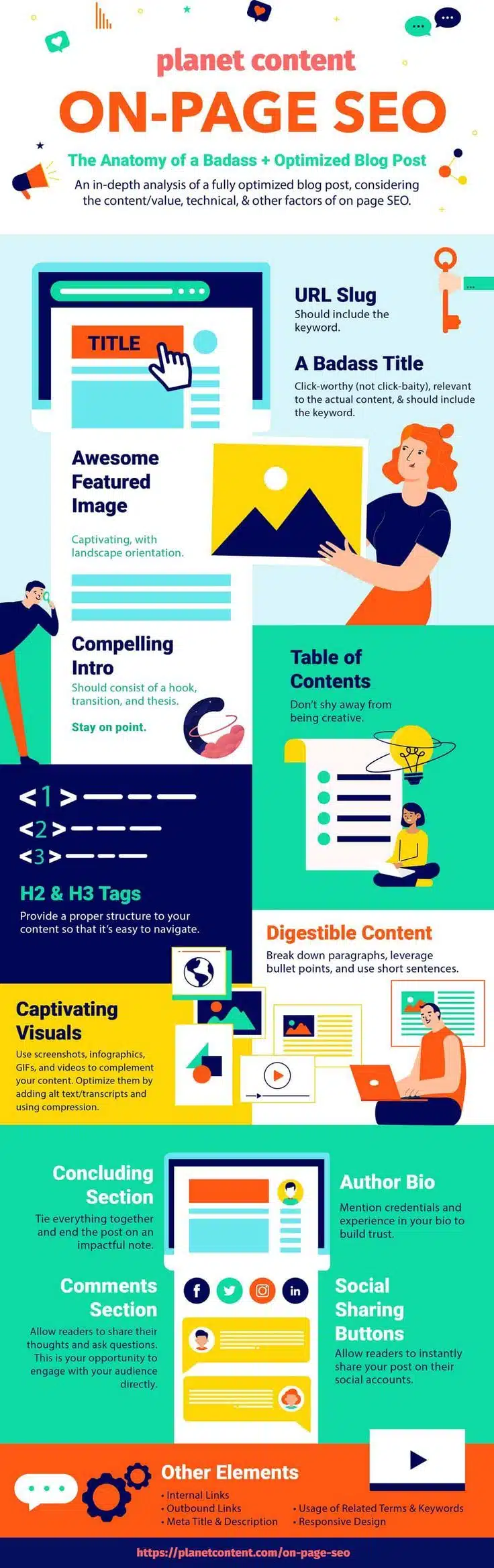
You’ll find some blog SEO basics in this infographic from Planet Content.
It breaks things down as follows:
- URL Slug
- Blog Title
- Featured Image
- Introduction
- Table of Contents
- Headings (H2 & H3 Tags)
- Digestible Content
- Visuals
- Conclusion
- Author Bio
- Comments Section
- Social Sharing Buttons
Check out the post below for more.
A great blog post isn’t just about great writing—it’s also about structure, SEO, and user experience. If you want your content to rank well and engage your audience, you need to focus on more than just the words.
From title to footer, every element plays a role in performance. In this post, we’ll break down each part of a fully optimised blog post.
URL Slug
The URL slug is more than just a web address—it’s a key indicator to both search engines and readers about what your content is about. It should be short, descriptive, and include your main keyword. A messy or unclear slug can negatively impact click-through rates. Make it clean, relevant, and easy to understand.
- Keep it short and remove unnecessary filler words like “the” or “and.”
- Include your target keyword to boost SEO relevance.
- Use hyphens (not underscores) to separate words.
- Avoid dates or numbers that may become outdated.
A Badass Title
Your blog title is the first thing users see, and it’s what compels them to click. A great title strikes a balance between being informative and intriguing without sounding like clickbait. It should also contain your primary keyword for search visibility. If your title fails to attract attention, your content might never be read.
- Include your primary keyword as naturally as possible.
- Use power words like “ultimate,” “proven,” or “essential” to create urgency.
- Keep it under 60 characters so it displays fully in search results.
- Make sure it accurately reflects the blog post content.
Awesome Featured Image
A strong featured image sets the tone for your content before a single word is read. It’s what gets pulled into previews and social shares, so make it count. An engaging, high-quality image with a landscape orientation works best. Ensure it visually represents the topic of your post.
- Choose a landscape image that reflects your content’s theme.
- Use high-resolution visuals that load quickly and look professional.
- Add your blog title to the image for better social media visibility.
- Compress the image to reduce page load times without losing quality.
Compelling Intro
The first few lines of your blog post are critical for drawing readers in. A good intro should hook attention, set expectations, and lead smoothly into the main content. Think of it as your pitch to keep someone reading. Keep it tight, relevant, and engaging.
- Start with a question, statistic, or bold statement to hook readers.
- Explain what the post will cover and why it matters.
- Keep it short—ideally under 150 words.
- End with a clear transition into the first main section.
Table of Contents
A Table of Contents helps users jump to the sections they care about, improving both user experience and SEO. It’s especially useful in long-form content. Google also loves it, as it can lead to sitelinks in search results. It’s a simple addition with big benefits.
- Use anchor links to allow smooth scrolling to each section.
- Make sure it’s visually distinct but not distracting.
- Keep the headings short and aligned with your H2/H3 tags.
- Place it near the top of your post, right after the intro.
H2 & H3 Tags
Subheadings make your content easier to scan, organise your thoughts, and give SEO more structure. H2 tags should mark major sections, while H3s can be used for subsections. Proper use of headers keeps readers engaged and search engines happy. It also improves accessibility and clarity.
- Use H2 tags for main ideas and H3 tags for supporting points.
- Include relevant keywords in at least some of your subheadings.
- Don’t overuse heading tags—keep the structure clean.
- Ensure headings reflect the content that follows them.
Digestible Content
In the age of skimming, dense paragraphs are your enemy. Content that’s easy to digest increases time on page and decreases bounce rates. Break up long text with bullet points, short sentences, and white space. This makes your content feel more approachable and readable.
- Limit paragraphs to 2–4 sentences each.
- Use bullet points and numbered lists to highlight key ideas.
- Stick to plain language and avoid jargon unless necessary.
- Add bold text or subheadings to emphasise important points.
Captivating Visuals
Visual content boosts engagement, helps explain complex topics, and keeps users on the page longer. Whether it’s images, infographics, or videos, visuals should complement and enhance your written content. Always optimise your visuals for performance and accessibility.
- Include alt text for every image to improve SEO and accessibility.
- Use infographics to summarise complex information visually.
- Embed videos or GIFs where relevant to demonstrate ideas.
- Compress files to ensure fast page loading without losing quality.
Concluding Section
Don’t leave your readers hanging—your conclusion should wrap everything up and reinforce your message. It’s your chance to drive home the key points and suggest next steps. Whether it’s a CTA or a summary, make it impactful. A strong ending keeps your brand memorable.
- Summarise the key takeaways in a few concise sentences.
- End with a clear call to action—subscribe, share, comment, etc.
- Pose a final question to encourage reader interaction.
- Link to related blog posts or resources to keep readers engaged.
Author Bio
An author bio gives your post a face and voice, building trust and authority with your readers. It’s especially important for thought leadership, expert content, or niches like health and finance. Keep it brief, but highlight your experience and relevance. Bonus points for adding a photo.
- Include your name, title, and a one-liner about your expertise.
- Add a link to your website or social profiles.
- Use a professional headshot to personalise the content.
- Keep the tone aligned with your brand and audience.
Comments Section
A comments section allows readers to engage, ask questions, and share their thoughts. This builds community and adds social proof to your content. It can also increase time on site and offer feedback for improvement. Don’t ignore it—participate and respond.
- Encourage readers to leave a comment with a simple prompt.
- Moderate comments to keep the conversation respectful.
- Respond promptly to build relationships with your audience.
- Use the feedback to inspire future blog content.
Social Sharing Buttons
If you want people to share your content, make it easy. Social sharing buttons give readers a quick way to spread your blog post on their networks. This increases visibility and potential backlinks. They should be easy to find but not intrusive.
- Place sharing buttons at the top, bottom, or side of your post.
- Include platforms relevant to your audience (e.g. LinkedIn, Twitter).
- Use visually consistent icons that match your site’s branding.
- Track shares with analytics to see what content performs best.
Other On-Page Elements
A fully optimised post doesn’t stop at content—it includes behind-the-scenes elements too. These technical features support SEO and user experience. Don’t overlook things like internal links, meta descriptions, and mobile responsiveness. They can make a major difference in search rankings.
- Add internal links to other relevant blog posts and pages.
- Include outbound links to trusted, authoritative sources.
- Write a compelling meta title and description for SERPs.
- Make sure your site is responsive and mobile-friendly.
Final Thoughts
A high-performing, search-optimised blog post is built from the ground up with intention and precision. Every element—from the title to the comments section—serves a purpose.
When done right, these pieces come together to create content that ranks well, reads well, and converts. Use this framework as your blueprint and start crafting posts that perform at their best.

Author:
Mark Ford