

Whether you’re an individual looking to stay connected with friends and family or a business trying to reach a wider audience, social media is a powerful tool.
However, managing multiple social media platforms can be time-consuming and overwhelming. This is where social media automation comes into play.
In this blog post, we will explore the dos and don’ts of social media automation and introduce you to some of the best tools available for streamlining your social media management.
Infographic from The Insurance Octopus.
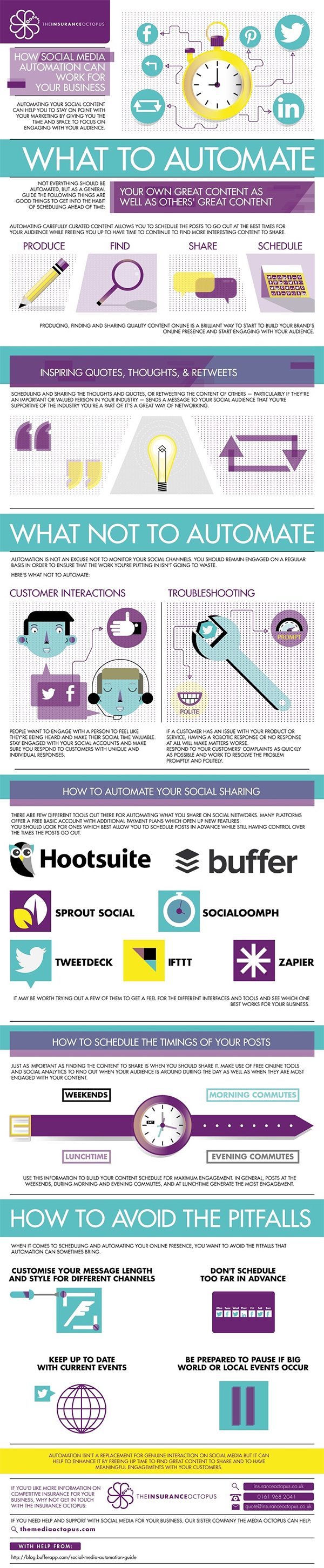
The Power of Social Media Automation
Social media automation involves using tools and software to schedule and publish posts, engage with followers, and analyze your social media performance. Automation can save you time, ensure consistency in your social media strategy, and help you reach your audience at the right time. However, it’s essential to use automation wisely to avoid coming across as robotic or spammy. Let’s dive into the dos and don’ts of social media automation.
The Dos of Social Media Automation
- Plan Your Content Calendar: Before diving into automation, create a content calendar. This helps you plan your posts strategically, ensuring that they align with your goals and resonate with your audience.
- Choose the Right Platforms: Not all social media platforms are created equal. Focus on the ones that are most relevant to your audience and business goals. Popular choices include Facebook, Twitter, Instagram, LinkedIn, and Pinterest.
- Use Scheduling Tools: Utilize scheduling tools like Buffer, Hootsuite, or Later to plan and schedule your posts in advance. This ensures that your content is consistently delivered, even during weekends or holidays.
- Customize Post Times: Experiment with different posting times to determine when your audience is most active. Tools like Facebook Insights and Twitter Analytics can provide valuable data on your followers’ online behavior.
- Automate Repetitive Tasks: Automation can handle repetitive tasks such as liking, retweeting, or thanking new followers. This frees up your time for more meaningful interactions.
- Personalize Your Automation: While automating posts is convenient, ensure that your messages and responses still sound authentic. Tailor your automated content to match your brand’s voice.
- Monitor Mentions and Comments: Don’t forget to keep an eye on mentions and comments. Tools like Mention and Brandwatch can help you stay engaged with your audience and address any concerns or questions promptly.
- Track Analytics: Regularly analyze your social media performance using analytics tools provided by the platforms or third-party tools like Google Analytics and Sprout Social. This data helps you refine your strategy and measure your ROI.
- Test and Iterate: Social media is constantly evolving. Don’t be afraid to experiment with different strategies and adjust your automation settings accordingly. What works today may not work tomorrow.
The Don’ts of Social Media Automation
- Over-Automate: While automation can be a time-saver, avoid overusing it. Excessive automation can make your brand appear distant and insincere. Balance automation with real-time engagement.
- Neglect Real-Time Engagement: Automation should complement, not replace, real-time engagement. Be present on your social media accounts to respond to comments, messages, and trends.
- Ignore Negative Feedback: Social media can be a double-edged sword. If you receive negative feedback, address it professionally and constructively. Ignoring or deleting negative comments can harm your brand’s reputation.
- Use the Same Content Across Platforms: Each social media platform has its unique audience and characteristics. Avoid posting the same content verbatim across all platforms. Tailor your content to fit each platform’s format and audience expectations.
- Automate Direct Messages (DMs): Sending automated DMs can be perceived as spammy and annoying. Instead, use DMs for personalized, one-on-one interactions with followers and customers.
- Forget About Trends and News: Social media is where trends and news stories often break first. Don’t miss opportunities to join relevant conversations by relying solely on pre-scheduled content.
- Rely Solely on Third-Party Tools: While third-party tools are invaluable, don’t neglect the native analytics and features provided by each social media platform. These tools offer insights and opportunities that may be missed when using only third-party options.
- Disregard A/B Testing: A/B testing allows you to compare different approaches and determine what resonates best with your audience. Don’t skip this valuable step in refining your content and strategy.
The Best Tools for Social Media Automation
Now that we’ve explored the dos and don’ts of social media automation, let’s take a closer look at some of the best tools available for streamlining your social media management.
1. Buffer
Buffer is a popular social media management tool that allows you to schedule posts, track performance, and manage multiple accounts from one dashboard. It supports major social media platforms, including Facebook, Twitter, Instagram, LinkedIn, and Pinterest. Buffer offers a user-friendly interface and robust analytics to help you refine your strategy.
2. Hootsuite
Hootsuite is another well-known social media management platform. It offers features like post scheduling, content curation, and social media monitoring. Hootsuite supports over 35 social networks, making it a versatile choice for businesses of all sizes.
3. Later
Later specializes in Instagram scheduling and visual content planning. It offers a user-friendly drag-and-drop interface for planning and scheduling posts, stories, and carousel content. Later also provides insights and analytics to help you optimize your Instagram strategy.
4. Sprout Social
Sprout Social is a comprehensive social media management tool that provides scheduling, monitoring, and analytics. It offers team collaboration features and integrates with various social media platforms, making it suitable for larger businesses and agencies.
5. Canva
While not a traditional social media management tool, Canva is a valuable resource for creating visually appealing social media content. It offers a wide range of templates and design tools, making it easy to create eye-catching graphics and images for your posts.
6. Google Analytics
Google Analytics is a powerful tool for tracking website traffic and social media referrals. By analyzing the data from your social media efforts, you can gain insights into which platforms are driving the most traffic and conversions to your website.
7. Mention
Mention is a social media monitoring tool that helps you track brand mentions and industry trends. It allows you to stay informed about what people are saying about your brand and competitors, enabling you to engage and respond effectively.
8. Brandwatch
Brandwatch is an advanced social listening tool that provides in-depth insights into your brand’s online presence. It helps you understand sentiment, track trends, and gather competitive intelligence. This information can inform your social media strategy and content.
Conclusion
Social media automation is a valuable tool for streamlining your social media management and reaching your audience effectively. By following the dos and don’ts outlined in this blog post, you can strike the right balance between automation and authentic engagement. Additionally, the best tools mentioned here can help you manage your social media accounts efficiently and make data-driven decisions to improve your social media strategy. Remember that the social media landscape is constantly evolving, so staying adaptable and informed is key to your success in the digital world.

Author:
Mark Ford



