

Is your Facebook reach declining and your likes and shares disappearing? Are you considering deleting your page altogether?
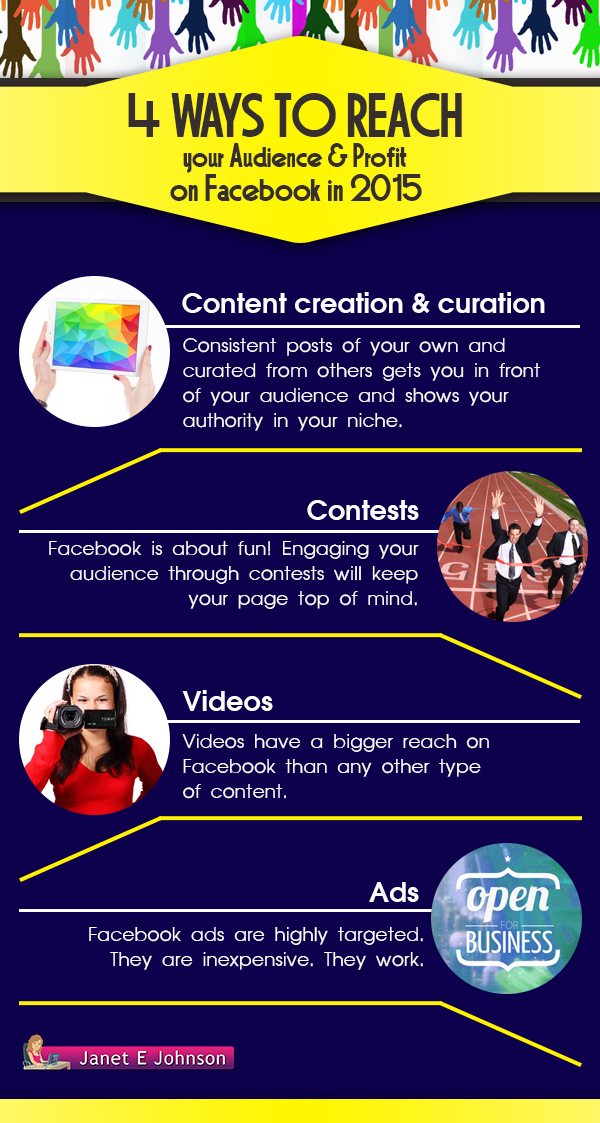
Facebook announced a while back that they were going to show less promotional posts from business pages unless you pay for their advertising service – and Facebook Ads is one of the 4 things Janet Johnson has suggested you try in the infographic below.
If you don’t fancy spending money why not give the other 3 a go before closing down your page for good.
In an era where social media platforms have become an integral part of our lives, the decision to delete your Facebook page can be a significant one. Whether you’re concerned about privacy, tired of the constant stream of updates, or simply want to take a break from the digital world, deleting your Facebook page is a step that many have contemplated. However, before you go ahead and click that delete button, there are a few important things to consider. In this blog post, we’ll explore four alternatives to deleting your Facebook page, each offering a different approach to address your concerns and possibly make your Facebook experience more enjoyable.
1. Review and Update Your Privacy Settings
Privacy concerns have been a central issue for Facebook users for years. If you’re feeling uneasy about the amount of personal information you’ve shared on the platform, or you’re worried about who can see your posts and data, the first step you should take is to review and update your privacy settings.
Here’s how you can do it:
A. Adjust Who Can See Your Posts:
- Go to your Facebook settings.
- Click on “Privacy” on the left-hand menu.
- Under “Who can see your future posts,” select your preferred audience. You can choose between “Public,” “Friends,” “Only Me,” or create custom lists.
B. Limit the Audience for Past Posts:
- In the same “Privacy” section, you’ll find an option to limit the audience for your past posts. Click on “Limit Past Posts” and confirm.
C. Control How People Can Find You:
- Under the “How people can find and contact you” section, you can manage who can send you friend requests, look you up using your email address or phone number, and more.
By fine-tuning these settings, you can regain control over your online presence without resorting to deleting your Facebook page. This step allows you to maintain your social connections while ensuring that your content is only visible to the people you trust.
2. Unfollow and Mute Instead of Unfriending
One common reason people consider deleting their Facebook page is the overwhelming amount of content in their newsfeed. If you find yourself annoyed by a friend’s constant updates or you’re overwhelmed by the sheer volume of posts, you don’t have to take the drastic step of unfriending or deleting them.
Instead, consider these alternatives:
A. Unfollow:
- Visit the profile of the person you want to unfollow.
- Click the “Following” button, which will reveal a dropdown menu.
- Select “Unfollow [Name].” This action will stop their posts from appearing in your newsfeed, but you’ll still remain friends.
B. Mute:
- On some posts, you’ll see three dots (ellipsis) in the top-right corner.
- Click on these dots, and you’ll find the option to “Mute [Name].” This allows you to mute a person or page for a specified period, ranging from 24 hours to 30 days.
Unfollowing and muting are excellent ways to maintain your online friendships while keeping your newsfeed clutter-free. It’s a more considerate approach that allows you to control what you see without hurting anyone’s feelings.
3. Utilize Facebook Groups for a Focused Experience
Are you tired of seeing irrelevant posts on your newsfeed? Instead of quitting Facebook altogether, consider harnessing the power of Facebook Groups. These communities can be a sanctuary for like-minded individuals and provide a more focused and enjoyable social media experience.
Here’s how you can make the most of Facebook Groups:
A. Search for Relevant Groups:
- Use Facebook’s search bar to look for groups related to your interests, hobbies, or goals.
- Join the groups that align with your preferences.
B. Adjust Group Notifications:
- Once you’re a member of a group, you can customize your notification settings to stay updated without being overwhelmed.
C. Participate Actively:
- Engage in discussions, ask questions, and share your expertise within the group. It’s an excellent way to connect with people who share your passions.
By focusing your Facebook activity on meaningful and relevant groups, you can reduce the noise and enjoy a more tailored social media experience. Plus, you’ll have the opportunity to build deeper connections with people who share your interests.
4. Take a Facebook Detox
Sometimes, the best way to regain control of your digital life is to take a break. If you’re considering deleting your Facebook page due to the feeling of being constantly connected, a Facebook detox might be just what you need.
Here’s how you can go about it:
A. Set a Timeframe:
- Decide how long you want your detox to last. It could be a few days, a week, or even a month.
B. Announce Your Break:
- Consider posting a status update or message to let your friends know you’ll be taking a break from Facebook. This way, they won’t worry about your sudden disappearance.
C. Log Out and Uninstall:
- Log out of your Facebook account on all devices and uninstall the app from your phone to reduce temptation.
D. Fill the Void:
- Use the time you would have spent on Facebook for other activities you enjoy, such as reading, exercising, or spending quality time with friends and family.
E. Reflect and Reevaluate:
- During your detox, reflect on how you feel without Facebook. Are you less stressed? Do you have more time for other activities? Use this time to reevaluate whether you want to return to the platform and, if so, how you can make your experience better.
Taking a Facebook detox can provide you with a fresh perspective on your social media habits. It allows you to break free from the constant barrage of updates and notifications, giving you a chance to reconnect with the real world.
Conclusion
Deleting your Facebook page is a significant decision that should not be taken lightly. Instead of jumping straight to the delete button, consider these four alternatives: reviewing and updating your privacy settings, unfollowing and muting instead of unfriending, utilizing Facebook Groups for a more focused experience, and taking a Facebook detox.
Each of these options allows you to address specific concerns and regain control over your Facebook experience without severing your social connections completely. Whether it’s privacy, content overload, or the need for a digital detox, these alternatives offer a way to find balance in your online life. So, before you say goodbye to Facebook, give these alternatives a try—you might find that they provide the solution you’ve been looking for.

Author:
Mark Ford



