
Are you frustrated that your Facebook Ads results don’t seem to match what you see in Google Analytics? Want to understand why the two platforms report different numbers and how to make sense of your data?
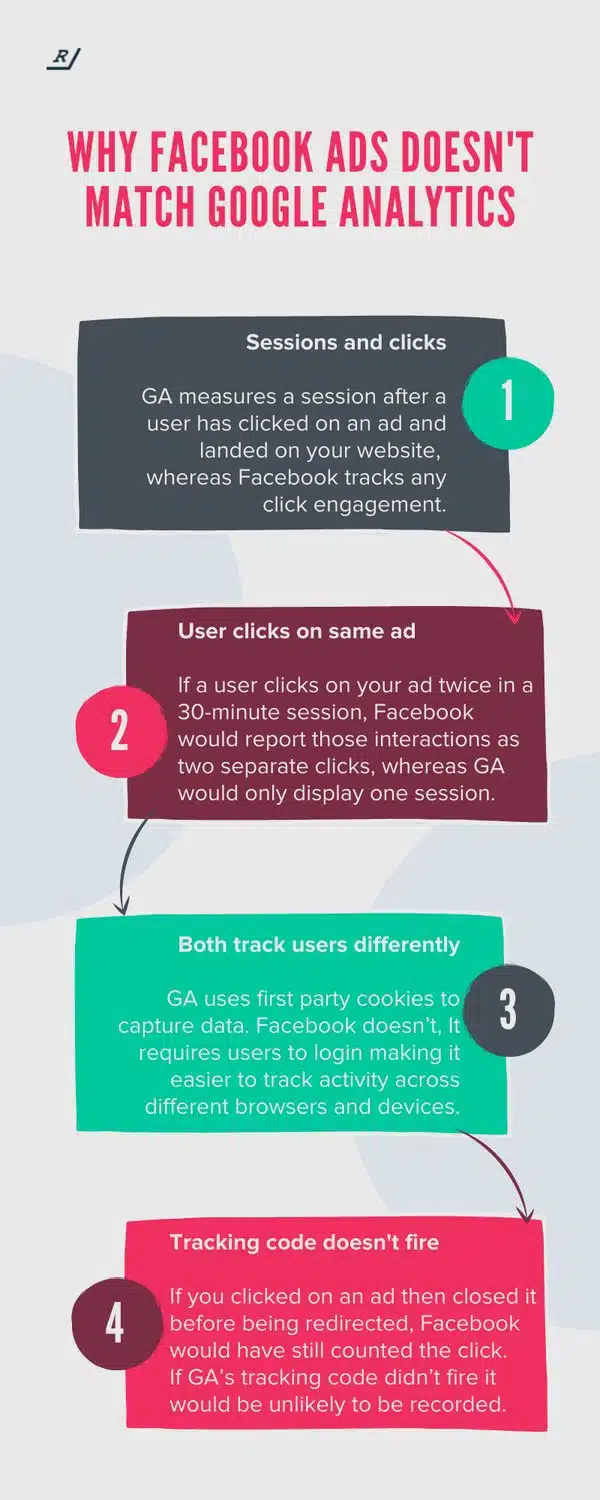
You’ll find some PPC basics in this infographic.
Here’s a summary of what’s covered:
- Sessions vs Clicks
- Repeated Clicks
- Different Tracking Methods
- Tracking Code Doesn’t Fire
- Attribution Window Differences
- Cross-Device Behaviour
- Ad Blocking and Privacy Settings
- Click vs Engagement Metrics
- Conversion Tracking Setups
- What You Can Do About It
Check out the post below for more.
When you’re running paid social campaigns, one of the most frustrating things is seeing Facebook Ads and Google Analytics tell completely different stories. You might see high click numbers in Facebook Ads Manager but far fewer sessions in Google Analytics. It’s easy to assume something’s wrong with your tracking, but in reality, the two platforms measure and report data in fundamentally different ways.
In this post, we’ll explain why those differences exist, how to interpret them correctly, and what steps you can take to align your reporting more closely. Understanding the mechanics behind each platform’s tracking system will help you make smarter decisions, allocate your ad spend more effectively, and trust your data with greater confidence.
Sessions vs Clicks
One of the main reasons for mismatched data is that Google Analytics and Facebook track actions differently. Google Analytics records a session only when a user actually lands on your website and the tracking code loads, while Facebook counts any click or engagement with your ad — even if the user never reaches your page. This leads to inflated click figures on Facebook compared to the sessions shown in Google Analytics.
- Make sure your Facebook Pixel and Google Analytics tags are both installed correctly to reduce tracking gaps.
- Check whether you’re comparing “clicks” in Facebook with “sessions” in Google Analytics — they measure two separate things.
- Use “landing page views” in Facebook Ads for a closer match to Google Analytics sessions.
- Focus on user behaviour after the click, not just click volume, to gauge campaign effectiveness more accurately.
Repeated Clicks
If someone clicks your ad more than once within a short time frame, Facebook will count each click individually. Google Analytics, however, groups those visits into a single session if they occur within a 30-minute window. This means Facebook may show double or even triple the number of clicks that Google Analytics reports as sessions, even though the same person performed all the actions.
- Understand that Facebook clicks and Google sessions are not interchangeable metrics.
- Compare your data using unique click metrics, which can offer a truer reflection of user activity.
- Use UTM parameters to see how often users return from the same ad within a session.
- When reporting, clarify whether figures represent clicks, sessions, or unique visitors to maintain transparency.
Different Tracking Methods
Google Analytics and Facebook use very different systems to identify and follow users. Google Analytics relies on first-party cookies stored on the user’s device, while Facebook uses logged-in user data that can persist across devices and browsers. This difference makes Facebook’s tracking broader in some ways but less precise in others, particularly when users are not logged in or decline cookies.
- Recognise that Facebook’s logged-in data can link user behaviour across devices, while Google’s cookie tracking cannot.
- Ensure your website’s cookie consent setup doesn’t block essential analytics tracking scripts.
- Use Google’s User-ID feature for multi-device tracking if your site allows users to log in.
- Regularly audit your data collection settings to stay compliant with privacy laws without losing key insights.
Tracking Code Doesn’t Fire
Sometimes the issue lies not in how the platforms define clicks or sessions, but whether the tracking actually works. If a user clicks your ad and closes the tab before your website fully loads, Facebook will still register that click, but Google Analytics won’t record a session if its tracking code doesn’t execute. Slow-loading pages or script errors can therefore cause significant discrepancies between the two data sets.
- Optimise your landing pages to load quickly, ensuring tracking scripts can fire properly.
- Test your Google Analytics and Facebook Pixel setups using debugging tools like Tag Assistant and Meta Pixel Helper.
- Monitor bounce rates alongside click and session data to identify potential loading or redirect issues.
- Keep scripts updated and placed correctly in the site’s header to avoid delays or missed tracking events.
Attribution Window Differences
Facebook and Google Analytics also attribute conversions differently. Facebook often uses a 7-day click and 1-day view attribution model, while Google Analytics defaults to last-click attribution. This means Facebook may credit itself for conversions that occur days after someone first saw or clicked an ad, even if the final conversion came through another channel.
- Familiarise yourself with the attribution models in both platforms to understand what each number represents.
- Adjust Facebook’s attribution settings if you want to compare more closely with Google Analytics’ last-click model.
- Use multi-channel funnel reports in Google Analytics to see how Facebook contributes to assisted conversions.
- Create a consistent attribution framework across platforms so reporting aligns with your marketing goals.
Cross-Device Behaviour
Many users switch between devices before making a purchase or completing a goal. Facebook can often track this behaviour because users stay logged in to their accounts, but Google Analytics struggles when cookies don’t carry over between devices. As a result, Facebook may show more conversions because it can connect cross-device actions that Google cannot see.
- Encourage logins on your site to help Google Analytics recognise returning users.
- Analyse device breakdowns in both platforms to identify where discrepancies occur.
- Use Google’s cross-device reports (if enabled) for a clearer understanding of customer journeys.
- Consider both platforms’ strengths: Facebook for cross-device visibility and Google for on-site accuracy.
Ad Blocking and Privacy Settings
Ad blockers, cookie consent banners, and privacy settings can prevent tracking codes from firing altogether. Because Facebook and Google Analytics use different technologies, one platform’s tracking code might be blocked while the other’s isn’t. This selective blocking leads to gaps in data and explains why some conversions appear in one dashboard but not the other.
- Regularly test your site’s tracking with and without ad blockers enabled to spot inconsistencies.
- Update your privacy policy and consent banner to encourage users to allow essential cookies.
- Use server-side tracking options, such as Facebook’s Conversion API, to reduce data loss from browser restrictions.
- Keep up to date with data privacy regulations like GDPR to ensure compliance without sacrificing valuable insights.
Click vs Engagement Metrics
Another common source of confusion comes from how Facebook defines engagement. While Google Analytics focuses on actions that occur on your website, Facebook also counts likes, shares, comments, and video views as engagement. If you’re comparing engagement metrics directly between the two, they’ll never align — they’re measuring different types of behaviour entirely.
- Separate your performance reports by platform to avoid mixing unrelated metrics.
- Use Facebook’s “landing page views” metric to evaluate genuine website traffic.
- Compare Google Analytics’ engagement rate or average session duration for on-site performance.
- Define success metrics clearly at the start of each campaign so both platforms are measured appropriately.
Conversion Tracking Setups
Even small differences in how your conversion events are configured can lead to big discrepancies. If your Facebook Pixel and Google Analytics goals are set up differently — for example, one tracks form submissions while the other tracks page views — the reported numbers will never match. It’s not a fault with the platforms but with inconsistent setup.
- Audit your conversion goals across both platforms to ensure they measure the same action.
- Use event tracking in Google Tag Manager to maintain consistency between analytics tools.
- Check that both the Pixel and Google Analytics fire correctly on confirmation pages or form events.
- Test conversions regularly using both Facebook’s Test Events and Google Tag Assistant to verify functionality.
What You Can Do About It
The key is not to aim for identical numbers but to understand how each platform tells a part of the story. Facebook focuses on audience engagement and assisted conversions, while Google Analytics measures verified on-site interactions. When you interpret them together instead of comparing them directly, you’ll get a far clearer picture of overall campaign performance.
- Align your tracking setups by using consistent UTM parameters and event definitions.
- Regularly cross-check both platforms’ data to identify trends rather than exact matches.
- Use a data visualisation tool like Looker Studio to combine and interpret metrics more effectively.
- Shift focus from raw numbers to actionable insights that improve your campaign strategy.
Conclusion
Discrepancies between Facebook Ads and Google Analytics aren’t a sign of broken tracking — they’re a natural outcome of how the two systems collect and interpret data. Each platform serves a unique purpose: Facebook helps you understand how users engage with your ads across devices, while Google Analytics shows what they do once they reach your site.
Instead of trying to make the numbers match, focus on what each set of data reveals about user behaviour. By aligning your tracking, clarifying attribution, and analysing trends over time, you can use both tools together to form a complete, accurate view of your digital marketing performance.

Author:
Mark Ford