

In today’s digital age, a website is often the first point of contact between a business and its potential customers. It serves as a virtual storefront, providing visitors with their initial impression of your brand.
To make a lasting impact and engage your audience effectively, it’s essential to focus on the visual communication of your website. Beautiful and well-thought-out design can convey your message, evoke emotions, and drive user engagement.
In this blog post, we’ll explore ten tips to enhance the visual communication of your website, making it both attractive and effective.
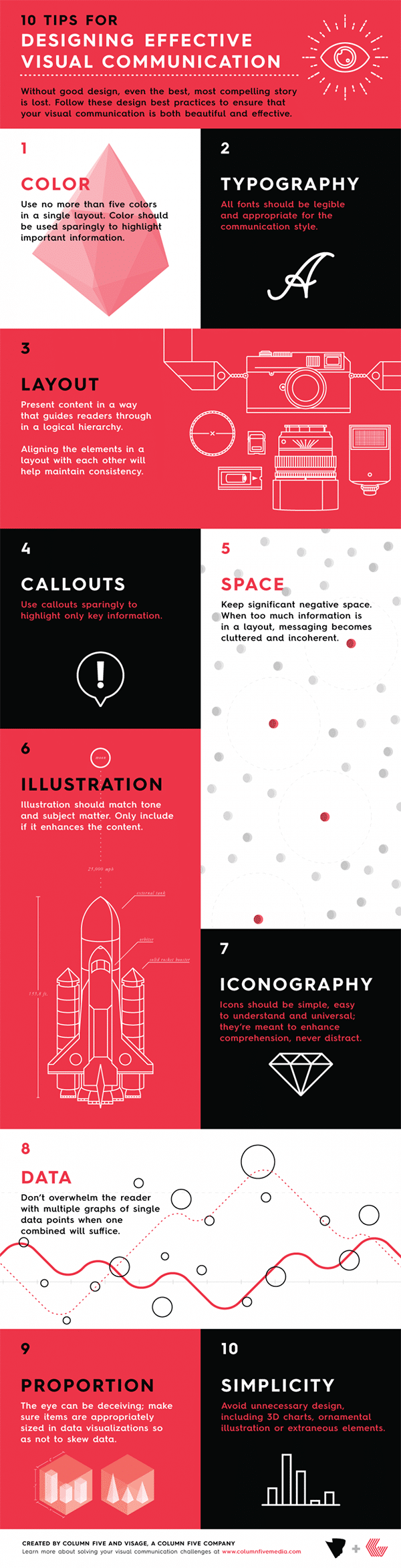
Infographic brought to you by Column Five.
1. Prioritize User-Friendly Navigation
The first step to improving your website design and visual communication is to ensure that it’s easy to navigate. A cluttered or confusing layout can deter visitors and leave them frustrated. To create a user-friendly experience, consider the following:
- Clear Menu Structure: Organize your content into a logical menu structure. Use concise and descriptive labels to guide users to the information they seek.
- Intuitive Navigation: Implement intuitive navigation elements, such as a prominent search bar, breadcrumbs, and easily accessible links to essential pages like the homepage and contact page.
- Mobile Responsiveness: Ensure that your website is responsive to different devices and screen sizes. A mobile-friendly design is essential, as a significant portion of internet traffic comes from mobile users.
2. Choose a Cohesive Color Palette
Colors play a crucial role in web design, as they can evoke emotions, convey brand identity, and establish a visual hierarchy. Selecting a cohesive color palette for your website is essential for effective visual communication:
- Brand Consistency: Use colors that align with your brand’s identity and values. Consistency in color choice helps strengthen brand recognition.
- Contrast and Readability: Ensure there is enough contrast between text and background colors to make content easily readable. Use color sparingly for emphasis and avoid overwhelming users.
- Emotional Impact: Consider the psychological impact of colors. For example, blue can convey trust and professionalism, while red may evoke excitement or urgency. Tailor your color choices to the emotions you want to elicit.
3. Invest in High-Quality Imagery
Images and visuals are powerful tools for conveying messages and creating a visually appealing website. Low-quality or generic images can diminish the overall impact of your site. Here are some tips for using imagery effectively:
- Professional Photography: Whenever possible, invest in professional photography to showcase your products, services, or team. Authentic images can build trust and credibility.
- Consistent Style: Maintain a consistent style for images, whether that’s through filters, color grading, or image composition. Consistency helps create a cohesive visual identity.
- Optimize for Web: Ensure that your images are optimized for the web to improve page load times. Compress images without compromising quality to keep your website fast and responsive.
4. Embrace White Space
White space, also known as negative space, is the empty area around elements on a web page. It’s a crucial design element that can enhance visual communication in several ways:
- Focus and Clarity: White space helps direct the user’s attention to the most important elements on the page, such as headlines, images, and call-to-action buttons.
- Readability: Ample white space around text blocks improves readability by reducing visual clutter and making the content more inviting.
- Aesthetic Appeal: White space adds elegance and sophistication to your website’s design, making it visually pleasing and less overwhelming.
5. Use Typography Wisely
Typography plays a significant role in web design, affecting both aesthetics and readability. To make the most of typography for visual communication:
- Font Selection: Choose fonts that align with your brand and are legible on various devices. A combination of a serif and sans-serif font can create visual contrast and hierarchy.
- Hierarchy: Use font size, weight, and style to establish a hierarchy of information. Headlines should be more prominent than body text, and important text should stand out.
- Consistency: Maintain consistency in typography throughout your website. Stick to a limited number of fonts and styles to avoid visual chaos.
6. Implement Visual Hierarchy
Visual hierarchy is the arrangement and prioritization of elements on a web page to guide users’ attention and actions. A well-defined visual hierarchy can improve the effectiveness of your website’s communication:
- Focal Points: Create focal points using elements like images, headlines, and vibrant colors to draw attention to essential information or calls to action.
- Readability: Ensure that text is organized logically, with clear headings and subheadings. Use bullet points and lists to break up content and improve scannability.
- Flow: Design your pages to have a natural flow, guiding users from one section to the next in a way that makes sense.
7. Incorporate Engaging Multimedia
Multimedia elements like videos, animations, and interactive features can make your website more engaging and memorable. When using multimedia, keep these considerations in mind:
- Relevance: Ensure that multimedia elements enhance your message rather than distract from it. Use videos and animations to explain complex concepts or showcase products.
- Optimization: Optimize multimedia files for web use to prevent slow loading times. Consider providing alternatives or captions for users with disabilities.
- Autoplay: Be cautious with autoplaying videos or audio, as they can be intrusive. Allow users to control when and if they want to engage with multimedia content.
8. Consistent Branding Elements
To reinforce your brand’s identity and maintain a cohesive visual communication strategy, incorporate consistent branding elements throughout your website:
- Logo Placement: Place your logo prominently in the header or top corner of every page. Link it to the homepage for easy navigation.
- Color and Typography: Use your brand’s colors and typography consistently across all web pages. This reinforces brand recognition and trust.
- Taglines and Messaging: Integrate your brand’s taglines and key messaging into various sections of your website to ensure a unified brand voice.
9. Test and Optimize for Speed
A slow-loading website can frustrate visitors and lead to high bounce rates. To improve visual communication, ensure your site loads quickly:
- Image Compression: As mentioned earlier, compress images without sacrificing quality to reduce loading times.
- Minimize Code: Keep your website’s code clean and optimized. Minimize unnecessary scripts and plugins that could slow down performance.
- Content Delivery Network (CDN): Consider using a CDN to distribute website content to servers worldwide, reducing latency for users from different locations.
10. Gather User Feedback
Finally, don’t overlook the importance of user feedback in improving the visual communication of your website. Solicit feedback from your audience and make adjustments accordingly:
- User Testing: Conduct usability testing with real users to identify pain points and areas for improvement in your website’s design and functionality.
- Surveys and Feedback Forms: Create surveys or feedback forms to gather insights from visitors about their experience on your site. Ask about the design, navigation, and overall satisfaction.
- Analytics: Use web analytics tools to track user behavior, such as click-through rates, bounce rates, and time spent on pages. Analyzing this data can help you identify areas that need attention.
In conclusion, improving the visual communication of your website is a multifaceted endeavor that requires attention to design, user experience, and branding. By prioritizing user-friendly navigation, cohesive design elements, and engaging multimedia, you can create a website that not only looks beautiful but also effectively conveys your message and engages your audience. Regular testing and optimization based on user feedback will ensure that your website continues to meet the evolving needs and expectations of your visitors.

Author:
Mark Ford



