

Are you looking for ways to streamline your Twitter marketing efforts? Did you know Twitter has some handy shortcuts that can save you a load of time?
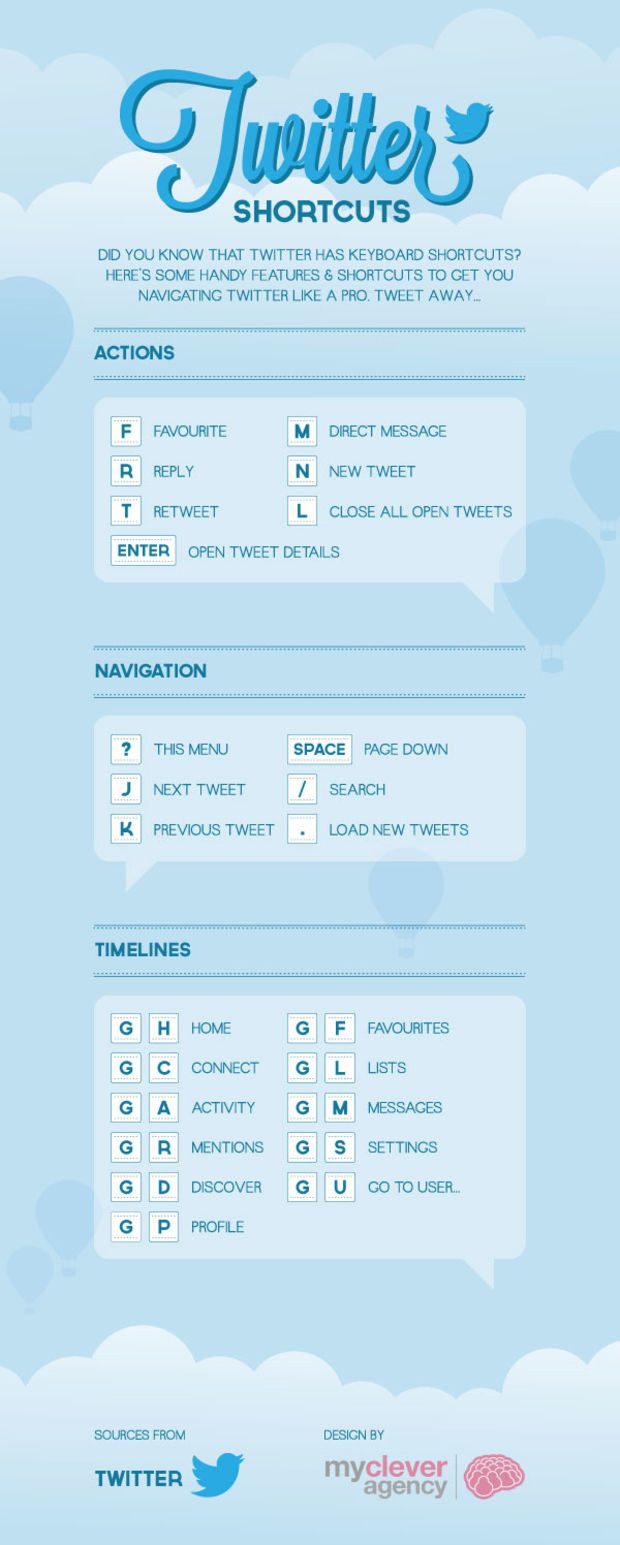
If you use a desktop to manage your Twitter account there are a number of ways you can reduce the time you spend carrying out repetitive tasks. From quickly replying and retweeting to navigating to new pages there’s a shortcut for most things.
My Clever Agency have included them in the infographic below.
In today’s fast-paced digital world, efficiency and speed are essential when it comes to managing your social media presence. Twitter, with its constant stream of tweets and updates, is no exception. To make the most of your time on this platform and become a Twitter power user, you need to leverage a range of time-saving shortcuts and tricks. In this comprehensive guide, we’ll explore a variety of techniques and tools that will help you master Twitter and increase your productivity.
1. Keyboard Shortcuts for Navigating Twitter
One of the quickest ways to save time on Twitter is by using keyboard shortcuts. These shortcuts can help you navigate through your timeline, interact with tweets, and access various Twitter features without the need to click around. Here are some essential keyboard shortcuts:
- Navigation Shortcuts:
N– Compose a new tweet.G+H– Go to the home timeline.G+N– Go to notifications.G+R– Go to mentions.
- Tweet Interaction Shortcuts:
L– Like a tweet.R– Reply to a tweet.T– Retweet a tweet.M– Send a direct message.
- Timeline Navigation Shortcuts:
J– Move to the next tweet.K– Move to the previous tweet.Space– Page down in the timeline.
- Search Shortcuts:
/– Activate the search bar.Enter– Start searching after typing in the search bar.
- Other Handy Shortcuts:
F– Follow a user.U– Unfollow a user.B– Block a user.
These shortcuts can significantly speed up your Twitter experience. Remember to use the ? key to view a full list of keyboard shortcuts whenever you need a reminder.
2. Schedule Tweets in Advance
Consistency is key to building a strong Twitter presence. However, it can be challenging to maintain a regular posting schedule amidst your busy day-to-day life. That’s where scheduling tools come in handy. With platforms like Buffer, Hootsuite, or TweetDeck, you can schedule tweets in advance.
- Buffer: Buffer is a popular social media management tool that allows you to schedule posts across multiple platforms, including Twitter. Simply create your tweets, select the date and time you want them to be posted, and Buffer will take care of the rest.
- Hootsuite: Hootsuite is another robust social media management platform that offers scheduling capabilities for Twitter and other social networks. It also provides analytics to track the performance of your tweets.
- TweetDeck: If you prefer a free option, Twitter’s TweetDeck is a powerful tool for managing your Twitter account. You can schedule tweets, monitor multiple accounts, and organize your timeline into columns for better visibility.
By scheduling tweets in advance, you can maintain a consistent online presence without spending your entire day on Twitter.
3. Create and Use Twitter Lists
Twitter Lists are a powerful and often overlooked feature for organizing your Twitter experience. They allow you to group accounts you follow into specific categories, making it easier to keep up with relevant content and engage with your target audience.
Here’s how to create and use Twitter Lists:
- Create a List:
- Click on your profile picture in the top right corner.
- Select “Lists.”
- Click “Create List” and give it a name.
- Choose whether the list is public or private.
- Add Twitter accounts to your list.
- View Lists:
- To view tweets from accounts on your list, go to your profile and select “Lists.”
- Click on the list you want to view.
- Engage with Your List:
- Interact with tweets from your list just like you would with your main timeline.
- This helps you focus on content from specific accounts, making it easier to connect with like-minded individuals or monitor industry trends.
Twitter Lists are especially valuable for businesses and individuals managing multiple aspects of their online presence. You can create lists for customers, competitors, industry influencers, and more.
4. Use Advanced Search Filters
Twitter’s search feature is a goldmine of information, but it can be overwhelming due to the sheer volume of tweets. To find precisely what you’re looking for and save time, use advanced search filters.
- Filter by Keywords: To search for tweets containing specific keywords, simply enter the keywords in the search bar.
- Filter by Hashtags: Use hashtags to find tweets related to specific topics. For example, searching for “#DigitalMarketing” will show you tweets related to digital marketing.
- Filter by Date: To find tweets from a particular date range, use the “Since” and “Until” filters. This is useful for researching recent trends or historical tweets.
- Filter by Accounts: To narrow your search to tweets from specific accounts, use the “From these accounts” filter.
- Filter by Engagement: You can search for tweets based on the number of likes, retweets, or replies they have received. This is useful for finding popular content in your niche.
- Filter by Media Type: Looking for tweets with images or videos? Use the “Media” filter to refine your search.
By using these advanced search filters, you can quickly locate valuable content, engage with relevant conversations, and stay up-to-date with the latest trends in your industry.
5. Turn on Tweet Notifications
If you want to stay updated on specific accounts or topics in real-time, consider turning on tweet notifications. When you enable notifications for a user’s tweets, you’ll receive an alert on your mobile device or desktop whenever they post something new. Here’s how to do it:
- Visit the User’s Profile:
- Go to the Twitter profile of the account you want to receive notifications from.
- Click on the Bell Icon:
- Next to the “Follow” button, there’s a bell icon. Click on it.
- Choose Notification Settings:
- You can select to receive notifications for all tweets or only tweets that are important to you (where you’re mentioned, or they reply to you).
- Confirm Your Selection:
- Click “Done” or “Save” to confirm your notification settings.
This feature is particularly useful for keeping tabs on breaking news, updates from your favorite accounts, or monitoring brand mentions and engagement with your content.
6. Utilize Twitter Analytics
To maximize your Twitter effectiveness, you need to understand what works and what doesn’t. Twitter Analytics is a powerful tool that provides valuable insights into your account’s performance. Here’s how to access and use it:
- Go to Twitter Analytics:
- Click on your profile picture in the top right corner.
- Select “Analytics.”
- Explore Your Dashboard:
- Twitter Analytics provides data on your tweets’ performance, including impressions, engagement, and follower growth.
- Review Your Top Tweets:
- Identify which of your tweets are performing well. Look for patterns in content, timing, and hashtags to replicate your success.
- Analyze Your Audience:
- Gain insights into your audience demographics, interests, and location. Use this information to tailor your content to your target audience.
- Track Follower Growth:
- Monitor your follower count over time to see how your efforts are paying off.
By regularly checking Twitter Analytics, you can fine-tune your Twitter strategy and focus on what resonates with your audience, ultimately saving time by avoiding ineffective tactics.
7. Use Twitter Moments
Twitter Moments is a feature that allows you to curate and share collections of tweets, creating a narrative or story around a particular topic or event. It’s a fantastic way to save time on content creation while delivering engaging and informative content to your followers.
Here’s how to create a Twitter Moment:
- **Click on “More” (represented by three dots) on your profile.
- **Select “Moments” from the drop-down menu.
- **Click on “Create new Moment.”
- **Add a Title, Description, and Cover Image to your Moment.
- **Search for tweets to add to your Moment. You can include tweets from various accounts and even your own.
- **Arrange the tweets in the desired order.
- **Click “Publish” when your Moment is ready.
You can create Moments for events, industry news, or to showcase your own tweets. They offer a visually appealing and concise way to share information with your followers.
8. Use Third-party Twitter Tools
There is a multitude of third-party tools and apps designed to enhance your Twitter experience and save you time. Here are a few worth exploring:
- Tweepi: Tweepi is a Twitter management tool that helps you manage your followers, find new accounts to follow, and clean up your Twitter feed.
- SocialBee: SocialBee is a social media scheduling and content curation tool that can help you maintain a consistent posting schedule and find relevant content to share.
- IFTTT (If This Then That): IFTTT is an automation platform that allows you to create “applets” to connect different apps and services. You can use it to automate various Twitter-related tasks, such as posting your Instagram photos as native Twitter photos.
- Zapier: Similar to IFTTT, Zapier connects apps and automates workflows. You can set up “Zaps” to trigger actions on Twitter based on events in other apps.
- Followerwonk: Followerwonk is a Twitter analytics tool that provides in-depth insights into your followers and helps you identify influencers in your niche.
These tools can help you streamline your Twitter management and make the most of your time on the platform.
9. Engage Actively and Authentically
While automation and shortcuts are valuable, authentic engagement is the heart of Twitter success. Take the time to respond to mentions, engage in conversations, and show appreciation to your followers. Building genuine relationships on Twitter can lead to more meaningful connections, increased brand loyalty, and higher levels of engagement.
Remember that social media is a two-way street. Listening and responding to your audience is just as important as posting content. Don’t solely focus on broadcasting your messages; actively participate in the Twitter community.
10. Stay Informed About Twitter Updates
Twitter is constantly evolving, with new features and changes being rolled out regularly. To stay ahead and make the most of the platform, it’s essential to stay informed about these updates. Follow Twitter’s official blog and social media accounts for announcements, or join Twitter-related communities where users discuss the latest developments and share tips and tricks.
Conclusion
Becoming a Twitter power user is all about efficiency and effectiveness. By implementing these time-saving shortcuts and strategies, you can make the most of your Twitter experience and achieve your social media goals with ease. Whether you’re managing a personal brand, promoting a business, or simply staying connected with the Twitter community, these tips will help you save time while maximizing your impact on this dynamic platform. So, go ahead and start implementing these strategies to become a Twitter pro today!

Author:
Mark Ford



