Are you looking for ways to convert more of your website visitors into customers? Have you considered how Google Remarketing can help?
Remarketing enables you to place paid adverts onto the screens of people who have visited your website previously. It’s a great way of giving your business a second chance with those who may not think to go back to your site.
The guys at Digitrio have explained more in the infographic below.
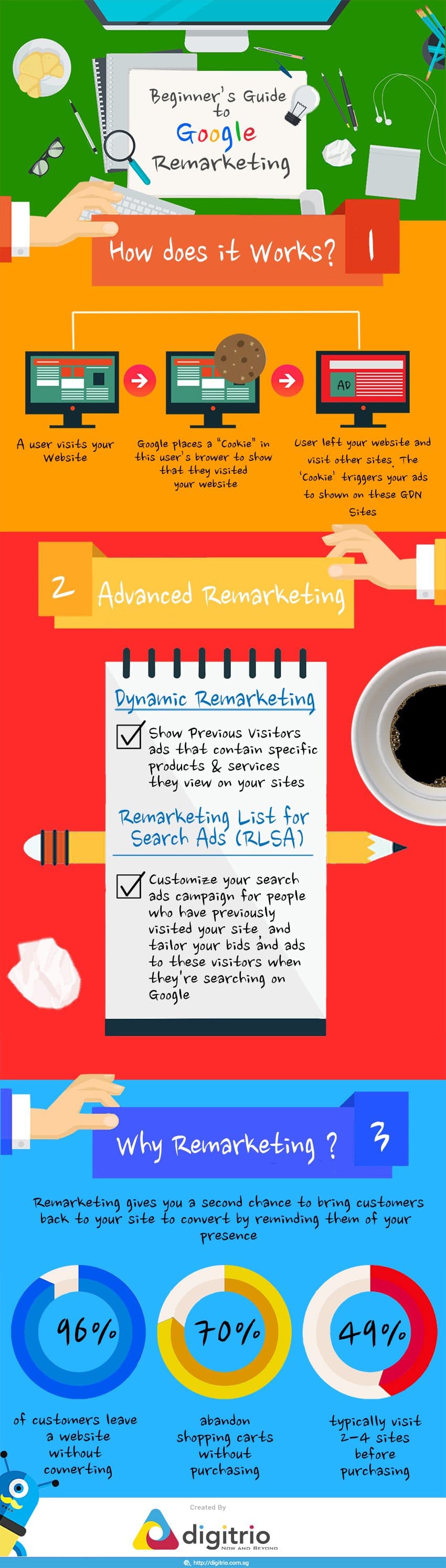
In the vast and competitive landscape of online marketing, businesses are constantly seeking ways to engage with their target audience and convert potential customers into loyal ones. One powerful tool in the digital marketer’s arsenal is Google Remarketing. This strategy allows you to re-engage with users who have previously interacted with your website or app, offering them a tailored experience that can significantly boost conversions and return on investment (ROI).
In this comprehensive guide, we will dive deep into Google Remarketing, exploring what it is, how it works, and why your business should be using it as a core component of your digital marketing strategy.
Understanding Google Remarketing
Before we delve into the advantages of Google Remarketing, let’s clarify what it actually is. Remarketing, also known as retargeting, is a digital advertising strategy that focuses on re-engaging with users who have previously visited your website or app but did not take the desired action, such as making a purchase, signing up for a newsletter, or completing a form.
Here’s how it works:
- User Interaction: A user visits your website or interacts with your app. This interaction could be as simple as browsing product pages, adding items to their cart, or signing up for an account.
- Tracking: To implement remarketing, you need to integrate tracking tags or pixels into your website or app. These tags collect data about user behavior, such as the pages they visited, the products they viewed, and how long they stayed on your site.
- Creating Audiences: Based on the collected data, you can create custom audiences. These audiences are segmented based on user behavior, allowing you to target specific groups with tailored ads.
- Displaying Ads: You create ad campaigns specifically designed for these custom audiences. When users from these audiences browse other websites or use Google services like YouTube, Gmail, or Google Search, your ads are displayed to them.
- Re-engagement: The goal is to re-engage with these users, reminding them of your brand and encouraging them to return to your website and complete the desired action.
Why Google Remarketing?
Now that we have a basic understanding of how Google Remarketing works, let’s explore why it’s an essential component of your digital marketing strategy.
1. Targeted Advertising
One of the primary advantages of Google Remarketing is its ability to deliver highly targeted advertising. Unlike traditional display advertising, which can be quite broad, remarketing allows you to focus your ad spend on users who have already expressed interest in your products or services. This laser-focused approach can significantly increase your chances of conversion because you’re reaching out to an audience that is already familiar with your brand.
For example, imagine a user visits your online clothing store, adds a few items to their cart, but doesn’t complete the purchase. With Google Remarketing, you can display ads featuring the exact products they showed interest in when they browse other websites or use Google services. This level of personalization can be a game-changer in driving conversions.
2. Cost-Effective
Compared to some other forms of digital advertising, remarketing is often more cost-effective. Since you’re targeting a smaller, more specific audience, you can allocate your budget more efficiently. Additionally, the cost per click (CPC) for remarketing campaigns tends to be lower than for broader advertising campaigns because the audience is already familiar with your brand, making them more likely to engage with your ads.
3. Increased Brand Recall
The power of repetition in advertising cannot be overstated. Remarketing allows you to reinforce your brand message by repeatedly showing your ads to users who have previously interacted with your site. The more users see your brand, the more likely they are to remember it. This increased brand recall can be invaluable when users are making a purchase decision, as they are more likely to choose a brand they are familiar with.
4. Cart Abandonment Recovery
Cart abandonment is a common issue for online retailers, with many users adding items to their carts but not completing the purchase. Remarketing can help you recover these potentially lost sales. By showing targeted ads to users who abandoned their carts, you can remind them of the products they were interested in and encourage them to return to your website to complete the purchase.
5. Cross-Device Targeting
In today’s digital landscape, users switch between devices seamlessly, moving from desktop to mobile to tablet. Google Remarketing enables cross-device targeting, ensuring that your ads are displayed consistently to users regardless of the device they’re using. This ensures a cohesive user experience and maximizes your chances of conversion.
6. Flexible Ad Formats
Google Remarketing offers a variety of ad formats to choose from, including display ads, dynamic ads, text ads, and even video ads. This flexibility allows you to create compelling and engaging advertisements that resonate with your target audience.
7. Detailed Analytics
To optimize your remarketing campaigns, it’s essential to gather data and analyze performance. Google provides robust analytics tools that allow you to track key metrics, such as click-through rates (CTR), conversion rates, and return on ad spend (ROAS). This data-driven approach empowers you to make informed decisions and refine your campaigns for better results.
Implementing Google Remarketing
Now that you understand the benefits of Google Remarketing, let’s explore how to implement it effectively for your business.
1. Set Up Google Ads and Google Analytics
To get started with Google Remarketing, you’ll need Google Ads and Google Analytics accounts. If you haven’t already, create these accounts and link them together. Google Analytics will provide valuable data about user behavior on your website, while Google Ads will be your platform for creating and managing remarketing campaigns.
2. Install Remarketing Tags
To track user interactions on your website or app, you need to install remarketing tags or pixels. These small pieces of code collect data and send it back to Google Ads. Google provides detailed instructions for setting up remarketing tags based on your platform, whether it’s a website, mobile app, or YouTube channel.
3. Create Custom Audiences
With the tracking tags in place, it’s time to create custom audiences. Google Ads allows you to segment users based on various criteria, such as pages viewed, specific products or services viewed, or how long they spent on your site. These audiences can be as broad or as narrow as you like, depending on your marketing goals.
4. Design Compelling Ads
Once you’ve defined your custom audiences, it’s time to create compelling ads. Remember, these ads should resonate with the specific audience segment you’re targeting. Consider using dynamic ads that automatically display products or services the user previously viewed on your website. Use eye-catching visuals, persuasive copy, and strong calls to action.
5. Set Budget and Bidding Strategy
Determine your budget for remarketing campaigns and choose a bidding strategy that aligns with your goals. Google Ads offers several bidding options, including manual bidding, automated bidding, and target return on ad spend (ROAS). Experiment with different strategies to find what works best for your business.
6. Launch and Monitor Campaigns
With your campaigns set up, launch them and closely monitor their performance. Google Ads provides real-time data on impressions, clicks, and conversions. Use this data to make adjustments as needed, such as increasing or decreasing budget, tweaking ad creatives, or refining audience segments.
7. Test and Optimize
Optimization is an ongoing process in digital marketing. Continuously test different ad creatives, audience segments, and bidding strategies to discover what drives the best results. A/B testing can be particularly valuable in fine-tuning your remarketing campaigns.
Best Practices for Google Remarketing
To make the most of Google Remarketing, consider implementing the following best practices:
1. Frequency Capping
While it’s essential to show your ads to users multiple times for increased brand recall, it’s also crucial not to overdo it. Implement frequency capping to limit the number of times an individual sees your ads in a given time period. This prevents ad fatigue and irritation, which can lead to negative perceptions of your brand.
2. Exclude Converters
Exclude users who have already completed the desired action, such as making a purchase or signing up for a newsletter, from your remarketing campaigns. There’s no need to continue targeting users who have already converted, and excluding them can help you allocate your budget more efficiently.
3. Segment Audiences
Create highly specific audience segments based on user behavior. For example, segment users who abandoned their carts differently from those who browsed multiple product pages. Tailor your ad content and messaging to each segment to increase relevance.
4. Personalization
Personalization is key to successful remarketing. Use dynamic ads to show users the exact products or services they viewed on your website. Address users by their first names in email remarketing campaigns. The more personalized your approach, the more effective your remarketing efforts will be.
5. Mobile Optimization
With the increasing use of mobile devices, ensure that your remarketing campaigns are optimized for mobile users. Your ads and landing pages should be mobile-friendly to provide a seamless experience across devices.
Conclusion
Google Remarketing is a powerful tool that can significantly enhance your digital marketing efforts. By re-engaging with users who have already shown interest in your brand, you can increase conversions, boost ROI, and strengthen brand recall. With the ability to target specific audiences, cost-effective advertising, and detailed analytics, it’s a strategy that every business should consider integrating into their marketing plan.
Remember that successful remarketing requires ongoing optimization and a commitment to delivering relevant, personalized ads to your target audience. By following best practices and continually refining your campaigns, you can make the most of Google Remarketing and drive impressive results for your business in today’s competitive online landscape.

Author:
Mark Ford