
Are you looking for practical ways to reclaim hours in your week without sacrificing the quality of your work? Want to learn how Microsoft Copilot can help you automate, streamline, and simplify the tasks that slow you down?
You’ll find smart, time-saving Copilot strategies in this guide.
Here’s a summary of what’s covered:
- Enhanced Web Browsing with Copilot
- Seamless Presentation Creation
- Custom Prompt Generation
- Email Writing Assistance
- Smart Meeting Summaries in Teams
- Mobile Copilot for Productivity On-the-Go
- Intelligent File Insights in OneDrive
- File Comparison and Visualisation
- Advanced Data Analysis in Excel
- Intelligent Content Referencing
Check out the post below for more.
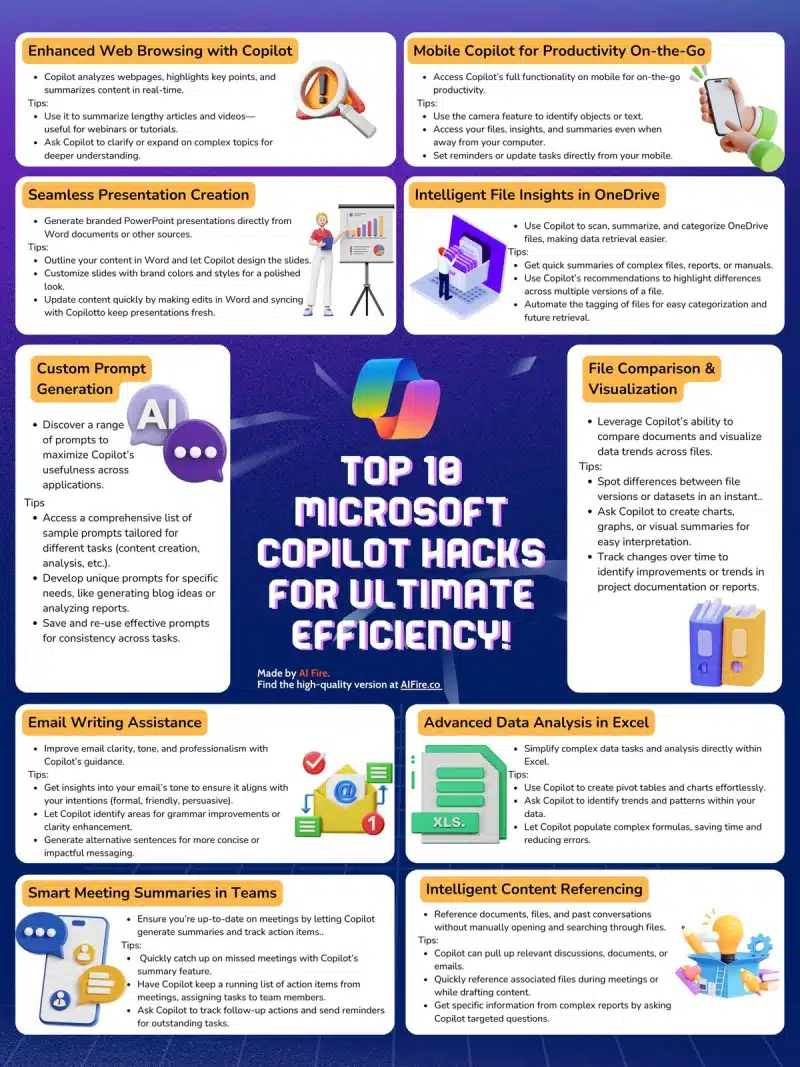
Running a business means juggling dozens of tasks, switching between tools, and constantly battling the clock. Modern founders need more than productivity hacks; they need intelligent systems that lighten the workload without slowing momentum. Microsoft Copilot is built for this reality, offering AI-driven support that streamlines workflows, simplifies complex tasks, and frees up time for higher-value thinking. When used strategically, it becomes a genuine force multiplier for founders who carry the weight of every department on their shoulders.
This guide explores how busy founders can use Microsoft Copilot to dramatically reduce manual workload, using its smartest features to automate, accelerate, and enhance daily responsibilities. Each section focuses on a practical aspect of Copilot’s capabilities and shows exactly how founders can apply them in a real business environment.
Enhanced Web Browsing with Copilot
Staying informed is essential for any founder, but reading endless articles, research papers, and competitor updates can consume hours. Copilot turns online browsing into a streamlined, high-speed process by summarising content and identifying key information instantly. Instead of manually combing through long pages, you can rely on Copilot to surface what matters most. This shift helps reduce research fatigue and ensures you stay up to date without sacrificing time.
- Use Copilot to summarise lengthy articles so you focus only on actionable insights relevant to your business.
- Ask Copilot to break down complex topics such as regulations or industry trends into clearer, founder-friendly explanations.
- Generate summaries of competitor pages to quickly understand positioning and messaging without reading everything in full.
- Turn research notes into structured reports by asking Copilot to compile key points from multiple tabs or articles.
Seamless Presentation Creation
Presentations often fall to the bottom of a founder’s priority list because of how long they take to design and refine. Copilot removes this burden by generating polished PowerPoint presentations directly from your notes or documents. With brand consistency and layout design handled automatically, you can shift your attention to strategy instead of formatting. This makes it far easier to prepare pitch decks, investor slides, internal updates, or client presentations in a fraction of the time.
- Draft a simple outline in Word and let Copilot convert it into a complete slide deck with visuals and structure.
- Ask Copilot to apply your brand colours, fonts, and styles so every presentation stays consistent.
- Make edits in Word and let Copilot sync changes directly into the presentation for effortless version updates.
- Generate speaker notes or slide summaries to streamline investor pitches, team briefings, or customer meetings.
Custom Prompt Generation
Every founder manages a wide variety of tasks, from content planning to data review. Copilot’s custom prompt generation feature allows you to build personalised workflows that work the way you do. By creating and saving prompts tailored to your business, you can automate repetitive thinking and speed up decision-making. Over time, these prompts become a library of shortcuts that reduce your cognitive load and keep your work consistent.
- Create custom prompts for content creation, reporting, or strategic planning to maintain a predictable workflow.
- Develop prompts designed around your business style, tone, and priorities for repeat use across tools.
- Save prompts for tasks you perform weekly, such as drafting newsletters or analysing performance metrics.
- Use prompts to generate new ideas, alternative structures, or fresh approaches to projects when you feel stuck.
Email Writing Assistance
Email is one of the biggest time drains for founders. Copilot’s writing assistance helps refine messages, improve clarity, and ensure your tone remains professional while saving substantial time. Instead of manually rewriting emails, Copilot can instantly adjust wording to match your intentions. This tool is especially valuable when responding to clients, partners, or team members with precision and speed.
- Use Copilot to rewrite long emails into concise versions for faster communication.
- Ask Copilot to adjust the tone to professional, friendly, assertive, or diplomatic depending on the situation.
- Allow Copilot to highlight grammar and clarity improvements for polished and confident messaging.
- Generate alternative sentences when you need to strengthen key points or make instructions easier to follow.
Smart Meeting Summaries in Teams
Meetings are necessary but can easily become overwhelming when you are already overloaded with responsibilities. Copilot transforms meeting management by generating clear summaries, action items, and responsibilities automatically. Instead of scrambling to take notes, you can focus on leading the discussion and making decisions. This ensures every meeting becomes more productive and leaves nothing forgotten.
- Let Copilot summarise discussions so you always have a clear record of key decisions and insights.
- Ask Copilot to create action lists with specific tasks assigned to team members.
- Use the summaries to catch up on meetings you missed without watching full recordings.
- Request follow-up reminders so important deadlines and commitments are tracked automatically.
Mobile Copilot for Productivity On-the-Go
Founders rarely stay at their desks, which means productivity needs to travel with them. Mobile Copilot brings full functionality to your phone, allowing you to stay efficient anywhere. Whether you are between meetings, commuting, or travelling, you can analyse content, summarise documents, or generate insights directly from your mobile device. This flexibility ensures that productivity doesn’t stop when you leave your computer.
- Use the mobile camera to identify text or objects and generate instant notes or summaries.
- Access files, insights, reports, and actions while working off-site or during travel.
- Generate content, draft messages, or review documents directly from your phone.
- Set reminders and manage tasks so nothing gets overlooked while you’re away from your desk.
Intelligent File Insights in OneDrive
Every founder accumulates documents, manuals, spreadsheets, and reports that can be difficult to keep organised. Copilot’s intelligent insights help categorise, scan, and summarise OneDrive files, making retrieval faster and more intuitive. It identifies relationships between documents and highlights important content without you having to open multiple files. This makes file management more efficient and significantly reduces time spent searching.
- Use Copilot to summarise long files instantly so you understand contents without reading everything.
- Ask Copilot to group related documents to simplify organisation across your storage.
- Automate file tagging to enhance searchability and reduce manual organising.
- Highlight changes or updates between versions of important documents to maintain accuracy.
File Comparison and Visualisation
Founders often deal with proposals, contracts, financial reports, or documentation that goes through multiple revisions. Copilot’s comparison and visualisation tools allow you to spot differences instantly, removing hours of manual checking. This feature also provides visual summaries that make complex data easier to interpret, which helps you make decisions faster and with greater confidence.
- Compare versions of proposals, agreements, or documents to identify changes quickly.
- Visualise datasets to understand trends before making financial or operational decisions.
- Track documentation updates across teams to stay aware of progress or bottlenecks.
- Ask Copilot to create charts that present information clearly for stakeholder communication.
Advanced Data Analysis in Excel
Data analysis can be time-consuming, especially when you are handling forecasting, budgeting, or performance reviews. Copilot simplifies these tasks by generating charts, pivot tables, and insights automatically. Instead of manually building formulas or digging through spreadsheets, you can rely on Copilot to perform the heavy lifting. This enables faster decision-making supported by accurate, visual data.
- Ask Copilot to detect trends or patterns in your sales, marketing, or financial datasets.
- Generate pivot tables and charts instantly, saving time on manual spreadsheet formatting.
- Get help from Copilot to create formulas for complex calculations you would normally need to research.
- Use AI-generated insights to understand performance fluctuations and plan strategic actions.
Intelligent Content Referencing
Founders constantly switch between files, discussions, notes, and documents while making decisions or writing content. Copilot connects these elements seamlessly, pulling reference material from across your workspace without manual searching. Whether you are drafting a proposal or reviewing project details, Copilot ensures you have the right information at your fingertips. This significantly reduces context-switching and helps maintain focused productivity.
- Pull information from past messages, discussions, or documents directly into your current project.
- Quickly reference related files so you stay aligned with previous work and avoid duplicating effort.
- Retrieve supporting data while writing reports or creating content without leaving the document.
- Use targeted questions to extract specific information from large files so you get exactly what you need.
Conclusion
For busy founders, productivity is not about doing more; it is about removing friction and focusing attention where it creates the greatest impact. Microsoft Copilot acts as an intelligent partner across your daily operations, cutting out manual work and transforming the speed at which you complete tasks.
By using Copilot strategically across browsing, communication, meetings, analysis, and content creation, you can reclaim hours every week. The result is a leaner workflow, more mental clarity, and the freedom to spend more time driving your business forward instead of managing endless admin.

Author:
Mark Ford

The Smart Entrepreneur’s Guide to Multitasking Without Burning Out
Are you struggling to juggle endless tasks without feeling like you’re constantly on the edge of burnout? Want to discover how successful entrepreneurs multitask strategically so they stay productive without sacrificing focus or wellbeing? […]