

Are you looking for ways to convert more website visitors into leads? Want to know how to create landing pages for each of your products or services?
In today’s digital landscape, converting website visitors into leads is a top priority for businesses. Your website’s landing page plays a pivotal role in achieving this goal. It serves as the first point of contact for potential customers and can make or break your conversion rates.
To help you make the most of this critical web page, this blog post will explore essential landing page design tips to maximize your lead generation efforts.
SmartBug Media share their tips for success in this infographic.
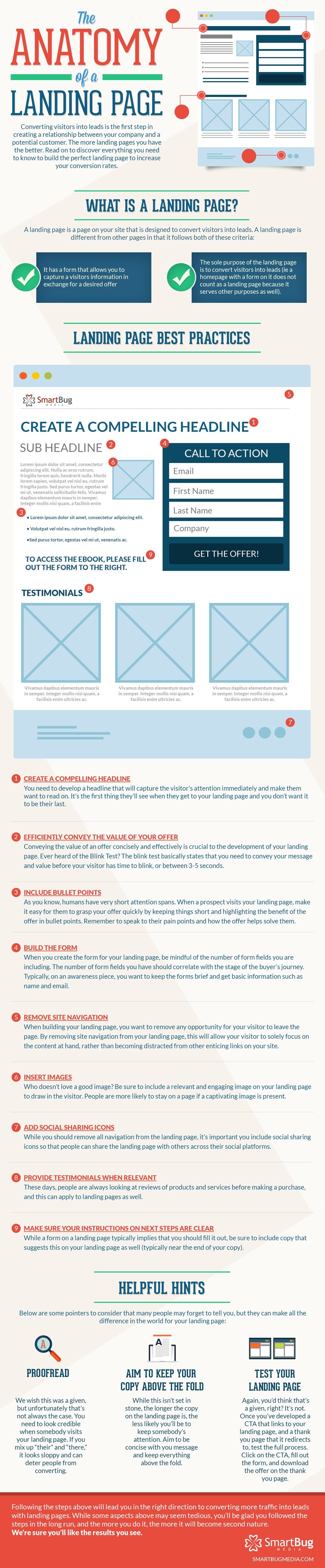
Start with a Clear Value Proposition
Your landing page’s success hinges on a clear and compelling value proposition. Visitors should instantly understand what your product or service offers and why it’s valuable to them. Here are some key elements to consider:
- a. Headline: Craft a concise, attention-grabbing headline that communicates your value proposition. Use strong, action-oriented language that highlights the benefits.
- b. Subheadline: Provide additional context or a brief explanation that supports your headline and clarifies your offer.
- c. Visuals: Incorporate relevant images, graphics, or videos that visually reinforce your value proposition.
Keep It Simple and Focused
Cluttered and overwhelming landing pages can drive visitors away. To keep your audience engaged and motivated to take action, maintain a clean and focused design:
- a. Minimalist Design: Embrace a minimalist approach with plenty of white space to reduce distractions and emphasize your offer.
- b. Limited Navigation: Remove unnecessary navigation elements, such as menu bars, to keep visitors focused on the conversion goal.
- c. Single Call-to-Action (CTA): Each landing page should have a single, prominent CTA button that guides visitors toward the desired action.
Optimize for Mobile Responsiveness
With the increasing use of smartphones and tablets, mobile optimization is crucial. Ensure your landing page is responsive and functions seamlessly across various devices and screen sizes. Here are some tips for mobile optimization:
- a. Test on Multiple Devices: Test your landing page on various devices and browsers to ensure a consistent user experience.
- b. Responsive Design: Implement responsive design principles to adapt your page layout and content to different screen sizes.
- c. Fast Loading Times: Optimize images and code to minimize loading times, as slow pages can lead to high bounce rates on mobile devices.
Build Trust with Social Proof
Building trust is essential in convincing visitors to become leads. Incorporate social proof elements that validate your product or service’s credibility:
- a. Customer Reviews and Testimonials: Display authentic reviews and testimonials from satisfied customers to showcase positive experiences.
- b. Trust Badges: Highlight any industry certifications, awards, or security badges to instill confidence in your brand.
- c. Case Studies: Share success stories or case studies that demonstrate how your product or service has benefited others.
Craft Persuasive Copy
Compelling copywriting is a cornerstone of effective landing page design. Use persuasive language and storytelling techniques to engage visitors and drive them toward conversion:
- a. Benefit-Oriented Content: Emphasize the benefits of your offer, addressing how it solves the visitor’s problem or fulfills a need.
- b. Concise and Scannable: Break content into short paragraphs, use bullet points, and employ subheadings to make the text easy to skim.
- c. Urgency and Scarcity: Create a sense of urgency with limited-time offers or scarcity by indicating limited quantities available.
A/B Testing for Continuous Improvement
Landing page optimization is an ongoing process. Implement A/B testing to compare different page elements and strategies to determine what resonates most with your audience. Here’s how to get started:
- a. Define Metrics: Clearly define your conversion goals and the key metrics you’ll measure to evaluate landing page performance.
- b. Test Variables: Experiment with various elements such as headlines, CTA buttons, images, and colors to identify what yields better results.
- c. Analyze and Iterate: Regularly analyze the data and make data-driven decisions to iterate and improve your landing page design.
Focus on Loading Speed
A slow-loading landing page can deter visitors and hinder conversions. Page speed is a crucial factor for user experience and search engine optimization (SEO). Here’s how to ensure your landing page loads quickly:
- a. Image Optimization: Compress and optimize images to reduce file sizes without compromising quality.
- b. Minimize Code: Remove unnecessary code and scripts to streamline your page’s loading process.
- c. Content Delivery Network (CDN): Utilize a CDN to distribute content across multiple servers and reduce server response times.
Implement Clear and Compelling CTAs
Your Call-to-Action (CTA) button should be the focal point of your landing page. It’s the gateway to conversion, so make it stand out and be irresistible:
- a. Button Design: Use contrasting colors and make the button large enough to catch the visitor’s eye without overwhelming the page.
- b. Action-Oriented Text: Craft CTA text that conveys a sense of action and urgency, such as “Get Started,” “Download Now,” or “Request a Quote.”
- c. Positioning: Place the CTA button strategically on the page, ensuring it’s visible without requiring excessive scrolling.
Capture User Data Effectively
To convert visitors into leads, you need to collect their information. However, you must strike a balance between obtaining valuable data and respecting user privacy:
- a. Form Fields: Keep the form fields concise, asking for only essential information. The shorter the form, the higher the conversion rate.
- b. Progressive Profiling: If you need more data, consider implementing progressive profiling, gathering additional information over time as the user engages with your brand.
- c. Privacy Assurance: Include a privacy statement or link to your privacy policy to reassure visitors that their information will be handled securely.
Leverage Visual Hierarchy
Visual hierarchy is a design principle that guides the viewer’s eye through the page. Use it to direct visitors’ attention to the most important elements:
- a. Headline and CTA: Make the headline and CTA button the most visually prominent elements on the page.
- b. Use of Colors: Use color contrast to emphasize key elements and create a visual flow from top to bottom.
- c. Directional Cues: Incorporate arrows, images of people looking or pointing, or other visual cues that guide the viewer’s gaze toward the CTA.
Test and Refine Your Landing Page
Even after your landing page goes live, the work isn’t over. Regularly monitor its performance and make adjustments as needed:
- a. Analytics Tools: Use analytics tools like Google Analytics to track user behavior, conversion rates, and other relevant metrics.
- b. Heatmaps: Employ heatmaps to see where users are clicking and scrolling, helping you identify areas for improvement.
- c. User Feedback: Gather feedback from users through surveys or direct contact to gain insights into their experiences.
Ensure Cross-Browser Compatibility
Your landing page should function seamlessly across different web browsers. Cross-browser compatibility is vital to reach a wider audience and maintain a professional image. Here’s how to achieve it:
- a. Test on Multiple Browsers: Ensure your landing page works well on popular browsers such as Chrome, Firefox, Safari, and Edge.
- b. Compatibility Checks: Verify that all scripts, CSS, and HTML elements function correctly on each browser.
- c. Regular Updates: Keep your landing page code and design up to date to accommodate changes in browser technology.
Conclusion
Designing an effective landing page that converts website visitors into leads requires a strategic approach. By implementing these landing page design tips, you can create a compelling and high-performing page that not only captures visitor attention but also drives them to take the desired action. Remember that continuous optimization and testing are key to long-term success, so be prepared to adapt and refine your landing page based on user feedback and data analysis. With the right strategies in place, you’ll be well on your way to boosting your lead generation efforts and growing your business online.

Author:
Mark Ford

Business-Led Web Design: Building Sites That Actually Support Your Objectives
Are you confident your website is actively supporting your business goals rather than just looking good? Do you want to understand how strategic design decisions can directly improve performance, conversions, and growth. […]


