

What type of profile photo do you use on LinkedIn? Is it making you look professional to prospective clients?
According to research you are 11 times more likely to be viewed if you have a profile image. Not all profile photos convey a professional image though so choose yours wisely. Just remember you’re connected to business contacts, not Facebook friends.
The guys at Sales for Life have listed 8 types of profile photo to avoid in the infographic below.
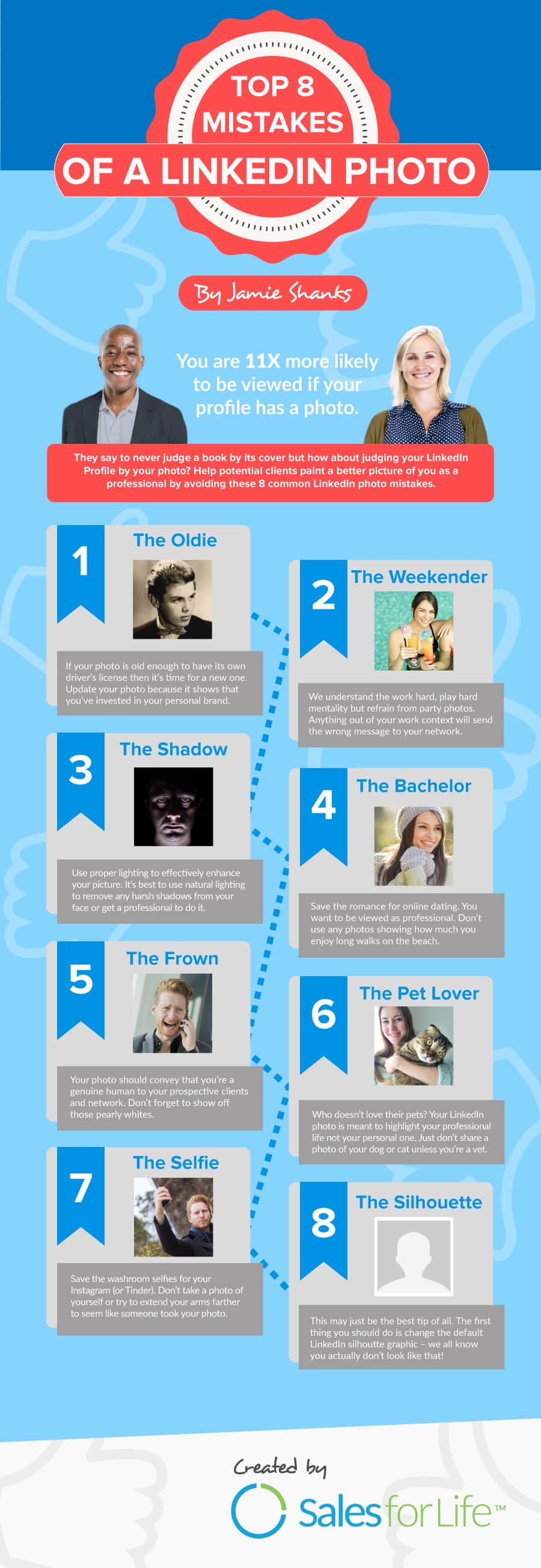
In today’s digital age, your LinkedIn profile photo is often the first impression you make on potential employers, clients, and colleagues. It’s your digital handshake, and it can play a crucial role in shaping your professional image. Yet, many LinkedIn users still make critical mistakes when it comes to choosing their profile photos. In this blog post, we will explore eight types of LinkedIn profile photo mistakes you should avoid at all costs. Let’s dive in.
- The Selfie
We’ve all taken selfies, but your LinkedIn profile is not the place for them. Selfies may be acceptable on personal social media accounts, but they convey a lack of professionalism on a platform designed for business connections. Selfies often suffer from poor lighting, odd angles, and distracting backgrounds. They rarely give off the impression of someone who takes their career seriously.
Solution: Invest in a professional headshot. A professional photographer can ensure proper lighting, framing, and background, resulting in a polished and business-appropriate photo.
- The Party Photo
LinkedIn is not Facebook, Instagram, or Snapchat. Posting a photo from a wild party, with a drink in hand and a goofy expression, is a surefire way to damage your professional reputation. Your potential employers and business partners are looking for someone reliable and serious, not someone who appears to prioritize partying over work.
Solution: Choose a photo where you appear sober, confident, and focused. Ideally, wear professional attire to convey your commitment to your career.
- The Vacation Snap
While vacation photos are great for personal albums, they have no place on your LinkedIn profile. A picture of you lounging on a beach or exploring a tourist attraction may be appealing to your friends, but it sends the wrong message to your professional network. It suggests that you’re more interested in leisure than work.
Solution: Select a photo taken in a professional setting, such as your office or a conference. This will emphasize your dedication to your profession.
- The Outdated Photo
Using an old photo on your LinkedIn profile can be misleading. If you’ve drastically changed your appearance since the photo was taken, it can create confusion or even distrust among your connections. Your LinkedIn photo should accurately represent your current professional identity.
Solution: Regularly update your profile photo to reflect your current appearance. Choose a picture taken within the last year to ensure accuracy.
- The Group Photo
LinkedIn is all about showcasing you as an individual professional. Using a group photo, especially one where you’re not easily identifiable, can be a major turn-off for potential employers or connections. They want to see you, not try to figure out which person in the group you are.
Solution: Select a solo photo where you are the focus, and it’s clear who you are. It’s your LinkedIn profile, after all, so make sure you’re the star of the show.
- The Casual Attire
Your LinkedIn profile photo should reflect your professionalism. While it’s essential to be yourself, it’s equally important to convey a sense of authority and competence. Wearing overly casual attire, such as a t-shirt or tank top, can undermine your professional image.
Solution: Opt for business attire that suits your industry. A crisp dress shirt, blazer, or professional dress can make a significant difference in how you’re perceived by others.
- The Poor Quality Image
Blurry, pixelated, or low-resolution images are simply unacceptable for a LinkedIn profile. Such photos give the impression that you don’t pay attention to detail or don’t care about your online presence. In a professional context, this can be a major red flag.
Solution: Make sure your profile photo is of high quality. It should be clear, well-lit, and properly cropped. If you’re unsure, seek the assistance of a professional photographer or a friend with photography skills.
- The Inappropriate Expression
Your LinkedIn photo is a chance to convey your professionalism and approachability. Avoid using photos with expressions that don’t align with these qualities. This includes overly serious, angry, or overly enthusiastic facial expressions.
Solution: Choose a photo where you have a warm and approachable expression. A genuine smile can go a long way in making a positive impression.
Conclusion
Your LinkedIn profile photo is an essential element of your professional online presence. It’s often the first thing people see when they come across your profile, so it’s crucial to make it count. By avoiding these eight common profile photo mistakes, you can present yourself as a competent, credible, and approachable professional in your field. Take the time to invest in a high-quality, updated photo that accurately represents your current professional identity, and you’ll be well on your way to making a positive impression on LinkedIn. Remember, your profile photo is your digital handshake – make it a strong one.

Author:
Mark Ford

How to Create Engaging Instagram Reels Without Ever Showing Your Face
Are you looking for creative ways to make engaging Instagram Reels without stepping in front of the camera? Want to discover proven content ideas that help your brand stand out on social media while keeping your privacy intact? […]


