Are you struggling to get more traffic and sales for your online store? Want to learn the essential SEO strategies to boost your ecommerce website’s rankings?
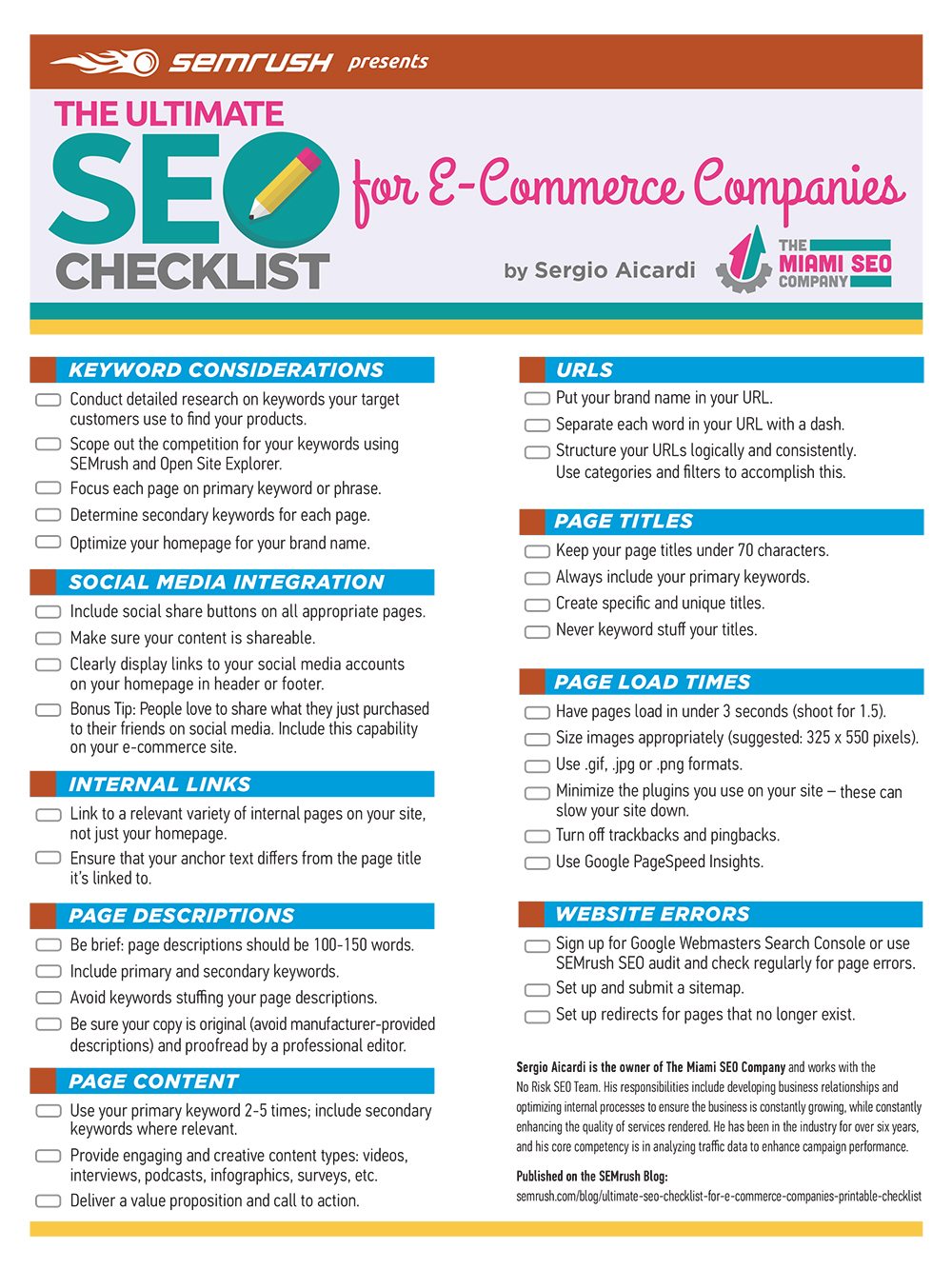
You’ll learn all about ecommerce SEO in this infographic from SEMrush.
They break things down into the following categories:
- Keyword Considerations
- Social Media Integration
- Internal Links
- Page Descriptions
- Page Content
- URLs
- Page Titles
- Page Load Times
- Website Errors
Check out the infographic for more.
Running an online store comes with many challenges, and one of the biggest is getting your website noticed. Search engine optimization (SEO) is crucial for attracting traffic, improving rankings, and ultimately increasing sales.
But where do you start? This ultimate SEO checklist will guide you through the essential steps to optimize your ecommerce site.
Keyword Considerations
Choosing the right keywords is the foundation of your SEO strategy. Keywords help search engines understand what your site is about and connect you with potential customers. Researching the best terms for your business ensures you attract the right audience. Here’s how to refine your keyword strategy:
- Conduct keyword research using tools like SEMrush to find terms your customers are searching for.
- Analyze competitors’ keywords to understand what’s working in your industry.
- Focus on long-tail keywords to capture more specific search intent.
- Optimize your homepage with your brand name and primary industry keywords.
Social Media Integration
Social media plays a vital role in driving traffic and engagement for ecommerce websites. By integrating social sharing features and linking your profiles, you can amplify your reach. The more people interact with your content, the better your site’s visibility. Here’s how to integrate social media effectively:
- Add social share buttons to product pages, blog posts, and key landing pages.
- Ensure your content is engaging and shareable to encourage organic promotion.
- Clearly display links to your social media profiles on your homepage and footer.
- Enable social sharing for customer purchases, making it easy for buyers to recommend products.
Internal Links
Internal linking helps search engines navigate your website and understand the relationship between different pages. It also keeps visitors engaged by guiding them to relevant content. A strong internal linking strategy can boost rankings and improve user experience. Follow these tips:
- Link to relevant pages within your site, not just the homepage.
- Use descriptive anchor text that provides context about the linked page.
- Ensure links lead to valuable, related content to keep users engaged.
- Avoid excessive linking on a single page, which can dilute SEO value.
Page Descriptions
Your page descriptions (meta descriptions) play a crucial role in attracting clicks from search engine results. A well-written description can entice users to visit your site and improve click-through rates. Keeping descriptions concise and relevant is key. Use these best practices:
- Keep descriptions between 100-150 words for readability and effectiveness.
- Include primary and secondary keywords naturally to improve relevance.
- Avoid keyword stuffing, which can make descriptions look spammy.
- Write unique and compelling descriptions for each page to encourage clicks.
Page Content
High-quality content is the backbone of SEO for ecommerce websites. Well-written product descriptions, blog posts, and guides help improve rankings and build credibility. Your content should inform, engage, and convert visitors. Here’s how to optimize it:
- Use your primary keyword naturally 2-5 times per page to maintain readability.
- Include secondary keywords to capture additional search intent.
- Diversify content types by incorporating videos, infographics, and user reviews.
- Always include a strong value proposition and clear call to action.
URLs
A well-structured URL makes it easier for search engines and users to understand your pages. Optimized URLs can improve your rankings and enhance user experience. Keep URLs clean and meaningful with these strategies:
- Include your brand name in URLs for better recognition and branding.
- Separate words with dashes to improve readability and avoid confusion.
- Organize URLs logically using categories and filters to improve navigation.
- Keep URLs short and descriptive, avoiding unnecessary numbers or characters.
Page Titles
Your page titles are one of the most important on-page SEO elements. A strong title helps search engines understand the page’s topic and encourages users to click. Writing compelling, keyword-rich titles is essential. Follow these tips:
- Keep titles under 70 characters to ensure they display properly in search results.
- Include your primary keyword naturally to improve search rankings.
- Avoid keyword stuffing, as it can reduce readability and effectiveness.
- Make titles engaging and specific to encourage more clicks from users.
Page Load Times
A slow website can frustrate users and hurt your SEO rankings. Google considers page speed a ranking factor, so optimizing your load times is critical. Fast-loading pages improve user experience and conversion rates. Use these techniques to speed up your site:
- Aim for pages to load in under 3 seconds, with an ideal target of 1.5 seconds.
- Optimize image sizes (recommended: 325 x 550 pixels) to reduce load time.
- Use efficient formats like .gif, .jpg, and .png to maintain quality without slowing down the site.
- Minimize unnecessary plugins and scripts that can slow performance.
Website Errors
Website errors can damage your SEO efforts and user experience. Broken links, missing pages, and technical issues can prevent search engines from properly indexing your site. Regular audits help you identify and fix problems. Here’s what to do:
- Use Google Search Console or SEMrush to check for page errors regularly.
- Set up and submit an XML sitemap to help search engines crawl your site efficiently.
- Implement 301 redirects for pages that no longer exist to avoid broken links.
- Fix duplicate content issues to prevent confusion and ranking penalties.
Conclusion
SEO is an ongoing process that requires continuous optimization and updates. By following this checklist, you can ensure your ecommerce website is well-optimized for search engines and user experience.
Implement these strategies to drive more traffic, improve rankings, and increase conversions. A well-structured, SEO-friendly website is key to standing out in the competitive world of online retail.

Author:
Mark Ford