Are you looking for proven ways to design a website that truly engages your visitors? Want to discover the strategies that turn casual browsers into loyal customers and conversions?
You’ll find some web design basics in this infographic.
Here’s a summary of what’s covered:
- Focus on Visual Branding
- Use Powerful CTAs
- Strategically Plan Website Navigation
- Optimise for Mobile Responsiveness
- Prioritise Fast Loading Speeds
- Incorporate Engaging Visual Content
- Write Clear and Compelling Copy
- Build Trust with Social Proof
- Make Forms Simple and User-Friendly
- Test and Continuously Improve
Check out the post below for more.
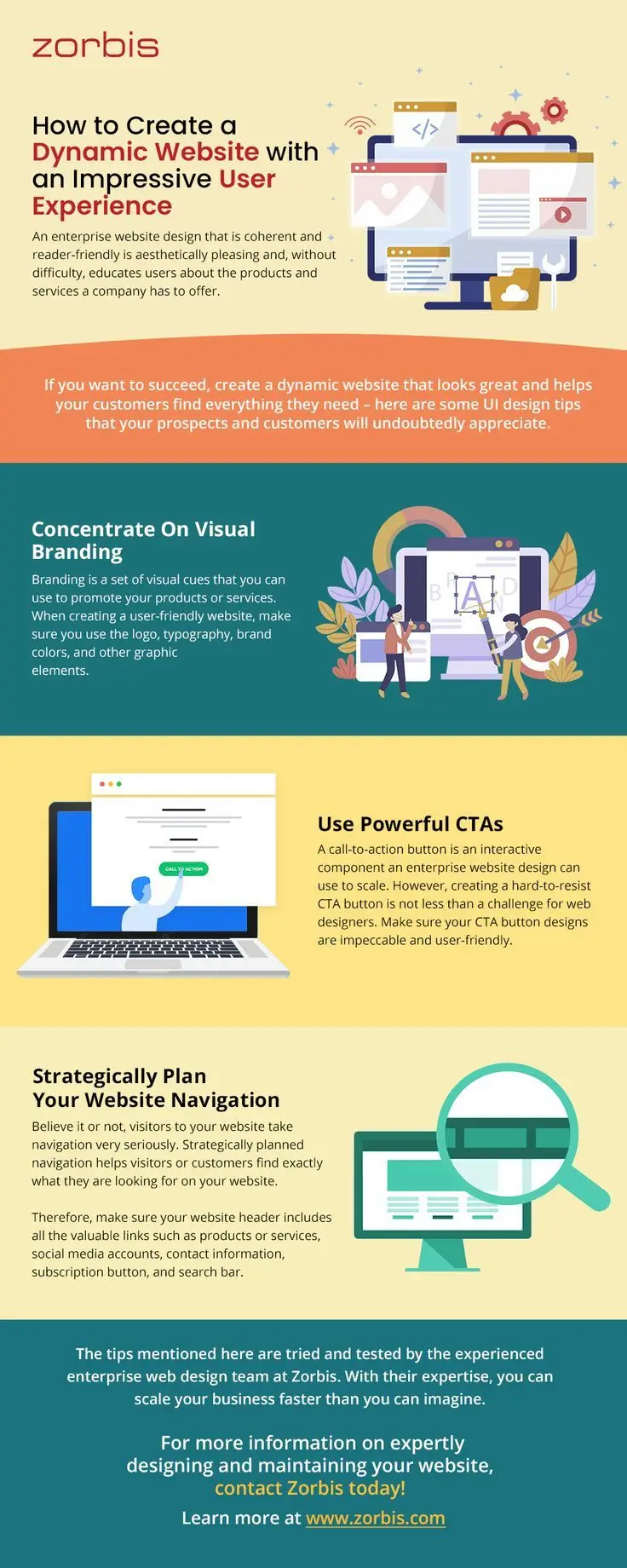
Designing a website is no longer just about looking good – it’s about creating an online experience that draws people in, keeps them engaged, and encourages them to take action. Whether you’re running a small business or a large enterprise, your website is often the first impression potential customers will have of you. That means it must combine strong design with user-friendly functionality to achieve real business results.
A well-designed website can make the difference between someone bouncing after a few seconds and someone sticking around long enough to become a customer. In this blog post, we’ll explore proven strategies for creating a website that engages your audience and drives conversions. You’ll learn how to focus on branding, leverage calls-to-action, and structure navigation in a way that helps visitors easily find what they need.
Focus on Visual Branding
Your website’s visual identity is one of the most powerful tools you have for building trust and recognition. Branding goes beyond just a logo – it’s about creating a consistent look and feel across every page of your site. Strong branding communicates professionalism and makes your business memorable in the eyes of your audience.
When visitors land on your site, they should immediately get a sense of who you are and what you stand for. This is achieved through deliberate choices in colour, typography, imagery, and layout. By concentrating on visual branding, you’ll create a unified experience that builds credibility and encourages visitors to explore further.
- Use consistent brand colours and typography to reinforce recognition.
- Incorporate your logo across all key touchpoints without overusing it.
- Select imagery and graphics that reflect your brand’s values and tone.
- Maintain a clean, professional design that avoids unnecessary clutter.
Use Powerful CTAs
A call-to-action (CTA) is the bridge between a visitor’s interest and their decision to take the next step. Without clear CTAs, even the most beautiful website risks losing conversions. CTAs should be visually prominent, easy to understand, and strategically placed where they will drive the most engagement.
Effective CTAs don’t just tell users what to do – they make it irresistible to act. Whether it’s signing up for a newsletter, booking a consultation, or making a purchase, your CTAs should reduce friction and encourage immediate response. When designed well, they turn passive browsers into active leads and customers.
- Use action-oriented language such as “Get Started,” “Book Now,” or “Download Free Guide.”
- Ensure buttons stand out with contrasting colours against the background.
- Place CTAs in multiple strategic locations throughout your site.
- Keep the message short, clear, and focused on the user’s benefit.
Strategically Plan Website Navigation
Navigation is the backbone of a good website experience. If visitors can’t easily find what they’re looking for, they’re unlikely to stay for long. Strategic navigation ensures that your most valuable content is accessible, clear, and structured in a way that makes sense to users.
Your website’s menu should serve as a roadmap, guiding visitors towards the actions you want them to take. By carefully planning navigation, you reduce frustration and increase the likelihood of conversions. From clear categories to well-placed search bars, every element of your navigation should be designed with the user journey in mind.
- Keep navigation menus simple with clear, concise labels.
- Prioritise important pages like products, services, and contact information.
- Include a search function to help users quickly locate specific content.
- Use a sticky or fixed header so navigation is always accessible.
Optimise for Mobile Responsiveness
With most users browsing on mobile devices, a responsive website is no longer optional. A mobile-friendly design ensures that your site looks and functions perfectly on screens of all sizes. Without it, you risk alienating a large portion of your potential audience.
Mobile responsiveness isn’t just about fitting content on a smaller screen – it’s about rethinking layout, navigation, and usability for touch-based browsing. By optimising for mobile, you create a seamless experience that boosts engagement and helps you rank better in search engines.
- Use flexible grids and layouts that adapt to different screen sizes.
- Simplify navigation for easy tapping and scrolling on smaller devices.
- Optimise images and videos for fast mobile loading speeds.
- Test your site regularly across various devices and browsers.
Prioritise Fast Loading Speeds
In today’s digital world, speed is everything. Studies show that even a one-second delay in page load time can significantly reduce conversions. Visitors expect websites to load quickly, and if yours doesn’t, they’re likely to move on to a competitor.
Improving your site’s speed not only enhances user experience but also boosts your search engine rankings. A fast, smooth experience keeps visitors engaged, encourages them to explore further, and ultimately makes them more likely to take action.
- Compress images and files to reduce load times.
- Use reliable hosting with sufficient bandwidth.
- Minimise the use of unnecessary scripts or plugins.
- Enable browser caching to improve repeat visits.
Incorporate Engaging Visual Content
Text alone is rarely enough to hold a visitor’s attention. Visual content such as images, videos, and graphics can make your website more engaging and easier to digest. It also helps convey complex ideas quickly and effectively.
The right visuals can add personality, showcase products, and strengthen your brand story. However, they must be used strategically – too many visuals or poorly optimised media can slow your site and overwhelm visitors. Balance is key to making your visuals work for you.
- Use high-quality images that reflect your brand and message.
- Incorporate videos to demonstrate products or explain services.
- Add infographics to simplify complex information.
- Ensure all visuals are optimised for web performance.
Write Clear and Compelling Copy
While design grabs attention, copy is what convinces visitors to stay and act. Clear, engaging, and benefit-driven copy ensures that your audience understands what you offer and why it matters to them. Strong copy builds trust and creates an emotional connection with readers.
Your website’s content should speak directly to your target audience in a tone that matches your brand. Avoid jargon and focus on providing value. Compelling copy turns interest into action and is a critical driver of conversions.
- Write headlines that capture attention and spark curiosity.
- Focus on benefits, not just features, in your descriptions.
- Use short paragraphs and bullet points for easy readability.
- Include persuasive microcopy on buttons and forms.
Build Trust with Social Proof
Visitors want reassurance that your business is credible and trustworthy before they commit. Social proof, such as testimonials, case studies, and industry recognition, provides evidence that others have benefited from your products or services. This reduces risk in the buyer’s mind.
By showcasing positive feedback and real-world results, you help potential customers feel more confident about choosing your brand. Social proof acts as a silent advocate, encouraging users to engage and convert.
- Display customer testimonials in prominent areas of your site.
- Use case studies to demonstrate measurable results.
- Highlight awards, certifications, or partnerships.
- Showcase real client logos or numbers of satisfied customers.
Make Forms Simple and User-Friendly
Forms are often the final step in conversion – whether for leads, sign-ups, or purchases. However, overly complicated forms can quickly drive people away. The key is to make them as short, simple, and user-friendly as possible.
A well-designed form removes friction from the user journey and encourages completion. By respecting your visitors’ time and making the process easy, you’ll significantly increase conversion rates.
- Only ask for essential information – keep fields to a minimum.
- Use clear labels and inline validation for accuracy.
- Ensure forms are optimised for mobile devices.
- Provide clear confirmation messages after submission.
Test and Continuously Improve
Web design is never “finished.” To truly engage and convert, you must continually test, measure, and refine your website’s performance. What works today might not be as effective tomorrow, so regular optimisation is essential.
By adopting a mindset of continuous improvement, you’ll stay ahead of competitors and ensure your site remains aligned with user expectations. Testing allows you to identify weaknesses and capitalise on opportunities for higher engagement and conversions.
- Run A/B tests on headlines, CTAs, and layouts.
- Monitor analytics to track user behaviour and conversion rates.
- Collect user feedback to identify pain points.
- Regularly update content to stay fresh and relevant.
Conclusion
Designing a website that engages and converts is about much more than aesthetics – it’s about creating a seamless, user-focused experience. From consistent branding to clear CTAs, strategic navigation, and ongoing optimisation, every decision should be made with your audience in mind. A site that looks good, loads fast, and is easy to use will always outperform one that doesn’t.
By implementing these proven strategies, you’ll not only attract visitors but also turn them into loyal customers. Remember, your website is one of your most powerful business tools. Treat it as a living, evolving asset, and you’ll create an online presence that drives measurable results.

Author:
Mark Ford

Designing for Humans: The Psychological Role of Colour in Web Design
Are you confident that the colours on your website are supporting how users feel, think and behave when they arrive? Have you ever wondered why some websites feel instantly trustworthy and intuitive, while others create friction without any obvious reason? […]