

Are you considering a website redesign for your business? Want to know how to recreate your site whilst keeping SEO in mind?
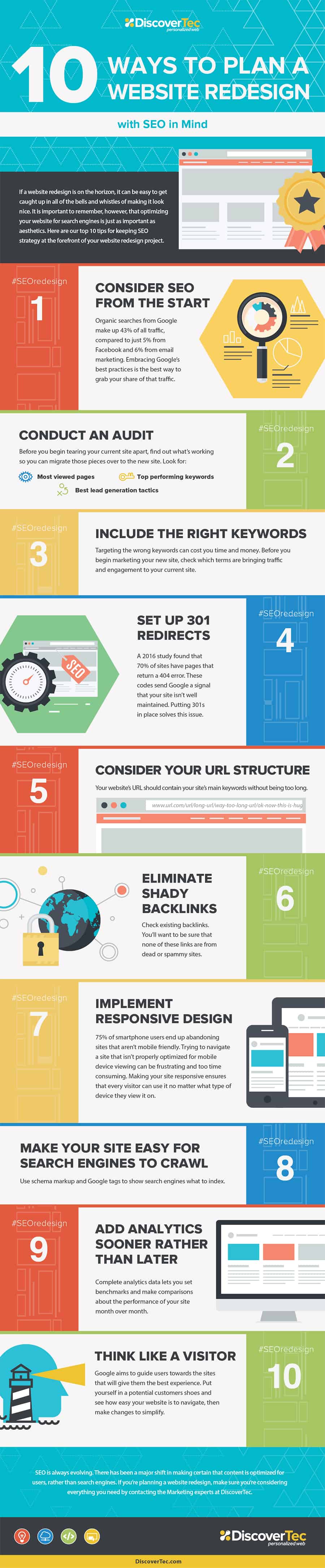
DiscoverTec share how to avoid an SEO nightmare during a redesign in this infographic.
Here’s a quick summary:
- Consider SEO from the start
- Conduct an audit
- Include the right keywords
- Set up 301 redirects
- Consider your URL structure
- Eliminate shady backlinks
- Implement responsive design
- Make your site easy to crawl
- Add analytics ASAP
- Think like a visitor
Check out the infographic for more detail.
Redesigning your website is a significant step that can rejuvenate your online presence, improve user experience, and boost conversions. However, a redesign can also spell disaster for your SEO if not handled correctly. A misstep can lead to lost rankings, traffic, and ultimately revenue. To prevent such an SEO tragedy, follow these ten essential steps:
Consider SEO from the Start
For small businesses, the prospect of redesigning a website can be both exciting and daunting. One of the most crucial aspects that should never be overlooked during this process is SEO. Integrating SEO from the start of your website redesign can have a profound impact on maintaining and improving your search engine rankings, driving organic traffic, and ultimately boosting your business. Here are some in-depth tips and guidance on how small businesses can effectively consider SEO from the start:
- Involve SEO Experts Early
Bringing in SEO experts during the initial planning stages of your website redesign is critical. These professionals can provide insights that will shape the foundation of your new site. They can help you avoid common pitfalls and ensure that every element of the redesign supports your SEO goals.
- Set Clear SEO Goals
Before diving into the redesign, define what you aim to achieve with your SEO strategy. Are you looking to increase organic traffic, improve search engine rankings for specific keywords, boost local SEO, or enhance user engagement? Setting clear goals will guide your SEO efforts and help measure the success of your redesign.
- Conduct a Competitive Analysis
Analyze your competitors’ websites to understand what they are doing well in terms of SEO. Identify their strengths and weaknesses, and find opportunities for your site to stand out. Look at their keyword usage, content strategy, backlink profile, and technical SEO elements. This analysis can provide valuable insights and inform your SEO strategy.
- Perform Comprehensive Keyword Research
Keyword research is the backbone of any SEO strategy. Use tools like Google Keyword Planner, Ahrefs, or SEMrush to identify keywords relevant to your business. Focus on a mix of short-tail and long-tail keywords that your target audience is likely to use. Consider search volume, competition, and user intent when selecting keywords.
- Integrate Keywords into Your Design
Once you have identified your target keywords, integrate them into your website design. Ensure that your site’s architecture, navigation, and URL structure reflect these keywords. For example, if you own a bakery in Austin, your URLs might look like this: www.yourbakery.com/austin-cakes, www.yourbakery.com/austin-cookies, etc. This helps search engines understand the relevance of your pages to specific queries.
- Optimize for Local SEO
For small businesses, local SEO is often a top priority. Ensure that your new site is optimized for local search by including your business name, address, and phone number (NAP) consistently across all pages. Create dedicated location pages if you serve multiple areas, and optimize these pages with local keywords.
- Focus on Content Strategy
Content is king in SEO. Develop a content strategy that aligns with your keyword research and business goals. Plan for high-quality, informative, and engaging content that addresses the needs and interests of your target audience. This could include blog posts, how-to guides, product descriptions, and customer testimonials.
- Plan for On-Page SEO Elements
Ensure that on-page SEO elements are incorporated into your redesign plan. This includes title tags, meta descriptions, header tags (H1, H2, H3), image alt texts, and internal linking. Each of these elements should be optimized with relevant keywords and crafted to improve the user experience.
- Prioritize Mobile Optimization
With the majority of searches now happening on mobile devices, mobile optimization is crucial. Ensure that your redesigned website is fully responsive and offers a seamless experience across all devices. Google’s mobile-first indexing means that your mobile site will be considered the primary version, so it must be fast, functional, and user-friendly.
- Enhance Site Speed
Site speed is a critical factor for both user experience and SEO. A slow website can lead to high bounce rates and lower rankings. Use tools like Google PageSpeed Insights to assess your current site speed and identify areas for improvement. Optimize images, leverage browser caching, and minimize code to enhance site performance.
- Plan for Structured Data
Structured data, or schema markup, helps search engines understand your content better and can improve your visibility in search results. Plan to implement structured data during your redesign to enhance rich snippets, local listings, and other search features. This can make your site more attractive in SERPs and improve click-through rates.
- Ensure Secure and Accessible Design
A secure and accessible website is essential for SEO. Implement HTTPS to secure your site and build trust with users. Ensure that your site is accessible to all users, including those with disabilities, by following web accessibility guidelines. Search engines favor secure and accessible websites, which can positively impact your rankings.
- Plan for a Seamless User Experience
User experience (UX) is closely tied to SEO. A well-designed site that offers a seamless, intuitive experience will keep visitors engaged and encourage longer visits. Consider factors such as easy navigation, clear calls-to-action, and a visually appealing design. A positive UX can lead to lower bounce rates and higher engagement, both of which are favorable for SEO.
- Monitor and Adjust
SEO is not a one-time task but an ongoing process. Once your redesigned site is live, continuously monitor its performance using tools like Google Analytics and Google Search Console. Track key metrics, identify issues, and make adjustments as needed. Regular monitoring and tweaking ensure that your site remains optimized and performs well in search rankings.
Conclusion
For small businesses, considering SEO from the start of a website redesign is vital for maintaining and improving search engine rankings, driving organic traffic, and achieving business goals. By involving SEO experts early, setting clear goals, conducting competitive analysis, performing keyword research, and integrating these elements into your design, you lay a strong foundation for a successful redesign.
Focusing on local SEO, content strategy, on-page SEO elements, mobile optimization, site speed, structured data, security, accessibility, and user experience further enhances your site’s SEO performance. Regular monitoring and adjustments ensure that your site continues to meet SEO best practices and remains competitive in search results.
By taking a comprehensive and strategic approach to SEO from the beginning, small businesses can avoid the pitfalls of a redesign and create a website that not only looks great but also performs exceptionally well in search engine rankings, ultimately driving growth and success.
Conduct an Audit
Conducting a thorough audit of your existing website is a crucial step in the redesign process, especially for small businesses. An audit helps you understand the current state of your website, identify areas for improvement, and set a baseline for measuring the success of your redesign. Here’s a comprehensive guide on how to conduct an effective website audit:
- Technical SEO Audit
A technical SEO audit involves checking the technical aspects of your website to ensure it can be crawled and indexed by search engines without issues. Here’s how to approach it:
- Crawl Your Website: Use tools like Screaming Frog SEO Spider or DeepCrawl to perform a comprehensive crawl of your site. This will help you identify broken links, duplicate content, and other technical issues.
- Check Site Speed: Use Google PageSpeed Insights, GTmetrix, or Pingdom to evaluate your site’s load time. Identify factors slowing down your site and implement improvements such as image optimization, browser caching, and minification of CSS and JavaScript files.
- Mobile Friendliness: Ensure your site is mobile-friendly using Google’s Mobile-Friendly Test tool. A responsive design that adapts to different screen sizes is essential for both user experience and SEO.
- Secure Your Site: Verify that your site uses HTTPS. An SSL certificate not only secures data between your site and its users but also boosts your rankings as search engines favor secure sites.
- Content Audit
A content audit assesses the quality and performance of your website’s content. Here’s how to carry it out:
- Inventory Your Content: Create a list of all the pages on your site, including blog posts, landing pages, and product descriptions. Tools like Screaming Frog can help automate this process.
- Evaluate Content Quality: Review each piece of content for relevance, accuracy, and depth. Ensure your content is providing value to your audience and is free of grammatical errors and outdated information.
- Analyze Content Performance: Use Google Analytics to assess the performance of your content. Look at metrics such as page views, average time on page, bounce rate, and conversions. Identify high-performing content and underperforming pages that need improvement.
- Identify Gaps and Opportunities: Based on your keyword research and competitive analysis, identify content gaps and opportunities. Create a plan to develop new content that addresses these gaps and targets high-value keywords.
- On-Page SEO Audit
On-page SEO involves optimizing individual pages to rank higher and earn more relevant traffic. Here’s how to audit on-page elements:
- Title Tags and Meta Descriptions: Ensure each page has a unique, keyword-optimized title tag and meta description. These elements should accurately describe the page’s content and include relevant keywords.
- Header Tags: Check the use of header tags (H1, H2, H3, etc.) to ensure they are used correctly and help structure your content. Each page should have one H1 tag that includes the primary keyword, with H2 and H3 tags used for subheadings.
- Keyword Optimization: Review the keyword usage on each page. Ensure that primary and secondary keywords are naturally integrated into the content, including in the opening paragraph, subheadings, and throughout the body text.
- Image Optimization: Check that all images have descriptive, keyword-rich alt text. Optimize image file sizes to improve load times without sacrificing quality.
- Internal Linking: Ensure there are sufficient internal links pointing to important pages on your site. Internal links help distribute link equity and improve the crawlability of your site.
- Backlink Audit
Backlinks from reputable sites are a crucial factor in SEO. A backlink audit helps you understand your backlink profile and identify any toxic links that could harm your rankings.
- Analyze Your Backlink Profile: Use tools like Ahrefs, Moz, or SEMrush to analyze your backlink profile. Identify the total number of backlinks, referring domains, and the quality of these links.
- Identify Toxic Links: Look for low-quality or spammy links that could be negatively impacting your SEO. These might include links from link farms, irrelevant sites, or sites with a poor reputation.
- Disavow Toxic Links: If you identify toxic backlinks, use Google’s Disavow Tool to inform Google that you do not want these links to be considered in your site’s ranking. This can help protect your site from penalties.
- User Experience (UX) Audit
A good user experience is essential for retaining visitors and encouraging conversions. A UX audit evaluates how users interact with your site and identifies areas for improvement.
- Navigation and Structure: Assess the structure of your site to ensure it is logical and intuitive. Users should be able to find what they’re looking for quickly and easily.
- Design and Layout: Evaluate your site’s design for visual appeal and usability. Ensure your design is consistent, with clear calls-to-action (CTAs) and an easy-to-read layout.
- Accessibility: Check that your site is accessible to all users, including those with disabilities. Use tools like WAVE or Axe to identify accessibility issues and make necessary adjustments.
- Engagement Metrics: Use Google Analytics to review engagement metrics such as bounce rate, average session duration, and pages per session. High bounce rates or low session durations may indicate usability issues that need to be addressed.
- Local SEO Audit
For small businesses, local SEO is often a key component of their digital strategy. A local SEO audit ensures that your business is optimized for local search.
- Google My Business (GMB): Ensure your GMB listing is claimed, verified, and fully optimized. Include accurate business information, such as name, address, phone number (NAP), hours of operation, and categories.
- Local Citations: Check that your business information is consistent across all online directories and citation sites. Inconsistent NAP information can confuse search engines and harm your local rankings.
- Reviews and Ratings: Monitor and manage online reviews. Encourage satisfied customers to leave positive reviews, and respond to reviews (both positive and negative) to show that you value customer feedback.
Conclusion
Conducting a comprehensive audit of your existing website is an essential step in the redesign process for small businesses. A thorough audit provides a clear understanding of your current SEO performance, identifies areas for improvement, and helps set a baseline for measuring the success of your redesign.
By conducting a technical SEO audit, content audit, on-page SEO audit, backlink audit, user experience audit, and local SEO audit, you can ensure that your website is optimized for search engines and provides a positive experience for users. This holistic approach to auditing will help you create a solid foundation for your redesigned website, ensuring that it performs well in search engine rankings and drives meaningful traffic to your business.
Include the Right Keywords
Including the right keywords is a fundamental aspect of any successful SEO strategy. For small businesses, effectively targeting the right keywords can significantly impact your visibility in search engine results, drive targeted traffic to your site, and ultimately increase conversions. Here are some in-depth tips and guidance on how to identify, choose, and implement the right keywords for your website:
- Understand Your Audience
Before diving into keyword research, it’s crucial to understand your audience. Knowing who your customers are, what they need, and how they search for information will guide your keyword strategy. Consider the following steps:
- Create Buyer Personas: Develop detailed profiles of your ideal customers, including demographics, interests, pain points, and search behaviors.
- Conduct Surveys and Interviews: Engage with your existing customers through surveys and interviews to gather insights into their search habits and the language they use.
- Analyze Customer Feedback: Review customer feedback, comments, and reviews to identify common terms and phrases they use when discussing your products or services.
- Conduct Comprehensive Keyword Research
Keyword research is the process of identifying the terms and phrases your target audience uses when searching for products, services, or information related to your business. Here’s how to conduct effective keyword research:
- Brainstorm Seed Keywords: Start with a list of basic keywords related to your business. These are often broad terms that describe your products or services.
- Use Keyword Research Tools: Utilize tools like Google Keyword Planner, Ahrefs, SEMrush, Moz Keyword Explorer, or Ubersuggest to expand your list of keywords. These tools provide data on search volume, keyword difficulty, and related keywords.
- Analyze Competitors: Look at your competitors’ websites to see what keywords they are targeting. Tools like Ahrefs and SEMrush allow you to analyze competitor keywords and identify gaps or opportunities.
- Identify Long-Tail Keywords: Long-tail keywords are longer, more specific phrases that often have lower search volume but higher intent. For example, “best organic coffee shop in Austin” is a long-tail keyword that can attract highly targeted traffic.
- Evaluate Keyword Metrics
Not all keywords are created equal. Evaluate potential keywords based on several important metrics to determine their viability:
- Search Volume: This indicates how often a keyword is searched for. While high search volume keywords can drive more traffic, they are often more competitive. Balance your strategy with a mix of high and low search volume keywords.
- Keyword Difficulty: This metric reflects how difficult it is to rank for a particular keyword. Tools like Ahrefs and SEMrush provide a keyword difficulty score. Aim for keywords with a reasonable balance between search volume and difficulty.
- Cost Per Click (CPC): Even if you’re not running paid ads, CPC can indicate the commercial value of a keyword. Higher CPC often means higher competition and greater commercial intent.
- Search Intent: Understand the intent behind each keyword. Are users looking to buy (transactional), learn (informational), or navigate to a specific site (navigational)? Align your keywords with the appropriate intent to attract the right audience.
- Group and Organize Keywords
Organizing your keywords into logical groups helps streamline content creation and optimization. Group similar keywords together based on themes, topics, or user intent. This approach allows you to create focused, relevant content that targets specific keyword clusters effectively.
- Topical Clusters: Organize keywords around core topics related to your business. For example, if you run a bakery, core topics might include “cakes,” “cookies,” “bread,” etc.
- Intent-Based Groups: Categorize keywords based on user intent. Create separate groups for informational, navigational, and transactional keywords to tailor content accordingly.
- Implement Keywords Strategically
Once you’ve identified and organized your keywords, it’s time to implement them strategically across your website. Here are key areas to focus on:
- Title Tags: Ensure each page has a unique, keyword-optimized title tag. The title tag is a critical on-page SEO element that helps search engines understand the page’s content.
- Meta Descriptions: Write compelling meta descriptions that include relevant keywords. Although meta descriptions don’t directly impact rankings, they influence click-through rates.
- Headings (H1, H2, H3): Use keywords in your headings to provide structure and relevance. The H1 tag should include the primary keyword, while H2 and H3 tags can feature secondary keywords.
- Body Content: Naturally incorporate keywords throughout your content. Avoid keyword stuffing, which can harm readability and SEO. Aim for a keyword density of around 1-2% and focus on creating valuable, engaging content.
- URLs: Optimize URLs by including relevant keywords. Keep URLs concise and descriptive, reflecting the page’s content.
- Image Alt Text: Use keywords in image alt text to help search engines understand the content of your images. This also improves accessibility for visually impaired users.
- Internal Links: Use keyword-rich anchor text for internal links to improve navigation and distribute link equity across your site.
- Monitor and Adjust Your Keyword Strategy
SEO is an ongoing process that requires regular monitoring and adjustments. Use tools like Google Analytics and Google Search Console to track the performance of your keywords and make data-driven decisions.
- Track Rankings: Monitor how your pages rank for target keywords. Look for trends and identify opportunities for improvement.
- Analyze Traffic and Engagement: Assess the impact of your keywords on organic traffic, bounce rates, and user engagement. High-performing keywords should be leveraged further, while underperforming ones may need re-evaluation.
- Adjust and Refine: Based on your analysis, refine your keyword strategy. Update existing content, create new content targeting emerging keywords, and continuously optimize for better results.
Conclusion
Including the right keywords is essential for driving targeted traffic and improving search engine rankings for small businesses. By understanding your audience, conducting comprehensive keyword research, evaluating keyword metrics, and strategically implementing keywords across your website, you can create a solid foundation for a successful SEO strategy.
Regularly monitoring and adjusting your keyword strategy ensures that your website remains relevant and competitive in search engine results. With a well-thought-out keyword strategy, small businesses can attract the right audience, increase online visibility, and achieve their business goals.
Set Up 301 Redirects
Setting up 301 redirects is a crucial component of website redesign, especially for small businesses. When URLs change due to a redesign, 301 redirects ensure that visitors and search engines can still find your content, preserving your SEO efforts and maintaining user experience. Here’s a detailed guide on how small businesses can effectively set up 301 redirects:
- Understand the Importance of 301 Redirects
A 301 redirect is a status code that tells search engines and browsers that a page has permanently moved to a new location. This is crucial for several reasons:
- Preserves SEO Value: 301 redirects transfer around 90-99% of the original page’s link equity to the new URL, helping maintain search engine rankings.
- Improves User Experience: Redirects prevent visitors from encountering 404 errors, ensuring they are seamlessly guided to the new page.
- Maintains Traffic Flow: Proper redirects ensure that existing traffic from bookmarks, links, or search engines continues to reach your site.
- Identify URL Changes
Before setting up redirects, you need a comprehensive list of URL changes. This typically happens when:
- Changing Domain Names: Moving from one domain to another.
- Reorganizing Site Structure: Modifying URL structures for better hierarchy or SEO.
- Updating Content: Merging, deleting, or renaming pages.
Use tools like Screaming Frog SEO Spider to crawl your existing site and export the list of URLs. Compare this with the new site’s URLs to identify which ones need to be redirected.
- Create a URL Mapping Plan
Develop a detailed mapping plan that pairs old URLs with their corresponding new URLs. This plan serves as a blueprint for setting up redirects and ensures no page is overlooked.
- One-to-One Mapping: Directly map old URLs to their new counterparts.
- Many-to-One Mapping: When consolidating content, map multiple old URLs to a single new URL.
- One-to-Many Mapping: Rarely used, but might occur when splitting content from one old URL into multiple new URLs.
- Implement 301 Redirects
The method for implementing 301 redirects depends on your web server or CMS platform:
- Apache Servers: Typically involves editing the .htaccess file to add redirect rules.
- Nginx Servers: Requires adding redirect rules to your Nginx configuration file.
- CMS Platforms: Many content management systems (CMS) like WordPress have plugins to manage redirects, such as Redirection or Yoast SEO Premium.
- Test Redirects Thoroughly
After implementing the redirects, thorough testing is essential to ensure they work correctly and there are no issues. Use the following methods:
- Manual Testing: Test a sample of the old URLs in your browser to ensure they correctly redirect to the new URLs.
- SEO Tools: Use tools like Screaming Frog or Sitebulb to crawl the old URLs and verify the redirects.
- Google Search Console: Check the “Coverage” report for any crawl errors or issues with the redirects.
- Update Internal Links
Updating internal links ensures that users and search engines do not have to go through a redirect to reach the new pages, improving load times and preserving link equity. This includes:
- Navigation Menus: Update links in your site’s navigation menus to point directly to the new URLs.
- Content Links: Update internal links within your content, such as blog posts and product descriptions.
- XML Sitemap: Ensure your XML sitemap reflects the new URLs and submit it to Google Search Console for faster indexing.
- Communicate Changes to External Stakeholders
Inform external stakeholders about the URL changes, especially if they frequently link to your site. This could include:
- Partner Websites: Request that they update any links to your site.
- Social Media Profiles: Update links in your social media profiles and posts.
- Marketing Materials: Ensure all marketing materials, both online and offline, reflect the new URLs.
- Monitor and Maintain Redirects
Setting up redirects is not a one-time task. Continuous monitoring and maintenance are crucial to ensure their effectiveness. Here’s how to manage ongoing redirect efforts:
- Monitor Traffic: Use Google Analytics to track the traffic to the new URLs and identify any drops that might indicate issues.
- Check for Errors: Regularly review Google Search Console for crawl errors or issues with redirects.
- Update Redirects: Over time, you may need to update or add new redirects as your site evolves.
- Handle Redirect Chains and Loops
Redirect chains (multiple redirects before reaching the final URL) and loops (a redirect that points back to itself) can negatively impact SEO and user experience. Here’s how to address them:
- Audit Regularly: Use tools like Screaming Frog to identify redirect chains and loops.
- Simplify Redirects: Update your redirects to point directly to the final URL, eliminating unnecessary steps.
- Avoid Loops: Ensure no redirect points to another redirect in a way that creates a loop.
- Communicate the Changes Internally
Ensure your team is aware of the changes and understands the importance of redirects for maintaining SEO value and user experience. This includes:
- SEO and Marketing Teams: Keep them informed about the new URL structure and the reasons for redirects.
- Customer Support: Equip your customer support team with the new URLs and information to assist users who might encounter issues.
Conclusion
Setting up 301 redirects is a crucial step in preserving your SEO value and ensuring a smooth user experience during a website redesign. For small businesses, it’s essential to understand the importance of 301 redirects, identify and map URL changes, implement and test redirects, update internal and external links, and continuously monitor and maintain the redirects.
By following these detailed steps, small businesses can successfully manage their URL transitions, avoid potential pitfalls, and ensure their redesigned website continues to perform well in search engine rankings, driving traffic and supporting business growth.
Consider Your URL Structure
A well-planned URL structure is a critical element of an effective SEO strategy and user experience. For small businesses, ensuring that your URLs are clean, descriptive, and logically organized can significantly impact how search engines and users interact with your site. Here’s a detailed guide on how to consider and optimize your URL structure during a website redesign:
- Keep URLs Simple and Descriptive
Simple and descriptive URLs are easier for users to read and remember. They also provide search engines with clear information about the content of the page.
- Avoid Special Characters and Numbers: Use words rather than numbers or special characters. For example, use “/services” instead of “/services123”.
- Use Hyphens to Separate Words: Hyphens are preferable to underscores for separating words in a URL because search engines treat hyphens as space characters but not underscores.
- Limit URL Length: While there’s no strict limit, shorter URLs are generally better for usability and SEO. Aim to keep your URLs concise and to the point.
- Reflect Site Hierarchy
Your URL structure should reflect the hierarchy of your website. This helps both users and search engines understand the relationship between different pages.
- Use Subdirectories Appropriately: Organize your URLs into clear, logical subdirectories. For example, a blog post about SEO tips might have a URL like “www.example.com/blog/seo-tips” rather than “www.example.com/123456”.
- Avoid Deep Nesting: URLs with too many levels of hierarchy can be confusing. Aim to keep your URL structure as flat as possible, while still reflecting the site’s structure.
- Incorporate Keywords Naturally
Incorporating relevant keywords into your URLs can improve SEO by signaling to search engines what the page is about.
- Use Primary Keywords: Include your primary keyword for the page naturally within the URL. This can improve your page’s relevance for that keyword.
- Avoid Keyword Stuffing: Overloading your URL with keywords can appear spammy and be counterproductive. Stick to one or two relevant keywords.
- Consistency is Key
Consistency in your URL structure helps maintain a professional appearance and improves user experience.
- Standardize Formats: Choose a consistent format for similar types of content. For example, use “www.example.com/products/product-name” for all product pages.
- Case Sensitivity: Decide whether your URLs will be case-sensitive or not. Generally, it’s best to use lowercase letters to avoid confusion and potential duplicate content issues.
- Utilize HTTPS
Using HTTPS is essential for security and SEO. Google favors secure websites, and having HTTPS can improve your search engine rankings.
- Secure Your Site: Ensure all URLs use HTTPS to protect data and build trust with users. This involves obtaining and installing an SSL certificate.
- Redirect HTTP to HTTPS: Set up 301 redirects from HTTP to HTTPS URLs to ensure all traffic is secured and search engines index the secure version of your site.
- Avoid Dynamic and Session IDs
Dynamic URLs with long strings of parameters and session IDs can be difficult for both users and search engines to understand.
- Use Clean URLs: Rewrite dynamic URLs to be more static and user-friendly. For instance, “www.example.com/product?id=123” can be rewritten to “www.example.com/product/123”.
- Remove Unnecessary Parameters: If parameters are necessary, try to keep them to a minimum and clearly explain their purpose.
- Plan for Scalability
As your business grows, so will your website. Planning a scalable URL structure from the beginning can save you from headaches down the line.
- Anticipate Future Content: Consider how your site might expand in the future and design your URL structure to accommodate new categories or content types.
- Flexible Structure: Ensure that your URL structure can easily incorporate new sections or changes without requiring a complete overhaul.
- Redirects and Canonicalization
Properly managing redirects and canonical tags can help prevent duplicate content issues and ensure that your preferred URLs are indexed.
- Use 301 Redirects for Old URLs: If you change a URL, set up a 301 redirect from the old URL to the new one to maintain link equity and provide a seamless user experience.
- Implement Canonical Tags: Use canonical tags to indicate the preferred version of a page when there are multiple versions with similar content. This helps consolidate link equity and avoid duplicate content penalties.
- Monitor and Maintain URL Health
Regularly monitoring your URL structure can help identify and fix issues before they impact your SEO.
- Crawl Your Site Regularly: Use SEO tools like Screaming Frog, Ahrefs, or SEMrush to crawl your site and identify broken links, duplicate content, and other URL-related issues.
- Fix Broken Links: Regularly check for and repair broken links to improve user experience and maintain SEO value.
- Update XML Sitemaps: Ensure your XML sitemap is up to date with the latest URLs and submit it to Google Search Console for efficient indexing.
- Communicate URL Changes
Whenever you make changes to your URL structure, it’s important to communicate these changes to stakeholders and update all relevant documentation and links.
- Inform Your Team: Make sure your SEO, marketing, and development teams are aware of the new URL structure and understand how to implement it correctly.
- Update External Links: Reach out to partners, directories, and other sites that link to your pages and request updates to reflect the new URLs.
- Revise Marketing Materials: Ensure all marketing materials, including social media profiles, email campaigns, and printed materials, reflect the new URLs.
Conclusion
Considering your URL structure is vital for both SEO and user experience. By keeping URLs simple and descriptive, reflecting site hierarchy, incorporating keywords naturally, maintaining consistency, utilizing HTTPS, avoiding dynamic and session IDs, planning for scalability, managing redirects and canonicalization, monitoring URL health, and communicating changes effectively, small businesses can create a robust URL structure that supports their SEO strategy and enhances user experience.
A well-optimized URL structure helps search engines understand and index your site more effectively, improves click-through rates, and provides a seamless experience for users. By following these detailed guidelines, small businesses can ensure that their website is well-structured, user-friendly, and optimized for search engines, ultimately driving more traffic and supporting business growth.
Eliminate Shady Backlinks
Backlinks, or inbound links, are an essential factor in SEO as they indicate to search engines that other websites find your content valuable. However, not all backlinks are beneficial. Shady or low-quality backlinks can harm your site’s reputation and rankings. For small businesses, it’s crucial to identify, manage, and eliminate these harmful backlinks to maintain a healthy backlink profile. Here’s an in-depth guide on how to eliminate shady backlinks effectively:
- Understand the Importance of Backlink Quality
Before diving into the process of eliminating shady backlinks, it’s essential to understand why backlink quality matters:
- SEO Impact: High-quality backlinks from reputable websites improve your search engine rankings, while low-quality backlinks can trigger penalties and harm your SEO efforts.
- Credibility and Trust: Quality backlinks enhance your site’s credibility and trustworthiness in the eyes of search engines and users.
- Referral Traffic: Good backlinks can drive targeted referral traffic to your site, leading to higher engagement and conversions.
- Conduct a Backlink Audit
A backlink audit is the first step in identifying and eliminating shady backlinks. Use the following tools and steps:
- Use SEO Tools: Tools like Ahrefs, Moz, SEMrush, and Google Search Console provide comprehensive backlink reports. These tools help you identify all the backlinks pointing to your site.
- Download Backlink Data: Export the list of backlinks from your chosen tool into a spreadsheet for analysis.
- Assess Link Quality: Evaluate each backlink based on the following criteria:
- Domain Authority (DA): Higher DA indicates a more reputable site.
- Relevance: Links from relevant websites in your industry are more valuable.
- Link Placement: Links embedded naturally within content are preferable to those in footers or sidebars.
- Anchor Text: Ensure that anchor texts are natural and not overly optimized with keywords.
- Traffic Metrics: Backlinks from sites with good traffic metrics are usually better.
- Identify Shady Backlinks
Once you have a comprehensive list of backlinks, identify the shady ones. Look for the following red flags:
- Low Domain Authority: Links from sites with low DA or no DA are often low-quality.
- Spammy Sites: Sites with spammy or irrelevant content, link farms, or those created solely for link-building purposes are harmful.
- Irrelevant Links: Backlinks from websites unrelated to your industry or niche are often seen as manipulative.
- Over-Optimized Anchor Text: Links with excessively optimized anchor text, such as keyword-stuffed phrases, can be a sign of unnatural linking.
- Link Networks: Backlinks from a network of sites created solely to interlink with each other and boost rankings are shady.
- Disavow Harmful Backlinks
If you identify backlinks that are harming your SEO, you can use the Google Disavow Tool to inform Google not to consider these links when assessing your site.
- Prepare a Disavow File: Create a text file listing all the URLs or domains you want to disavow. Use the format specified by Google.
- Upload the File to Google: Access the Disavow Tool in Google Search Console and upload your disavow file. This tells Google to ignore these backlinks in their ranking algorithm.
- Reach Out to Webmasters
In some cases, it’s better to directly contact the webmasters of the sites linking to you and request link removal. Here’s how to do it:
- Identify Contact Information: Find the contact details of the site owner. This information is often available in the website’s contact or about page.
- Craft a Polite Request: Write a courteous email explaining that the backlink is harmful to your site and requesting its removal. Provide the exact URL of the page linking to you and the anchor text used.
- Follow Up: If you don’t receive a response within a week or two, send a follow-up email. Persistence can sometimes be key to getting links removed.
- Monitor Your Backlink Profile Regularly
Backlink profiles can change over time, so it’s important to regularly monitor your backlinks to catch and address any new shady links promptly.
- Set Up Alerts: Use tools like Google Search Console, Ahrefs, or Moz to set up alerts for new backlinks. This helps you stay on top of any potentially harmful links.
- Periodic Audits: Conduct regular backlink audits, at least quarterly, to identify and manage any new low-quality backlinks.
- Build High-Quality Backlinks
While eliminating shady backlinks is crucial, it’s equally important to build high-quality backlinks to strengthen your backlink profile.
- Create Valuable Content: Produce high-quality, valuable content that naturally attracts backlinks from reputable sites.
- Guest Blogging: Contribute guest posts to authoritative blogs in your industry. Ensure your content is relevant and includes a natural backlink to your site.
- Engage in Industry Forums and Communities: Participate in forums, communities, and social media groups related to your industry. Provide valuable insights and include links to your content where appropriate.
- Leverage Relationships: Reach out to business partners, suppliers, and satisfied customers to request backlinks from their websites.
- Understand Google’s Guidelines
Familiarize yourself with Google’s guidelines on link schemes and unnatural links. This knowledge helps you avoid practices that could lead to penalties.
- Avoid Paid Links: Paying for backlinks can lead to severe penalties. Focus on earning backlinks through quality content and genuine relationships.
- Be Cautious with Link Exchanges: While exchanging links with relevant partners can be beneficial, excessive link exchanges can appear manipulative.
- Steer Clear of Automated Link Building: Avoid using automated tools or services that promise to build a large number of backlinks quickly.
- Stay Updated with SEO Trends
SEO is an ever-evolving field, and staying updated with the latest trends and best practices is crucial for maintaining a healthy backlink profile.
- Follow SEO Blogs and News: Regularly read reputable SEO blogs and news sites to stay informed about algorithm updates and industry best practices.
- Attend Webinars and Conferences: Participate in SEO webinars, workshops, and conferences to learn from experts and network with other professionals.
- Seek Professional Help if Needed
If managing your backlink profile seems overwhelming, consider seeking help from an SEO professional or agency. They can provide expertise and resources to effectively manage your backlinks and improve your site’s SEO.
Conclusion
Eliminating shady backlinks is essential for maintaining a strong and healthy backlink profile, which in turn supports your overall SEO strategy. By conducting regular backlink audits, identifying and disavowing harmful links, reaching out to webmasters, monitoring your backlink profile, building high-quality backlinks, understanding Google’s guidelines, staying updated with SEO trends, and seeking professional help when needed, small businesses can protect their online reputation and improve their search engine rankings.
By taking a proactive approach to managing your backlinks, you can ensure that your site remains credible, trustworthy, and competitive in search engine results, ultimately driving more traffic and supporting your business growth.
Implement Responsive Design
In today’s digital landscape, having a responsive design is essential for any website, particularly for small businesses. A responsive design ensures that your website provides an optimal viewing experience across a wide range of devices, from desktop computers to mobile phones. Here’s an in-depth guide on how to implement responsive design effectively:
- Understand the Importance of Responsive Design
Responsive design is not just about making your site look good on mobile devices; it’s about improving user experience and ensuring that your content is accessible to everyone, regardless of the device they use.
- User Experience (UX): A responsive design adapts to different screen sizes, providing a seamless and enjoyable experience for users. This can lead to increased engagement and lower bounce rates.
- SEO Benefits: Google uses mobile-first indexing, which means it predominantly uses the mobile version of the content for indexing and ranking. A responsive design can improve your search engine rankings.
- Cost-Effectiveness: Instead of maintaining separate websites for desktop and mobile users, a single responsive site can cater to all users, reducing maintenance costs and efforts.
- Plan Your Design with Mobile-First Approach
A mobile-first approach means designing the mobile version of your website before the desktop version. This ensures that the mobile experience is prioritized, which is crucial given the increasing number of users accessing websites via mobile devices.
- Simplify Navigation: Mobile screens have limited space, so ensure your navigation is simple and intuitive. Use clear, concise labels for menu items and consider a hamburger menu for mobile devices.
- Prioritize Content: Determine the most important content for mobile users and prioritize its placement. Ensure that essential information is easily accessible without excessive scrolling or clicking.
- Touch-Friendly Design: Make buttons and links large enough to be easily tapped with a finger. Ensure adequate spacing between clickable elements to prevent accidental clicks.
- Use Flexible Grid Layouts
A flexible grid layout adjusts to different screen sizes and orientations. This is a core principle of responsive design.
- Fluid Grids: Use relative units like percentages instead of fixed units like pixels to define the width of elements. This allows the layout to adapt to different screen sizes.
- Grid Systems: Implement a grid system like Bootstrap or Foundation, which provides a flexible grid layout and pre-designed components that adjust to various screen sizes.
- Optimize Images and Media
Images and media can significantly impact the performance and responsiveness of your site. Ensure that they are optimized for all devices.
- Responsive Images: Use the srcset attribute in HTML to provide different versions of an image for different screen sizes and resolutions. This ensures that users download the appropriate image size for their device.
- Media Queries: Use CSS media queries to apply different styles for different screen sizes. This allows you to control how images and other media elements are displayed on various devices.
- Compression: Compress images to reduce file sizes without compromising quality. Tools like TinyPNG or image optimization plugins for CMS platforms can help.
- Implement Flexible Typography
Typography should be readable on all devices, from large desktop monitors to small mobile screens.
- Relative Font Sizes: Use relative units like em or rem for font sizes instead of fixed units like px. This allows the text to scale appropriately based on the screen size.
- Responsive Fonts: Adjust font sizes using CSS media queries to ensure readability across different devices. For example, you might use a larger font size for headings on larger screens and a slightly smaller size on mobile devices.
- Line Length and Spacing: Optimize line length and spacing for readability. Aim for 50-75 characters per line and adjust line height (leading) to ensure comfortable reading.
- Ensure Cross-Browser Compatibility
Responsive design should work seamlessly across all browsers. Test your design on various browsers and devices to ensure compatibility.
- Browser Testing Tools: Use tools like BrowserStack or CrossBrowserTesting to test your website on different browsers and devices. These tools can simulate various environments, allowing you to identify and fix compatibility issues.
- Progressive Enhancement: Start with a basic, functional design that works on all browsers, and then add advanced features that enhance the experience on modern browsers.
- Optimize Performance for Mobile Devices
Performance is critical for mobile users, who may have slower internet connections compared to desktop users.
- Minimize HTTP Requests: Reduce the number of HTTP requests by combining files (such as CSS and JavaScript) and using CSS sprites for images.
- Enable Caching: Use browser caching to store static files locally, reducing load times for repeat visitors.
- Content Delivery Network (CDN): Utilize a CDN to deliver content from servers closer to the user’s geographical location, improving load times.
- Test Responsiveness Regularly
Regular testing is crucial to ensure your responsive design works well across all devices.
- Manual Testing: Manually test your site on various devices, including smartphones, tablets, laptops, and desktop computers. Check for usability, readability, and overall user experience.
- Automated Testing Tools: Use automated tools like Google’s Mobile-Friendly Test, Lighthouse, or responsive design checkers to evaluate your site’s responsiveness and identify potential issues.
- Implement User Feedback
User feedback is invaluable for refining your responsive design. Listen to your users and make improvements based on their experiences.
- Surveys and Feedback Forms: Use surveys and feedback forms to gather user opinions about your website’s mobile experience.
- Analytics Tools: Utilize tools like Google Analytics to monitor user behavior on different devices. Look for patterns such as high bounce rates on specific devices, which may indicate usability issues.
- Stay Updated with Responsive Design Trends
The field of responsive design is continually evolving. Stay informed about the latest trends and best practices to ensure your website remains effective and up-to-date.
- Follow Industry Blogs: Regularly read blogs and websites dedicated to web design and development, such as Smashing Magazine, A List Apart, and CSS-Tricks.
- Attend Webinars and Conferences: Participate in webinars and conferences focused on responsive design and web development to learn from experts and stay current with industry advancements.
Conclusion
Implementing responsive design is crucial for small businesses looking to provide a seamless and enjoyable user experience across all devices. By understanding the importance of responsive design, planning with a mobile-first approach, using flexible grid layouts, optimizing images and media, implementing flexible typography, ensuring cross-browser compatibility, optimizing performance, testing regularly, implementing user feedback, and staying updated with industry trends, small businesses can create a responsive website that enhances user satisfaction, boosts SEO, and drives business growth.
A well-executed responsive design ensures that your website is accessible, user-friendly, and effective in converting visitors into customers, regardless of the device they use. By following these detailed guidelines, small businesses can achieve a robust, responsive website that meets the needs of today’s mobile-centric users.
Make Your Site Easy to Crawl
Ensuring that your website is easy for search engines to crawl is crucial for effective SEO. When search engines can efficiently crawl and index your site, your content is more likely to appear in search results, driving organic traffic. Here’s an in-depth guide for small businesses on how to make your site easy to crawl:
- Understand How Crawling Works
Search engines use bots, known as spiders or crawlers, to navigate the web and index content. Understanding this process helps you optimize your site:
- Crawlers Follow Links: Crawlers start with a list of known URLs and follow links from those pages to discover new content.
- Indexing: After crawling, the content is indexed, meaning it’s stored and organized to be retrieved during search queries.
- Create and Optimize Your XML Sitemap
An XML sitemap is a file that lists all the pages on your website, helping search engines find and index your content.
- Generate an XML Sitemap: Use tools like Yoast SEO for WordPress, Screaming Frog, or XML-Sitemaps.com to create an XML sitemap.
- Update Regularly: Ensure your sitemap is updated whenever new content is added or existing content is removed.
- Submit to Search Engines: Submit your sitemap to Google Search Console and Bing Webmaster Tools to facilitate crawling.
- Use Robots.txt File Wisely
The robots.txt file tells search engines which pages or sections of your site they can or cannot crawl.
- Create a Robots.txt File: Place it in the root directory of your site.
- Block Unimportant Pages: Use robots.txt to block pages that are not valuable for SEO, such as admin pages, thank you pages, and certain duplicate content.
- Avoid Blocking Essential Content: Ensure important pages and resources like CSS and JavaScript files are not accidentally blocked.
- Ensure a Logical Site Structure
A clear, logical site structure helps both users and crawlers navigate your site.
- Hierarchy and Organization: Structure your site hierarchically, with a clear path from the homepage to category pages and subcategory pages.
- Breadcrumb Navigation: Implement breadcrumb navigation to show the user’s path and improve internal linking.
- Consistent Internal Linking: Link related pages within your content to help crawlers discover and index more of your site.
- Optimize URL Structure
A clean and descriptive URL structure aids in both crawling and user understanding.
- Use Keywords: Include relevant keywords in your URLs to provide context to search engines.
- Avoid Dynamic Parameters: Use static URLs whenever possible, as dynamic URLs with parameters can complicate crawling.
- Maintain Consistency: Keep URLs short, consistent, and easy to understand.
- Improve Site Speed
Fast-loading pages are essential for user experience and crawling efficiency.
- Optimize Images: Compress images and use next-gen formats like WebP to reduce load times.
- Minimize CSS and JavaScript: Reduce, minify, and combine CSS and JavaScript files to streamline loading.
- Use Caching: Implement browser and server-side caching to speed up page loading.
- Implement Structured Data
Structured data helps search engines understand your content better, enhancing how your site appears in search results.
- Schema Markup: Use schema.org vocabulary to add structured data to your site. This can help with rich snippets in search results.
- Test with Google’s Rich Results Tool: Ensure your structured data is correctly implemented and error-free.
- Fix Crawl Errors
Regularly monitor and fix crawl errors reported in Google Search Console.
- 404 Errors: Identify and fix 404 errors by redirecting broken URLs to relevant pages using 301 redirects.
- Server Errors: Investigate and resolve server errors (5xx) promptly to ensure search engines can access your site.
- Blocked Resources: Ensure that important resources are not blocked by robots.txt or other restrictions.
- Prioritize Mobile-Friendliness
With mobile-first indexing, it’s crucial that your site is optimized for mobile devices.
- Responsive Design: Ensure your site adapts to different screen sizes and orientations.
- Mobile Usability: Test your site’s mobile usability using Google’s Mobile-Friendly Test and fix any issues.
- Speed Optimization: Optimize for mobile speed using tools like Google’s PageSpeed Insights.
- Manage Duplicate Content
Duplicate content can confuse crawlers and dilute your SEO efforts.
- Canonical Tags: Use canonical tags to indicate the preferred version of a page when multiple pages have similar content.
- 301 Redirects: Implement 301 redirects for duplicate pages to consolidate link equity.
- Unique Content: Ensure all your pages have unique and valuable content.
- Monitor Crawl Budget
Crawl budget refers to the number of pages a search engine will crawl on your site within a given timeframe. Efficient use of your crawl budget ensures that important pages are crawled and indexed.
- Update Frequency: Frequently updated sites may have a higher crawl budget.
- Avoid Duplicate and Thin Content: Remove or improve low-value pages to ensure the crawl budget is spent on high-quality content.
- Optimize Crawl Settings: In Google Search Console, adjust the crawl rate if necessary to manage how often Google’s crawler visits your site.
- Regular Audits and Updates
Regularly audit your site to identify and fix issues that could hinder crawling.
- SEO Audit Tools: Use tools like Ahrefs, SEMrush, or Moz to conduct comprehensive site audits.
- Content Updates: Keep your content fresh and relevant, updating old content and removing outdated pages.
Conclusion
Making your site easy to crawl is essential for SEO success. By understanding how crawling works, creating and optimizing your XML sitemap, using the robots.txt file wisely, ensuring a logical site structure, optimizing URL structure, improving site speed, implementing structured data, fixing crawl errors, prioritizing mobile-friendliness, managing duplicate content, monitoring crawl budget, and conducting regular audits, small businesses can ensure their websites are accessible to search engines.
A well-crawled site not only improves search engine indexing but also enhances user experience, leading to higher rankings and increased organic traffic. By following these detailed guidelines, small businesses can make their sites easy to crawl, ultimately driving more traffic and supporting business growth.
Add Analytics ASAP
Implementing analytics on your website as soon as possible is crucial for small businesses. Analytics tools provide valuable insights into how visitors interact with your site, allowing you to make informed decisions to enhance user experience, optimize marketing strategies, and improve SEO. Here’s an in-depth guide on how to add and effectively use analytics for your website:
- Choose the Right Analytics Tool
Selecting the right analytics tool is the first step. Several options are available, each with its own strengths and features.
- Google Analytics: The most widely used and powerful free tool for tracking and analyzing website traffic. It provides comprehensive data on user behavior, traffic sources, conversions, and more.
- Google Analytics 4 (GA4): The latest version of Google Analytics, designed for future scalability and enhanced tracking capabilities, including cross-device tracking.
- Hotjar: Offers heatmaps, session recordings, and user feedback tools to understand user behavior on a deeper level.
- Mixpanel: Focuses on tracking user interactions with your web and mobile applications, providing detailed event tracking and advanced segmentation.
- Matomo: An open-source analytics platform that gives you complete ownership of your data with strong privacy protections.
- Set Up Google Analytics
Setting up Google Analytics (or GA4) is straightforward and should be done as early as possible.
- Create an Account: Sign up for Google Analytics and create a new account for your website.
- Add a Property: Set up a property for your website within your account.
- Install Tracking Code: Google Analytics provides a tracking code snippet. Add this code to the <head> section of every page on your website. If you’re using a CMS like WordPress, there are plugins available to make this process easier.
- Configure Google Analytics Properly
Proper configuration ensures you get the most accurate and useful data from Google Analytics.
- Set Up Goals: Define goals to measure important actions like form submissions, purchases, or newsletter sign-ups. This helps track conversions and measure the effectiveness of your marketing efforts.
- Enable E-commerce Tracking: If you run an e-commerce site, enable e-commerce tracking to get detailed reports on product performance, sales, and customer behavior.
- Link Google Search Console: Integrate Google Search Console with Google Analytics to access valuable search data and understand how users find your site through organic search.
- Filter Internal Traffic: Create filters to exclude internal traffic from your data. This ensures your analytics reflect the behavior of actual visitors, not your team.
- Use Google Tag Manager
Google Tag Manager simplifies the process of adding and managing multiple tracking codes on your website.
- Set Up Tag Manager Account: Create an account and container for your website in Google Tag Manager.
- Install Tag Manager Code: Add the provided Tag Manager code snippet to your website, replacing the Google Analytics tracking code.
- Add Tags: Use Tag Manager to add and manage tags for Google Analytics, remarketing, conversion tracking, and other third-party services.
- Configure Triggers and Variables: Define triggers (e.g., page views, clicks) and variables (e.g., page URL, button text) to control when and how tags are fired.
- Track Key Metrics and KPIs
Identify and track the key performance indicators (KPIs) that are most relevant to your business goals.
- Traffic Metrics: Monitor overall traffic, unique visitors, page views, and session duration to understand how many people visit your site and how they interact with it.
- Acquisition Channels: Analyze traffic sources to see how visitors find your site (e.g., organic search, paid search, social media, direct traffic).
- User Behavior: Track metrics like bounce rate, pages per session, and average session duration to evaluate user engagement.
- Conversion Metrics: Measure conversion rates, goal completions, and e-commerce transactions to assess the effectiveness of your site in driving desired actions.
- Set Up Custom Dashboards and Reports
Custom dashboards and reports help you visualize and access the most important data quickly.
- Create Custom Dashboards: Use Google Analytics to create dashboards that display key metrics and KPIs in a single view. Customize these dashboards to focus on specific aspects like traffic, conversions, or user behavior.
- Schedule Reports: Set up automated email reports to receive regular updates on your website’s performance. Schedule these reports to be sent daily, weekly, or monthly, depending on your needs.
- Use Data Studio: Google Data Studio allows you to create interactive reports and dashboards by connecting Google Analytics and other data sources. This can provide deeper insights and more visually appealing reports.
- Utilize Event Tracking
Event tracking allows you to measure specific interactions on your website, such as button clicks, video plays, and form submissions.
- Define Events: Identify the key interactions you want to track. Examples include clicks on call-to-action buttons, downloads of whitepapers, and video plays.
- Implement Event Tracking: Use Google Tag Manager to set up event tracking by defining triggers and variables for each event.
- Analyze Event Data: Review event data in Google Analytics to understand how users interact with your site and identify opportunities for improvement.
- Implement Enhanced E-commerce Tracking
For e-commerce websites, enhanced e-commerce tracking provides detailed insights into product performance and shopping behavior.
- Enable Enhanced E-commerce: Turn on enhanced e-commerce features in Google Analytics and configure your site to send e-commerce data.
- Track Product Impressions and Clicks: Measure how often products are viewed and clicked on product listing pages.
- Track Add-to-Cart and Checkout: Monitor actions like adding products to the cart, initiating checkout, and completing purchases.
- Analyze Shopping Behavior: Use the shopping behavior report to identify drop-off points in the purchase process and optimize your site to increase conversions.
- Use Heatmaps and Session Recordings
Heatmaps and session recordings provide visual insights into user behavior on your site.
- Implement Heatmap Tools: Use tools like Hotjar, Crazy Egg, or Microsoft Clarity to generate heatmaps that show where users click, scroll, and move their cursor.
- Analyze Session Recordings: Review session recordings to see how users navigate your site and identify any usability issues.
- Gather User Feedback: Use on-site surveys and feedback tools to collect direct input from visitors about their experience.
- Regularly Review and Act on Data
Analytics is an ongoing process that requires regular review and action.
- Set Up Regular Reviews: Schedule regular reviews of your analytics data to track performance trends and identify areas for improvement.
- Conduct A/B Testing: Use A/B testing to experiment with different design elements, content, and features to see what performs best.
- Adjust Strategies: Based on your data insights, adjust your marketing, content, and UX strategies to optimize performance.
- Stay Updated: Keep up with the latest developments in analytics tools and methodologies to continually improve your tracking and analysis capabilities.
Conclusion
Adding analytics to your website as soon as possible is essential for understanding and optimizing your online presence. By choosing the right analytics tools, setting them up correctly, configuring them for your specific needs, tracking key metrics, using custom dashboards and reports, implementing event tracking, leveraging enhanced e-commerce features, using heatmaps and session recordings, and regularly reviewing and acting on your data, small businesses can gain valuable insights into their website performance.
These insights enable data-driven decisions that improve user experience, boost SEO, and enhance marketing strategies, ultimately leading to increased traffic, higher engagement, and better conversions. By following these detailed guidelines, small businesses can ensure they are effectively leveraging analytics to support growth and achieve their business goals.
Think Like a Visitor
For small businesses, ensuring that your website caters to the needs and expectations of your visitors is paramount. By thinking like a visitor, you can create a user-friendly experience that keeps users engaged, drives conversions, and fosters loyalty. Here’s an in-depth guide on how to think like a visitor and optimize your website accordingly:
- Understand Your Audience
The first step to thinking like a visitor is to understand who your audience is. Knowing your audience’s demographics, preferences, and behaviors helps you tailor your website to meet their needs.
- Create Detailed Buyer Personas: Develop profiles of your ideal customers, including age, gender, location, interests, and pain points. This helps you visualize and understand your audience better.
- Conduct Surveys and Interviews: Gather direct feedback from your existing customers through surveys and interviews. Ask about their preferences, challenges, and what they expect from your website.
- Analyze Customer Data: Use analytics tools to gather data on user behavior, such as pages visited, time spent on site, and conversion paths. This data provides insights into what your audience is looking for.
- Focus on User Experience (UX)
A positive user experience is crucial for retaining visitors and encouraging them to take action on your website.
- Simplify Navigation: Ensure your site’s navigation is intuitive and easy to use. Categorize content logically and use clear, descriptive labels for menu items. A well-structured menu helps visitors find what they’re looking for quickly.
- Consistent Design: Maintain a consistent design throughout your site to build familiarity and trust. Use a cohesive color scheme, typography, and layout.
- Fast Load Times: Page load speed is critical for user satisfaction. Optimize images, use efficient coding practices, and leverage browser caching to ensure your site loads quickly.
- Mobile Responsiveness: Ensure your site is fully responsive and provides a seamless experience on all devices. Use mobile-friendly design practices to cater to the growing number of mobile users.
- Create Engaging Content
Content is a significant factor in how visitors interact with your site. Providing valuable, engaging content can keep users on your site longer and encourage them to return.
- High-Quality Content: Produce well-researched, informative, and engaging content that addresses your audience’s needs and interests. This could include blog posts, videos, infographics, and case studies.
- Clear and Concise Copy: Use clear, concise, and jargon-free language to communicate your message. Break up text with headings, bullet points, and images to make it more digestible.
- Visual Content: Incorporate visuals such as images, videos, and infographics to enhance your content. Visual content can capture attention and make your site more engaging.
- Implement Clear Calls-to-Action (CTAs)
Effective CTAs guide visitors towards taking desired actions on your website, such as making a purchase, signing up for a newsletter, or downloading a resource.
- Strategic Placement: Place CTAs prominently on your site where visitors are likely to see them, such as at the end of blog posts, in the sidebar, or as pop-ups.
- Compelling Language: Use action-oriented and compelling language in your CTAs. Phrases like “Get Started,” “Learn More,” and “Sign Up Now” can motivate visitors to take action.
- Visual Contrast: Ensure CTAs stand out by using contrasting colors and clear fonts. They should be easily noticeable without being intrusive.
- Streamline the User Journey
Mapping out and optimizing the user journey helps ensure visitors can easily find the information they need and complete desired actions.
- Clear Pathways: Design your site with clear pathways that guide users from one section to another. Use internal linking to connect related content and provide next steps.
- Reduce Friction: Minimize obstacles that could hinder the user journey. Simplify forms, reduce the number of steps required for conversions, and eliminate unnecessary pop-ups.
- Personalization: Use personalization techniques to tailor the user experience based on visitor behavior and preferences. Personalized content and recommendations can enhance engagement and satisfaction.
- Provide Excellent Customer Support
Offering accessible and efficient customer support can significantly enhance the visitor experience and build trust.
- Contact Information: Make it easy for visitors to find your contact information. Include a dedicated contact page with multiple ways to reach you, such as phone, email, and live chat.
- Live Chat: Implement live chat functionality to provide immediate assistance to visitors. Live chat can help answer questions and resolve issues in real-time, improving the user experience.
- Help Center: Create a comprehensive help center or FAQ section that addresses common questions and issues. This can help visitors find answers quickly without needing to contact support.
- Test and Iterate
Continuously testing and iterating on your website is crucial for maintaining a visitor-centric experience.
- A/B Testing: Conduct A/B tests to compare different versions of pages, content, and CTAs. Analyze the results to determine what works best for your audience.
- User Testing: Perform user testing sessions with real users to identify pain points and areas for improvement. Tools like UserTesting or usabilityhub can facilitate this process.
- Feedback Loops: Create feedback loops where visitors can easily provide their thoughts and suggestions. Use this feedback to make data-driven improvements to your site.
- Ensure Accessibility
Making your website accessible ensures that all visitors, including those with disabilities, can use your site effectively.
- Accessible Design: Follow web accessibility guidelines (WCAG) to design your site in a way that is usable for people with various disabilities. This includes providing alt text for images, using appropriate contrast ratios, and ensuring keyboard navigability.
- Accessibility Tools: Use tools like WAVE, Axe, or Lighthouse to test your site’s accessibility and identify areas for improvement.
- Inclusive Content: Ensure your content is inclusive and easy to understand for all users. Avoid complex language and provide transcripts for video and audio content.
- Leverage Analytics and Insights
Regularly review analytics to understand visitor behavior and make informed decisions to improve their experience.
- Google Analytics: Use Google Analytics to track key metrics such as traffic sources, user demographics, page views, bounce rates, and conversion rates. Identify trends and areas for improvement.
- Heatmaps: Implement heatmap tools like Hotjar or Crazy Egg to visualize how visitors interact with your site. Heatmaps can highlight popular areas, clicks, and scrolling behavior.
- User Feedback Tools: Collect direct feedback from visitors using surveys, feedback forms, or tools like Qualaroo. This provides qualitative insights into their experience and satisfaction.
- Foster a Sense of Community
Creating a sense of community around your website can enhance visitor loyalty and engagement.
- Interactive Features: Implement interactive features like forums, comment sections, and social media integrations to encourage visitor interaction and engagement.
- Regular Updates: Keep your content fresh and regularly updated to encourage repeat visits. Announce updates through newsletters or social media to keep your audience informed.
- Loyalty Programs: Implement loyalty programs or offer incentives for repeat visitors and customers. This can foster a sense of belonging and reward loyal users.
Conclusion
Thinking like a visitor is essential for small businesses to create a user-friendly, engaging, and effective website. By understanding your audience, focusing on user experience, creating engaging content, implementing clear CTAs, streamlining the user journey, providing excellent customer support, testing and iterating, ensuring accessibility, leveraging analytics, and fostering a sense of community, you can ensure that your website meets the needs and expectations of your visitors.
By putting yourself in your visitors’ shoes and continuously optimizing your site based on their feedback and behavior, you can build a website that not only attracts visitors but also converts them into loyal customers, driving business growth and success.
Conclusion
Redesigning your website is a golden opportunity to improve both aesthetics and functionality. However, without careful consideration of SEO, it can lead to significant setbacks. By following these ten steps, you can avoid an SEO tragedy and ensure that your redesigned website performs well in search engine rankings.
From incorporating SEO from the start to thinking like a visitor, each step is designed to maintain and enhance your site’s SEO health. Conducting an audit, using the right keywords, setting up 301 redirects, considering your URL structure, eliminating shady backlinks, implementing responsive design, making your site easy to crawl, adding analytics, and prioritizing user experience are all crucial elements of a successful redesign.
By taking a holistic approach that integrates SEO into every phase of your redesign, you can create a website that not only looks great but also drives organic traffic, engages visitors, and achieves your business goals.

Author:
Mark Ford



