

So, you’re reading blogs to learn about SEO to get your site ranking higher on Google, but you’re seeing conflicting information and aren’t sure what to believe?
We share 6 SEO myths you should ignore, or risk missing out on rankings, in this infographic.
Here’s a quick summary:
- Keywords are not necessary
- Meta tags don’t matter
- Having a sitemap will boost your rankings
- Keywords in anchor text no longer matters
- Guest blogging is dead
- Social signals aren’t a ranking factor
Check out our infographic for more detail.
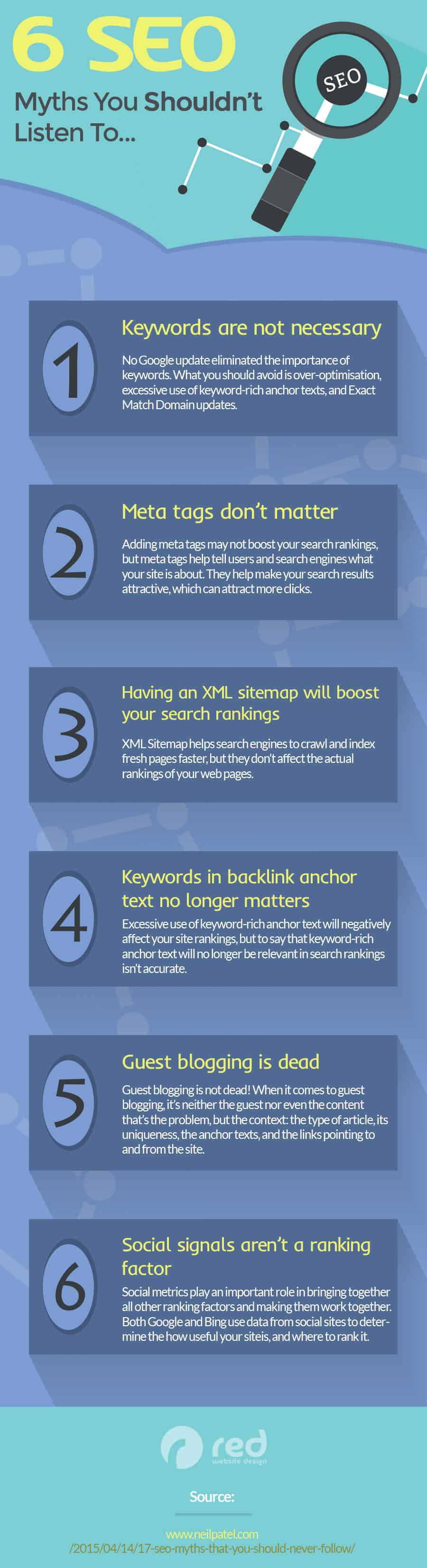
Search Engine Optimization (SEO) is a constantly evolving field, driven by frequent algorithm updates and shifts in user behavior. Yet, certain myths persist, steering many businesses off course and preventing them from achieving their desired search rankings. Here, we debunk six prevalent SEO myths that could be harming your website’s visibility.
Keywords are not necessary
One of the most damaging myths in the SEO world is the belief that keywords are no longer important. While it’s true that the days of keyword stuffing—cramming as many keywords as possible into your content—are long gone, keywords themselves remain crucial. Keywords serve as the bridge between what people are searching for and the content you are providing to fill that need. For small businesses, understanding and using keywords effectively can be the difference between obscurity and online success.
Understanding Keyword Importance
Search engines use keywords to understand the content of a page and determine its relevance to a user’s search query. Without relevant keywords, search engines may struggle to classify and rank your content correctly. Keywords are not just about visibility; they also help in aligning your content strategy with the actual needs and questions of your target audience.
Effective Keyword Research
- Use Keyword Research Tools:
- Tools like Google Keyword Planner, SEMrush, Ahrefs, and Ubersuggest can help identify popular keywords in your niche. These tools provide insights into search volume, competition, and related keywords, enabling you to make informed decisions.
- Understand User Intent:
- Keywords should reflect the intent behind a user’s search. There are typically three types of search intent:
- Navigational: Users looking for a specific website.
- Informational: Users seeking information or answers to questions.
- Transactional: Users ready to make a purchase or complete a specific action.
- Tailor your keywords to match these intents. For example, a bakery might use “best bakery near me” for navigational intent, “how to bake a cake” for informational intent, and “buy birthday cake online” for transactional intent.
- Keywords should reflect the intent behind a user’s search. There are typically three types of search intent:
- Focus on Long-Tail Keywords:
- Long-tail keywords are more specific phrases that visitors are likely to use when they are closer to making a purchase or finding the information they need. These keywords often have less competition and can lead to higher conversion rates. For example, instead of targeting “shoes,” a more effective long-tail keyword might be “comfortable running shoes for women.”
- Analyze Competitors:
- Look at the keywords your competitors are ranking for. Tools like Ahrefs or SEMrush can provide detailed competitor analysis. Understanding what works for your competitors can give you ideas for your own keyword strategy.
Strategic Keyword Placement
Once you’ve identified the right keywords, placing them strategically throughout your content is crucial:
- Title Tags:
- Incorporate your primary keyword into the title tag of your page. The title tag is one of the first things search engines and users see, so make it compelling and relevant.
- Meta Descriptions:
- While meta descriptions aren’t a direct ranking factor, they influence click-through rates. Include your primary keyword in the meta description to make it clear to users and search engines what your page is about.
- Headings (H1, H2, H3):
- Use your primary keyword in the H1 tag and related keywords in H2 and H3 tags. This structure helps search engines understand the hierarchy and main topics of your content.
- Content Body:
- Naturally incorporate your keywords throughout the content. Aim for a keyword density of around 1-2% and ensure the text reads naturally. Overuse of keywords can be penalized by search engines and deter readers.
- URL Slugs:
- Include your primary keyword in the URL slug to make it clear and descriptive. For example, a page about SEO tips might have a URL like “www.yourwebsite.com/seo-tips-for-small-businesses.
- Alt Text for Images:
- Use keywords in the alt text of images to improve the chances of your images ranking in search results. This also enhances accessibility for users with visual impairments.
Creating High-Quality Content
- Answer User Questions:
- Create content that addresses common questions and concerns of your target audience. Use tools like AnswerThePublic to find out what questions people are asking related to your keywords.
- Offer Value:
- Provide valuable, informative content that helps your audience. This not only improves user engagement but also encourages other sites to link to your content, boosting your SEO.
- Keep Content Updated:
- Regularly update your content to ensure it remains relevant and accurate. Search engines favor fresh content, and users appreciate up-to-date information.
- Use Synonyms and Related Terms:
- Incorporate synonyms and related terms to avoid keyword stuffing and make your content more comprehensive. Search engines are sophisticated enough to understand variations and related terms, enhancing your content’s relevance.
Monitoring and Adjusting
- Track Performance:
- Use tools like Google Analytics and Google Search Console to monitor the performance of your keywords. Pay attention to metrics like organic traffic, bounce rates, and conversion rates to gauge the effectiveness of your keyword strategy.
- A/B Testing:
- Conduct A/B testing on different keywords and placements to see what works best for your audience. This iterative approach allows you to refine your strategy over time.
- Adjust Based on Data:
- Be prepared to adjust your keyword strategy based on the data you collect. If certain keywords aren’t performing well, try different variations or focus on other keywords that show more promise.
Conclusion
Keywords remain an integral part of SEO, serving as the foundation for search engines to understand and rank your content. For small businesses, effective keyword research and strategic placement can lead to increased visibility, more traffic, and higher conversions. By focusing on quality content that meets the needs of your audience and using keywords thoughtfully, you can overcome the myth that keywords are not necessary and position your business for online success.
Meta tags don’t matter
Meta tags, including title tags and meta descriptions, are often misunderstood or overlooked. Some believe they hold no value in modern SEO practices. However, meta tags still play a significant role in SEO, albeit differently than in the past. For small businesses, properly utilizing meta tags can improve search engine rankings, drive more organic traffic, and enhance the user experience. Here’s a deep dive into why meta tags matter and how to optimize them effectively.
Understanding Meta Tags
Meta tags are snippets of text that describe a page’s content; they don’t appear on the page itself but only in the page’s source code. Meta tags are essentially little content descriptors that help tell search engines what a web page is about.
The Importance of Title Tags
Title tags are one of the most critical on-page SEO elements. They appear in three key places: the browser tab, search engine results pages (SERPs), and social networks. A well-crafted title tag can improve click-through rates (CTR) and help search engines understand the content’s relevance. Here are some tips for optimizing title tags:
- Incorporate Primary Keywords:
- Ensure your primary keyword appears in the title tag, preferably towards the beginning. This helps search engines understand the main topic of your page quickly.
- Keep it Concise:
- Google typically displays the first 50-60 characters of a title tag. Keeping your title within this limit ensures it appears fully in search results.
- Be Descriptive and Compelling:
- Create a title that accurately describes the page content and entices users to click. A good title tag strikes a balance between being keyword-rich and engaging.
- Include Your Brand Name:
- Adding your brand name at the end of the title tag can help build brand recognition. For example, “Effective SEO Strategies | YourBrandName.”
Crafting Effective Meta Descriptions
Meta descriptions, while not a direct ranking factor, influence user behavior. A persuasive and informative meta description can entice users to click on your link instead of a competitor’s. Here’s how to make the most of your meta descriptions:
- Summarize the Content:
- Provide a brief, compelling summary of what the page is about. Ensure it aligns with the content users will find upon clicking.
- Use Primary Keywords:
- Incorporate relevant keywords naturally. Google highlights the search query in the meta description, which can attract users’ attention.
- Focus on Benefits and Solutions:
- Highlight the benefits or solutions your content provides. For example, “Learn effective SEO strategies to boost your website traffic and improve rankings.
- Include a Call to Action:
- Encourage users to take action with phrases like “Learn more,” “Discover now,” or “Get started today.”
- Stay Within the Character Limit:
- Google typically truncates meta descriptions longer than 155-160 characters. Keep your meta descriptions concise and within this limit to ensure the full text is displayed.
Additional Meta Tags
Beyond title tags and meta descriptions, there are other meta tags that can be beneficial:
- Meta Keywords Tag:
- Historically, this tag was used to list keywords relevant to the page. However, due to abuse, it is no longer a ranking factor for major search engines like Google. It’s generally safe to ignore this tag.
- Robots Meta Tag:
- This tag instructs search engines on how to crawl and index your pages. For example, “index, follow” tells search engines to index the page and follow the links, while “noindex, nofollow” tells them not to index the page or follow any links.
- Viewport Meta Tag:
- This tag is crucial for responsive design. It ensures your website looks good on all devices by controlling the layout on mobile browsers. A common setting is <meta name=”viewport” content=”width=device-width, initial-scale=1.0″>.
Best Practices for Small Businesses
- Regularly Review and Update Meta Tags:
- As your content evolves, so should your meta tags. Regularly review and update them to ensure they remain relevant and optimized.
- Use Unique Meta Tags for Each Page:
- Avoid duplicate title tags and meta descriptions. Each page should have unique meta tags that accurately reflect its specific content.
- Test and Optimize:
- Use tools like Google Search Console to test different versions of your meta tags. Analyze which versions yield better CTRs and make data-driven adjustments.
- Monitor Competitors:
- Look at the meta tags of your top competitors. Identify patterns or strategies that seem effective and consider how you might incorporate similar techniques.
- Ensure Consistency with Content:
- Make sure your meta tags accurately represent the content on the page. Misleading meta tags can result in high bounce rates and negatively impact your SEO.
Tools for Meta Tag Optimization
- Yoast SEO (WordPress Plugin):
- Yoast provides a user-friendly interface for editing meta tags, along with real-time analysis and suggestions for improvement.
- Google Search Console:
- This tool helps you track the performance of your meta tags and identify issues. It also provides insights into how your pages appear in SERPs.
- SEMrush and Ahrefs:
- These tools offer comprehensive SEO analysis, including meta tag optimization suggestions and competitor analysis.
Common Mistakes to Avoid
- Keyword Stuffing:
- Overloading meta tags with keywords can lead to penalties from search engines. Focus on readability and relevance instead.
- Using Generic Descriptions:
- Avoid using the same meta description for multiple pages. Each description should be unique and tailored to the specific page content.
- Ignoring Mobile Optimization:
- Ensure your meta tags are optimized for mobile users. This includes using the viewport meta tag and keeping titles and descriptions concise.
Conclusion
Meta tags are a fundamental aspect of SEO that, when used correctly, can significantly impact your website’s visibility and user engagement. For small businesses, optimizing meta tags is a straightforward yet powerful way to improve search engine rankings and attract more visitors. By understanding the importance of title tags and meta descriptions, and implementing the best practices outlined above, you can ensure that your website is well-positioned to capture the attention of both search engines and users. Don’t fall for the myth that meta tags don’t matter—embrace their potential and watch your online presence grow.
Having a sitemap will boost your rankings
Sitemaps are vital for ensuring that search engines can crawl and index your website effectively, but having a sitemap alone won’t boost your rankings. The myth that simply submitting a sitemap to search engines will result in higher rankings is widespread but misguided. For small businesses, understanding the true value of sitemaps and how to use them effectively can make a significant difference in SEO performance. Here’s an in-depth look at sitemaps and how to leverage them for better search engine visibility.
Understanding Sitemaps
A sitemap is a file that provides information about the pages, videos, and other files on your site, and the relationships between them. Search engines like Google read this file to more intelligently crawl your site. There are two main types of sitemaps:
- XML Sitemaps:
- Primarily designed for search engines, an XML sitemap lists a website’s important pages to ensure they can be found and crawled. This is particularly useful for large websites, new websites, or websites with complex structures.
- HTML Sitemaps:
- Created for users, an HTML sitemap is a clickable list of pages on a website. It helps visitors find specific pages and also benefits SEO by improving internal linking and site navigation.
The Role of Sitemaps in SEO
While a sitemap doesn’t directly boost rankings, it aids in ensuring that all your site’s pages are indexed by search engines. This indirect benefit can contribute to better SEO performance over time. Here’s how sitemaps assist in SEO:
- Improved Crawl Efficiency:
- Sitemaps help search engines discover and crawl all the important pages on your website, especially those that are not well-linked internally or are new.
- Highlighting Key Content:
- By listing the most important pages and their last modified dates, sitemaps can help search engines prioritize crawling and indexing these pages.
- Indexing Multimedia and News Content:
- Specialized sitemaps can help search engines index images, videos, and news articles more efficiently, ensuring this content appears in relevant search results.
Creating an Effective Sitemap
For small businesses, creating and maintaining an effective sitemap involves several key steps:
- Use a Sitemap Generator Tool:
- Tools like Google XML Sitemaps (for WordPress), Screaming Frog, and XML-Sitemaps.com can automatically generate an XML sitemap for your website.
- Include Important Pages:
- Ensure your sitemap includes all important pages, such as those that provide value to your users and contribute to your business goals. Exclude low-value or duplicate content pages.
- Prioritize High-Quality Content:
- Highlight pages with unique, valuable content. Use the <priority> tag in your XML sitemap to indicate the relative importance of different pages, although it’s not a major factor for search engines.
- Update Regularly:
- Keep your sitemap up to date. Whenever you add new content or make significant changes to your site, update your sitemap to reflect these changes.
Submitting Your Sitemap to Search Engines
Once your sitemap is created, the next step is to submit it to major search engines. Here’s how:
- Google Search Console:
- Sign in to Google Search Console.
- Select your website property.
- Go to the “Sitemaps” section under “Index”.
- Enter the URL of your sitemap and click “Submit”.
- Bing Webmaster Tools:
- Sign in to Bing Webmaster Tools.
- Select your site.
- Go to the “Sitemaps” section.
- Enter your sitemap URL and click “Submit”.
Best Practices for Maintaining Your Sitemap
- Monitor Your Sitemap:
- Regularly check for errors or issues in Google Search Console and Bing Webmaster Tools. Fix any reported problems promptly.
- Ensure Proper URL Formatting:
- Use absolute URLs in your sitemap. This helps avoid confusion and ensures that each URL is unique and correctly referenced.
- Limit the Number of URLs:
- An XML sitemap should not contain more than 50,000 URLs or be larger than 50MB. If your site exceeds these limits, break the sitemap into smaller sitemaps and create a sitemap index file.
- Keep URLs Consistent:
- Ensure that the URLs in your sitemap match the canonical URLs of your pages. Consistency helps avoid indexing issues and duplicate content problems.
Leveraging HTML Sitemaps
In addition to XML sitemaps, HTML sitemaps can also enhance SEO and user experience. Here’s how to use them effectively:
- Enhance User Navigation:
- An HTML sitemap provides a clear, hierarchical view of your site’s structure, helping visitors quickly find the information they need.
- Improve Internal Linking:
- HTML sitemaps can improve internal linking, which is beneficial for SEO. By linking to important pages from your HTML sitemap, you help distribute link equity throughout your site.
- Accessibility Benefits:
- HTML sitemaps enhance accessibility for users with disabilities who rely on screen readers to navigate websites.
- Regular Updates:
- Like XML sitemaps, keep your HTML sitemap up to date with new and modified pages.
Common Mistakes to Avoid
- Ignoring Sitemap Errors:
- Regularly check for and fix errors in your sitemap submissions. Errors can prevent search engines from fully indexing your site.
- Including Low-Value Pages:
- Avoid listing pages with thin content, duplicate content, or pages that are irrelevant to search engines. Focus on quality over quantity.
- Failing to Update:
- Ensure your sitemap reflects the current state of your website. An outdated sitemap can lead to indexing issues and missed opportunities.
- Not Using Sitemap Index Files:
- For large websites, use sitemap index files to manage multiple sitemaps efficiently. This approach ensures that all important pages are indexed without exceeding size limits.
Conclusion
Having a sitemap is essential for ensuring that search engines can crawl and index your website effectively, but it’s not a magic bullet for higher rankings. For small businesses, creating and maintaining an effective sitemap is part of a broader SEO strategy that includes quality content, proper keyword usage, and excellent user experience. By understanding the true value of sitemaps and following best practices, you can improve your site’s visibility and ensure that all your valuable content is discoverable by search engines. Don’t fall for the myth that a sitemap alone will boost your rankings—use it as a tool to support a comprehensive SEO strategy.
Keywords in anchor text no longer matters
Anchor text, the clickable text in a hyperlink, has historically been a significant ranking factor. Some argue that its importance has diminished, but that’s not entirely accurate. The use of keywords in anchor text still plays a role in SEO, albeit with more caution required than before. For small businesses, understanding how to use anchor text effectively can enhance both SEO and user experience. Here’s a detailed guide on how to make the most of keywords in anchor text.
The Role of Anchor Text in SEO
Anchor text helps search engines understand the context and relevance of the linked page. It signals what the linked page is about, which can influence how it ranks in search results. Proper use of anchor text can improve a page’s visibility for specific keywords and enhance the overall SEO strategy of your website.
Types of Anchor Text
- Exact Match:
- Contains the exact keyword for which the target page is optimized. For example, if you are linking to a page about “SEO tips,” the anchor text would be “SEO tips.”
- Partial Match:
- Includes a variation of the keyword. For instance, “effective SEO tips” when linking to the same page.
- Branded:
- Uses the brand name as the anchor text. For example, “YourCompanyName” linking to your homepage.
- Generic:
- Uses generic terms like “click here” or “read more.” While easy to use, they provide no context about the linked page to search engines.
- Naked URLs:
- Uses the URL itself as the anchor text, such as “www.yourwebsite.com.”
- Image Alt Text:
- When an image is linked, the alt text of the image serves as the anchor text. It’s essential to ensure alt text is descriptive and relevant.
Best Practices for Using Keywords in Anchor Text
- Diversify Anchor Text:
- Avoid overusing exact match anchor text, as it can appear manipulative to search engines and lead to penalties. Use a mix of exact match, partial match, branded, and generic anchor texts.
- Focus on Relevance:
- Ensure the anchor text is relevant to both the linking and linked pages. Relevance helps search engines understand the relationship between the pages and improves user experience.
- Avoid Over-Optimization:
- Overuse of keyword-rich anchor text can be seen as spammy. Aim for natural language and context. For instance, instead of repeatedly using “best SEO services,” use variations like “learn more about our SEO services.”
- Use Descriptive Text:
- Descriptive anchor text gives users and search engines a clear idea of what to expect from the linked page. For example, “discover effective SEO strategies” is more informative than “click here.”
- Incorporate Long-Tail Keywords:
- Long-tail keywords in anchor text can be beneficial, especially for niche topics. They often have less competition and can be more specific to user intent.
Strategic Placement of Anchor Text
- Internal Linking:
- Internal links help distribute link equity throughout your site and improve navigation. Use keyword-rich anchor text for internal links to signal relevance to search engines.
- External Linking:
- When linking to external sites, ensure the anchor text is relevant to the content of the linked page. This practice not only aids SEO but also builds credibility with users.
- Contextual Links:
- Place anchor text within the context of the surrounding content. Contextual links are more valuable than those placed in footers or sidebars.
- Navigation Links:
- Use clear and descriptive anchor text in your site’s navigation to enhance user experience and provide search engines with context about your site’s structure.
Monitoring and Analyzing Anchor Text
- Use SEO Tools:
- Tools like Ahrefs, SEMrush, and Moz can help you analyze your anchor text profile. Look for patterns, over-optimization, or gaps in your anchor text strategy.
- Check for Spammy Links:
- Regularly audit your backlink profile for spammy or irrelevant links. Disavow links that could harm your site’s credibility.
- Track Performance:
- Monitor the performance of pages linked with various anchor texts. Use metrics like organic traffic, bounce rates, and conversion rates to assess effectiveness.
Common Mistakes to Avoid
- Overusing Exact Match Anchor Text:
- While it’s tempting to use exact match keywords frequently, it can lead to penalties. Balance your use with other types of anchor text.
- Using Generic Anchor Text:
- Generic terms like “click here” or “read more” provide no context to search engines. Use more descriptive, relevant text to enhance SEO.
- Ignoring Anchor Text Variations:
- Variety is key. Use different variations of your keywords to create a natural link profile.
- Linking to Irrelevant Pages:
- Ensure that the linked pages are relevant to the anchor text and the content of the page where the link is placed.
Leveraging Anchor Text for Local SEO
- Use Location-Based Keywords:
- For local SEO, include location-based keywords in your anchor text. For example, “best pizza in Chicago” if linking to a Chicago-based pizzeria.
- Link to Local Listings:
- Use anchor text to link to your business’s local listings, such as Google My Business or Yelp. This can help boost your local search visibility.
- Partner with Local Businesses:
- Collaborate with local businesses to exchange backlinks. Use relevant, location-based anchor text to enhance local SEO.
Conclusion
Keywords in anchor text still matter and play a crucial role in SEO. For small businesses, understanding and applying best practices for anchor text can enhance search engine rankings and improve user experience. By diversifying anchor text, focusing on relevance, avoiding over-optimization, and strategically placing links, you can leverage anchor text effectively. Regular monitoring and analysis will ensure your anchor text strategy remains robust and aligned with SEO goals. Don’t fall for the myth that keywords in anchor text no longer matter—use them wisely to support your broader SEO strategy and achieve better visibility online.
Guest blogging is dead
Guest blogging has faced scrutiny over the years, leading some to declare it dead as an SEO strategy. This misconception stems from Google’s warnings against spammy guest blogging practices used solely for link building. However, guest blogging, when done correctly, remains a valuable SEO tactic. For small businesses, it offers an opportunity to reach new audiences, build authority, and enhance their online presence. Here’s an in-depth look at how to effectively use guest blogging for SEO and overall digital marketing success.
The Evolution of Guest Blogging
Guest blogging initially gained popularity as a method for acquiring backlinks, which are crucial for SEO. However, as the practice became widespread, it also became abused. Many marketers engaged in low-quality, spammy guest blogging purely for the sake of obtaining links. This led to Google’s crackdown, with guidelines and penalties introduced to combat manipulative link-building tactics.
Despite this, guest blogging is far from dead. When approached with quality and relevance in mind, it can be a powerful strategy to drive traffic, build brand authority, and improve SEO.
Benefits of Guest Blogging
- Increased Exposure:
- Guest blogging on reputable sites allows you to tap into established audiences, driving traffic back to your site.
- Enhanced Authority:
- Publishing high-quality content on authoritative blogs positions you as an expert in your field, building credibility and trust.
- Quality Backlinks:
- When done correctly, guest blogging provides valuable backlinks that can enhance your site’s SEO.
- Networking Opportunities:
- Collaborating with other bloggers and industry leaders can lead to further opportunities, including partnerships and collaborations.
Tips for Successful Guest Blogging
- Identify Relevant Blogs:
- Focus on blogs that are relevant to your industry and have an engaged, active audience. Tools like Ahrefs and SEMrush can help identify authoritative blogs in your niche.
- Research the Blog’s Audience:
- Understand the audience of the blog you’re targeting. This ensures your content is relevant and valuable to the readers.
- Create High-Quality Content:
- Your guest posts should be well-researched, informative, and engaging. Aim to provide unique insights or valuable information that benefits the audience.
- Follow the Blog’s Guidelines:
- Adhere to the guest post guidelines provided by the blog. This includes word count, formatting, and content style. Failing to follow these guidelines can result in rejection.
- Include a Relevant Bio:
- Your author bio is crucial for driving traffic back to your site. Include a brief, compelling bio with a link to your website or a specific landing page.
- Avoid Overly Promotional Content:
- Focus on providing value rather than promoting your products or services. Overly promotional content can be a turnoff for readers and may not be accepted by the blog.
How to Pitch Guest Posts
- Personalize Your Pitch:
- Address the blog owner or editor by name and show that you’ve done your homework. Mention specific posts you’ve enjoyed or found valuable.
- Propose Relevant Topics:
- Suggest topics that are relevant to the blog’s audience and that haven’t been covered extensively. Highlight how your post will benefit their readers.
- Showcase Your Expertise:
- Provide links to your previous work or examples of similar content you’ve created. This helps establish your credibility and writing ability.
- Be Concise and Professional:
- Keep your pitch brief and to the point. Clearly outline your proposed topic and why it’s a good fit for the blog.
Creating Effective Guest Posts
- Engage with the Audience:
- Write in a conversational tone that resonates with the blog’s audience. Encourage comments and interaction to foster engagement.
- Use Visuals:
- Incorporate images, infographics, or videos to make your post more engaging and visually appealing.
- Optimize for SEO:
- Use relevant keywords naturally within your content. Include internal links to other posts on the blog and external links to authoritative sources.
- Promote Your Guest Post:
- Share your guest post on your social media channels and email newsletters. This drives additional traffic to the post and demonstrates your commitment to the collaboration.
Monitoring and Measuring Success
- Track Referral Traffic:
- Use tools like Google Analytics to track the traffic coming from your guest posts. Monitor how visitors engage with your site and whether they convert into leads or customers.
- Analyze SEO Impact:
- Use SEO tools to monitor the impact of backlinks obtained through guest blogging. Track improvements in your site’s search rankings and overall domain authority.
- Engage with Comments:
- Respond to comments on your guest post to engage with readers and build relationships. This also increases the visibility and reach of your post.
- Evaluate Long-Term Benefits:
- Assess the long-term benefits of your guest blogging efforts. Look at ongoing traffic, SEO improvements, and any new opportunities or partnerships that arise from your guest posts.
Common Mistakes to Avoid
- Targeting Irrelevant Blogs:
- Posting on blogs that are not relevant to your industry or audience can dilute your message and provide little value.
- Low-Quality Content:
- Submitting poorly written or researched content can harm your reputation and reduce the chances of being accepted for future guest posts.
- Ignoring Guidelines:
- Failing to follow the blog’s submission guidelines can result in rejection. Always review and adhere to the specific requirements of each blog.
- Being Overly Promotional:
- Focusing too much on promoting your business can turn off readers and editors. Provide valuable content first and foremost.
Leveraging Guest Blogging for Local SEO
- Focus on Local Blogs:
- Identify and target local blogs or community sites. This can help improve your local SEO and increase visibility within your community.
- Use Local Keywords:
- Incorporate local keywords in your guest posts to enhance relevance for local search queries.
- Highlight Local Involvement:
- Share stories or examples of your business’s involvement in the local community. This builds local credibility and trust.
Conclusion
Guest blogging is not dead; it has simply evolved. For small businesses, it remains a powerful strategy to build authority, drive traffic, and enhance SEO when done correctly. By focusing on quality, relevance, and value, small businesses can effectively leverage guest blogging to reach new audiences and achieve their digital marketing goals. Don’t fall for the myth that guest blogging is no longer effective—embrace it as a key component of your SEO strategy and watch your online presence grow.
Social signals aren’t a ranking factor
The role of social signals—likes, shares, and comments on social media—in SEO is a topic of much debate. While social signals are not direct ranking factors, dismissing their impact on SEO is a mistake. Social media activity can influence SEO indirectly by driving traffic, increasing engagement, and building brand awareness. For small businesses, leveraging social signals effectively can lead to better overall online visibility and improved search engine rankings. Here’s an in-depth look at how social signals impact SEO and how to harness their potential.
Understanding Social Signals
Social signals are actions taken by users on social media platforms such as likes, shares, retweets, and comments. These actions indicate user engagement and can lead to increased visibility and traffic. While search engines like Google have stated that social signals are not used directly in their ranking algorithms, the indirect benefits they provide are substantial.
The Indirect Impact of Social Signals on SEO
- Increased Traffic:
- Content that is widely shared on social media can drive significant traffic to your website. Increased traffic can lead to higher engagement metrics, such as longer visit duration and lower bounce rates, which are positive signals to search engines.
- Enhanced Brand Awareness:
- A strong social media presence helps build brand awareness. As more people become familiar with your brand, they are more likely to search for it directly, leading to more branded searches, which can positively impact your SEO.
- Improved Link Building:
- Content that gains traction on social media has a higher chance of being noticed by bloggers, journalists, and influencers who may link to it. High-quality backlinks from reputable sites are a critical ranking factor.
- Content Indexing:
- Social media can help search engines discover new content faster. When your content is shared widely, search engine bots may index it more quickly, improving its chances of appearing in search results sooner.
- Local SEO Benefits:
- Social signals can enhance local SEO efforts by increasing visibility within your community. Positive reviews, check-ins, and local shares can boost your local search presence.
Strategies for Leveraging Social Signals
- Create Shareable Content:
- Focus on creating high-quality, engaging content that resonates with your audience. Infographics, videos, and listicles tend to perform well on social media. Ensure your content is visually appealing and provides value.
- Optimize Social Media Profiles:
- Make sure your social media profiles are complete and optimized. Use relevant keywords in your bio and descriptions, and include links to your website. A consistent and professional presence builds credibility.
- Engage with Your Audience:
- Actively engage with your followers by responding to comments, participating in discussions, and sharing user-generated content. Building a community around your brand encourages more interaction and shares.
- Use Hashtags Strategically:
- Utilize relevant hashtags to increase the reach of your posts. Research popular and trending hashtags in your industry and incorporate them into your content strategy.
- Leverage Influencers:
- Partner with influencers in your niche to amplify your content’s reach. Influencers can introduce your brand to a wider audience, driving more traffic and engagement.
- Encourage Social Sharing:
- Add social sharing buttons to your website and blog posts to make it easy for visitors to share your content. You can also run contests or promotions to incentivize sharing.
Measuring the Impact of Social Signals
- Monitor Social Engagement:
- Use social media analytics tools like Facebook Insights, Twitter Analytics, and Instagram Insights to track likes, shares, comments, and overall engagement. Monitor which types of content perform best and adjust your strategy accordingly.
- Analyze Traffic with Google Analytics:
- Use Google Analytics to track the traffic coming from social media platforms. Look at metrics such as visit duration, bounce rate, and conversion rate to understand the quality of traffic.
- Track Backlinks:
- Use tools like Ahrefs, Moz, or SEMrush to monitor backlinks generated from social media activity. Identify which content pieces are attracting the most links and replicate their success.
- Assess Brand Mentions:
- Use tools like Mention, Brand24, or Google Alerts to track mentions of your brand on social media. Increased brand mentions can correlate with higher brand awareness and search volume.
Common Mistakes to Avoid
- Neglecting Quality:
- Avoid focusing solely on quantity over quality. High-quality content is more likely to be shared and engaged with, providing more substantial SEO benefits.
- Ignoring Negative Feedback:
- Don’t ignore negative comments or reviews on social media. Address them professionally and constructively to show that you value customer feedback.
- Inconsistent Posting:
- Consistency is key in social media marketing. Develop a content calendar and stick to a regular posting schedule to maintain engagement and visibility.
- Overlooking Platform Differences:
- Each social media platform has its own unique audience and best practices. Tailor your content and approach to fit the specific platform rather than using a one-size-fits-all strategy.
Advanced Tactics for Maximizing Social Signals
- Create Viral Content:
- Craft content that has the potential to go viral. This often includes emotional, humorous, or highly informative pieces that resonate deeply with a broad audience.
- Host Live Events:
- Live streaming on platforms like Facebook, Instagram, and YouTube can drive real-time engagement and interaction. Live Q&A sessions, product launches, and behind-the-scenes content can captivate your audience.
- Utilize Paid Social Advertising:
- Boost your best-performing organic posts with paid social advertising. This can expand your reach and increase the likelihood of gaining more social signals.
- Incorporate User-Generated Content:
- Encourage your customers to create and share content related to your brand. User-generated content can be incredibly influential and add authenticity to your brand.
- Analyze Competitors:
- Study your competitors’ social media strategies. Identify what’s working for them and incorporate similar tactics into your own strategy.
Integrating Social Media with SEO Efforts
- Content Promotion:
- Use social media to promote your blog posts, articles, and other content. Increased traffic and engagement from social media can lead to more shares and backlinks.
- Keyword Integration:
- Incorporate relevant keywords into your social media posts and profiles. This helps in being discovered through social media searches and enhances your overall SEO strategy.
- Cross-Promotion:
- Promote your social media profiles on your website and email newsletters. Encourage website visitors to follow you on social media and vice versa.
- Create Social-Specific Content:
- Develop content specifically for social media that complements your SEO content. For example, create a summary video of a blog post or an infographic that highlights key points.
Conclusion
While social signals may not be direct ranking factors, their indirect impact on SEO is undeniable. For small businesses, effectively leveraging social media can drive traffic, enhance brand awareness, and improve overall search engine visibility. By creating shareable content, engaging with your audience, and integrating social media efforts with your SEO strategy, you can harness the power of social signals to support your broader digital marketing goals. Don’t fall for the myth that social signals don’t matter—use them to your advantage and watch your online presence grow.
Conclusion
Navigating the world of SEO can be challenging, especially with so many myths circulating. By understanding and debunking these six myths, you can refocus your efforts on strategies that genuinely impact your search rankings. Remember, SEO is about creating valuable, relevant content that meets the needs of your audience while adhering to best practices that help search engines understand and rank your site effectively.

Author:
Mark Ford



