Are you trying to grow your presence and engagement on LinkedIn this year? Want to know which tools top creators are using to save time, boost visibility, and stand out in 2025?
You’ll find some LinkedIn basics in this infographic.
Here’s a summary of what’s covered:
- Design Tools
- Image Tools
- Video Resources
- Idea Generation Tools
- Audio Tools
- Video Editing Tools
- Writing Tools
Check out the post below for more.
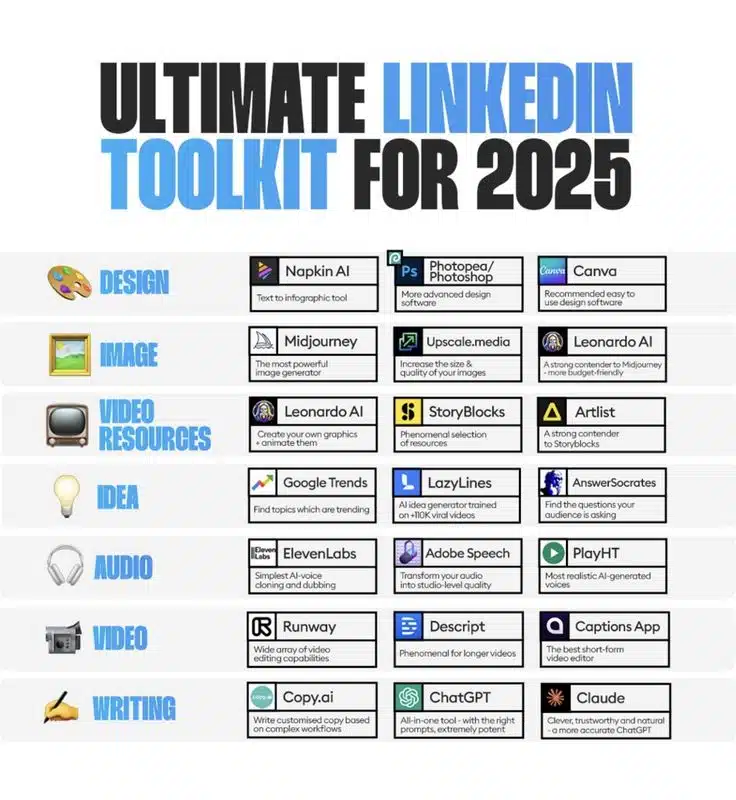
Whether you’re a content strategist, solopreneur, or industry thought leader, LinkedIn remains one of the most powerful platforms for growing your personal brand and business. But in 2025, standing out takes more than a good post—it requires the right tools.
From design to video editing, AI is reshaping how creators produce and promote content. In this post, we’ll break down the essential tools across seven key categories to help you optimise your LinkedIn strategy.
Design Tools
Effective LinkedIn visuals can stop the scroll and increase engagement instantly. Whether you’re creating infographics, banners, or branded carousels, having the right design tools is non-negotiable. These platforms make professional-quality visuals accessible to creators of all skill levels.
- Napkin AI: Instantly convert text into polished infographics.
- Photopea/Photoshop: Access robust image editing without premium software.
- Canva: Create branded graphics and templates with ease.
- Tip: Use consistent colours and fonts to maintain visual identity.
Image Tools
Eye-catching imagery plays a vital role in LinkedIn content. From concept art to sharp product visuals, these tools help you generate, enhance, and refine your images. Even non-designers can now produce professional-grade graphics thanks to AI-driven platforms.
- Midjourney: Generate high-quality, creative visuals from prompts.
- Upscale.media: Improve resolution for sharper, crisper images.
- Leonardo AI: A versatile alternative to Midjourney, great for detailed outputs.
- Tip: Use AI images to bring blog headlines or post quotes to life.
Video Resources
Video continues to dominate on LinkedIn, from short reels to detailed explainers. These tools give creators access to premium stock, sound, and animations to elevate video content. Whether you’re telling a story or educating your audience, visual depth matters.
- Leonardo AI: Animate custom graphics for unique content.
- StoryBlocks: Pull from a vast collection of video and audio clips.
- Artlist: Great for budget-friendly music and stock video assets.
- Tip: Mix stock elements with personal footage to boost authenticity.
Idea Generation Tools
Running out of content ideas? These tools help you stay on top of trends, understand what your audience cares about, and spark creativity. By analysing search behaviour and viral content formats, you can craft posts that land better and travel further.
- Google Trends: Discover rising topics in your industry.
- LazyLines: Generate scripts for high-engagement viral videos.
- AnswerSocrates: See the exact questions your audience is asking.
- Tip: Build a content calendar based on trending themes and FAQs.
Audio Tools
High-quality audio can transform how your audience experiences your content—especially in video posts, webinars, and podcasts. These AI tools make voiceovers, dubbing, and audio enhancement easier than ever, even without a recording studio.
- ElevenLabs: Clone your voice for consistent narration across videos.
- Adobe Speech: Automatically enhance audio clarity and remove background noise.
- PlayHT: Create realistic AI voiceovers in multiple styles.
- Tip: Use different voices to match your brand tone or content format.
Video Editing Tools
Whether you’re cutting short clips or editing in-depth explainers, video editing is easier than ever thanks to AI. These platforms simplify the process with intuitive interfaces and automation, helping you deliver slick, shareable content faster.
- Runway: Offers a wide range of creative editing tools powered by AI.
- Descript: Edit video by editing text—ideal for long-form content.
- Captions App: Create engaging, subtitled short-form videos for LinkedIn.
- Tip: Add captions to every video—most LinkedIn users watch without sound.
Writing Tools
At the heart of any LinkedIn strategy is writing—whether you’re scripting a video, writing a post, or planning an article. These tools help streamline the content creation process and give you AI-enhanced suggestions to write faster and better.
- Copy.ai: Create compelling post copy from a few inputs or ideas.
- ChatGPT: Use for content planning, headline generation, and rewriting.
- Claude: A more natural and context-aware AI for detailed posts.
- Tip: Use writing tools to A/B test post variations and see what performs best.
Conclusion
LinkedIn in 2025 is driven by innovation—and creators who embrace the right tools will have a clear edge. Whether you need help with visuals, voiceovers, or viral ideas, there’s an AI-powered tool ready to support your strategy.
Use this toolkit as your starting point to experiment, refine your workflow, and elevate your LinkedIn presence. Because when you combine great ideas with the right execution tools, there’s no limit to what you can achieve.

Author:
Mark Ford