

Has it been a while since you last updated your website design? Looking for some ideas to bring it up to date with modern trends?
In the ever-evolving digital landscape, your website is often the first interaction potential customers have with your brand. It’s your digital storefront, your online presence, and it should reflect the latest trends and technologies to leave a lasting impression.
If your website feels old and outdated, it’s time for a refresh. In this blog post, we’ll explore some modern web design and development trends that will breathe new life into your online presence.
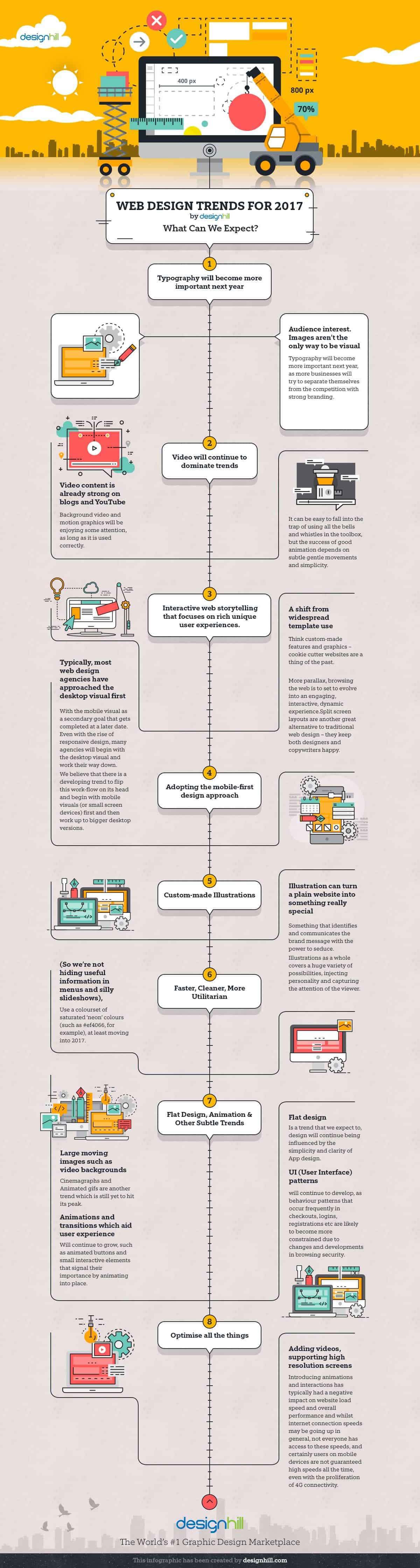
Designhill share their web design trends to consider in this infographic.
The Need for a Modern Website
Before diving into the latest trends, let’s discuss why having a modern website is crucial for your business.
1. User Experience (UX)
User experience is at the forefront of modern web design. An outdated website can frustrate visitors, leading to high bounce rates and lost opportunities. A modern website focuses on providing a seamless, user-friendly experience, making it easier for visitors to navigate, find information, and take desired actions.
2. Mobile Responsiveness
With the majority of internet traffic coming from mobile devices, having a mobile-responsive website is non-negotiable. If your website isn’t optimized for smartphones and tablets, you’re missing out on a significant chunk of your potential audience.
3. SEO and Ranking
Search engines like Google prioritize websites that offer a great user experience, are mobile-responsive, and follow modern web standards. An outdated website may suffer in search engine rankings, leading to decreased visibility and traffic.
4. Brand Perception
Your website is a reflection of your brand. An outdated website can give the impression that your business is behind the times or unprofessional. Conversely, a modern website can boost your brand’s credibility and trustworthiness.
Modern Web Design Trends
Now that we understand why modernizing your website is essential, let’s explore the top web design trends that can help you achieve a fresh and contemporary look.
1. Minimalistic Design
Less is often more in modern web design. Minimalistic design focuses on simplicity, clean lines, ample white space, and a limited color palette. This approach not only looks aesthetically pleasing but also enhances the user’s ability to focus on the content and key elements of the website.
2. Bold Typography
Typography can make or break your website’s visual appeal. Modern websites are embracing bold and expressive typography to create memorable impressions. Large, readable fonts with unique styles can help convey your brand’s personality and message effectively.
3. Dark Mode
Dark mode has gained popularity as it reduces eye strain and conserves battery life on mobile devices. Implementing a dark mode option on your website can improve user experience and give your site a modern edge.
4. Asymmetry and Broken Grid Layouts
Breaking away from traditional grid layouts, modern websites often use asymmetry and broken grid layouts to create unique and dynamic designs. This trend adds a sense of creativity and movement to web pages, making them more engaging.
5. Microinteractions
Microinteractions are subtle animations and feedback elements that respond to user actions. They enhance user engagement and make the website feel more interactive and responsive. Examples include animated buttons, hover effects, and loading animations.
6. 3D Elements and Illustrations
Adding depth to your website through 3D elements and illustrations can create a visually stunning experience. These elements can be used for storytelling, product showcases, or simply to grab users’ attention.
7. Video Backgrounds
Video backgrounds are an excellent way to convey your message and capture users’ attention immediately. They can be used to tell a story, showcase a product, or create a captivating atmosphere on your website’s homepage.
8. Custom Graphics and Icons
Stock photos and generic icons are out. Modern websites opt for custom graphics and icons that align with their brand identity and convey a unique message. Custom visuals help your website stand out and feel more authentic.
9. Accessibility
Ensuring that your website is accessible to all users, including those with disabilities, is a modern trend driven by inclusivity and compliance with accessibility standards. Features like alt text for images, keyboard navigation, and proper HTML semantics are essential for accessibility.
Modern Web Development Trends
A modern website isn’t just about design; it’s also about the underlying technology and functionality. Here are some web development trends to consider:
1. Progressive Web Apps (PWAs)
PWAs combine the best of web and mobile apps. They provide fast loading, offline capabilities, and a native app-like experience. PWAs are a game-changer for user engagement and retention.
2. Single Page Applications (SPAs)
SPAs load a single HTML page and dynamically update content as the user interacts with the site. This results in faster load times and a smoother user experience. Popular JavaScript frameworks like React, Angular, and Vue.js are commonly used for building SPAs.
3. Headless CMS
Traditional content management systems (CMS) are giving way to headless CMS solutions. Headless CMS separates content from the presentation layer, allowing for greater flexibility in delivering content across various platforms and devices.
4. Serverless Architecture
Serverless computing allows developers to focus on writing code without the need to manage servers. It can significantly reduce hosting costs and improve scalability.
5. API-First Development
API-first development involves designing and building the application’s backend as a set of reusable APIs. This approach makes it easier to integrate with third-party services and ensures flexibility and scalability.
6. Motion UI
Motion UI involves adding animations and transitions to web interfaces to create a more engaging user experience. When used appropriately, motion UI can guide users, provide feedback, and enhance overall usability.
7. Voice Search Optimization
With the rise of voice-activated devices like smart speakers and virtual assistants, optimizing your website for voice search is becoming increasingly important. Structuring content to answer voice queries and providing concise, informative responses can boost your website’s visibility in voice search results.
8. Cybersecurity
As cyber threats continue to evolve, website security is paramount. Implementing robust security measures, such as SSL certificates, regular security audits, and user data protection, is a modern trend that safeguards your website and user data.
Putting It All Together
Modernizing your website involves more than just adopting the latest design and development trends. It requires a thoughtful approach that considers your brand identity, target audience, and business goals. Here’s a step-by-step guide to help you get started:
1. Define Your Goals
Identify the primary objectives of your website redesign. Are you looking to increase conversions, improve user engagement, or showcase your products and services more effectively?
2. Know Your Audience
Understand your target audience’s preferences, behaviors, and expectations. Tailor your website design and content to cater to their needs.
3. Choose the Right Design Elements
Select design elements that align with your brand identity and convey your message effectively. Don’t just follow trends blindly; ensure they enhance your website’s user experience.
4. Optimize for Performance
Pay attention to website performance by optimizing load times and ensuring responsiveness on various devices and browsers. Slow-loading websites can drive visitors away.
5. Prioritize Accessibility
Make your website accessible to all users, including those with disabilities. Consider incorporating accessibility testing and compliance into your development process.
6. Stay Updated
The digital landscape is ever-changing. Regularly update your website to stay current with design and technology trends. An outdated website can quickly lose relevance.
7. Test and Iterate
Test your website with real users and gather feedback. Use this information to make iterative improvements and enhance the overall user experience.
Conclusion
Your website is your digital storefront, and it should always reflect the latest trends and technologies to stay competitive in today’s digital landscape. Modernizing your website isn’t just about aesthetics; it’s about providing an exceptional user experience, staying ahead of the competition, and effectively communicating your brand’s message.
By embracing modern web design and development trends, such as minimalistic design, bold typography, accessibility, and progressive web apps, you can revitalize your online presence and create a website that captivates and converts visitors. So, don’t let your website become old and dated—follow these modern trends to thrive in the digital age.

Author:
Mark Ford

Mastering the Art of the Landing Page: Design, Copy, and Conversion in Harmony
Are you trying to design a landing page that not only looks great but actually converts visitors into customers? Want to learn how to balance design, copy, and strategy to create landing pages that work in perfect harmony? […]


