

Are you concerned about the security of your personal data online? Want to learn more about the information big data companies collect about you?
Security Baron share the information you need to know in this infographic.
They include the data captured by the following companies:
- Apple
- Amazon
- Microsoft
Check out the infographic for more detail.
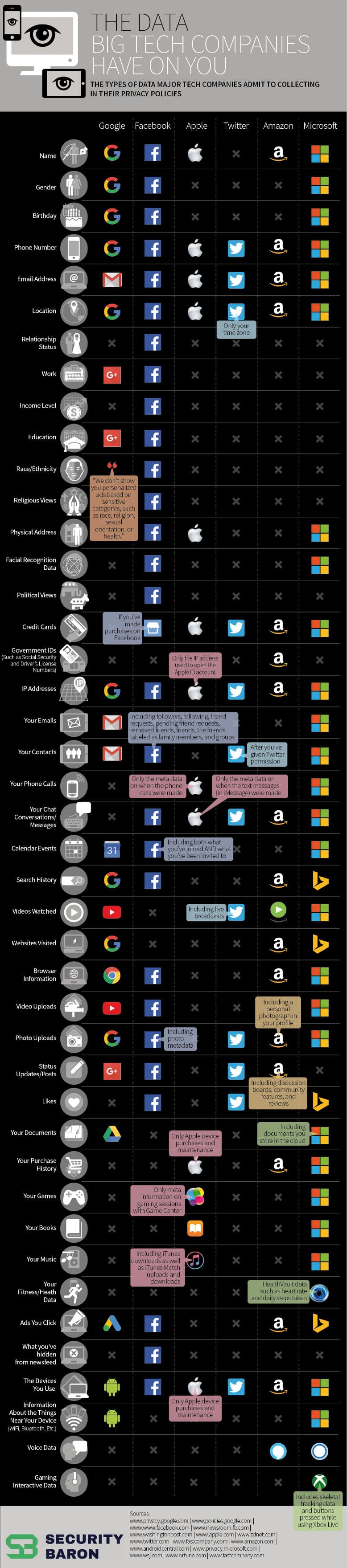
In the digital age, tech giants like Google, Facebook, Apple, Twitter, Amazon, and Microsoft have become essential parts of our daily lives. Whether it’s for searching the web, staying connected on social media, or shopping online, we rely on these platforms for convenience. However, this convenience comes with a price—your data. These companies collect vast amounts of personal information, some of which may surprise you. Let’s break down what each of these tech giants knows about you and how they use your data.
Google: The King of Data
For small businesses, understanding how Google collects and uses data is not only essential for privacy but also for optimizing digital marketing strategies. Google offers a wide range of tools and services that help businesses operate more efficiently, reach target audiences, and generate leads. However, the same tools that benefit small businesses also collect significant amounts of data from both business owners and their customers. Let’s dive deeper into what Google knows about users and how small businesses can leverage this knowledge effectively.
Search History: Tapping Into User Intent
Every search query made through Google is recorded and linked to a user’s profile, creating a goldmine of information about customer behavior, interests, and pain points. For small businesses, Google Search data offers incredible insights into what potential customers are searching for, which in turn can shape content strategy, SEO practices, and paid advertising efforts.
How Small Businesses Can Use This:
- Optimize for SEO: By understanding the search queries your target audience is using, you can optimize your website with relevant keywords. Tools like Google Search Console and Google Analytics provide insights into which queries are driving traffic to your site. Small businesses can then tailor content to these high-volume keywords.
- Create Content Around Search Queries: Blogs, how-to guides, and FAQ pages that address popular search queries not only improve SEO but also establish your business as an authority in your field. Content that matches user intent can lead to higher engagement and conversions.
- Targeted Google Ads: Google’s knowledge of user search history allows businesses to create highly targeted ads through Google Ads. By focusing on keywords that are closely related to what your audience is searching for, small businesses can drive more qualified traffic to their sites.
Location Tracking: Geo-Targeting for Local Businesses
Google tracks users’ location through GPS, IP addresses, and Wi-Fi signals, giving the company a near-complete picture of where users are and where they have been. For small businesses, especially those with a physical presence, this presents a significant opportunity for location-based marketing.
How Small Businesses Can Use This:
- Local SEO Optimization: Optimize your Google My Business (GMB) listing to ensure your business appears in local search results. Include relevant keywords in your GMB profile, keep business hours updated, and encourage customer reviews. Local SEO ensures that when users in your area search for your products or services, your business is visible.
- Google Ads with Location Targeting: By using location targeting in Google Ads, businesses can focus their advertising efforts on users within a specific geographic range. This is particularly useful for brick-and-mortar stores or service-based businesses that rely on local clientele. Targeting customers who are physically near your business can drive foot traffic and increase conversions.
- Google Maps Advertising: Google Maps ads allow small businesses to appear in prominent positions when users search for local services. If you run a local business, advertising on Google Maps can be an excellent way to attract customers who are looking for nearby solutions.
Emails and Messages: Harnessing Gmail for Business
For businesses that use Gmail as a communication tool, Google’s algorithms scan email content to deliver personalized advertisements. While this raises privacy concerns for individual users, businesses can leverage Gmail to run targeted email marketing campaigns.
How Small Businesses Can Use This:
- Target Gmail Users with Ads: Google Ads offers an option to run campaigns targeting Gmail users. Ads appear in the “Promotions” tab of Gmail, allowing businesses to target potential customers right in their inbox. By creating appealing subject lines and valuable offers, businesses can attract the attention of users in their email feed.
- Analyze Email Campaigns Through Google Analytics: For email marketing, connecting platforms like Mailchimp or Constant Contact with Google Analytics allows small businesses to track campaign performance. Metrics such as open rates, click-through rates, and conversions provide insight into the effectiveness of your email campaigns and can help refine future strategies.
- Leverage Google Workspace for Professionalism: Using Google Workspace (formerly G Suite) for business email gives small businesses a professional edge while benefiting from Google’s suite of tools, including Gmail, Google Drive, and Google Calendar. Google’s enterprise-level tools are especially useful for small teams who need integrated email, scheduling, and file storage solutions.
Browsing Habits: Personalized Advertising with Display and Video Ads
Through its Chrome browser and Google Analytics, Google tracks users’ browsing habits extensively. This data allows small businesses to serve personalized ads to users based on their interests and past behavior, enhancing the relevance of ads and driving higher engagement.
How Small Businesses Can Use This:
- Retargeting Campaigns: Google’s retargeting (or remarketing) feature allows businesses to show ads to users who have previously visited their website. This is incredibly useful for recapturing lost leads or encouraging repeat visitors to complete a purchase. For example, an e-commerce store can retarget users who added items to their cart but didn’t check out.
- Display Ads on the Google Display Network (GDN): The GDN reaches over 90% of internet users worldwide by placing display ads on millions of websites, videos, and apps. Small businesses can use Google’s data to create ads that appear on sites their target audience frequently visits. Display ads can be used to build brand awareness or drive users to take specific actions, like signing up for a newsletter.
- YouTube Advertising: Since Google owns YouTube, it uses the same user data for targeting ads on this platform. Small businesses can run video ads on YouTube to promote products or services to users based on their YouTube viewing history and Google search behavior. For businesses with limited budgets, YouTube advertising offers highly targeted options that maximize return on investment.
Voice Data: Using Google Assistant for Brand Engagement
With the rise of voice search and Google Assistant, voice commands are becoming an integral part of how users interact with technology. Google stores voice data from devices like Google Home and smartphones, using it to improve search results and personalize interactions.
How Small Businesses Can Use This:
- Optimize for Voice Search: As more consumers use voice assistants to search for local businesses or products, optimizing your website for voice search becomes essential. Voice searches tend to be more conversational, so small businesses should focus on long-tail keywords and natural language queries.
- Develop Content for Featured Snippets: Google Assistant often pulls responses to voice queries from featured snippets in search results. By structuring content to answer common questions directly, businesses can increase the likelihood that their site will be featured in voice search responses.
- Explore Voice-Activated Commerce: For e-commerce businesses, voice-activated shopping is an emerging trend. By integrating your online store with Google Assistant, users can browse and purchase products using voice commands, providing a convenient shopping experience.
Google Analytics: Understanding Customer Behavior
One of the most powerful tools Google offers to small businesses is Google Analytics. This tool allows you to track and analyze traffic, conversions, user behavior, and much more on your website. Google Analytics provides actionable insights that can help small businesses optimize their digital strategy.
How Small Businesses Can Use This:
- Track Website Performance: Google Analytics provides detailed data on how visitors interact with your website. You can track metrics such as page views, bounce rates, time on site, and conversion rates. By understanding how users navigate your website, you can identify areas for improvement and optimize the user experience.
- Understand Customer Demographics: Analytics allows you to view detailed demographic data about your visitors, including age, gender, location, and interests. This information can help businesses refine their target audience and create more effective marketing campaigns.
- Monitor Conversion Goals: Small businesses can set specific goals within Google Analytics to track key actions, such as newsletter sign-ups, purchases, or form submissions. By monitoring these conversion goals, businesses can measure the success of marketing efforts and make data-driven decisions to improve results.
Privacy Concerns: How Small Businesses Can Balance Data Use and Customer Trust
While Google’s data collection offers numerous benefits for small businesses, it’s essential to be mindful of user privacy. Today’s consumers are more aware of how their data is used, and businesses must balance data collection with transparent and ethical practices.
How Small Businesses Can Address Privacy Concerns:
- Be Transparent About Data Collection: Clearly communicate how you collect and use customer data. Whether through a privacy policy on your website or a disclaimer in your email marketing campaigns, transparency helps build trust with your audience.
- Offer Opt-In Choices: Give users the ability to opt-in or out of data collection, particularly when using tools like cookies or tracking pixels. Offering clear choices respects your users’ privacy while maintaining compliance with regulations like GDPR or CCPA.
- Ensure Data Security: Use secure platforms and encryption to protect any customer data you collect, especially if you store payment information or personal details. Small businesses should invest in cybersecurity measures to avoid data breaches and maintain customer trust.
Conclusion: Leveraging Google’s Data Ethically for Business Growth
For small businesses, Google’s extensive data collection can be a double-edged sword. On one hand, it provides unparalleled insights into customer behavior and offers powerful tools for digital marketing. On the other hand, businesses must be cautious of privacy concerns and ensure they use customer data responsibly.
By understanding the different ways Google collects data and learning how to utilize tools like Google Ads, Analytics, and voice search optimization, small businesses can enhance their marketing strategies and drive growth. However, always remember to balance data collection with transparency and respect for user privacy to build long-lasting relationships with your customers.
Facebook: The Social Media Behemoth
For small businesses, Facebook can be an invaluable platform for reaching target audiences, building brand awareness, and generating leads. However, the data Facebook collects from its users provides a window into consumer behaviors and preferences like no other. While these insights can help small businesses create highly personalized and effective marketing campaigns, it’s essential to understand how Facebook’s data collection works and how to use this information ethically.
Profile Data: Creating Highly Targeted Campaigns
One of the most powerful aspects of Facebook’s data collection is the vast amount of personal information stored in user profiles. This includes basic information such as age, gender, location, and relationship status, as well as more specific data like job titles, hobbies, and even political preferences. Every like, follow, and interaction provides Facebook with deeper insights into user preferences, which can be leveraged by businesses.
How Small Businesses Can Use This:
- Detailed Audience Targeting: Facebook Ads allows small businesses to create highly specific target audiences based on profile data. For example, if you own a bridal shop, you can target ads to users who have recently gotten engaged or changed their relationship status to “engaged.” Similarly, if you’re promoting a fitness brand, you can target users who have shown interest in health and wellness pages.
- Lookalike Audiences: Facebook’s Lookalike Audience feature enables businesses to target users who are similar to their existing customers. By uploading a customer list or using data from your Facebook page or website visitors, Facebook identifies users with similar demographics, interests, and behaviors, helping you expand your reach to a broader but relevant audience.
- Custom Audiences for Retargeting: Small businesses can create Custom Audiences using customer data such as email addresses, phone numbers, or website visitors. This allows you to target existing customers or people who have interacted with your business, offering opportunities for retargeting campaigns aimed at driving conversions.
Behavioral Data: Understanding Consumer Actions
Facebook tracks user behavior both on its platform and across the web through tools like the Facebook Pixel and interactions with content shared on the platform. This data includes the pages users visit, the posts they interact with, the ads they click on, and even their purchasing behavior.
How Small Businesses Can Use This:
- Facebook Pixel for Retargeting: The Facebook Pixel is a code you can install on your website that tracks user behavior, such as page visits, actions like purchases or form submissions, and more. This data allows you to retarget users who visited your site but didn’t convert. For example, if someone visited your online store but didn’t complete a purchase, you can retarget them with an ad that reminds them of the items they viewed or offers a discount to encourage conversion.
- Conversion Tracking: Using the Pixel, small businesses can also track the effectiveness of their ads by measuring specific actions users take on their website after seeing or clicking on a Facebook ad. This enables businesses to optimize their ad spend, refine their targeting, and improve return on investment (ROI).
- Behavioral Targeting: Facebook Ads allows businesses to target users based on their behaviors, such as purchasing patterns, travel habits, and device usage. If you’re promoting an e-commerce store, you can target users who frequently shop online or have made recent purchases in your product category.
Engagement Data: Building a Community Around Your Brand
Facebook tracks how users engage with posts, ads, and other content on its platform. Every like, comment, share, and reaction adds to Facebook’s understanding of user preferences, allowing businesses to create more engaging content that resonates with their audience.
How Small Businesses Can Use This:
- Engagement Ads: Facebook offers various ad formats designed to increase engagement, including boosted posts, video ads, and polls. For small businesses, these ads can help increase brand visibility, encourage interactions, and build a loyal community. For example, running a poll ad can engage your audience by asking for their opinion on a new product feature or service offering.
- User-Generated Content: Encouraging your followers to engage with your content by liking, commenting, or sharing creates social proof and can expand your organic reach. Small businesses can run contests or promotions that incentivize users to share their experiences or create content around your brand, increasing exposure without paid advertising.
- Facebook Groups: Creating or participating in Facebook Groups relevant to your industry allows small businesses to engage directly with a community of like-minded individuals. Groups can be used to gather customer feedback, share valuable content, and foster a sense of community, which builds brand loyalty.
Interest Data: Crafting Relevant Content
Facebook tracks user interests based on the pages and posts they like, the content they engage with, and the communities they belong to. This data helps businesses create content that aligns with their audience’s preferences.
How Small Businesses Can Use This:
- Interest-Based Targeting: Facebook Ads enables businesses to target users based on their interests, hobbies, and activities. For example, if your business sells outdoor gear, you can target users who have shown an interest in hiking, camping, and nature-related activities. This helps ensure that your ads are being shown to people who are more likely to engage with your products or services.
- Tailor Content to Audience Preferences: By analyzing the interests of your followers and target audience, small businesses can craft content that resonates with them. For instance, a restaurant might share recipes, food tips, or cooking tutorials if they notice their audience frequently engages with food-related content.
- Sponsored Content for Brand Awareness: If your goal is to increase brand visibility, you can use interest-based targeting to promote sponsored content that aligns with your audience’s passions. For example, a fitness brand could promote a blog post about workout routines to users who frequently engage with health and wellness content.
Location Data: Reaching the Right Audience Locally
Facebook also collects location data from users through the GPS of mobile devices, check-ins, and tagged locations in posts. For small businesses, particularly those with a local presence, this offers the opportunity to target customers in a specific geographic area.
How Small Businesses Can Use This:
- Local Awareness Ads: Local businesses can use Facebook’s geo-targeting feature to run ads specifically targeting users within a certain radius of their location. This is especially useful for restaurants, retail stores, and service-based businesses that rely on foot traffic. For example, a local coffee shop could run ads targeting people within a 5-mile radius, offering them a discount for visiting the store.
- Promote Events: If your business is hosting an event, such as a grand opening, sale, or workshop, you can use location-based targeting to promote the event to users in the area. This ensures that your ads are reaching people who are likely to attend.
- Boost Posts to Local Audiences: For organic posts that perform well, you can use the boost feature to promote them to a local audience. This can help increase visibility for posts that are relevant to your community, such as announcements or customer testimonials.
Mobile App Data: Driving Engagement on the Go
If your business has a mobile app, Facebook allows you to track user behavior within your app and run app-specific ads designed to drive downloads or increase engagement.
How Small Businesses Can Use This:
- Mobile App Ads: Facebook’s mobile app install ads are designed to drive app downloads by targeting users who are likely to be interested in your app. These ads can be shown in users’ newsfeeds or on Instagram, which is owned by Facebook.
- In-App Behavior Tracking: By integrating Facebook’s SDK into your mobile app, you can track in-app behavior such as purchases, actions, and app usage. This allows you to retarget users with personalized ads based on how they interact with your app. For example, if a user frequently uses a certain feature in your app, you can promote related products or services to them.
- App Engagement Ads: Facebook also offers app engagement ads that encourage users to take specific actions within your app. If you notice that users download your app but don’t engage with certain features, you can run ads that guide them to explore more of what your app has to offer.
Messenger: Personalizing Customer Communication
Facebook Messenger is more than just a chat app—it’s a powerful tool for small businesses to engage with customers, provide support, and even drive sales. With over 1.3 billion active users, Messenger offers a direct line of communication between your business and your customers.
How Small Businesses Can Use This:
- Messenger Ads: Small businesses can run click-to-Messenger ads that prompt users to start a conversation with the business. This is particularly useful for driving inquiries, booking appointments, or offering personalized product recommendations.
- Automated Chatbots: Messenger chatbots allow businesses to automate customer service and engage with customers 24/7. For example, you can set up a chatbot to answer frequently asked questions, provide product information, or even guide users through the sales process.
- Messenger for Customer Support: Many businesses use Messenger as a customer support channel. By offering real-time responses to customer queries, you can build trust and improve the customer experience. For small businesses with limited staff, Messenger’s quick replies and automation features can streamline communication and reduce response times.
Privacy Considerations: Balancing Data Use with Transparency
While Facebook provides powerful tools for collecting and utilizing data, businesses must be mindful of how they handle user data. With increasing concerns about privacy, it’s essential to use Facebook’s data ethically and transparently.
How Small Businesses Can Address Privacy Concerns:
- Be Transparent About Data Collection: Clearly explain how you use customer data and what it’s used for. Make sure your privacy policy is easily accessible and complies with data protection regulations such as the General Data Protection Regulation (GDPR) or the California Consumer Privacy Act (CCPA).
- Allow Users to Opt Out: Provide customers with the option to opt out of data collection or targeted advertising. Respect their preferences and avoid using intrusive data collection practices that could damage your brand’s reputation.
- Protect Customer Data: Ensure that any data you collect through Facebook or other means is securely stored and protected from unauthorized access. Implement best practices for data security, such as encryption, secure access controls, and regular security audits.
By leveraging Facebook’s extensive data collection capabilities, small businesses can create highly targeted and effective marketing campaigns. However, it’s crucial to balance the use of this data with a commitment to privacy and ethical marketing practices.
Apple: The Privacy-Focused Giant?
Apple is renowned for its strong stance on privacy, often positioning itself as a company that values user data protection. However, Apple still collects significant amounts of data from its users, especially through its ecosystem of devices and services. For small businesses, understanding how to leverage Apple’s ecosystem for marketing and customer engagement—while staying mindful of privacy—is essential for success. Apple’s data ecosystem offers numerous touchpoints, such as the App Store, iMessage, Apple Pay, Siri, and user behaviors across devices, all of which provide insights that can be valuable for targeted marketing.
Apple’s Privacy Framework: Building Trust with Customers
Apple differentiates itself from other big tech companies by promoting itself as a privacy-focused organization. While Facebook and Google have come under scrutiny for how they handle user data, Apple has marketed its services as more secure, with features such as encryption, App Tracking Transparency (ATT), and user consent for data collection.
How Small Businesses Can Use This:
- Leverage Privacy as a Selling Point: For businesses in industries where trust and privacy are crucial (such as finance, healthcare, or legal services), aligning your brand with Apple’s privacy-first ethos can build credibility. Highlight the security features your business offers, especially if you integrate Apple services like Apple Pay, which is known for its encryption and secure processing of payments.
- Understand App Tracking Transparency (ATT): Apple’s ATT framework requires apps to ask users for permission to track their activity across other apps and websites. As a small business, if you have an app or rely on third-party ad networks for tracking, you need to clearly explain the benefits of opting in to tracking. Emphasize how this data enhances the user experience, such as offering personalized recommendations or promotions.
App Store Insights: Gaining Visibility through Mobile Apps
If your small business has a mobile app or is considering developing one, the App Store is a crucial gateway to acquiring and engaging customers. Apple collects data related to user behaviors on the App Store, including search trends, app downloads, and in-app interactions. By analyzing this data, you can improve your app’s visibility, optimize user experience, and tailor marketing campaigns.
How Small Businesses Can Use This:
- App Store Optimization (ASO): Just like search engine optimization (SEO) for websites, ASO is essential for improving your app’s ranking in the App Store search results. Pay attention to the keywords users search for, user reviews, and app engagement metrics. Focus on optimizing your app title, description, and visuals (icons, screenshots, and video previews) to ensure it stands out in a crowded market.
- Leverage In-App Analytics: Apple provides developers with insights into how users interact with apps. Small businesses can use this data to identify which features are most popular, where users drop off, and how to improve engagement. For instance, if you notice that users frequently abandon the app at the checkout process, you can streamline the user interface to reduce friction and boost conversions.
- Push Notifications and User Retention: Apple allows apps to send push notifications, which can be a powerful tool for re-engaging users. Use personalized and timely notifications to alert users about special offers, new products, or app updates. However, be cautious not to overuse this feature, as excessive notifications can lead to app uninstalls.
Apple Pay and Wallet: Enhancing the Payment Experience
Apple Pay is an increasingly popular payment method for consumers due to its convenience and security. It allows users to make purchases in physical stores, online, and within apps without having to manually enter payment details. Apple does not store transaction details that can be tied to the user, making it a privacy-friendly payment option. For small businesses, integrating Apple Pay can streamline the payment process and improve customer satisfaction.
How Small Businesses Can Use This:
- Frictionless Mobile Payments: If you sell products online or have a mobile app, integrating Apple Pay provides a seamless checkout experience. Customers can complete transactions with a single tap, reducing the risk of cart abandonment. The convenience of Apple Pay is particularly appealing to mobile users, where manual input of payment details can be cumbersome.
- Boost In-Store Sales with Apple Pay: For brick-and-mortar businesses, accepting Apple Pay at your point of sale can attract tech-savvy consumers who prefer digital wallets over cash or cards. Not only does Apple Pay offer a fast checkout experience, but it also enhances security by using tokenization and encryption, which can help build customer trust.
- Leverage Loyalty Programs: Apple Wallet allows users to store digital loyalty cards, tickets, and coupons. As a small business, you can create digital passes for customers to store in their Wallet. This allows you to engage customers with loyalty rewards, discounts, and exclusive offers, all without needing a physical card.
Siri and Voice Search: Optimizing for Voice-Driven Queries
Siri, Apple’s voice assistant, plays a significant role in how users interact with their devices. Voice search is becoming increasingly popular, especially for local businesses. When users ask Siri for recommendations on nearby services or products, businesses optimized for voice search are more likely to appear in the results. Additionally, Siri integrates with Apple Maps, making local SEO crucial for businesses seeking to capture nearby customers.
How Small Businesses Can Use This:
- Optimize for Local SEO and Voice Search: Ensure that your business information (such as name, address, phone number, and hours of operation) is up-to-date and consistent across platforms, especially on Apple Maps, Google My Business, and Yelp. Voice search queries are often conversational and phrased as questions, so optimize your website content to answer common customer questions and include natural language keywords.
- Leverage Siri Shortcuts for Customer Engagement: Siri Shortcuts allows users to create custom voice commands for frequently used actions within apps. If your small business has an app, encourage users to create shortcuts for actions like placing an order, checking delivery status, or booking appointments. This enhances user experience and encourages repeat usage of your app or services.
- Siri Suggestions for Local Businesses: Siri offers suggestions for local services based on user behavior and preferences. For small businesses, having a strong presence on Apple Maps, using accurate business listings, and maintaining a high volume of positive reviews increases the likelihood of being recommended by Siri when users search for nearby businesses.
iMessage: Personalizing Customer Communication
iMessage is a frequently overlooked tool for customer engagement, yet it offers a unique opportunity for businesses to provide personalized service through Business Chat. Apple Business Chat allows customers to communicate with businesses directly through the Messages app, facilitating customer support, sales inquiries, and appointment bookings in a user-friendly environment.
How Small Businesses Can Use This:
- Business Chat for Customer Support: By enabling Business Chat, small businesses can allow customers to ask questions, request support, or book services directly within iMessage. This can streamline communication and improve the customer experience by offering a convenient and familiar method of interaction.
- Personalized Promotions through iMessage: Use iMessage to send personalized promotions, updates, or appointment reminders to customers. For example, if you own a salon, you can send reminders for upcoming appointments or offer special promotions to loyal customers. The benefit of iMessage is its high engagement rate, as users are likely to read messages in their inbox.
- Integrate Apple Pay into iMessage: Customers can even make purchases through iMessage using Apple Pay. If your business offers products or services that can be purchased directly, enabling this feature within iMessage offers a seamless transaction process. This can be particularly useful for booking services or handling customer inquiries that lead to sales.
Apple Maps: Local Search and Visibility
Apple Maps is the default mapping and navigation app for iPhone users, and it plays a significant role in how people discover local businesses. Small businesses that rely on foot traffic or local customers should ensure that they are optimized for Apple Maps, as users often search for nearby services and stores while on the go.
How Small Businesses Can Use This:
- Claim Your Business Listing on Apple Maps: To ensure your business appears in Apple Maps search results, claim your business listing on Apple’s “Maps Connect” platform. This allows you to manage important details like location, hours of operation, contact information, and website links. Make sure all information is accurate and up-to-date to improve visibility in local searches.
- Encourage Customer Reviews: Positive customer reviews play a crucial role in local search rankings. Encourage satisfied customers to leave reviews on platforms like Yelp, which integrates with Apple Maps. High ratings and detailed reviews can improve your business’s ranking and make it more likely to be featured when users search for similar services.
- Use Indoor Maps for Large Venues: If your business operates in a large venue, such as a shopping mall or airport, Apple’s Indoor Maps feature allows users to navigate within the building. This can help customers find your store or service easily, enhancing the in-person experience.
Privacy-Centric Marketing: Respecting Apple’s User-First Approach
One of the biggest challenges for businesses that rely on digital marketing is adapting to Apple’s strict privacy guidelines. With features like App Tracking Transparency (ATT) and its firm stance on limiting third-party tracking, businesses must find creative, non-invasive ways to engage customers and gather insights.
How Small Businesses Can Use This:
- Focus on First-Party Data: Apple’s restrictions on third-party tracking mean that small businesses need to rely more on first-party data—information gathered directly from customers through interactions on your website, app, or in-store. Offer incentives for users to share their email addresses or opt in to receive personalized communications, such as newsletters, exclusive offers, or loyalty rewards.
- Build Trust with Transparency: As users become more aware of privacy concerns, they value transparency from businesses. Make sure to clearly explain how customer data is used and reassure customers that their privacy is respected. This transparency can build trust and loyalty, especially when you align your business with Apple’s privacy-first approach.
- Utilize Email and SMS Marketing: As third-party tracking becomes more difficult, email and SMS marketing remain effective channels for direct communication with customers. These methods allow you to maintain personalized relationships without relying on invasive tracking technologies.
Apple’s commitment to privacy and its closed ecosystem present unique opportunities and challenges for small businesses. By understanding the tools available within Apple’s ecosystem—such as the App Store, Siri, Apple Pay, and iMessage—you can create a privacy-centric marketing strategy that respects user data while driving engagement and growth.
Twitter: Your Public Diary
Twitter is known for its fast-paced, real-time conversations that span across industries and audiences. While it may not collect data as comprehensively as Facebook or Google, Twitter still gathers extensive information from user behavior, interactions, location, and interests. For small businesses, understanding how Twitter uses this data and how to leverage the platform’s unique characteristics can help in building brand visibility, engaging with customers, and creating real-time marketing strategies.
Twitter excels in enabling businesses to engage directly with customers, monitor industry trends, and amplify content through retweets, likes, and mentions. The data Twitter collects, such as user demographics, tweet engagement, and follower insights, can be valuable for small businesses looking to reach targeted audiences and stay on top of relevant trends.
Twitter’s Data Collection: What Does Twitter Know About You?
Twitter collects data based on users’ activity on the platform, including tweets, retweets, likes, and the accounts they follow. It also tracks interactions with ads, location data, and information from linked accounts and devices. Twitter’s focus on real-time communication means it provides immediate insights into public opinion, making it a vital tool for monitoring customer sentiment and staying ahead of trending topics.
How Small Businesses Can Use This:
- Audience Insights and Trends: Twitter collects data on the types of content users interact with, their interests, and demographic details. Small businesses can access Twitter’s Audience Insights to understand their followers’ preferences and tailor their content to match audience interests. Use these insights to create more engaging and relevant content that resonates with your target audience.
- Monitor Real-Time Conversations: Twitter is one of the best platforms for real-time engagement. Use Twitter’s advanced search features and tools like hashtags to monitor conversations that are relevant to your business or industry. By tapping into trending topics, you can insert your brand into popular discussions, making it more visible and relevant to current events.
- Track Sentiment Around Your Brand: Use Twitter to track what people are saying about your brand, products, or services. Sentiment analysis tools can help you gauge public opinion and identify both positive and negative feedback. This information is crucial for improving customer service and product offerings.
Crafting a Twitter Strategy for Small Businesses
Twitter requires a unique approach to marketing compared to other social media platforms due to its focus on brevity, immediacy, and conversational nature. A successful Twitter strategy for small businesses involves real-time engagement, the use of relevant hashtags, participating in trending topics, and using Twitter analytics to measure success.
How Small Businesses Can Use This:
- Stay Active and Post Frequently: The fast-paced nature of Twitter means content can quickly get lost in users’ feeds. Regular posting is essential to maintain visibility. Aim to post multiple times a day to stay relevant, but balance this with high-quality content that provides value to your audience.
- Use Hashtags Wisely: Hashtags are the gateway to visibility on Twitter. Use trending hashtags that are relevant to your industry to increase the reach of your tweets. You can also create branded hashtags for events, promotions, or campaigns to encourage user-generated content and interaction. However, avoid overloading your tweets with too many hashtags, as this can come off as spammy.
- Engage in Conversations: Twitter is a platform for real-time dialogue, so take the opportunity to engage directly with customers and industry influencers. Respond to mentions, participate in relevant conversations, and retweet or comment on user-generated content that aligns with your brand. Active participation in discussions can boost brand visibility and help foster community.
- Use Twitter Polls: Twitter polls are a great way to interact with your audience, gather feedback, or even conduct market research. They’re easy to set up and allow users to engage with your brand effortlessly. You can use polls to ask questions about new products, customer preferences, or industry-related topics. This helps drive engagement while providing valuable insights.
Twitter Ads: Reaching the Right Audience
Twitter ads offer businesses a variety of ways to reach targeted audiences through promoted tweets, accounts, and trends. Unlike Facebook’s complex ad platform, Twitter’s advertising system is more straightforward but still offers powerful targeting based on user interests, behaviors, keywords, and location.
How Small Businesses Can Use This:
- Promoted Tweets and Trends: Small businesses can use promoted tweets to reach a broader audience beyond their followers. Promoted trends can be particularly useful for driving attention to a new product, event, or campaign, as they appear at the top of trending topics.
- Target Based on Interests and Keywords: Twitter allows you to target ads to users based on their interests, the accounts they follow, and even the keywords they use in their tweets. This is an excellent way for small businesses to ensure their ads are seen by the right audience, increasing the chances of engagement and conversions.
- Maximize Budget with Engagement-Based Bidding: Twitter offers a variety of bidding options for ads, including engagement-based bidding, where you only pay when a user interacts with your tweet (likes, retweets, clicks, etc.). This can help small businesses maximize their ad budget by ensuring they only pay for meaningful interactions.
Customer Service: Real-Time Support on Twitter
One of Twitter’s most significant advantages for small businesses is its ability to provide real-time customer service. Many customers turn to Twitter to ask questions, voice complaints, or seek support from brands. Handling these interactions swiftly and professionally can build customer loyalty and improve your brand’s reputation.
How Small Businesses Can Use This:
- Monitor Mentions for Customer Inquiries: Set up notifications or use Twitter tools to monitor mentions of your business in real-time. Responding quickly to customer questions or concerns shows that your business is attentive and cares about customer satisfaction. Many customers expect businesses to respond within a few hours on Twitter, so timeliness is crucial.
- Create a Separate Support Handle: For businesses that receive a high volume of customer inquiries, creating a separate Twitter handle for customer support can be a good idea. This allows you to streamline responses and keep customer service interactions separate from your main business account. It also gives customers a clear channel for support requests.
- Use Direct Messages (DMs) for Detailed Issues: While Twitter is great for public conversations, certain customer service issues may require more privacy. Encourage users to send direct messages if they need help with more personal or account-specific problems. Offering support through DMs also allows for longer, more detailed interactions than the character-limited public tweets.
Twitter Analytics: Measuring Success
Twitter Analytics provides valuable insights into the performance of your tweets, follower growth, engagement rates, and more. For small businesses, regularly analyzing this data can help refine your Twitter strategy, improve engagement, and identify what content resonates most with your audience.
How Small Businesses Can Use This:
- Track Engagement Metrics: Use Twitter Analytics to monitor key engagement metrics such as likes, retweets, replies, and clicks. Identify which types of content (videos, images, polls, text-only tweets) receive the most engagement and focus on creating more of that content.
- Monitor Follower Demographics: Twitter Analytics provides demographic insights into your followers, including age, gender, interests, and location. Use this information to tailor your content and promotions to the audience most likely to engage with your brand.
- Measure Campaign Success: If you’re running a Twitter ad campaign or participating in a trending hashtag, use Twitter Analytics to measure the success of the campaign. Monitor impressions, engagement, and conversions to assess whether your campaign met its goals and adjust future strategies accordingly.
- Identify Top Influencers: Twitter Analytics also shows which accounts engage with your content the most. Identify influencers or loyal customers who regularly retweet or mention your business and consider reaching out for collaborations, giveaways, or shout-outs. Influencer marketing can expand your reach significantly on Twitter.
Leveraging Twitter for Brand Building and Thought Leadership
Beyond customer engagement and advertising, Twitter is a powerful platform for establishing your brand’s voice and thought leadership within your industry. By consistently sharing valuable insights, engaging in relevant industry discussions, and contributing to trending conversations, small businesses can position themselves as experts and thought leaders.
How Small Businesses Can Use This:
- Share Industry Insights and Trends: Position your business as a thought leader by sharing news, insights, and trends related to your industry. Tweet about innovations, challenges, or notable events that are relevant to your audience. Your followers will come to see your brand as a knowledgeable resource, which can increase trust and authority.
- Use Twitter Lists to Follow Industry Leaders: Create or subscribe to Twitter Lists that include influencers, industry leaders, or competitors. This allows you to stay informed about important discussions and engage with key players in your industry. Interacting with these accounts through retweets, replies, or quotes can increase your visibility and build connections.
- Host or Participate in Twitter Chats: Twitter chats are organized conversations based on specific hashtags that allow participants to discuss various topics. By hosting or participating in Twitter chats, your business can engage directly with a broader community and showcase expertise. Consider creating a recurring Twitter chat around a topic relevant to your business to foster a community of engaged followers.
Twitter offers small businesses a dynamic and fast-paced environment for real-time engagement, customer service, brand building, and marketing. By leveraging Twitter’s data, analytics, advertising tools, and customer service capabilities, businesses can craft an effective strategy that drives engagement and growth. Keep in mind that Twitter thrives on authenticity and quick responses, so building strong relationships through genuine conversations will set your business apart.
Amazon: The Shopping Giant Knows It All
Amazon is one of the most powerful tech giants, collecting massive amounts of data to understand consumer behavior, optimize its marketplace, and recommend products to its customers. For small businesses, Amazon offers unparalleled access to a global audience but also comes with challenges regarding competition and the platform’s control over data and analytics. Understanding how Amazon collects and uses customer data—and how you can leverage its tools—can give your business a competitive edge in this crowded marketplace.
Amazon’s Data Collection: What Does Amazon Know About You?
Amazon collects a vast range of data from its users. This includes basic demographic information, such as age, gender, and location, as well as more detailed behavioral data like purchasing history, product reviews, browsing patterns, search queries, and even voice data from Alexa devices. Amazon uses this data to build comprehensive customer profiles that help it personalize shopping experiences and improve recommendations.
For small businesses, understanding Amazon’s data collection is key to optimizing product listings, marketing strategies, and customer engagement on the platform.
How Small Businesses Can Use This:
- Personalized Recommendations and Customer Data: Amazon’s data-driven recommendation engine is one of its most powerful tools. As a small business selling on Amazon, you can benefit from this by optimizing your product listings with relevant keywords, high-quality images, and detailed descriptions. Amazon will use this data to recommend your products to the right customers based on their previous purchases and browsing history.
- Leverage Customer Reviews: Amazon places significant emphasis on customer feedback. Reviews are a key source of data that Amazon uses to recommend products. Small businesses can use customer reviews not only to improve products but also to increase visibility on the platform. Positive reviews can improve your product’s ranking in search results, while negative reviews provide opportunities to identify areas for improvement.
- Understand Shopping Behavior with Analytics: Amazon Seller Central provides a wealth of data about your customers, including their purchase behavior, geographic locations, and repeat purchase rates. Use this data to refine your marketing and inventory strategies, ensuring you target the right audience with the right products at the right time.
The Amazon Ecosystem: Leveraging Amazon Tools for Success
Amazon’s ecosystem offers several tools and services designed to help small businesses succeed on its platform. From fulfillment services to advertising options, Amazon’s integrated solutions allow businesses to scale quickly and efficiently. However, these tools also come with limitations and costs, so it’s important to understand how to use them strategically.
How Small Businesses Can Use This:
- Fulfillment by Amazon (FBA): Small businesses can benefit from Amazon’s extensive logistics network by using Fulfillment by Amazon (FBA). With FBA, Amazon stores, packs, and ships products for you, while also handling customer service and returns. This allows small businesses to scale without having to manage the complexities of warehousing and logistics. Moreover, FBA products are eligible for Amazon Prime, which can lead to increased sales due to faster shipping and increased trust from customers.
- Amazon Advertising (Sponsored Products): Amazon’s advertising platform offers small businesses a way to increase product visibility through sponsored listings. Sponsored Products appear in search results and on product detail pages, giving your products prime placement in front of customers who are already looking for similar items. Amazon’s pay-per-click model ensures you only pay when someone clicks on your ad, making it a cost-effective way to drive traffic.
- Sponsored Brands: This ad type allows you to showcase your brand logo and up to three products at the top of search results. It’s ideal for small businesses looking to build brand recognition on the platform.
- Sponsored Display: This option targets customers both on and off Amazon, allowing small businesses to reach customers who have previously viewed or purchased their products.
- Amazon Brand Registry: If you sell branded products, registering your brand on Amazon can help protect your intellectual property and give you access to additional tools like enhanced content features and the ability to report counterfeit listings. Brand Registry also helps improve the customer experience by ensuring that customers are buying authentic products from your brand.
Optimizing Product Listings for Amazon SEO
Amazon’s search algorithm (A9) is designed to prioritize products that are most likely to result in sales. For small businesses, optimizing product listings is crucial to improve search rankings and increase sales. This involves using relevant keywords, providing detailed product descriptions, and ensuring high-quality images.
How Small Businesses Can Use This:
- Keyword Optimization: Amazon’s algorithm relies heavily on keywords to match products with customer search queries. Conduct keyword research to identify the most relevant terms for your products and integrate them into your product title, description, and backend search terms. Tools like Amazon’s Keyword Tool or third-party platforms like Jungle Scout or Helium 10 can help you find the best keywords to use.
- Compelling Product Titles: Your product title is one of the first things customers see, and it plays a crucial role in both SEO and conversion rates. Include the most important keywords in your product title, but also ensure it’s clear and easy to read. Focus on the key details that customers care about, such as brand name, product type, material, size, or any special features.
- High-Quality Images and Bullet Points: Amazon requires high-quality images for all product listings, and this can make a significant impact on conversion rates. Use multiple images that show your product from different angles, and consider adding infographics that highlight important features. Additionally, use bullet points in your product description to break down key benefits and features, making it easier for customers to understand what they’re purchasing.
- Utilize Enhanced Brand Content (EBC): If you’re enrolled in Amazon’s Brand Registry, you can use Enhanced Brand Content (EBC) to add additional images, videos, and rich formatting to your product listings. EBC can help you stand out from competitors by providing a more engaging and informative shopping experience.
Amazon Reviews and Ratings: Building Credibility
Customer reviews and ratings are a crucial factor in Amazon’s ranking algorithm and play a significant role in driving sales. Positive reviews build trust with potential buyers, while negative reviews can hurt your product’s visibility. Managing and improving your review score should be a key part of your Amazon strategy.
How Small Businesses Can Use This:
- Encourage Reviews: Encourage customers to leave reviews by providing excellent customer service and following up with them after a purchase. While Amazon has strict policies about incentivizing reviews, you can still ask customers to share their feedback through post-purchase emails or packaging inserts.
- Respond to Reviews: Engage with customers by responding to their reviews, especially negative ones. Addressing complaints publicly shows that you care about your customers’ experiences and are committed to improving. Positive responses to negative reviews can also help mitigate the impact of bad feedback.
- Use Amazon Vine: If you’re launching a new product, consider enrolling in the Amazon Vine program, which allows trusted reviewers to receive your product for free in exchange for a review. Vine reviews tend to carry more weight in Amazon’s algorithm and can help kickstart your product’s reputation.
Managing Inventory and Pricing Strategies
Inventory management and pricing play critical roles in the success of your Amazon business. Running out of stock or pricing your products too high or too low can hurt your ranking and sales.
How Small Businesses Can Use This:
- Maintain Optimal Inventory Levels: Stockouts can negatively affect your product’s search ranking and reduce your chances of winning the Buy Box (the section on a product detail page where customers can add items to their cart). Use Amazon’s inventory management tools to track stock levels and forecast demand. FBA sellers should monitor Amazon’s fulfillment centers to ensure their products are available in all regions.
- Dynamic Pricing: Pricing on Amazon is highly competitive, and small businesses need to be strategic to stay ahead. Use dynamic pricing tools to adjust your prices in real-time based on demand, competitor prices, and market trends. These tools can help you stay competitive while maximizing profit margins. Consider offering limited-time discounts or bundling products to attract more customers.
- Win the Buy Box: The Buy Box is crucial for sales on Amazon, as most customers simply add the featured product to their cart. To increase your chances of winning the Buy Box, ensure your products are competitively priced, maintain a high seller rating, and keep adequate inventory levels. FBA sellers have an advantage in winning the Buy Box due to Amazon’s preference for Prime-eligible products.
Leveraging Amazon’s International Marketplace
For small businesses looking to expand their reach, Amazon’s international marketplace offers a significant opportunity. With fulfillment centers around the world, small businesses can easily access new markets and sell to customers in different regions.
How Small Businesses Can Use This:
- Sell Globally with Amazon Global Selling: Amazon’s Global Selling program allows small businesses to list products in multiple countries, including the US, Europe, Japan, and Australia. The program provides access to Amazon’s international customer base, making it easier for small businesses to expand globally without needing to set up operations in other countries.
- Use FBA for International Fulfillment: Amazon’s FBA service extends to international markets, allowing you to store products in Amazon’s overseas warehouses. This ensures faster delivery to international customers and access to Amazon’s trusted logistics network. Be aware of international regulations, taxes, and duties when expanding into new markets.
Amazon offers small businesses a powerful platform to reach millions of customers, but success requires a strategic approach. By optimizing product listings, leveraging Amazon’s tools and advertising, and managing customer relationships and inventory effectively, small businesses can thrive in the competitive Amazon marketplace. Understanding Amazon’s data-driven approach to personalization and customer experience allows businesses to create more targeted marketing strategies that drive growth and long-term success.
Microsoft: The Enterprise Giant’s Reach
Microsoft is a tech giant that not only provides operating systems and productivity software but also collects significant data on users through its various platforms, including Windows, Office 365, LinkedIn, and Azure. For small businesses, leveraging Microsoft’s tools and understanding how to manage data effectively can lead to improved operations, enhanced productivity, and a stronger online presence.
Microsoft’s Data Collection: What Does Microsoft Know About You?
Microsoft collects a variety of data points, including personal information like name, email, and phone number, as well as usage data from its products and services. This can include how often you use certain applications, the types of files you access, and even voice data from Cortana and other features. For small businesses, understanding this data can help optimize workflows and improve customer engagement.
How Small Businesses Can Use This:
- Personalized Customer Experiences: Microsoft’s data collection allows businesses to gain insights into customer preferences and behaviors. Use tools like Dynamics 365 to analyze customer data and tailor your marketing efforts to meet their needs. This personalization can lead to increased customer loyalty and higher conversion rates.
- Improving Team Collaboration: By analyzing usage data from Microsoft Teams or Office 365, small businesses can identify patterns in how teams collaborate. This data can inform decisions about communication tools, project management strategies, and workflows that best suit your team’s needs.
Leveraging Microsoft Tools for Business Operations
Microsoft offers a suite of tools designed to streamline business operations, enhance productivity, and improve communication. Understanding how to effectively leverage these tools can give small businesses a significant advantage.
Key Tools and How to Use Them:
- Microsoft 365 (formerly Office 365): This suite of applications includes Word, Excel, PowerPoint, Outlook, and more, all of which can be integrated into your business operations. Use OneDrive for cloud storage and file sharing, enabling easy access and collaboration among team members. Utilize SharePoint for team sites and intranet solutions to keep your team organized and informed.
- Microsoft Teams: As a hub for teamwork, Teams enables seamless communication and collaboration. Small businesses can use Teams for video meetings, chat, and file sharing, which enhances remote work and ensures all team members stay connected. Leverage Teams integrations with other Microsoft apps for a more streamlined workflow.
- Power BI: This business analytics tool allows small businesses to visualize data and share insights. Use Power BI to create interactive reports and dashboards that provide a comprehensive overview of your business performance, helping you make data-driven decisions.
- Microsoft Dynamics 365: This customer relationship management (CRM) and enterprise resource planning (ERP) solution is perfect for small businesses looking to streamline their sales, marketing, and customer service processes. Use Dynamics 365 to track customer interactions, manage leads, and automate marketing campaigns.
Data Security and Compliance
With increasing data privacy regulations, small businesses must prioritize data security and compliance. Microsoft offers robust security features to help businesses protect sensitive information.
How Small Businesses Can Use This:
- Data Protection and Encryption: Utilize Microsoft’s built-in security features to encrypt sensitive data both in transit and at rest. Azure Information Protection can help classify and protect data based on sensitivity, ensuring that confidential information is only accessible to authorized users.
- Multi-Factor Authentication (MFA): Implement MFA across all Microsoft accounts to add an extra layer of security. This requires users to provide two or more verification factors to access accounts, significantly reducing the risk of unauthorized access.
- Compliance Tools: Microsoft provides tools to help small businesses comply with data privacy regulations like GDPR and CCPA. Use the Compliance Center in Microsoft 365 to manage compliance-related tasks, including data loss prevention, audit logs, and information governance.
Optimizing Online Presence with Microsoft Advertising
Microsoft Advertising (formerly Bing Ads) offers small businesses a way to reach potential customers through targeted advertising. With less competition than Google Ads, Microsoft Advertising can provide cost-effective opportunities for businesses.
How Small Businesses Can Use This:
- Targeting Options: Use Microsoft Advertising’s robust targeting options to reach specific demographics based on location, device, and interests. This precision can help you connect with the right audience and maximize your ad spend.
- Ad Formats: Experiment with different ad formats, such as text ads, shopping ads, and responsive search ads. Each format has unique benefits, so testing different types can help you determine what resonates best with your audience.
- Integration with LinkedIn: Microsoft’s acquisition of LinkedIn allows for unique targeting capabilities that can enhance your advertising efforts. Use LinkedIn data to target professionals based on their job title, industry, and company size, making your ads more relevant to potential customers.
Enhancing Customer Engagement with LinkedIn
LinkedIn, owned by Microsoft, is an essential platform for B2B marketing and networking. For small businesses, effectively using LinkedIn can lead to increased brand visibility and customer engagement.
How Small Businesses Can Use This:
- Optimizing Your LinkedIn Profile: Ensure your company profile is complete, professional, and optimized for search. Use relevant keywords, a compelling company description, and high-quality images to create a strong first impression.
- Content Marketing: Share valuable content related to your industry to establish thought leadership and engage with your audience. Regularly post articles, updates, and insights to keep your followers informed and interested.
- Networking Opportunities: Leverage LinkedIn’s networking capabilities to connect with potential customers, partners, and industry influencers. Participate in relevant groups, engage in discussions, and share your expertise to build relationships that can lead to business opportunities.
Continuous Learning and Development
Microsoft offers numerous resources for small businesses to continue learning and improving their operations. Utilizing these resources can help you stay updated on industry trends and enhance your skills.
How Small Businesses Can Use This:
- Microsoft Learn: Take advantage of Microsoft Learn, which offers free online courses and training on a variety of topics, including Microsoft tools and technologies. Investing in employee development can improve productivity and efficiency within your business.
- Webinars and Events: Participate in Microsoft-hosted webinars and events to learn about new products, best practices, and industry trends. These events provide valuable insights and networking opportunities that can benefit your business.
In conclusion, Microsoft offers small businesses a powerful array of tools and services that can enhance productivity, streamline operations, and improve customer engagement. By leveraging Microsoft’s data-driven approach and utilizing its suite of applications, small businesses can gain a competitive edge in their respective markets. Understanding how to harness Microsoft’s data collection and tools effectively will not only improve internal processes but also enhance customer experiences, driving growth and success.
Conclusion: What Can You Do?
The sheer amount of data that Google, Facebook, Apple, Twitter, Amazon, and Microsoft collect is staggering. While these companies claim to use this data to improve their services and offer personalized experiences, it’s important to recognize the privacy trade-offs involved. You can take steps to protect your data, such as reviewing privacy settings, limiting the amount of personal information you share, and using privacy-focused tools and services. However, in the interconnected digital world we live in, avoiding data collection entirely is nearly impossible. The best approach is to stay informed about what these companies know and take control of your digital footprint.

Author:
Mark Ford