

Are you in the process of creating a new website for your business? Need help crafting written content that conveys your message to visitors and helps you rank on Google?
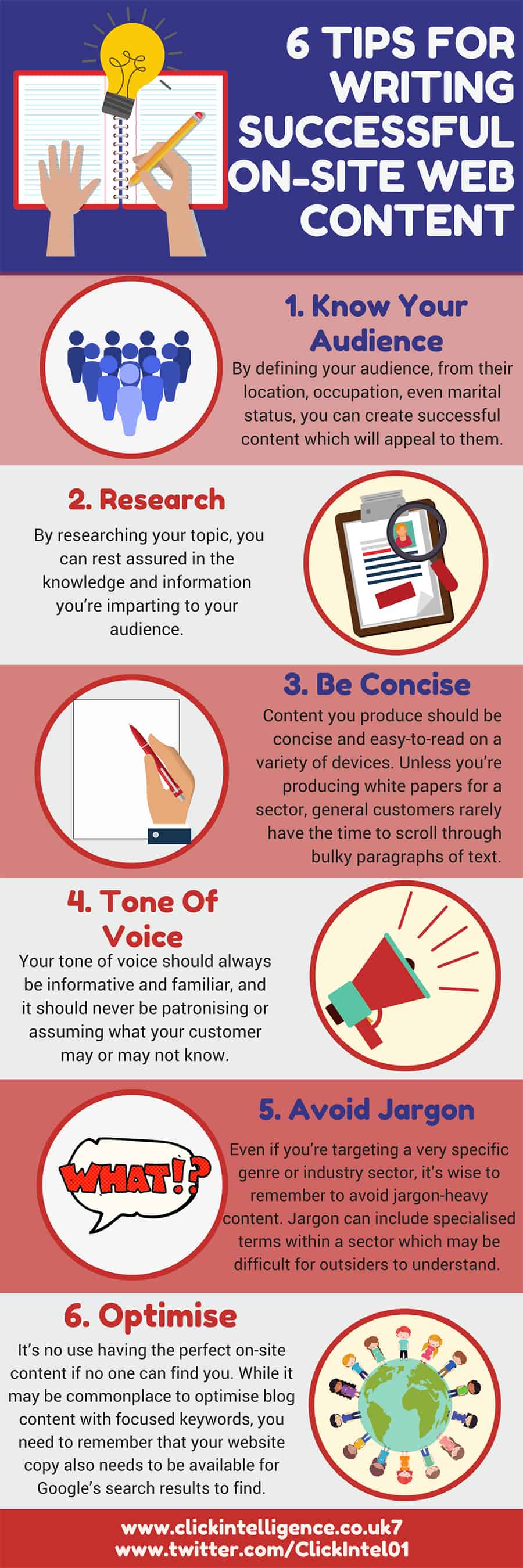
Click Intelligence share their website writing tips in this infographic.
Here’s a quick summary:
- Know your audience
- Research
- Be concise
- Tone of voice
- Avoid jargon
- Optimise
Check out the infographic for more detail.
Creating compelling website content is both an art and a science. It requires understanding your audience, thorough research, and strategic optimization. With the right approach, you can craft content that resonates with your visitors and ranks well on Google.
Here are six tips to help you achieve this balance.
Know Your Audience
Understanding your audience is the cornerstone of creating effective website content. For small businesses, this knowledge can make the difference between content that converts and content that falls flat. Knowing your audience allows you to tailor your content to meet their specific needs, preferences, and behaviors.
Here are some in-depth tips and guidance to help small businesses get a clear picture of their audience.
Define Your Target Audience
The first step in knowing your audience is to define who they are. This involves creating detailed buyer personas that represent your ideal customers.
Create Buyer Personas
Buyer personas are fictional characters that embody the key characteristics of your target audience. To create effective buyer personas, gather data from various sources such as:
- Customer Surveys and Interviews: Direct feedback from your customers provides invaluable insights. Ask about their demographics, interests, pain points, and how they use your product or service.
- Website Analytics: Use tools like Google Analytics to understand the demographics, behavior, and interests of your website visitors.
- Social Media Insights: Platforms like Facebook and Instagram provide detailed insights into the demographics and preferences of your followers.
- Sales and Customer Service Teams: These teams interact with customers daily and can provide firsthand information about their needs and challenges.
Once you have gathered sufficient data, create detailed profiles that include:
- Demographic Information: Age, gender, income, education level, and location.
- Psychographic Information: Interests, hobbies, values, and lifestyle.
- Behavioral Information: Purchasing behavior, brand loyalty, and online activity.
- Pain Points and Challenges: Specific problems they are trying to solve and how your product or service can help.
Understand Their Needs and Preferences
Once you have defined your target audience, the next step is to understand their needs and preferences. This involves identifying the problems they face and the type of content that resonates with them.
Identify Pain Points
Understanding the pain points of your audience allows you to create content that addresses their specific needs. To identify these pain points:
- Customer Feedback: Regularly review feedback from customer surveys, reviews, and social media comments.
- Competitor Analysis: Analyze your competitors’ content and see what topics they cover and how their audience responds.
- Keyword Research: Use tools like Google Keyword Planner to find out what your audience is searching for. Look for common questions and problems related to your industry.
Tailor Content to Preferences
Different audiences prefer different types of content. By understanding these preferences, you can create content that engages your audience effectively.
- Content Format: Determine whether your audience prefers blog posts, videos, infographics, podcasts, or social media updates. Use a mix of formats to cater to different preferences.
- Content Style: Consider the tone and style your audience prefers. Do they like formal, professional content or more casual, conversational pieces?
- Content Topics: Identify the topics that interest your audience the most. Use tools like BuzzSumo to find popular content in your industry and see what resonates with your audience.
Segment Your Audience
Your audience is not a monolith. Different segments of your audience may have different needs and preferences. Segmenting your audience allows you to tailor your content more precisely.
- Demographic Segmentation: Segment your audience based on demographic factors such as age, gender, income, and location. This helps in creating content that is relevant to each group. For example, younger audiences may prefer more visual content, while older audiences may appreciate detailed, informative articles.
- Behavioral Segmentation: Segment your audience based on their behavior, such as purchasing habits, product usage, and brand loyalty. Create content that caters to each segment’s specific needs. For instance, loyal customers might appreciate exclusive content or sneak peeks of new products, while new visitors may benefit from educational content that introduces them to your offerings.
- Psychographic Segmentation: Psychographic segmentation involves dividing your audience based on their interests, values, and lifestyle. This deeper understanding allows you to create content that resonates on a personal level. For example, environmentally conscious consumers might be interested in content about your sustainable practices.
Engage with Your Audience
Building a relationship with your audience is crucial for long-term success. Engaging with your audience helps you understand them better and builds loyalty.
- Encourage Interaction: Encourage your audience to interact with your content. Ask questions, prompt discussions, and invite comments. This not only boosts engagement but also provides insights into their preferences and opinions.
- Use Social Media: Social media platforms are excellent tools for engaging with your audience. Regularly post content, respond to comments, and participate in conversations. Use social media listening tools to monitor what your audience is saying about your brand and industry.
- Conduct Surveys and Polls: Surveys and polls are direct ways to gather feedback from your audience. Use them to ask about their preferences, challenges, and interests. This feedback can guide your content strategy and ensure you’re meeting their needs.
Personalize Your Content
Personalization is a powerful way to connect with your audience. By delivering personalized content, you can enhance the user experience and increase engagement.
- Use Personalization Tools: Use tools like HubSpot, Marketo, or Salesforce to personalize your content. These tools can segment your audience and deliver tailored content based on their behavior, preferences, and demographics.
- Dynamic Content: Incorporate dynamic content on your website that changes based on the visitor’s profile. For example, show different product recommendations to returning customers versus new visitors. This creates a more relevant and engaging experience for each user.
Analyze and Adjust
Understanding your audience is an ongoing process. Regularly analyze your content’s performance and adjust your strategy based on the data.
- Monitor Performance Metrics: Use analytics tools to monitor key performance metrics such as page views, bounce rates, time on page, and conversion rates. Identify which content performs well and which doesn’t.
- Conduct A/B Testing: A/B testing involves creating two versions of a piece of content and seeing which one performs better. Test different headlines, content formats, and calls to action to find what resonates best with your audience.
- Gather Continuous Feedback: Continuously gather feedback from your audience through surveys, comments, and social media. Use this feedback to refine your content strategy and ensure you’re meeting their evolving needs.
Conclusion
For small businesses, knowing your audience is crucial for creating effective website content.
By defining your target audience, understanding their needs and preferences, segmenting your audience, engaging with them, personalizing your content, and continuously analyzing performance, you can create content that resonates with your visitors and drives engagement.
Remember, the more you know about your audience, the better you can serve them with valuable, relevant, and engaging content.
Research
Research forms the foundation of creating valuable and engaging website content. For small businesses, thorough research helps ensure your content is accurate, relevant, and useful to your audience, while also boosting your visibility on search engines.
Here are in-depth tips and guidance to help small businesses conduct effective research.
Conduct Thorough Keyword Research
Keyword research is crucial for understanding what your audience is searching for and optimizing your content for search engines.
Use Keyword Research Tools
There are several tools available to help you find relevant keywords for your content. Some popular ones include:
- Google Keyword Planner: A free tool that provides keyword ideas and traffic estimates.
- Ahrefs: A comprehensive SEO tool that offers keyword research, backlink analysis, and more.
- SEMrush: Another robust tool that provides keyword suggestions, competitor analysis, and site audits.
- Ubersuggest: A user-friendly tool that provides keyword suggestions, search volume, and competition data.
Identify Long-Tail Keywords
Long-tail keywords are longer, more specific phrases that visitors are more likely to use when they’re closer to making a purchase or when using voice search. These keywords often have lower search volume but higher conversion rates. For example, instead of targeting “shoes,” a long-tail keyword could be “best running shoes for flat feet.”
Analyze Competitors
Look at the keywords your competitors are ranking for. Tools like Ahrefs and SEMrush can help you analyze your competitors’ websites to see which keywords drive traffic to their pages. This can provide ideas for your own keyword strategy.
Stay Updated with Industry Trends
Keeping up with industry trends ensures your content remains relevant and valuable to your audience.
- Follow Industry Leaders: Identify and follow industry leaders and influencers on social media, subscribe to their newsletters, and read their blogs. This helps you stay informed about the latest developments, trends, and discussions in your field.
- Join Industry Groups and Forums: Participate in industry-specific groups and forums on platforms like LinkedIn, Reddit, and specialized industry forums. Engaging in these communities can provide insights into the latest trends, common questions, and emerging issues in your industry.
- Attend Webinars and Conferences: Attend webinars, virtual conferences, and industry events to stay current with the latest trends and network with other professionals. These events often feature expert speakers who share valuable insights and data.
Verify Your Information
Accuracy is critical for building trust with your audience. Ensure the information you provide is credible and up-to-date.
- Use Credible Sources: Always use reliable sources to back up your claims. This includes reputable websites, academic journals, industry reports, and government publications. Avoid using outdated or questionable sources that can damage your credibility.
- Cross-Check Information: Verify the information you gather by cross-checking it with multiple sources. This helps ensure accuracy and reliability. If multiple reputable sources confirm a fact, it’s more likely to be accurate.
- Cite Your Sources: When using data, quotes, or ideas from other sources, always provide proper attribution. This not only gives credit to the original author but also adds credibility to your content. Use hyperlinks to link to the original sources whenever possible.
Organize Your Research
Organizing your research helps streamline your writing process and ensures you can easily access the information you need.
- Create an Outline: Before you start writing, create a detailed outline of your content. This should include the main points you want to cover and any supporting information or data. An outline helps you structure your content logically and ensures you cover all necessary points.
- Use Research Tools: There are several tools available to help you organize your research. Tools like Evernote, OneNote, or Google Keep allow you to store and organize notes, links, and other information in one place. You can also use project management tools like Trello or Asana to track your research progress.
- Keep a Research Log: Maintain a research log where you record all the sources you’ve consulted, along with key takeaways and notes. This can be a simple spreadsheet or a document where you list the source, date accessed, and key points. A research log helps you keep track of your sources and ensures you don’t overlook any important information.
Develop a Content Calendar
A content calendar helps you plan and organize your content creation process. It ensures you consistently produce and publish content that aligns with your research and audience needs.
- Plan Content Around Keywords and Trends: Use your keyword research and industry trends to plan your content topics. A content calendar allows you to schedule content around relevant dates, events, or seasonal trends. This helps you stay organized and ensures a steady flow of content.
- Set Deadlines and Responsibilities: Assign deadlines for each piece of content and designate responsibilities if you have a team. This helps keep everyone on track and ensures timely publication. Use tools like Google Calendar, Trello, or Asana to manage your content calendar.
- Analyze and Adjust Your Strategy: Research is an ongoing process. Regularly analyzing your content’s performance helps you understand what works and what doesn’t, allowing you to adjust your strategy accordingly.
Monitor Performance Metrics
Use analytics tools like Google Analytics, Ahrefs, or SEMrush to monitor key performance metrics such as organic traffic, bounce rates, time on page, and conversion rates. These metrics provide insights into how well your content is performing and where improvements are needed.
- Conduct Regular Content Audits: Periodically review your existing content to ensure it remains accurate and relevant. Update outdated information, add new data or insights, and optimize for SEO if necessary. Regular content audits help maintain the quality and relevance of your content library.
- Gather Audience Feedback: Solicit feedback from your audience through surveys, comments, and social media interactions. Understanding their preferences, questions, and challenges helps you create content that better meets their needs. Use this feedback to refine your content strategy and research process.
Leverage Data and Analytics
Using data and analytics can significantly enhance your research efforts, helping you create more effective content.
- Use Google Analytics: Google Analytics provides a wealth of data about your website visitors, including demographics, behavior, and acquisition channels. Analyzing this data helps you understand who your audience is, what content they engage with, and how they find your website.
- Employ Heatmaps: Tools like Hotjar or Crazy Egg offer heatmaps that show how users interact with your website. Heatmaps can reveal which parts of your content are most engaging and where users drop off, allowing you to optimize your content layout and design.
- Track Keyword Rankings: Monitor your keyword rankings using tools like Ahrefs, SEMrush, or Moz. Tracking your rankings helps you see how well your content is performing in search engines and identify opportunities for optimization.
Use Case Studies and Examples
Including case studies and real-world examples in your content can make it more relatable and credible.
- Conduct Case Studies: If you have successful projects or satisfied customers, conduct case studies to showcase your work. Include specific details, results, and testimonials to provide a comprehensive view of your success. Case studies can serve as powerful proof of your expertise and effectiveness.
- Use Real-World Examples: Incorporate real-world examples to illustrate your points and make your content more relatable. Examples can come from your own experiences, customer stories, or industry case studies. Using examples helps your audience understand complex concepts and see the practical application of your advice.
Leverage Expert Opinions
Expert opinions add credibility and depth to your content. Including quotes, insights, and interviews with industry experts can enhance the value of your research.
- Conduct Expert Interviews: Reach out to industry experts for interviews. Prepare thoughtful questions that elicit valuable insights and perspectives. Expert interviews can provide unique content that sets you apart from competitors.
- Quote Reputable Sources: When referencing expert opinions, always cite reputable sources. This adds authority to your content and demonstrates that you’ve done your research. Use quotes to support your arguments and provide additional context.
Conclusion
Effective research is essential for creating high-quality website content that engages your audience and performs well on search engines. For small businesses, thorough keyword research, staying updated with industry trends, verifying information, organizing research, and leveraging data and analytics are key strategies.
By following these tips and continuously refining your research process, you can create content that not only attracts visitors but also builds trust and drives conversions.
Be Concise
In the digital age, where attention spans are notoriously short, being concise is crucial for engaging your audience. Concise content is easier to read, understand, and act upon. For small businesses, mastering the art of brevity can significantly enhance the effectiveness of your website content.
Here are in-depth tips and guidance to help you be concise while delivering maximum value.
Write Clear and Direct Headlines
Your headlines are the first impression visitors get of your content. Clear and direct headlines capture attention and provide a preview of what’s to come.
Use Powerful Keywords
Incorporate powerful, relevant keywords in your headlines. Keywords not only improve SEO but also make it clear what the content is about. For example, “10 Essential Tips for Small Business Marketing” is more effective than “Marketing Tips.”
Be Specific
Specificity adds clarity and sets the right expectations. Instead of a vague headline like “Improve Your Business,” opt for something specific like “5 Proven Strategies to Increase Small Business Revenue.”
Avoid Clickbait
While it’s important to grab attention, avoid using clickbait tactics. Misleading headlines can harm your credibility and frustrate your audience. Ensure your headlines accurately reflect the content.
Use Short Paragraphs and Sentences
Breaking your content into short paragraphs and sentences makes it more readable, especially on digital screens.
Keep Paragraphs Brief
Aim for paragraphs with no more than three to four sentences. This creates white space on the page, making your content less daunting and easier to skim. Each paragraph should convey a single idea or point.
Use Simple Sentences
Short, simple sentences enhance clarity and readability. Avoid complex sentence structures and unnecessary words. For example, instead of “In order to achieve success, it is imperative that you follow these steps,” simply say, “Follow these steps to succeed.”
Incorporate Bullet Points and Lists
Bullet points and lists are excellent for breaking down information into digestible chunks. They highlight key points and make it easy for readers to scan your content. Use bullet points for lists, steps, or key takeaways.
Eliminate Unnecessary Words
Concise writing involves cutting out fluff and focusing on the essentials. Every word should add value to your content.
Edit Ruthlessly
Review your content and remove any words, phrases, or sentences that don’t contribute to your main message. Ask yourself if each element is necessary. For example, instead of saying “due to the fact that,” simply say “because.”
Avoid Redundancies
Redundancies are words or phrases that repeat the same idea. Eliminate them to tighten your writing. For instance, “advance planning” can be shortened to “planning,” and “free gift” can simply be “gift.”
Use Active Voice
Active voice makes your writing more direct and vigorous. It usually requires fewer words than passive voice. For example, “The team completed the project” (active) is more concise than “The project was completed by the team” (passive).
Focus on the Essential Information
Concise content delivers essential information without unnecessary details. Prioritize what’s most important to your audience.
Identify Your Main Points
Before you start writing, outline the main points you want to cover. Stick to these points and avoid veering off-topic. This helps you stay focused and ensures your content remains relevant.
Use the Inverted Pyramid Model
The inverted pyramid model is a journalistic technique where the most important information is presented first. Start with the key message or conclusion, followed by supporting details. This structure ensures readers get the most critical information upfront.
Answer the 5 W’s and H
Ensure your content answers the fundamental questions: Who, What, Where, When, Why, and How. This approach helps you cover all necessary information concisely and thoroughly.
Write with Purpose
Every piece of content should have a clear purpose. Whether it’s to inform, persuade, or entertain, having a defined purpose helps you stay focused and concise.
Define Your Goal
Ask yourself what you want to achieve with your content. Are you trying to educate your audience, promote a product, or drive traffic to your website? Defining your goal helps you stay on track and eliminate irrelevant details.
Stay on Topic
Avoid tangents and unrelated information. Stick to the topic at hand and ensure every sentence contributes to your main message. If an idea doesn’t support your goal, consider omitting it.
Use Visuals to Enhance Understanding
Visual elements can convey complex information more effectively than text alone. They also break up the text and make your content more engaging.
Include Relevant Images
Use images, infographics, charts, and diagrams to illustrate key points. Visuals can simplify complex concepts and add visual interest to your content. Ensure your visuals are high-quality and relevant to the topic.
Use Captions and Alt Text
Provide captions and alt text for your images. Captions help explain the image, while alt text improves accessibility and SEO. Be concise but descriptive in your captions and alt text.
Leverage Video Content
Video content is highly engaging and can convey information quickly and effectively. Consider creating short videos to complement your written content. Embed videos on your website or link to them from your text.
Test and Refine Your Content
Concise writing is a skill that improves with practice and feedback. Regularly test and refine your content to ensure it’s as effective as possible.
Gather Feedback
Ask colleagues, customers, or friends to review your content and provide feedback. They can offer fresh perspectives and identify areas where you can be more concise.
Use Readability Tools
Readability tools like Hemingway Editor or Grammarly can help you identify complex sentences, passive voice, and unnecessary words. These tools provide suggestions for making your writing clearer and more concise.
A/B Testing
Conduct A/B testing to compare different versions of your content. Test variations of headlines, paragraphs, and calls to action to see which version performs better. Use the results to refine your content and improve its effectiveness.
Practice Regularly
Like any skill, concise writing improves with practice. Regularly write, edit, and refine your content to hone your ability to communicate clearly and concisely.
Set Writing Goals
Set specific writing goals, such as writing a certain number of articles per month or reducing the word count of your existing content by a certain percentage. Goals provide motivation and help you track your progress.
Study Good Examples
Read articles, blog posts, and other content from skilled writers. Pay attention to how they structure their sentences, use active voice, and eliminate unnecessary words. Learning from good examples can inspire and improve your own writing.
Reflect on Your Writing
After completing a piece of content, take a step back and reflect on your writing. Consider what worked well and what could be improved. Continuous reflection helps you identify patterns and areas for improvement.
Conclusion
For small businesses, being concise in your website content is essential for capturing and retaining your audience’s attention.
By writing clear and direct headlines, using short paragraphs and sentences, eliminating unnecessary words, focusing on essential information, writing with purpose, using visuals, testing and refining your content, and practicing regularly, you can create content that is both engaging and effective.
Remember, concise content not only improves readability but also enhances your credibility and makes a stronger impact on your audience.
Tone of Voice
The tone of voice you use in your website content is a powerful tool for communicating your brand’s personality and values. It helps build a connection with your audience and sets the overall mood of your communication.
For small businesses, establishing a consistent and appropriate tone of voice can differentiate you from competitors and build stronger relationships with your customers.
Here are in-depth tips and guidance to help small businesses effectively define and implement their tone of voice.
Define Your Brand’s Voice
Before you can consistently use a particular tone, you need to clearly define what that tone should be. This involves understanding your brand’s personality and how you want to be perceived by your audience.
Understand Your Brand’s Personality
Consider your brand as if it were a person. What kind of personality traits would it have? Would it be formal and professional, or casual and friendly? Determining these traits helps you set a foundation for your tone of voice. Ask yourself questions like:
- What are our brand’s core values?
- How do we want our customers to feel when they interact with our brand?
- What are the key characteristics that differentiate our brand from others?
Create a Voice Chart
A voice chart is a useful tool that outlines your brand’s voice. It typically includes:
- Voice Attributes: Descriptive words that define your voice (e.g., friendly, authoritative, empathetic).
- Dos and Don’ts: Specific guidelines on how to use your voice (e.g., Do use simple language; Don’t use jargon).
- Examples: Sample sentences that illustrate your tone (e.g., “Welcome to our site! We’re here to help you find what you need” vs. “Please explore our offerings to find suitable solutions”).
Align with Your Audience
Your tone of voice should resonate with your target audience. If your audience is young and tech-savvy, a casual and witty tone might be appropriate. If you’re targeting professionals in a serious industry, a more formal tone may be needed. Understanding your audience’s preferences and expectations helps you align your tone of voice with their needs.
Maintain Consistency
Consistency in your tone of voice is crucial for building a recognizable brand. Inconsistent tones can confuse your audience and weaken your brand identity.
Create a Style Guide
A style guide documents your tone of voice and provides guidelines for maintaining consistency. It should be accessible to everyone involved in content creation. Key elements to include are:
- Tone of Voice Guidelines: Detailed descriptions of your tone, including voice attributes, dos and don’ts, and examples.
- Grammar and Punctuation Rules: Specific rules about grammar, punctuation, and style preferences.
- Content Examples: Real examples of your content that exemplify your tone of voice.
Train Your Team
Ensure that everyone involved in content creation understands and can apply your tone of voice. Conduct training sessions, provide examples, and offer feedback to help your team internalize the guidelines.
Use Content Templates
Content templates can help maintain consistency across different types of content. Create templates for common content types like blog posts, emails, and social media updates. Include guidelines for tone, structure, and key elements to ensure uniformity.
Adapt to Different Content Types
While maintaining a consistent overall tone, it’s important to adapt your voice to different content types and contexts. The tone you use in a blog post may differ from that in a formal report or a social media post.
Tailor Tone to Context
Different contexts require different tones. For example:
- Blog Posts: Typically more conversational and engaging. You can use anecdotes, ask questions, and include personal touches.
- Product Descriptions: Clear, concise, and informative. Highlight key features and benefits without being overly salesy.
- Customer Support: Empathetic and helpful. Address concerns directly and provide clear solutions.
- Social Media: Casual and interactive. Use a friendly tone and engage with your audience through comments and direct messages.
Consider the Platform
Each platform has its own norms and audience expectations. Adapt your tone to fit the platform you’re using:
- LinkedIn: More professional and formal. Share industry insights, thought leadership, and professional updates.
- Facebook: A mix of professional and casual. Engage with a wide audience through posts, comments, and community interactions.
- Twitter: Brief and to the point. Use a witty and concise tone to engage with followers and participate in conversations.
- Instagram: Visual and personal. Use a friendly and conversational tone to complement your visual content.
Engage with Your Audience
Your tone of voice should foster engagement and build relationships with your audience. Use your tone to create a dialogue and make your audience feel valued.
Be Authentic
Authenticity is key to building trust and credibility. Speak in a way that feels natural and genuine. Avoid overly promotional language and focus on providing value to your audience.
Address Your Audience Directly
Using second-person language (you, your) helps create a personal connection. Address your audience directly to make your content feel more conversational and engaging.
Encourage Interaction
Prompt your audience to interact with your content. Ask questions, invite comments, and encourage sharing. Respond to comments and messages in a way that reflects your tone of voice, showing that you value their input.
Avoid Common Pitfalls
Maintaining an appropriate tone of voice involves avoiding certain pitfalls that can undermine your efforts.
Avoid Jargon and Technical Language
Unless your audience is highly specialized, avoid using jargon and technical terms that might be confusing. Use simple, clear language that everyone can understand. If you must use technical terms, provide explanations or definitions.
Stay Positive
Maintain a positive and upbeat tone, even when addressing problems or negative feedback. Focus on solutions and highlight positive aspects. Avoid negative language that can turn off your audience.
Be Respectful and Inclusive
Ensure your tone is respectful and inclusive. Avoid language that could be seen as offensive, discriminatory, or exclusive. Aim to create a welcoming and inclusive environment for all your audience members.
Measure and Refine Your Tone
Regularly assessing how your tone of voice is being received helps you refine and improve your approach.
Monitor Audience Feedback
Pay attention to comments, reviews, and social media interactions to gauge how your audience responds to your tone. Positive feedback indicates your tone is resonating, while negative feedback can highlight areas for improvement.
Analyze Engagement Metrics
Use analytics tools to track engagement metrics such as time on page, bounce rates, and social media interactions. Higher engagement levels often indicate that your tone is effective and resonates with your audience.
Conduct Surveys
Periodically survey your audience to get direct feedback on your content and tone of voice. Ask specific questions about how they perceive your tone and whether it aligns with their expectations.
Continuously Improve
Based on feedback and performance metrics, continuously refine your tone of voice. Stay flexible and be willing to adapt as your audience and brand evolve.
Conclusion
For small businesses, a well-defined and consistently applied tone of voice is essential for creating engaging and effective website content.
By understanding your brand’s personality, maintaining consistency, adapting to different content types, engaging authentically with your audience, avoiding common pitfalls, and regularly measuring and refining your approach, you can develop a tone of voice that strengthens your brand identity and builds lasting relationships with your customers.
Avoid Jargon
Using jargon in your website content can alienate your audience and make your message difficult to understand. For small businesses, it’s essential to communicate clearly and effectively to engage a broader audience. Avoiding jargon helps ensure your content is accessible, relatable, and easily digestible.
Here are in-depth tips and guidance to help small businesses eliminate jargon and communicate more effectively.
Understand the Impact of Jargon
Jargon refers to specialized terms and language used within a particular industry or profession. While it might be common in professional circles, it can be confusing or off-putting to a general audience. Understanding the impact of jargon helps underscore the importance of clear communication.
Confusion and Misunderstanding
Using jargon can confuse your audience, leading to misunderstandings. If your readers don’t understand the terms you’re using, they might miss the key points of your message. This can result in lost opportunities and a disconnect with your audience.
Reduced Engagement
Content filled with jargon can be difficult to read and less engaging. Readers might become frustrated and leave your site if they find the language too complex or inaccessible. This increases bounce rates and reduces the effectiveness of your content.
Alienation of Potential Customers
Jargon can make your audience feel excluded or alienated, particularly if they are not familiar with your industry. To build a broad and inclusive audience, it’s crucial to use language that everyone can understand.
Identify and Eliminate Jargon
The first step in avoiding jargon is to identify it in your content and replace it with simpler, more accessible language.
Conduct a Content Audit
Review your existing content to identify instances of jargon. Look for technical terms, industry-specific acronyms, and complex phrases that might not be familiar to your audience. Make a list of these terms for further review.
Use Plain Language
Replace jargon with plain language that is easy to understand. Plain language involves using simple, clear words and sentences to convey your message. For example, instead of saying “leverage synergies,” say “work together” or “collaborate.”
Provide Explanations
If you must use a technical term or industry-specific language, provide a brief explanation or definition. This ensures that all readers, regardless of their familiarity with the topic, can understand your content. For example, “SEO (Search Engine Optimization) helps improve your website’s visibility on search engines.”
Focus on Clarity and Simplicity
Clear and simple language makes your content more accessible and engaging. Focus on conveying your message in the most straightforward way possible.
Write Short Sentences
Short sentences are easier to read and understand. Aim to keep your sentences concise and to the point. Break up long, complex sentences into shorter ones to enhance readability.
Use Common Words
Prefer common, everyday words over complex or technical terms. This makes your content more relatable and easier to grasp. For example, use “buy” instead of “purchase” and “start” instead of “commence.”
Avoid Unnecessary Complexity
Avoid adding unnecessary complexity to your content. Stick to the essential information and eliminate any superfluous details that don’t add value. This helps keep your content focused and easy to follow.
Tailor Content to Your Audience
Understanding your audience’s knowledge level and preferences allows you to tailor your content accordingly. This ensures your message resonates and is easily understood.
Know Your Audience’s Expertise Level
Consider the expertise level of your audience when creating content. If you’re writing for a general audience, avoid technical terms and industry-specific language. For a more specialized audience, you can use some technical language but still aim for clarity and simplicity.
Use Audience Feedback
Gather feedback from your audience to understand how well they comprehend your content. Use surveys, comments, and direct interactions to gauge their understanding and identify areas where you might be using too much jargon.
Test Your Content
Before publishing, test your content with a sample of your audience or with someone outside your industry. Ask if they understand the message and if any terms need clarification. Use their feedback to make necessary adjustments.
Utilize Readability Tools
Readability tools can help you identify and eliminate jargon, ensuring your content is accessible to a broader audience.
Hemingway Editor
The Hemingway Editor highlights complex sentences, adverbs, and difficult words in your content. It provides a readability grade, helping you simplify your language and improve clarity.
Grammarly
Grammarly offers suggestions for simplifying your language and improving readability. It can help you identify complex phrases and jargon, providing alternatives that are easier to understand.
Readability Score Tools
Use tools like Readable or the Flesch-Kincaid readability test to assess the readability of your content. These tools provide scores that indicate how easy your text is to read, helping you make adjustments for better clarity.
Educate Your Team
Ensuring everyone involved in content creation understands the importance of avoiding jargon helps maintain consistency across all your content.
Provide Training
Offer training sessions on the importance of plain language and how to avoid jargon. Provide examples and best practices to help your team recognize and replace jargon in their writing.
Create Style Guides
Include guidelines on avoiding jargon in your content style guide. Provide examples of common jargon terms and their plain language alternatives. Ensure all team members have access to and understand the style guide.
Encourage Peer Reviews
Encourage your team to review each other’s work for instances of jargon. Peer reviews can provide fresh perspectives and help identify terms that might be too technical or complex for your audience.
Maintain a Jargon-Free Glossary
Create a glossary of terms commonly used in your industry along with their plain language definitions. This can serve as a reference for your team and help ensure consistency in avoiding jargon.
Regularly Update the Glossary
Keep your glossary updated with new terms and their definitions. As your industry evolves, new jargon can emerge, so it’s important to stay current and ensure your glossary reflects these changes.
Make the Glossary Accessible
Ensure your glossary is easily accessible to all team members involved in content creation. This can be a shared document or part of your content management system.
Continuous Improvement
Avoiding jargon is an ongoing process. Continuously evaluate your content and make improvements to ensure clarity and accessibility.
Regularly Review Content
Periodically review your content to ensure it remains jargon-free. Update older content to align with your current guidelines and maintain a high standard of clarity.
Stay Informed
Stay informed about trends and changes in your industry to recognize and address new jargon. Regularly update your knowledge and adapt your content to maintain clarity.
Encourage Feedback
Continuously seek feedback from your audience and team members. Use this feedback to refine your approach and ensure your content is always clear and accessible.
Conclusion
For small businesses, avoiding jargon in website content is crucial for clear and effective communication.
By understanding the impact of jargon, identifying and eliminating it, focusing on clarity and simplicity, tailoring content to your audience, utilizing readability tools, educating your team, maintaining a jargon-free glossary, and committing to continuous improvement, you can create content that is accessible, engaging, and effective.
Clear communication not only helps you connect with a broader audience but also builds trust and credibility, ultimately driving better engagement and conversions.
Optimise
Optimizing your website content is crucial for enhancing user experience and improving search engine rankings. For small businesses, effective optimization can significantly increase visibility, drive traffic, and boost engagement.
Here are in-depth tips and guidance to help small businesses optimize their website content effectively.
On-Page SEO
On-page SEO involves optimizing individual pages to rank higher and earn more relevant traffic in search engines. It includes both content and HTML source code optimization.
Use Relevant Keywords
Keywords are the terms and phrases your audience uses to search for information. Integrating relevant keywords into your content helps search engines understand the topic and rank your pages accordingly.
- Keyword Placement: Place your main keywords in the title, headings, meta descriptions, and throughout the content. Ensure they fit naturally and do not disrupt the flow.
- Long-Tail Keywords: Use long-tail keywords, which are more specific and less competitive. These can attract highly targeted traffic and improve conversion rates.
- Avoid Keyword Stuffing: Overusing keywords can lead to penalties from search engines. Aim for a natural keyword density and focus on providing value to your readers.
Optimize Title Tags and Meta Descriptions
Title tags and meta descriptions are crucial for both SEO and user experience. They provide a summary of your content to search engines and users.
- Title Tags: Keep title tags under 60 characters. Include your primary keyword and make the title compelling to encourage clicks.
- Meta Descriptions: Write meta descriptions under 160 characters. Summarize the content, include a call-to-action, and incorporate your primary keyword. While meta descriptions don’t directly affect rankings, they can improve click-through rates.
Use Header Tags Properly
Header tags (H1, H2, H3, etc.) help structure your content and make it easier for search engines and users to understand.
- H1 Tag: Use a single H1 tag for the main title of the page. It should be descriptive and include the primary keyword.
- H2 and H3 Tags: Use H2 tags for main sections and H3 tags for subsections. This hierarchical structure helps break up the content and improves readability.
Optimize Images
Images enhance your content but can also impact your page load speed if not optimized.
- File Size: Compress images to reduce file size without compromising quality. Tools like TinyPNG or JPEG-Optimizer can help.
- Alt Text: Use descriptive alt text for images. Include relevant keywords where appropriate. Alt text helps search engines understand the image content and improves accessibility.
- File Names: Use descriptive file names for your images, incorporating keywords. This can help with image search optimization.
Mobile Optimization
With the majority of web traffic coming from mobile devices, it’s essential to ensure your website is mobile-friendly.
Responsive Design
A responsive design adapts your website layout to fit different screen sizes, providing a seamless experience across devices.
- Fluid Grids: Use fluid grids that adjust the layout based on the screen size. This ensures your content is displayed correctly on all devices.
- Flexible Images: Ensure images resize automatically to fit the screen. Use CSS media queries to set different image sizes for different devices.
- Touch-Friendly Navigation: Design navigation elements to be easily accessible on touch screens. Use larger buttons and ensure clickable areas are adequately spaced.
Improve Page Load Speed
Page load speed is critical for user experience and SEO. Slow-loading pages can lead to higher bounce rates and lower search rankings.
- Minimize HTTP Requests: Reduce the number of elements on your page (scripts, images, CSS) to minimize HTTP requests.
- Use Browser Caching: Enable browser caching to store some data locally in the user’s browser. This reduces load times for returning visitors.
- Optimize CSS and JavaScript: Minify CSS and JavaScript files to reduce file size. Consider loading JavaScript files asynchronously to avoid delaying page rendering.
Test Mobile Usability
Regularly test your website’s mobile usability to identify and fix issues.
- Google’s Mobile-Friendly Test: Use Google’s Mobile-Friendly Test tool to check how easily a visitor can use your page on a mobile device.
- User Testing: Conduct user testing with real users to gather feedback on mobile usability. Observe how they interact with your site and identify pain points.
User Experience
A positive user experience (UX) keeps visitors on your site longer and encourages them to return. Good UX is also rewarded by search engines.
Clear Navigation
Ensure your website has a clear and intuitive navigation structure.
- Simple Menu: Use a simple and straightforward menu. Limit the number of menu items to avoid overwhelming users.
- Breadcrumbs: Implement breadcrumb navigation to help users understand their location within your site and easily navigate back.
- Search Functionality: Include a search bar to help users quickly find what they’re looking for.
Readable Content
Make your content easy to read and scan.
- Font Size and Style: Use a legible font size (at least 16px) and a web-friendly font. Ensure sufficient contrast between text and background.
- Line Spacing: Use adequate line spacing to improve readability. Generally, 1.5 to 1.6 line height is recommended.
- Subheadings and Bullet Points: Break up text with subheadings, bullet points, and short paragraphs. This helps users quickly scan and find relevant information.
Calls to Action (CTAs)
Effective CTAs guide users towards desired actions, such as making a purchase or signing up for a newsletter.
- Clear and Compelling: Write clear and compelling CTAs that encourage action. Use action verbs and create a sense of urgency.
- Visible and Accessible: Place CTAs in prominent positions where users can easily see them. Use contrasting colors to make them stand out.
Regular Updates
Keeping your content fresh and up-to-date signals to search engines and users that your site is active and relevant.
Update Existing Content
Regularly review and update your existing content to ensure it remains accurate and relevant.
- Refresh Information: Update statistics, facts, and references to keep your content current.
- Add New Insights: Incorporate new insights, examples, or case studies to enhance the value of your content.
- Improve SEO: Revisit your SEO strategy and optimize content for new keywords or trends.
Publish New Content
Consistently publishing new content helps attract new visitors and keeps your audience engaged.
- Content Calendar: Create a content calendar to plan and schedule your posts. This helps ensure a steady flow of new content.
- Diverse Formats: Experiment with different content formats, such as blog posts, videos, infographics, and podcasts, to cater to various audience preferences.
- Engage with Trends: Stay informed about industry trends and create content that addresses current topics and questions.
Technical SEO
Technical SEO involves optimizing the technical aspects of your website to improve its performance and visibility in search engines.
Improve Site Structure
A well-structured site is easier for search engines to crawl and index.
- Sitemap: Create and submit an XML sitemap to search engines. This helps them understand your site’s structure and find all your pages.
- Internal Linking: Use internal links to connect related pages within your site. This helps distribute link equity and improve crawlability.
- Clean URLs: Use clean, descriptive URLs that include relevant keywords. Avoid long, complex URLs with unnecessary parameters.
Ensure Secure and Accessible Website
A secure and accessible website is essential for both user trust and SEO.
- SSL Certificate: Ensure your site has an SSL certificate and uses HTTPS. This encrypts data and is a ranking factor for search engines.
- Accessibility: Make your website accessible to users with disabilities. Use descriptive alt text for images, ensure keyboard navigability, and follow WCAG (Web Content Accessibility Guidelines).
Monitor and Fix Errors
Regularly monitor your site for errors and fix them promptly to maintain optimal performance.
- Google Search Console: Use Google Search Console to monitor your site’s health. Check for crawl errors, security issues, and other problems.
- Broken Links: Regularly check for and fix broken links to improve user experience and prevent negative SEO impacts.
Analytics and Continuous Improvement
Regularly analyzing your website’s performance helps you understand what works and what doesn’t, allowing you to make continuous improvements.
Set Up Analytics
Implement analytics tools to track and measure your website’s performance.
- Google Analytics: Use Google Analytics to monitor traffic, user behavior, and conversion rates. Set up goals to track key actions on your site.
- Heatmaps: Use heatmap tools like Hotjar or Crazy Egg to visualize user interactions. Identify areas where users click, scroll, and spend the most time.
Analyze Data and Insights
Regularly review your analytics data to gain insights into your site’s performance.
- Traffic Sources: Analyze where your traffic is coming from (organic, direct, referral, social) to understand which channels are most effective.
- User Behavior: Study user behavior metrics like bounce rate, time on page, and pages per session to identify areas for improvement.
- Conversion Rates: Track conversion rates for key actions (e.g., sign-ups, purchases) to assess the effectiveness of your CTAs and overall user experience.
Make Data-Driven Improvements
Use the insights gained from analytics to make informed improvements to your website.
- Content Optimization: Identify high-performing content and replicate its success. Update or remove underperforming content.
- UX Enhancements: Make UX enhancements based on user behavior data. Improve navigation, page layout, and loading speed to boost engagement.
- SEO Adjustments: Continuously refine your SEO strategy based on performance data. Experiment with new keywords, optimize meta tags, and improve site structure.
Conclusion
For small businesses, effective website optimization is key to enhancing user experience and improving search engine rankings.
By focusing on on-page SEO, mobile optimization, user experience, regular updates, technical SEO, and continuous improvement through analytics, you can create a website that attracts, engages, and converts visitors.
Remember, optimization is an ongoing process that requires regular monitoring and adjustments to ensure long-term success.
Conclusion
Creating content that resonates with your audience and ranks well on Google requires a strategic approach.
By knowing your audience, conducting thorough research, being concise, maintaining a consistent tone of voice, avoiding jargon, and optimizing your content, you can create valuable and engaging content.
Remember, the goal is to provide value to your visitors while also satisfying the requirements of search engines. With these tips, you’ll be well on your way to creating content that both your visitors and Google will love.

Author:
Mark Ford



