We all want to get to the top of Google – its pretty obvious that the higher you are the more traffic you’ll receive and more leads and sales you’ll generate.
But how exactly do you achieve this?
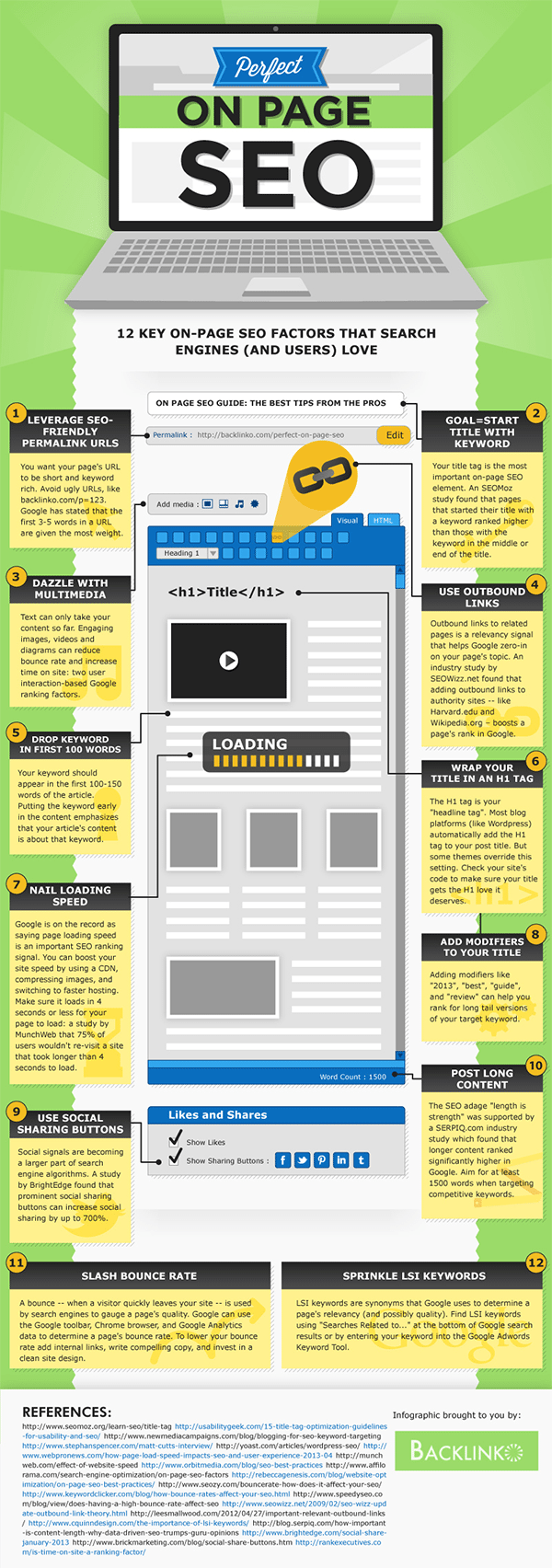
The infographic below from Backlinko gives you 12 ways to optimise your webpages and fire yourself up the Google search engine rankings.
In today’s digital age, having a strong online presence is crucial for businesses and individuals alike. Whether you’re running an e-commerce store, a personal blog, or a corporate website, the success of your online venture hinges on the visibility and user-friendliness of your webpages.
To achieve this, you need to create perfectly optimized webpages that not only rank well on search engines but also provide an exceptional user experience. In this comprehensive guide, we’ll walk you through 12 essential steps to help you create the perfectly optimized webpage.
Step 1: Define Your Goals
Before you start optimizing your webpage, it’s vital to define your goals. What do you want to achieve with this particular page? Are you aiming to increase sales, generate leads, or provide valuable information to your audience? Having clear objectives will guide your optimization efforts and help you measure success.
Step 2: Keyword Research
Keywords are the foundation of SEO (Search Engine Optimization). Conduct thorough keyword research to identify the phrases and terms your target audience is using to search for content related to your webpage. Use tools like Google Keyword Planner, SEMrush, or Ahrefs to discover relevant keywords with a reasonable search volume and low competition.
Step 3: Create High-Quality Content
Content is king on the internet. Craft informative, engaging, and valuable content that addresses your audience’s needs and interests. Make sure your content is well-structured with headings, subheadings, and bullet points to enhance readability. Remember to incorporate your chosen keywords naturally within the content.
Step 4: Optimize Title Tags and Meta Descriptions
Title tags and meta descriptions are the first things users see on search engine results pages (SERPs). Make them compelling and relevant to your content while including your primary keyword. A well-optimized title tag and meta description can significantly improve click-through rates.
Step 5: Mobile Responsiveness
With the increasing use of mobile devices, it’s crucial to ensure your webpage is mobile-friendly. Use responsive design to make sure your content displays correctly on various screen sizes. Google also prioritizes mobile-friendly websites in its rankings.
Step 6: Page Loading Speed
Slow-loading pages can deter visitors and negatively impact your search engine rankings. Optimize your webpage’s loading speed by compressing images, utilizing browser caching, and minimizing HTTP requests. Tools like Google PageSpeed Insights can help you identify areas for improvement.
Step 7: Schema Markup
Schema markup is a code added to your webpage that helps search engines understand the content better. Implementing schema markup can lead to rich snippets in search results, making your webpage stand out and providing more information to users.
Step 8: Internal Linking
Internal linking involves adding links from one page on your website to another. It helps search engines understand the structure of your website and how different pages are related. Additionally, it can keep users engaged by offering them more relevant content to explore.
Step 9: Optimize Images
Images are essential for engaging content, but they can also slow down your webpage if not optimized. Compress images to reduce file sizes without compromising quality. Use descriptive alt text for images to improve accessibility and SEO.
Step 10: User-Friendly URLs
Create user-friendly and descriptive URLs for your webpages. Avoid long strings of numbers or gibberish in your URLs. A clear and concise URL structure makes it easier for both users and search engines to understand the content.
Step 11: Content Updates
Regularly update your content to keep it relevant and fresh. This not only provides value to your audience but also signals to search engines that your website is active and should be crawled more often.
Step 12: Monitor and Analyze
Once you’ve implemented these optimization steps, it’s essential to monitor and analyze the performance of your webpage. Use tools like Google Analytics and Google Search Console to track your website’s traffic, user behavior, and search engine rankings. Adjust your optimization strategy based on the data you gather to continually improve your webpage’s performance.
In conclusion, creating the perfectly optimized webpage requires careful planning and attention to detail. By following these 12 steps, you can enhance your webpage’s visibility on search engines, provide a better user experience, and achieve your online goals. Remember that SEO is an ongoing process, and staying up-to-date with industry trends and algorithm changes is crucial for long-term success in the ever-evolving digital landscape.

Author:
Mark Ford