

How Google friendly are your URL’s? Are they all yourdomain.co.uk/gobbledygook or do they look something like this – yourdomain.co.uk/your-target-keyword?
Your URL’s are one of the first things Google sees when they index your site so they play an important part of your SEO success. You’ll rank higher on Google if you include your target keyword or phrase rather than a load of gobbledygook.
For that and more URL SEO tips take a look at this infographic from My Site Auditor.
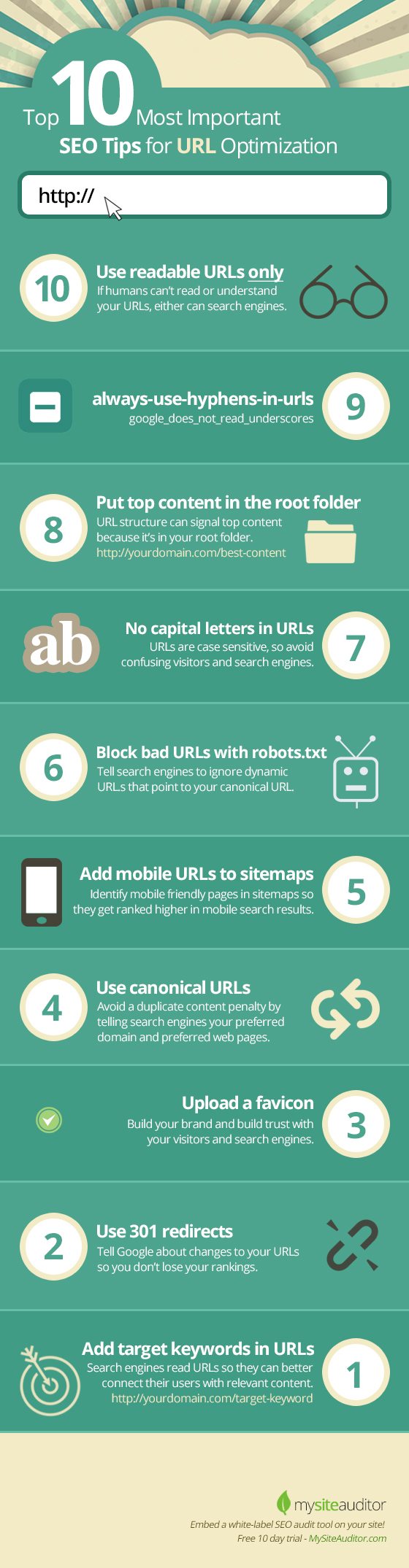
In the ever-evolving world of SEO (Search Engine Optimization), every aspect of your website plays a crucial role in determining its visibility and ranking on search engine results pages (SERPs). One often overlooked yet vital component of SEO is crafting Google-friendly URLs. The structure and readability of your URLs can significantly impact your website’s performance in search rankings. In this blog post, we will explore 10 important steps to create Google-friendly URLs that enhance your SEO efforts.
- Use Descriptive Keywords
The first and foremost step in creating Google-friendly URLs is to use descriptive keywords. A descriptive URL provides both users and search engines with a clear idea of what to expect from the webpage. For instance, compare these two URLs:
Non-descriptive URL: https://www.example.com/p=123456
Descriptive URL: https://www.example.com/seo-tips-google-friendly-urls
In the second example, the descriptive URL immediately tells users and search engines that the page contains information about SEO tips for creating Google-friendly URLs. This clarity not only improves user experience but also helps search engines understand the content of the page.
- Keep It Short and Sweet
Short and concise URLs are not only easier for users to remember but also preferred by search engines. Long, complex URLs can confuse both users and search engine crawlers, potentially leading to lower rankings. Aim to keep your URLs as brief as possible while still conveying the topic of the page. Ideally, your URLs should contain 3-5 words.
- Use Hyphens to Separate Words
When you have multiple words in your URL, it’s essential to separate them with hyphens (-) rather than underscores (_) or spaces. Search engines interpret hyphens as word separators, making it easier for them to identify individual keywords within the URL. For example:
Correct: https://www.example.com/seo-tips-google-friendly-urls Incorrect: https://www.example.com/seo_tips_google_friendly_urls
Using hyphens improves URL readability for both humans and search engines.
- Avoid Special Characters
Special characters, such as &, %, $, and @, can cause issues with URL interpretation. It’s best to avoid these characters in your URLs as they may be misinterpreted or lead to errors. Stick to alphanumeric characters and hyphens for a clean and error-free URL structure.
- Include Target Keywords
Incorporating your target keywords into the URL is an essential SEO strategy. When search engines crawl your website, they consider the keywords in the URL as one of the factors in determining the page’s relevance to a search query. However, avoid keyword stuffing – using too many keywords in the URL – as it can lead to penalties from search engines. Keep it relevant and natural.
- Eliminate Stop Words
Stop words are common words like “and,” “the,” “of,” and “in” that add little to no value in a URL. Removing stop words can make your URLs shorter and more concise. For example:
With stop words: https://www.example.com/seo-tips-for-improving-google-search-ranking Without stop words: https://www.example.com/seo-tips-improving-google-search-ranking
While removing stop words is beneficial, ensure that the resulting URL remains grammatically correct and understandable.
- Maintain Consistency
Consistency in your URL structure is vital for both user experience and SEO. Choose a format for your URLs and stick with it throughout your website. Consistency makes it easier for users to navigate your site and helps search engines understand your site’s structure.
For example, if you choose to use a category/subcategory structure in your URLs, maintain this format across all pages. Inconsistent URL structures can confuse both users and search engines, potentially impacting your site’s rankings.
- Implement Canonical URLs
Canonicalization is a process that helps search engines understand the preferred version of a URL when multiple variations of the same content exist. It’s essential to specify a canonical URL to prevent duplicate content issues. Duplicate content can dilute your SEO efforts and confuse search engines.
To implement canonical URLs, add a canonical tag to the HTML header of your web pages. This tag informs search engines which version of a URL should be considered the primary one. By specifying canonical URLs, you ensure that search engines consolidate ranking signals for the specified page, boosting its SEO performance.
- Use HTTPS
Security is a significant factor in SEO, and Google considers HTTPS (Hypertext Transfer Protocol Secure) as a ranking signal. Secure websites that use HTTPS are favored in search results over non-secure ones. To ensure your URLs are Google-friendly, make sure your website uses HTTPS. Additionally, Google Chrome and other popular browsers now display a “Not Secure” warning for non-HTTPS websites, which can deter visitors.
- Monitor and Update URLs
SEO is an ongoing process, and it’s crucial to monitor and update your URLs regularly. As your website evolves and new content is added, revisit older URLs to ensure they remain relevant and optimized. Redirect outdated URLs to new ones when necessary, and update internal and external links accordingly. This proactive approach ensures that your URLs continue to contribute positively to your SEO efforts.
Conclusion
Google-friendly URLs are a fundamental aspect of SEO that should not be underestimated. Crafting descriptive, concise, and well-structured URLs can significantly impact your website’s visibility and ranking on search engine results pages. By following the ten important steps outlined in this blog post, you can optimize your URLs for both users and search engines, ultimately improving your website’s SEO performance. Remember that SEO is an ongoing process, so regularly review and update your URLs to stay ahead in the competitive world of online search.

Author:
Mark Ford



