

Are you looking for ways to improve your Twitter marketing strategy? Want some tools that can help you to build followers, schedule posts and generate engagement?
We share 6 tools you should try in the infographic below. They all have free versions, you can upgrade them to unlock the best features.
You can access the tools here:
Take a look at the infographic for more detail.
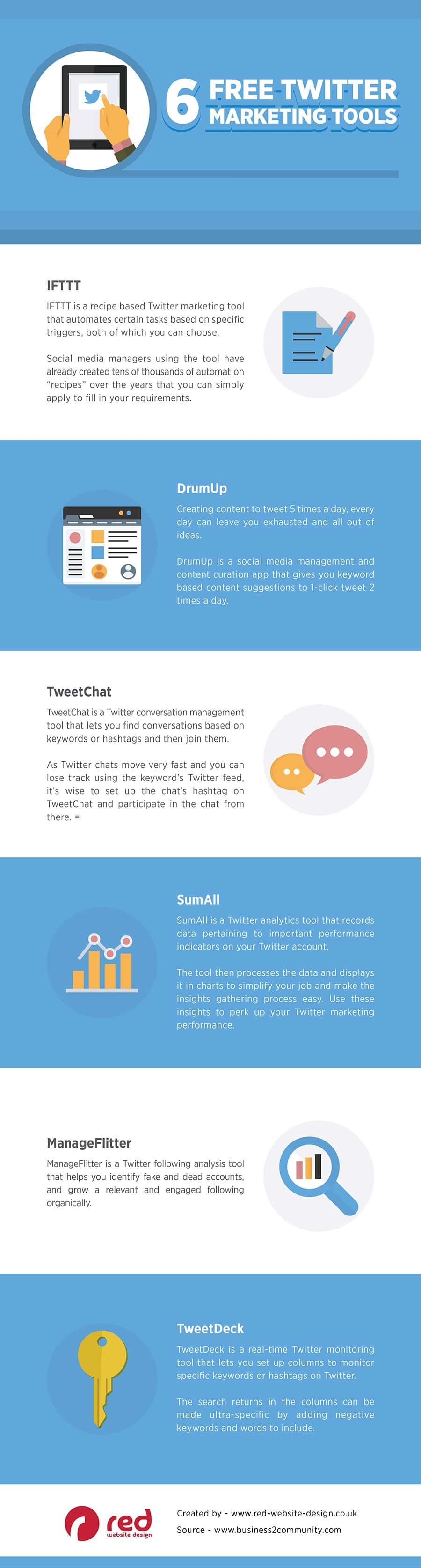
In the fast-paced world of social media, having a well-defined and effective Twitter marketing strategy is crucial for brands and individuals alike.
Twitter, with its real-time engagement and vast user base, offers immense potential for connecting with audiences, building brand awareness, and driving traffic. However, managing a Twitter account efficiently and effectively can be challenging without the right tools.
Fortunately, several free tools can enhance your Twitter marketing efforts, making it easier to schedule posts, engage with followers, and analyze performance. Here are six essential free tools to improve your Twitter marketing strategy.
Using IFTTT for Small Businesses
IFTTT (If This Then That) is a powerful tool that can help small businesses streamline their operations, improve efficiency, and automate repetitive tasks. Here are some in-depth tips and guidance on how small businesses can make the most of IFTTT:
Automate Social Media Management
- Cross-Posting: Set up applets to automatically share posts across multiple social media platforms. For example, when you post on Instagram, the same post can be shared on Facebook, Twitter, and LinkedIn.
- Content Curation: Use applets that automatically share relevant content from trusted sources to your social media accounts, keeping your profiles active and engaging without constant manual effort.
Streamline Communication
- Email Notifications: Create applets to receive immediate notifications for important emails or calendar events. For instance, you can get a text message or Slack notification whenever you receive an email from a specific client or about a particular project.
- Team Coordination: Integrate tools like Slack, Trello, and Google Calendar to ensure all team members are updated on meetings, deadlines, and project updates automatically.
Enhance Customer Relationship Management (CRM)
- Lead Capture: Automate the process of capturing leads from social media or website forms directly into your CRM system like Salesforce or HubSpot.
- Follow-Up Reminders: Set reminders for follow-ups with clients or customers based on actions they take, such as filling out a form or making a purchase.
Improve Marketing Efforts
- Newsletter Subscription: Automatically add new email subscribers from different platforms (like Mailchimp, Google Sheets, etc.) into a unified list.
- Campaign Tracking: Use IFTTT to track campaign performance by integrating Google Analytics with other marketing tools, sending you summaries or alerts about your campaign performance.
Boost E-commerce Operations
- Inventory Management: Connect your e-commerce platform (like Shopify or WooCommerce) with Google Sheets to keep track of inventory levels. Receive alerts when stock levels are low.
- Order Notifications: Set up applets to notify you immediately via email or SMS when a new order is placed or when an order status changes.
Manage Finances
- Expense Tracking: Automatically log expenses by linking your bank or accounting software (like QuickBooks) with Google Sheets, ensuring all transactions are recorded in real-time.
- Invoice Reminders: Set up reminders for invoice due dates to avoid late payments and maintain a healthy cash flow.
Optimize Workflow and Productivity
- Task Management: Integrate task management tools like Todoist, Asana, or Trello with your email and calendar to automatically create tasks based on emails or calendar events.
- Daily Summaries: Receive a daily email or Slack message summarizing your schedule, tasks, and important reminders.
Monitor Online Reputation
- Reviews and Mentions: Set up alerts for when your business is mentioned online, whether in reviews, news articles, or social media. This helps in promptly addressing customer feedback and managing your online reputation.
Data Backup and Security
- Automatic Backups: Automatically back up important documents, spreadsheets, and other files from various platforms (like Google Drive, Dropbox, etc.) to ensure your data is secure.
- Security Alerts: Get immediate alerts if there are security breaches or login attempts on your business accounts.
Customer Support
- Ticket Management: Integrate customer support tools (like Zendesk or Freshdesk) with your email and CRM systems to streamline support tickets and ensure timely responses.
- Feedback Collection: Automate the collection of customer feedback through forms or surveys, and aggregate the results in a central location for analysis.
Getting Started with IFTTT for Your Business
- Identify Key Processes: Determine which tasks and processes in your business can benefit the most from automation.
- Set Clear Goals: Define what you aim to achieve with IFTTT, whether it’s saving time, improving accuracy, or enhancing customer satisfaction.
- Explore Applets: Browse the IFTTT platform for pre-made applets relevant to your business needs. Customize these applets or create new ones to fit your specific requirements.
- Test and Iterate: Start with a few key automations and monitor their performance. Make adjustments as necessary to improve their efficiency and effectiveness.
- Train Your Team: Ensure that your team understands how to use IFTTT and the benefits of automation. Provide training and resources to help them leverage these tools effectively.
By integrating IFTTT into your business operations, you can save time, reduce errors, and focus more on strategic tasks that drive growth. Automation with IFTTT not only improves efficiency but also enhances the overall customer experience, making it a valuable tool for small businesses.
Using DrumUp for Small Businesses
DrumUp is a social media management and content curation tool designed to help businesses efficiently manage their social media presence and engage with their audience. Here are some in-depth tips and guidance on how small businesses can effectively use DrumUp:
Streamline Content Curation
- Customized Content Streams: Set up custom content streams based on keywords, hashtags, and industry-specific topics. This allows you to discover and share relevant content with your audience regularly.
- RSS Feeds: Integrate RSS feeds from your favorite blogs, news sites, and industry publications to automatically pull in fresh content that can be shared on your social media channels.
Optimize Social Media Scheduling
- Automated Scheduling: Use DrumUp’s scheduling feature to plan your social media posts in advance. This helps maintain a consistent posting schedule without the need for daily manual updates.
- Best Time to Post: Utilize DrumUp’s analytics to identify the best times to post based on audience engagement, ensuring your content reaches the maximum number of followers.
Enhance Engagement with Followers
- Interactive Content: Share engaging content such as polls, quizzes, and interactive posts that encourage followers to participate and engage with your brand.
- Monitor Mentions: Use DrumUp to monitor mentions of your brand and keywords related to your industry. Respond promptly to comments, questions, and feedback to build a stronger relationship with your audience.
Boost Content Visibility
- Hashtag Suggestions: Take advantage of DrumUp’s hashtag suggestions to increase the visibility of your posts. Using relevant and trending hashtags can help attract a wider audience.
- Content Recycling: Reuse high-performing posts by scheduling them to be shared again at different times. This ensures that your best content continues to reach new audiences.
Improve Team Collaboration
- Team Accounts: If you have a social media team, use DrumUp’s team account feature to collaborate efficiently. Assign roles and permissions to team members to streamline the content creation and approval process.
- Content Approval Workflow: Set up an approval workflow where team members can submit posts for review before they are published, ensuring consistency and quality in your social media content.
Leverage Analytics and Insights
- Performance Analytics: Regularly review DrumUp’s analytics to track the performance of your posts. Analyze metrics such as likes, shares, comments, and click-through rates to understand what type of content resonates with your audience.
- A/B Testing: Experiment with different types of posts, headlines, and images to see what performs best. Use the insights gained to refine your content strategy.
Content Creation and Customization
- Visual Content: Utilize DrumUp’s integrated image and GIF libraries to create visually appealing posts. Customize images with your branding to maintain a consistent visual identity.
- Content Templates: Create templates for recurring post types (e.g., weekly tips, customer testimonials) to save time and ensure a cohesive look across your social media channels.
Expand Your Reach with Content Amplification
- Employee Advocacy: Encourage employees to share your content on their personal social media profiles. DrumUp’s employee advocacy feature makes it easy for employees to find and share approved content, extending your brand’s reach.
- Influencer Collaboration: Identify and engage with industry influencers who can amplify your content. Use DrumUp to monitor influencer activity and build relationships with key figures in your industry.
Stay Updated with Industry Trends
- Industry News: Keep track of the latest industry news and trends by setting up content streams for relevant topics. Share timely and relevant updates with your audience to position your brand as a thought leader.
- Competitor Analysis: Monitor competitors’ social media activity to understand their content strategy. Identify gaps and opportunities to differentiate your own content and stay ahead in the market.
Maximize Efficiency with Integrations
- CRM Integration: Integrate DrumUp with your CRM system to align your social media efforts with your overall marketing strategy. Use CRM data to create targeted social media campaigns and track their impact on lead generation and sales.
- Marketing Tools: Connect DrumUp with other marketing tools like email marketing platforms, analytics tools, and project management software to create a seamless marketing ecosystem.
Getting Started with DrumUp for Your Business
- Define Your Goals: Determine what you want to achieve with your social media efforts, whether it’s increasing brand awareness, driving website traffic, or generating leads.
- Explore Features: Familiarize yourself with DrumUp’s features and capabilities. Take advantage of their tutorials and support resources to get the most out of the platform.
- Create a Content Plan: Develop a content plan that outlines the types of content you will share, the frequency of posts, and the platforms you will focus on.
- Monitor and Adjust: Regularly review your social media performance and make adjustments to your strategy based on the insights gained. Stay flexible and be willing to experiment with new approaches.
By leveraging DrumUp’s capabilities, small businesses can effectively manage their social media presence, engage with their audience, and achieve their marketing goals. Automation and curated content can save time and effort, allowing you to focus on growing your business.
Using TweetChat for Small Businesses
TweetChat is a powerful tool that allows users to participate in and manage Twitter chats more effectively. For small businesses, leveraging TweetChat can enhance engagement, build community, and amplify their social media presence.
Here are some in-depth tips and guidance on how small businesses can effectively use TweetChat:
Understand the Basics of Twitter Chats
- What is a Twitter Chat? A Twitter chat is a public discussion on Twitter focused on a specific hashtag. It usually occurs at a predetermined time and is led by a moderator who asks questions to guide the conversation.
- Purpose of Twitter Chats: Twitter chats are great for networking, sharing knowledge, and engaging with a community around a particular topic.
Choose the Right Hashtag
- Relevance: Select a hashtag that is relevant to your industry or the topic you want to discuss. It should be unique, memorable, and easy to type.
- Consistency: Use the same hashtag consistently for your Twitter chats to build recognition and a following.
Plan Your Twitter Chat
- Define Objectives: Determine what you want to achieve with your Twitter chat. Objectives could include increasing brand awareness, engaging with customers, or establishing thought leadership.
- Schedule Regularly: Hold your Twitter chats at regular intervals (e.g., weekly, bi-weekly, or monthly) to build anticipation and a loyal audience.
- Prepare Questions: Create a list of questions to guide the discussion. Start with easy, open-ended questions to encourage participation and gradually move to more specific ones.
Promote Your Twitter Chat
- Advance Notice: Promote your Twitter chat in advance through your social media channels, email newsletters, and website. Provide details such as the date, time, topic, and hashtag.
- Engage Influencers: Invite industry influencers or guest experts to participate. Their involvement can attract more participants and add credibility to the chat.
- Teasers: Share teasers or questions ahead of time to spark interest and encourage participation.
Engage During the Chat
- Welcome Participants: Start by welcoming participants, introducing yourself and any guest hosts, and explaining the chat format.
- Moderate Effectively: Post questions using a structured format (e.g., Q1, Q2) and encourage participants to respond using a corresponding format (e.g., A1, A2). Retweet or reply to insightful responses to keep the conversation flowing.
- Stay On-Topic: Gently steer the conversation back on track if it starts to veer off-topic. Use the hashtag in every tweet to ensure all responses are visible in the chat.
Use TweetChat Tools Effectively
- Streamlined Interface: TweetChat provides a simplified interface to follow and participate in Twitter chats. It filters out non-relevant tweets and highlights the chat hashtag.
- Auto-Add Hashtag: Enable the auto-add hashtag feature to ensure every tweet you send during the chat includes the chat hashtag automatically.
- Pace Control: Adjust the pace of the conversation using TweetChat’s features, such as pausing the stream to catch up on important tweets.
Analyze and Follow-Up
- Review Analytics: After the chat, review the analytics to measure engagement, reach, and participation. Identify which questions generated the most responses and who the most active participants were.
- Follow-Up Content: Create follow-up content such as blog posts, infographics, or summaries based on the chat discussion. Share this content with participants to keep the conversation going and provide additional value.
- Thank Participants: Show appreciation by thanking participants and highlighting notable contributions. This can help build a loyal community and encourage future participation.
Build a Community
- Consistent Engagement: Regularly engage with your chat participants outside of scheduled chats. Respond to their tweets, share their content, and maintain a presence in the community.
- Create a Hub: Develop a dedicated space on your website or a social media group where participants can continue the conversation and stay updated on future chats.
- Feedback and Improvement: Solicit feedback from participants on how to improve future chats. Use this feedback to refine your approach and enhance the experience.
Integrate with Broader Marketing Strategy
- Cross-Promotion: Promote your Twitter chats across all your marketing channels. For example, mention them in your email newsletters, blog posts, and other social media platforms.
- Lead Generation: Use Twitter chats as an opportunity to generate leads. Encourage participants to sign up for your newsletter, download resources, or take other actions that bring them into your marketing funnel.
- Brand Voice: Ensure that your participation in Twitter chats aligns with your brand voice and messaging. This helps in building a consistent brand image.
Handle Challenges Proactively
- Trolls and Spam: Be prepared to handle trolls or spam during your Twitter chat. Have a plan in place to moderate or block disruptive participants.
- Technical Issues: Familiarize yourself with the features of TweetChat and have a backup plan in case of technical difficulties. Ensure you have a stable internet connection during the chat.
By following these tips and leveraging the features of TweetChat, small businesses can effectively manage Twitter chats, build a vibrant community, and enhance their social media presence.
Consistent and meaningful engagement through Twitter chats can lead to increased brand loyalty, better customer relationships, and more opportunities for business growth.
Using SumAll for Small Businesses
SumAll is an analytics and automation tool designed to help businesses track, analyze, and visualize their social media and marketing data. For small businesses, leveraging SumAll can provide valuable insights and improve decision-making.
Here are some in-depth tips and guidance on how small businesses can effectively use SumAll:
Understand Your Metrics
- Identify Key Metrics: Determine which metrics are most relevant to your business goals. Common metrics include social media engagement (likes, shares, comments), website traffic, conversion rates, and revenue.
- Set Benchmarks: Establish benchmarks for these metrics based on historical data or industry standards to measure your performance accurately.
Integrate Multiple Platforms
- Comprehensive View: Connect all your social media accounts (e.g., Facebook, Twitter, Instagram) and marketing tools (e.g., Google Analytics, Mailchimp) to SumAll for a comprehensive view of your data.
- Simplified Dashboard: Utilize SumAll’s dashboard to monitor key metrics from all integrated platforms in one place, making it easier to track performance and identify trends.
Automate Reporting
- Scheduled Reports: Set up automated reports to be generated and sent to your email on a regular basis (daily, weekly, monthly). This ensures you consistently review your performance without manual effort.
- Custom Reports: Customize reports to focus on specific metrics or timeframes relevant to your business needs. Tailored reports provide actionable insights and help you make informed decisions.
Visualize Data Effectively
- Charts and Graphs: Use SumAll’s visualization tools to create charts and graphs that make complex data easier to understand. Visual representations can help identify patterns and anomalies quickly.
- Compare Performance: Compare performance over different time periods (e.g., month-over-month, year-over-year) to understand growth trends and seasonal variations.
Analyze Social Media Impact
- Engagement Analysis: Track engagement metrics such as likes, shares, and comments to understand what content resonates with your audience. Identify high-performing posts and replicate their success.
- Follower Growth: Monitor follower growth over time to assess the effectiveness of your social media strategies. Sudden changes in follower count can indicate successful campaigns or potential issues.
Monitor Website Traffic and Conversions
- Traffic Sources: Analyze website traffic sources to determine which channels (e.g., social media, search engines, email marketing) drive the most visitors to your site.
- Conversion Tracking: Set up conversion tracking to measure how effectively your website turns visitors into customers. Track actions such as purchases, sign-ups, and downloads.
Optimize Marketing Campaigns
- Campaign Performance: Use SumAll to track the performance of your marketing campaigns across different channels. Identify which campaigns are most effective and allocate resources accordingly.
- A/B Testing: Conduct A/B testing on different marketing strategies and use SumAll to compare results. This helps in refining your approach based on data-driven insights.
Customer Insights
- Demographic Data: Analyze demographic data from your social media and website analytics to understand your audience better. Tailor your marketing messages to resonate with your target demographics.
- Customer Behavior: Monitor customer behavior patterns such as engagement times, preferred content types, and purchase behavior. Use this information to personalize your marketing efforts.
Set and Track Goals
- SMART Goals: Set SMART (Specific, Measurable, Achievable, Relevant, Time-bound) goals for your social media and marketing activities. Use SumAll to track progress towards these goals.
- KPIs: Define Key Performance Indicators (KPIs) that align with your business objectives. Regularly review these KPIs using SumAll’s dashboard to stay on track.
Leverage Insights for Strategic Planning
- Trend Analysis: Identify trends and patterns in your data to inform your strategic planning. Understanding market trends helps you stay ahead of the competition.
- Data-Driven Decisions: Use insights from SumAll to make data-driven decisions. Whether it’s adjusting your marketing budget, tweaking your content strategy, or targeting new customer segments, rely on the data to guide your actions.
Collaborate with Your Team
- Share Reports: Share SumAll reports with your team to ensure everyone is aligned on performance metrics and goals. Collaborative analysis fosters a data-driven culture within your business.
- Set Responsibilities: Assign specific metrics or goals to team members and use SumAll to track their progress. This promotes accountability and ensures collective effort towards business objectives.
Customer Support and Training
- Utilize Resources: Take advantage of SumAll’s customer support, tutorials, and resources to fully understand and utilize the platform’s capabilities.
- Continuous Learning: Stay updated with new features and best practices through SumAll’s blog, webinars, and community forums. Continuous learning ensures you maximize the value of the tool.
Getting Started with SumAll for Your Business
- Sign Up and Integrate: Start by signing up for SumAll and integrating all relevant social media and marketing platforms. The more data sources you connect, the richer your insights will be.
- Customize Your Dashboard: Set up your dashboard to focus on the metrics that matter most to your business. Customize the layout for easy access to key data points.
- Schedule Regular Reviews: Establish a routine for reviewing your data and reports. Regular analysis helps you stay proactive and responsive to changes in performance.
- Act on Insights: Use the insights gained from SumAll to make informed decisions and improve your marketing strategies. Adjust your tactics based on what the data reveals.
By effectively using SumAll, small businesses can gain a deeper understanding of their performance across various channels, optimize their marketing efforts, and make strategic decisions that drive growth.
Data-driven insights from SumAll empower small businesses to enhance their marketing strategies and achieve their business goals more efficiently.
Using ManageFlitter for Small Businesses
ManageFlitter is a powerful Twitter management tool that helps businesses grow and manage their Twitter accounts more effectively. It offers a range of features, including follower management, tweet scheduling, analytics, and more.
Here are some in-depth tips and guidance on how small businesses can effectively use ManageFlitter:
Optimize Your Twitter Profile
- Complete Your Profile: Ensure that your Twitter profile is complete with a professional profile picture, cover photo, bio, website link, and location. A complete profile appears more credible and attractive to potential followers.
- Keyword-Rich Bio: Use relevant keywords in your bio to make your profile more discoverable. This can help attract followers who are interested in your industry or niche.
Manage Followers and Unfollowers
- Identify Inactive Accounts: Use ManageFlitter to identify and unfollow inactive accounts that don’t engage with your content. This helps in maintaining a healthy follower-to-following ratio and ensures your feed is filled with active users.
- Remove Fake Accounts: Identify and unfollow fake or spam accounts that might be following you. This improves the quality of your follower base and enhances engagement rates.
Grow Your Follower Base
- Targeted Following: Use ManageFlitter’s search filters to find and follow users based on keywords, location, and other criteria relevant to your business. Following users who are interested in your niche increases the likelihood of them following you back.
- Engage with Influencers: Identify and engage with industry influencers. Comment on their tweets, retweet their content, and mention them in your tweets to build relationships and attract their followers to your profile.
Optimize Tweet Scheduling
- Best Time to Tweet: Use ManageFlitter’s scheduling tool to post tweets at times when your audience is most active. This increases the visibility and engagement of your tweets.
- Content Calendar: Plan and schedule your tweets in advance using a content calendar. This ensures a consistent posting schedule and saves time in the long run.
Analyze and Improve Performance
- Track Analytics: Regularly review ManageFlitter’s analytics to track key metrics such as follower growth, engagement rates, and tweet performance. Understanding these metrics helps in refining your Twitter strategy.
- A/B Testing: Experiment with different types of content, posting times, and tweet formats. Use the analytics to determine what works best and adjust your strategy accordingly.
Engage with Your Audience
- Monitor Mentions and Replies: Keep track of mentions and replies to your tweets. Respond promptly to engage with your audience and build stronger relationships.
- Retweet and Like: Actively retweet and like relevant content from your followers and other users in your industry. This not only engages others but also increases the visibility of your profile.
Leverage Advanced Search Filters
- Geo-Targeting: Use ManageFlitter’s advanced search filters to find users and tweets based on specific locations. This is particularly useful for local businesses looking to engage with a local audience.
- Keyword Search: Find and engage with tweets and users based on specific keywords related to your industry. This helps in participating in relevant conversations and attracting a targeted audience.
Clean Up Your Twitter Account
- Unfollow Non-Followers: Identify and unfollow users who do not follow you back, especially if they are not relevant to your business. This helps in maintaining a more engaged and reciprocal follower base.
- Filter and Manage Lists: Use ManageFlitter to organize your followers into lists. This helps in managing your interactions more effectively and ensures you don’t miss important tweets from key users.
Automate Routine Tasks
- Automated DMs: Set up automated direct messages to welcome new followers or provide them with useful information about your business. Be careful to make these messages personal and not overly promotional to avoid appearing spammy.
- Recurring Posts: Schedule recurring posts to share evergreen content regularly. This keeps your profile active and continually provides value to your followers.
Monitor Competitors
- Competitive Analysis: Use ManageFlitter to monitor your competitors’ Twitter activity. Analyze their follower growth, engagement rates, and content strategy to gain insights and identify opportunities for your own Twitter strategy.
- Benchmarking: Compare your Twitter performance with that of your competitors. Identify areas where you can improve and strategies that you can adopt to enhance your own Twitter presence.
Getting Started with ManageFlitter for Your Business
- Sign Up and Connect Accounts: Begin by signing up for ManageFlitter and connecting your Twitter account. Allow the tool to analyze your account and provide insights.
- Set Clear Goals: Define your goals for using ManageFlitter. Whether it’s growing your follower base, increasing engagement, or improving tweet performance, having clear objectives will guide your strategy.
- Explore Features: Familiarize yourself with the various features ManageFlitter offers. Utilize tutorials and customer support to make the most of the tool.
- Implement a Strategy: Develop a Twitter strategy based on your goals and the insights gained from ManageFlitter. Regularly review and adjust your strategy based on performance data.
By effectively using ManageFlitter, small businesses can optimize their Twitter presence, engage with their audience more effectively, and achieve their social media marketing goals.
Consistent management and strategic use of Twitter can lead to increased brand awareness, better customer relationships, and business growth.
Using TweetDeck for Small Businesses
TweetDeck is a robust Twitter management tool that allows users to organize and monitor multiple Twitter accounts, schedule tweets, and track engagement in real time.
For small businesses, leveraging TweetDeck can enhance social media efficiency and effectiveness. Here are some in-depth tips and guidance on how small businesses can effectively use TweetDeck:
Set Up Your TweetDeck Dashboard
- Multiple Columns: Use TweetDeck’s column feature to create a customized dashboard. Columns can include timelines, mentions, direct messages, lists, hashtags, and scheduled tweets.
- Account Management: Add and manage multiple Twitter accounts from one interface. This is particularly useful for businesses with different departments or brands.
Monitor Real-Time Engagement
- Mentions and Replies: Set up columns for mentions and replies to monitor interactions with your audience in real time. Respond promptly to engage with customers and address any issues.
- Hashtag Tracking: Create columns to track relevant hashtags. This helps you stay updated on industry trends and join relevant conversations.
Organize with Lists
- Create Lists: Organize your followers, influencers, competitors, and industry leaders into lists. This allows you to monitor specific groups separately and ensures you don’t miss important updates.
- Engage with Lists: Regularly engage with the content shared by users in your lists. Like, retweet, and comment to build relationships and increase your visibility within your niche.
Schedule Tweets
- Content Calendar: Use TweetDeck to schedule tweets in advance. This ensures a consistent posting schedule and saves time by allowing you to plan content ahead.
- Optimal Timing: Schedule tweets for times when your audience is most active. Use Twitter Analytics to identify peak engagement times.
Analyze and Adjust Strategy
- Track Performance: Monitor the performance of your tweets in real time. Analyze engagement metrics such as likes, retweets, and replies to understand what content resonates with your audience.
- Adjust Content: Based on performance data, adjust your content strategy. Focus on sharing more of what works and refine or eliminate what doesn’t.
Manage Campaigns
- Campaign Columns: Create separate columns for different campaigns. This allows you to track the performance and engagement of each campaign individually.
- Hashtag Campaigns: If you are running a hashtag campaign, set up a column to monitor all tweets using the campaign hashtag. Engage with participants and amplify their content.
Enhance Customer Service
- Customer Support Column: Set up a column dedicated to customer support queries and mentions. Responding quickly and effectively to customer inquiries can improve satisfaction and loyalty.
- Keyword Monitoring: Monitor keywords related to your business or industry. This helps in identifying potential customer issues and addressing them proactively.
Collaborate with Your Team
- Team Access: Share access to your TweetDeck dashboard with your team. Assign specific roles and responsibilities to team members for managing different aspects of your Twitter strategy.
- Unified Efforts: Use TweetDeck to ensure all team members are aligned and working towards the same goals. Coordinate efforts and share insights to improve overall performance.
Leverage Advanced Search
- Custom Searches: Use TweetDeck’s advanced search feature to create custom search queries. Filter results by location, date, engagement, and more to find relevant content and conversations.
- Competitor Monitoring: Set up search columns to monitor competitor activity. Analyze their tweets, engagement, and follower interactions to gain insights and identify opportunities.
Engage with Influencers
- Influencer Lists: Create lists of influencers in your industry. Monitor their tweets and engage with their content regularly.
- Build Relationships: Reach out to influencers by mentioning them in your tweets, replying to their tweets, and retweeting their content. Building relationships with influencers can help expand your reach and credibility.
Use TweetDeck Shortcuts
- Keyboard Shortcuts: Familiarize yourself with TweetDeck’s keyboard shortcuts to navigate the platform more efficiently. Shortcuts can save time and streamline your workflow.
- Quick Actions: Use quick actions such as replying, retweeting, and liking directly from the dashboard to manage interactions swiftly.
Stay Informed with Trends
- Trending Topics: Monitor trending topics to stay informed about what’s popular on Twitter. Participate in trending conversations if they are relevant to your business.
- News Monitoring: Create columns for news sources and industry publications. Staying updated on the latest news helps you share timely and relevant content with your audience.
Getting Started with TweetDeck for Your Business
- Set Up Your Account: Begin by setting up your TweetDeck account and linking your Twitter profiles. Customize your dashboard by adding the columns that are most relevant to your business goals.
- Define Your Goals: Clearly define what you aim to achieve with TweetDeck. Whether it’s increasing engagement, growing your follower base, or improving customer service, having specific goals will guide your strategy.
- Explore Features: Take the time to explore all the features TweetDeck offers. Use the available tutorials and support resources to fully understand how to utilize the platform.
- Implement and Monitor: Start implementing your Twitter strategy using TweetDeck. Monitor the performance of your tweets and engagement levels, and be ready to adjust your approach based on the insights you gain.
By effectively using TweetDeck, small businesses can enhance their Twitter presence, engage with their audience more efficiently, and achieve their social media marketing objectives.
The platform’s powerful features and real-time capabilities make it an essential tool for any small business looking to optimize their Twitter strategy.
Conclusion
Implementing a successful Twitter marketing strategy requires more than just posting tweets; it involves engaging with your audience, analyzing performance, and optimizing your content.
The six free tools mentioned in this post—IFTTT, DrumUp, TweetChat, SumAll, ManageFlitter, and TweetDeck—offer a range of features to help you achieve these goals. By leveraging these tools, you can streamline your Twitter marketing efforts, save time, and ultimately improve your presence and performance on the platform.
Whether you’re a seasoned social media manager or just starting, these tools can provide the support you need to make the most of your Twitter marketing strategy.

Author:
Mark Ford



