

Are you looking for ways to generate more email subscribers? Wondering how to create a high converting squeeze page for your website?
In the world of digital marketing, building and nurturing an email list is a fundamental strategy for success. Email marketing allows you to directly connect with your audience, share valuable content, promote your products or services, and ultimately, drive conversions. But to have a successful email marketing campaign, you need a steady influx of email subscribers. This is where a well-crafted squeeze page can make all the difference.
In this comprehensive guide, we’ll delve into the art of creating a squeeze page that not only captures the attention of your website visitors but also compels them to willingly share their email addresses. We’ll explore what a squeeze page is, why it’s essential, and provide you with a step-by-step guide on how to create one that converts like a pro.
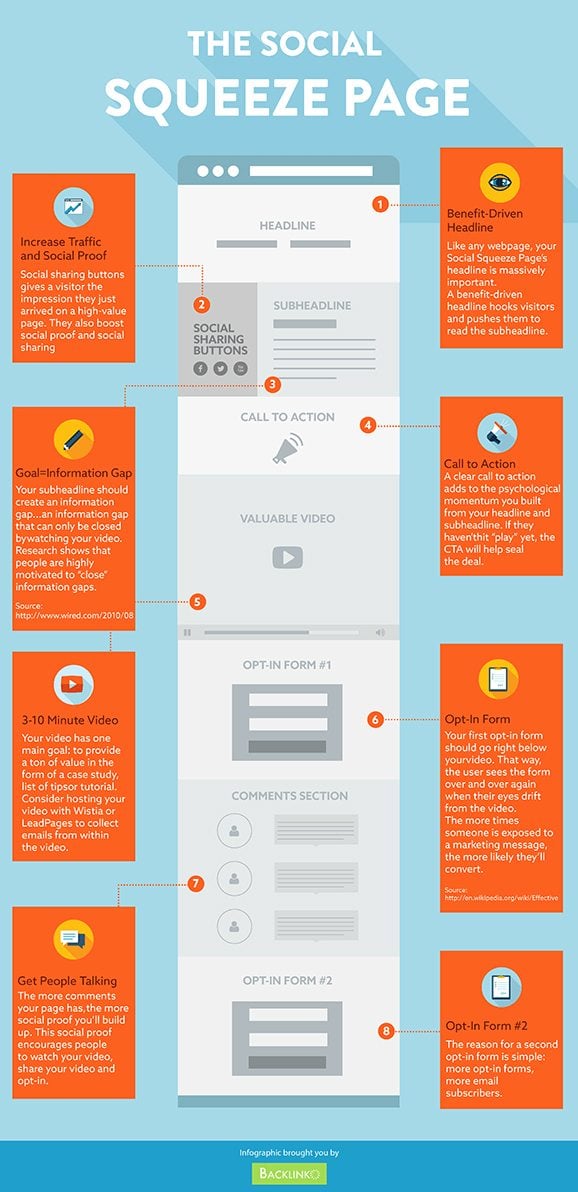
Backlinko share their steps to success in this infographic.
Chapter 1: Understanding the Squeeze Page
What is a Squeeze Page?
A squeeze page, also known as a lead capture page or opt-in page, is a dedicated web page designed with one primary purpose: to collect email addresses from your visitors. Unlike typical webpages, which may have multiple goals and distractions, a squeeze page is laser-focused on encouraging visitors to take a specific action – typically, submitting their email addresses in exchange for something valuable, such as a free e-book, webinar, or newsletter subscription.
Why Squeeze Pages Matter
Squeeze pages are a powerful tool in your digital marketing arsenal for several reasons:
- Building Your Email List: Squeeze pages are highly effective for rapidly growing your email list. By offering a compelling incentive, you can entice visitors to willingly share their email addresses, allowing you to build a database of potential customers.
- Higher Conversion Rates: Compared to regular website pages, squeeze pages often have significantly higher conversion rates. Their simplicity and singular focus make it easier for visitors to make a decision.
- Segmentation: When visitors provide their email addresses on a squeeze page, they are expressing an interest in a specific topic or offer. This allows you to segment your email list and send targeted content, increasing engagement and conversion rates.
Now that you understand the importance of squeeze pages let’s move on to creating one that will help you achieve your email marketing goals.
Chapter 2: Crafting an Effective Squeeze Page
1. Define Your Goal
Before you start creating your squeeze page, you need to have a clear understanding of your goal. What do you want to achieve with this page? Common goals for squeeze pages include:
- Building an email list
- Promoting a product or service
- Encouraging webinar sign-ups
- Offering a lead magnet (e-book, checklist, template)
Your goal will determine the content and design of your squeeze page.
2. Create an Irresistible Offer
The heart of any successful squeeze page is the offer. Your offer should be something of high value that resonates with your target audience. Here are some ideas:
- E-books: Offer an exclusive e-book packed with valuable insights.
- Webinars: Invite visitors to join a free webinar on a relevant topic.
- Checklists and Templates: Provide downloadable resources that make life easier for your audience.
- Exclusive Discounts: Offer subscribers access to special promotions or discounts.
Remember, your offer should be compelling enough to convince visitors that sharing their email addresses is worth it.
3. Write an Attention-Grabbing Headline
Your headline is the first thing visitors will see on your squeeze page. It needs to be attention-grabbing and convey the value of your offer. Here are some tips for writing an effective headline:
- Keep it concise and clear.
- Use action-oriented language.
- Highlight the benefits of your offer.
- Create a sense of urgency if applicable.
4. Craft a Persuasive Copy
The body of your squeeze page should provide more information about your offer and why visitors should take action. Here’s how to craft persuasive copy:
- Focus on the benefits, not just the features.
- Use bullet points to highlight key points.
- Address potential objections or concerns.
- Keep it concise and scannable.
5. Add High-Quality Visuals
Incorporate relevant images or graphics that enhance your offer’s appeal. Visuals can help break up the text and make your squeeze page more engaging. Ensure that the visuals are high-quality and directly related to your offer.
6. Design for Clarity and Simplicity
A cluttered or confusing design can deter visitors from taking action. Keep your squeeze page design clean, simple, and easy to navigate. Use contrasting colors for your call-to-action buttons to make them stand out.
7. Create a Compelling Call-to-Action (CTA)
Your call-to-action button is where the magic happens. It should be prominently displayed and use action-oriented language. Here are some CTA examples:
- “Get Started Now”
- “Claim Your Free E-book”
- “Sign Up for the Webinar”
- “Download Your Checklist”
8. Build Trust
Include elements that build trust with your audience. This can include testimonials, trust badges, privacy policy links, and any relevant social proof that demonstrates your credibility.
9. Mobile Responsiveness
Ensure that your squeeze page is fully responsive and looks great on mobile devices. With an increasing number of users accessing websites on smartphones, mobile optimization is crucial.
10. A/B Testing
To optimize your squeeze page for the best possible conversion rates, conduct A/B tests. Test different headlines, copy, visuals, and CTA button colors to see what resonates best with your audience.
Chapter 3: Squeeze Page Best Practices
1. Keep It Short and Sweet
Squeeze pages should be concise and to the point. Avoid unnecessary distractions or links that could lead visitors away from the primary goal.
2. Use Social Proof
Include social proof elements, such as testimonials or statistics, to build trust and credibility.
3. Offer a Privacy Assurance
Assure visitors that their email addresses will be kept confidential and won’t be shared or sold to third parties.
4. Testimonials and Reviews
If applicable, showcase positive reviews or testimonials from previous subscribers or customers who have benefited from your offer.
5. Implement Exit-Intent Pop-ups
Consider using exit-intent pop-ups that trigger when a visitor is about to leave the page without taking action. These pop-ups can present one final offer or incentive to encourage sign-ups.
Chapter 4: Building and Launching Your Squeeze Page
1. Choose a Reliable Website Builder or Platform
To create your squeeze page, you can use website builders like WordPress, Wix, or dedicated landing page builders like Unbounce or Leadpages. Select a platform that aligns with your technical expertise and budget.
2. Select a Domain or Subdomain
Choose a domain or subdomain where your squeeze page will reside. Make sure it’s easily accessible from your main website.
3. Design Your Squeeze Page
Use the tips and best practices mentioned earlier to design your squeeze page. Most website builders offer templates specifically designed for creating high-converting squeeze pages.
4. Set Up Your Email Marketing Integration
Integrate your squeeze page with your email marketing software (e.g., Mailchimp, ConvertKit, or AWeber) to ensure that email addresses are automatically added to your list.
5. Test Your Page
Before launching, thoroughly test your squeeze page on different devices and browsers to ensure that it functions correctly and looks appealing.
6. Monitor and Optimize
After launching, closely monitor the performance of your squeeze page using analytics tools. Track conversion rates, traffic sources, and user behavior. Use this data to make improvements and optimize for better results.
Chapter 5: Promoting Your Squeeze Page
Creating a fantastic squeeze page is just the first step. To maximize its effectiveness, you need to promote it actively:
- Social Media: Share your squeeze page on your social media profiles and groups relevant to your niche.
- Email Signature: Include a link to your squeeze page in your email signature.
- Content Marketing: Write blog posts or create videos related to your offer and include links to your squeeze page.
- Paid Advertising: Consider running paid ads on platforms like Google Ads or Facebook to drive targeted traffic to your squeeze page.
- Collaborations: Partner with influencers or other businesses to promote your squeeze page to their audience.
Conclusion
A well-crafted squeeze page can be a game-changer for your email marketing efforts. It’s a powerful tool for capturing leads, building your email list, and ultimately driving conversions. By following the steps and best practices outlined in this guide, you’ll be well on your way to creating a squeeze page that converts like a pro. Remember, the key is to offer something of value, keep it simple, and continuously optimize for better results. So, go ahead and start building your high-converting squeeze page today and watch your email list grow.

Author:
Mark Ford



