Are you looking for ways to improve your email marketing strategy? Want to know how to use email to increase sales and customer engagement?
Smart Mail share their Beatles inspired tips in this infographic.
Here are the key points:
- Use email retargeting to say hello when shoppers say goodbye
- Make shoppers feel safe with the use of confidence building imagery
- Implement a full lifecycle email marketing strategy that covers the entire shopping journey
- Don’t buy or rent email lists, build them yourself
- Enlist the help of experts for improved email campaign performance
- Get shoppers back to where they once belonged by sending browse abandonment emails
- Adding social media imagery to your emails
- Always use customer support callouts
- Be here, there, and everywhere with mobile-friendly, responsive emails
- Personalize your emails to make them relevant to each individual shopper
Hope the infographic helps!
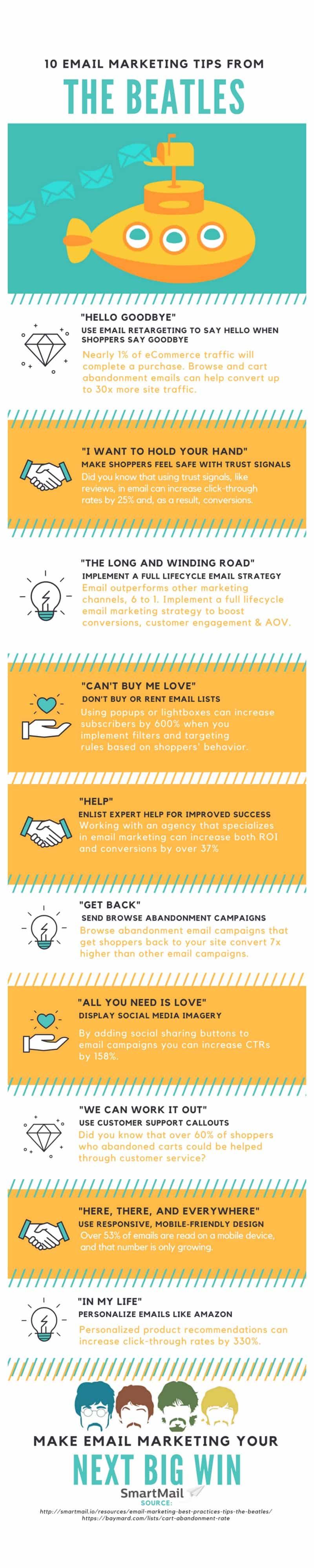
The Beatles, one of the most influential bands of all time, have inspired generations with their timeless music and innovative approach to songwriting. Their creativity, adaptability, and ability to connect with their audience can also serve as an excellent blueprint for crafting an effective email marketing strategy. Here are ten tips to improve your email marketing, inspired by the legendary Beatles.
Use Email Retargeting to Say Hello When Shoppers Say Goodbye
Retargeting is a powerful tool in the digital marketing arsenal, particularly for small businesses looking to maximize their online sales. When a potential customer visits your website but leaves without making a purchase, it’s crucial to remind them of what they left behind. Just as the Beatles’ song “Hello, Goodbye” highlights the duality of greetings and farewells, email retargeting allows you to re-engage with those who have seemingly said goodbye. Here’s an in-depth look at how small businesses can effectively implement email retargeting to turn potential missed opportunities into successful conversions.
Understanding Email Retargeting
Email retargeting, also known as remarketing, involves sending targeted emails to visitors who have interacted with your website but did not complete a desired action, such as making a purchase or filling out a form. These emails serve as a reminder and often include incentives to encourage visitors to return and complete their transaction.
The Benefits of Email Retargeting
- Increased Conversion Rates: By targeting interested customers, retargeting emails typically have higher open and click-through rates, leading to better conversion rates.
- Enhanced Customer Engagement: Retargeting keeps your brand at the forefront of customers’ minds, encouraging them to re-engage with your site.
- Cost-Effective Marketing: Retargeting emails focus on individuals who have already shown interest, making them a more cost-effective marketing strategy compared to cold outreach.
Key Steps to Implementing Email Retargeting
- Segment Your Audience: Identify and segment visitors based on their behavior on your website. Common segments include cart abandoners, product viewers, and previous purchasers.
- Set Up Triggered Emails: Use marketing automation tools to set up triggered emails that are sent automatically when a visitor takes a specific action, such as abandoning their cart.
- Craft Compelling Messages: Create personalized and compelling email content that speaks directly to the recipient’s behavior. Include product images, descriptions, and persuasive copy.
- Offer Incentives: Encourage customers to return with special offers, discounts, or free shipping. Highlighting scarcity, such as low stock or limited-time offers, can also be effective.
- Optimize Timing: Timing is crucial. Send the first retargeting email within an hour of the customer’s exit. Follow up with additional emails over the next few days if they do not return.
Detailed Tips and Guidance
Segment Your Audience
Behavioral Segmentation: Divide your audience based on their actions. Common segments include:
- Cart Abandoners: Visitors who added items to their cart but did not check out.
- Product Viewers: Visitors who viewed specific product pages but did not add items to their cart.
- General Browsers: Visitors who spent a significant amount of time on your site without engaging deeply.
Demographic Segmentation: Further segment your audience based on demographic data such as age, gender, and location to tailor your messages more effectively.
Set Up Triggered Emails
Use an email marketing platform like Mailchimp, Klaviyo, or HubSpot that supports automation and retargeting. Set up triggers based on the segments you’ve defined. For example:
- Cart Abandonment Trigger: An email is triggered when a user leaves items in their cart for more than 30 minutes.
- Browse Abandonment Trigger: An email is triggered when a user views a product page but does not add the item to their cart.
Craft Compelling Messages
Personalization: Use the recipient’s name and personalize the email content based on their browsing behavior. For example, “Hi [Name], we noticed you were interested in [Product Name]”.
Visual Appeal: Include high-quality images of the products the customer was interested in. Visuals play a crucial role in reminding customers of what caught their eye.
Persuasive Copy: Write concise and engaging copy that highlights the benefits of the product. Use urgency and scarcity tactics, such as “Only a few items left!” or “Get 10% off if you complete your purchase today”.
Clear Call-to-Action (CTA): Include a prominent CTA that directs the recipient back to their cart or the product page. Examples include “Complete Your Purchase” or “Take Another Look”.
Offer Incentives
Discount Codes: Provide a discount code in the email, such as “Use code SAVE10 for 10% off your order”.
Free Shipping: Offer free shipping to reduce the purchase barrier, especially for first-time customers.
Exclusive Deals: Create a sense of exclusivity by offering deals that are only available to the email recipients.
Optimize Timing
First Email: Send the first retargeting email within an hour of the cart abandonment. This is when the customer’s interest is still fresh.
Follow-Up Emails: If there is no response to the first email, send follow-up emails:
- Second Email: 24 hours after abandonment, with a reminder and possibly a small incentive.
- Third Email: 48-72 hours later, with a stronger incentive or a sense of urgency, such as “Last chance to get 15% off!”.
Best Practices for Effective Email Retargeting
- A/B Testing: Continuously test different email subject lines, content, CTAs, and sending times to determine what works best for your audience.
- Mobile Optimization: Ensure your emails are mobile-friendly since many users will open emails on their mobile devices.
- Clear Unsubscribe Options: Always include an easy way for recipients to unsubscribe. This builds trust and keeps your email list clean.
- Analyze and Adjust: Regularly review the performance metrics of your retargeting emails, such as open rates, click-through rates, and conversion rates. Use this data to refine your strategy.
Summary
Email retargeting is a vital strategy for small businesses aiming to maximize their online sales and engagement. By effectively segmenting your audience, setting up automated triggers, crafting compelling messages, offering enticing incentives, and optimizing the timing of your emails, you can significantly improve your chances of converting potential customers. Just like the Beatles’ timeless appeal, a well-executed retargeting strategy can keep your brand top-of-mind and drive meaningful connections with your audience.
Make Shoppers Feel Safe with the Use of Confidence-Building Imagery
Creating a sense of trust and security is crucial for any e-commerce business. Customers need to feel confident that their personal information is safe, the products they’re buying are of high quality, and the company will provide reliable service. Using confidence-building imagery in your emails and on your website can significantly enhance this sense of trust. Here are some in-depth tips and guidance for small businesses on how to make shoppers feel safe using imagery.
Understanding the Role of Imagery in Building Confidence
Imagery plays a powerful role in shaping perceptions. High-quality images that convey professionalism, security, and authenticity can make a significant difference in how customers perceive your brand. Trustworthy images can help alleviate any fears or concerns shoppers might have, encouraging them to move forward with their purchase.
Key Elements of Confidence-Building Imagery
- High-Quality Product Images: Ensure your product images are clear, high-resolution, and professionally taken.
- Trust Badges and Seals: Display trust badges that certify your website’s security and product authenticity.
- Customer Testimonials and Reviews: Include images of real customers along with their testimonials to build credibility.
- Behind-the-Scenes Photos: Show images of your team, workspace, or production process to humanize your brand.
- Clear Return and Guarantee Icons: Use icons that clearly communicate your return policy and guarantees.
Detailed Tips and Guidance
High-Quality Product Images
Professional Photography: Invest in professional photography to ensure your product images are of the highest quality. This includes:
- Multiple Angles: Show your products from various angles to give customers a comprehensive view.
- Close-Ups: Include close-up shots to highlight details and quality.
- In-Use Photos: Display images of the product being used to help customers envision how they can use it.
Consistent Style: Maintain a consistent style and quality across all product images. This creates a cohesive look and reinforces your brand’s professionalism.
Background and Lighting: Use clean backgrounds and good lighting to make your products stand out. Avoid cluttered or dark images that can detract from the product’s appeal.
Trust Badges and Seals
Security Badges: Display badges from recognized security providers such as Norton, McAfee, or TRUSTe. These can be placed near the checkout button or in the footer of your site to reassure customers their data is secure.
Certification Logos: If your products are certified by reputable organizations (e.g., USDA Organic, Fair Trade), include these logos in your imagery.
Money-Back Guarantee: Use badges or seals that highlight any money-back guarantees or warranties you offer. This can reduce the perceived risk for the customer.
Customer Testimonials and Reviews
Real Customer Photos: Include images of real customers alongside their testimonials. Seeing a face associated with the review can make it more relatable and trustworthy.
Diverse Demographics: Showcase testimonials from a diverse range of customers to appeal to a broader audience.
Before-and-After Photos: If applicable, use before-and-after photos to demonstrate the effectiveness of your products. This is particularly effective for beauty, health, and fitness products.
Video Testimonials: Incorporate video testimonials where customers share their positive experiences. Video adds a layer of authenticity and engagement that text alone cannot achieve.
Behind-the-Scenes Photos
Team Introductions: Share images of your team members and their roles. This humanizes your brand and shows the real people behind your business.
Workspace Images: Include photos of your office, workshop, or store. This gives customers a glimpse into your operations and can build a sense of connection.
Production Process: Show the process behind your products, from creation to packaging. This transparency can enhance trust, especially for handmade or artisanal products.
Clear Return and Guarantee Icons
Return Policy Icons: Use icons or badges to highlight your return policy. Clear communication about returns can alleviate concerns and make customers feel more secure about their purchase.
Guarantee Seals: Display seals that communicate any satisfaction guarantees or warranties. For example, “100% Satisfaction Guaranteed” or “2-Year Warranty” can be visually represented with seals.
Implementing Confidence-Building Imagery in Emails
Welcome Emails
- Trust Badges: Include security badges and any certifications in your welcome emails to reassure new subscribers.
- Team Photos: Introduce key team members with friendly images to create a personal connection.
Abandoned Cart Emails
- Product Images: Show high-quality images of the items left in the cart.
- Customer Reviews: Include testimonials or reviews related to the abandoned products to reassure customers of their quality.
Promotional Emails
- Limited-Time Offers: Use badges that highlight limited-time offers or guarantees.
- User-Generated Content: Incorporate images of customers using your products to build social proof.
Post-Purchase Emails
- Thank You Message: Include a team photo in your thank-you emails to add a personal touch.
- Follow-Up Review Request: Encourage customers to leave reviews with examples of other satisfied customers’ photos and testimonials.
Best Practices for Using Imagery Effectively
- Consistency: Ensure all images across your emails and website are consistent in style and quality to create a cohesive brand image.
- Relevance: Use images that are directly relevant to the content of your email or webpage. Irrelevant images can confuse customers and dilute your message.
- Optimization: Optimize all images for fast loading times to prevent slowdowns that can frustrate customers.
- Accessibility: Add descriptive alt text to all images to ensure accessibility for all users, including those using screen readers.
Summary
Confidence-building imagery is a critical component of any successful e-commerce strategy. By using high-quality product images, trust badges, customer testimonials, behind-the-scenes photos, and clear return and guarantee icons, small businesses can significantly enhance the perceived trustworthiness of their brand. Implementing these elements thoughtfully in your email marketing and website can help create a secure and inviting shopping experience, encouraging customers to make a purchase with confidence. Just as the Beatles made their fans feel safe and connected, your brand can use imagery to build a lasting, trustworthy relationship with your customers.
Implement a Full Lifecycle Email Marketing Strategy that Covers the Entire Shopping Journey
An effective email marketing strategy should engage customers at every stage of their shopping journey, from initial awareness to post-purchase follow-up. By implementing a full lifecycle email marketing strategy, small businesses can build strong relationships with customers, increase conversion rates, and drive long-term loyalty. Here are in-depth tips and guidance on how to cover the entire shopping journey with your email marketing efforts.
Understanding the Customer Lifecycle
The customer lifecycle can be broken down into several key stages:
- Awareness: The customer becomes aware of your brand.
- Consideration: The customer considers purchasing your product or service.
- Decision: The customer decides to make a purchase.
- Purchase: The customer completes the purchase.
- Retention: The customer engages with your brand post-purchase and considers repeat purchases.
- Advocacy: The customer becomes a loyal advocate for your brand, referring others.
Key Elements of a Full Lifecycle Email Marketing Strategy
- Welcome Emails: Introduce your brand to new subscribers.
- Nurture Emails: Build relationships and guide potential customers towards making a purchase.
- Promotional Emails: Drive sales with special offers and promotions.
- Transactional Emails: Confirm orders and provide essential information.
- Post-Purchase Emails: Follow up after the sale to ensure satisfaction and encourage future purchases.
- Re-Engagement Emails: Reconnect with inactive customers and win back their business.
Detailed Tips and Guidance
Awareness Stage: Welcome Emails
Purpose: Introduce your brand, set expectations, and provide value to new subscribers.
Content Ideas:
- Brand Introduction: Share your brand story, mission, and values to create a personal connection.
- Special Offers: Offer a discount or freebie to encourage first-time purchases.
- Content Highlights: Showcase popular products, blog posts, or other valuable content.
Best Practices:
- Timing: Send the welcome email immediately after the subscriber joins your list.
- Personalization: Address the subscriber by their name and tailor content based on their sign-up source (e.g., website, social media).
- Clear CTA: Include a clear call-to-action, such as “Shop Now” or “Learn More”.
Consideration Stage: Nurture Emails
Purpose: Build trust and provide information that helps potential customers make an informed decision.
Content Ideas:
- Educational Content: Share blog posts, how-to guides, and videos that highlight the benefits of your products.
- Product Features: Provide detailed information about your products, including unique features and benefits.
- Customer Testimonials: Showcase positive reviews and testimonials to build credibility.
Best Practices:
- Segmentation: Segment your audience based on their interests and behaviors to send targeted content.
- Consistency: Maintain a regular sending schedule to keep your brand top-of-mind.
- Value-Driven: Focus on providing value rather than pushing for a sale in every email.
Decision Stage: Promotional Emails
Purpose: Encourage potential customers to make a purchase by offering incentives and highlighting popular products.
Content Ideas:
- Special Offers: Provide exclusive discounts, limited-time promotions, or free shipping offers.
- Product Recommendations: Use personalized product recommendations based on browsing history or past purchases.
- Urgency: Create a sense of urgency with countdown timers, low-stock alerts, or limited-time deals.
Best Practices:
- Clear and Compelling CTAs: Make it easy for recipients to take action with clear and compelling call-to-action buttons.
- Mobile Optimization: Ensure your emails are mobile-friendly, as many customers will open them on their phones.
- A/B Testing: Test different subject lines, email designs, and offers to see what resonates best with your audience.
Purchase Stage: Transactional Emails
Purpose: Provide essential information about the customer’s order and enhance their purchase experience.
Content Ideas:
- Order Confirmation: Send a detailed order confirmation email that includes the order summary, shipping information, and estimated delivery date.
- Shipping Notification: Inform customers when their order has shipped, including tracking information and delivery expectations.
- Thank You Message: Express gratitude for their purchase and offer additional support or recommendations.
Best Practices:
- Timeliness: Send transactional emails promptly to keep customers informed.
- Clarity: Ensure the information is clear, concise, and easy to understand.
- Cross-Selling Opportunities: Include product recommendations for related items that the customer might be interested in.
Retention Stage: Post-Purchase Emails
Purpose: Ensure customer satisfaction, provide additional value, and encourage repeat purchases.
Content Ideas:
- Review Request: Ask customers to leave a review or rating for their recent purchase.
- Product Care Tips: Provide tips on how to use or care for the purchased product to enhance their experience.
- Loyalty Programs: Introduce your loyalty program and offer points or rewards for future purchases.
Best Practices:
- Follow-Up Timing: Send follow-up emails a few days after the product has been delivered to ensure satisfaction.
- Personalization: Tailor the content based on the purchased product and customer’s preferences.
- Value Addition: Focus on providing additional value and support rather than immediately pushing for another sale.
Advocacy Stage: Re-Engagement Emails
Purpose: Reconnect with inactive customers and encourage them to engage with your brand again.
Content Ideas:
- We Miss You: Send a personalized email acknowledging the customer’s absence and inviting them back.
- Special Offers: Provide an exclusive discount or offer as an incentive to return.
- Feedback Request: Ask for feedback on why they haven’t engaged recently and how you can improve.
Best Practices:
- Segmentation: Identify inactive customers based on their last purchase date or email engagement and segment them accordingly.
- Incentivize: Offer compelling incentives to motivate re-engagement.
- Survey and Feedback: Include a short survey to gather insights on how to better meet their needs.
Implementing a Full Lifecycle Strategy
- Automate with Email Marketing Tools: Use email marketing platforms like Mailchimp, Klaviyo, or HubSpot to set up automated email workflows for each stage of the customer lifecycle. Automation ensures timely and consistent communication.
- Data-Driven Decisions: Leverage customer data to personalize emails and segment your audience effectively. Use insights from purchase history, browsing behavior, and engagement metrics.
- Continuous Improvement: Regularly review and analyze the performance of your email campaigns. Use A/B testing and feedback to refine your strategy and improve results.
- Integrated Channels: Ensure your email marketing strategy is integrated with other marketing channels, such as social media, content marketing, and paid advertising, for a cohesive customer experience.
Summary
Implementing a full lifecycle email marketing strategy allows small businesses to engage customers at every stage of their shopping journey. From initial awareness to post-purchase advocacy, each stage offers unique opportunities to build trust, provide value, and foster long-term relationships. By understanding the customer lifecycle and tailoring your email marketing efforts accordingly, you can create a seamless and engaging experience that drives conversions and loyalty. Embrace the power of email marketing and watch your small business grow by nurturing each customer through their entire journey with your brand.
Don’t Buy or Rent Email Lists, Build Them Yourself
Building an organic email list is one of the most effective and sustainable strategies for small businesses. Unlike bought or rented lists, an organically grown list consists of individuals who have shown genuine interest in your brand, leading to higher engagement rates and fewer legal risks. Here’s an in-depth guide on why you should avoid purchasing or renting email lists and how to build your own high-quality email list.
The Pitfalls of Buying or Renting Email Lists
- Low Engagement Rates: Individuals on purchased or rented lists haven’t opted in to receive communications from your brand, leading to lower open and click-through rates.
- Spam Complaints: Unsolicited emails are more likely to be marked as spam, which can damage your sender reputation and reduce deliverability.
- Legal Risks: Sending emails to people who haven’t opted in can violate laws such as the General Data Protection Regulation (GDPR) and the CAN-SPAM Act, resulting in hefty fines.
- Poor Quality Leads: Lists that are bought or rented often contain outdated or inaccurate information, leading to wasted efforts and resources.
Benefits of Building Your Own Email List
- Higher Engagement: Subscribers who choose to join your list are more likely to engage with your content and offers.
- Improved Deliverability: A clean, opt-in list reduces the chances of your emails being marked as spam.
- Compliance with Regulations: Collecting emails organically ensures that you comply with data protection laws.
- Quality Relationships: Building your list organically helps you establish trust and foster long-term relationships with your customers.
Key Strategies for Building Your Own Email List
- Offer Valuable Incentives
- Optimize Your Website for Conversions
- Leverage Social Media
- Create Engaging Content
- Host Events and Webinars
- Utilize Pop-Ups and Slide-Ins
- Run Contests and Giveaways
- Network and Collaborate
- Use Offline Methods
Detailed Tips and Guidance
Offer Valuable Incentives
Exclusive Discounts and Promotions: Provide special offers or discounts to visitors who sign up for your email list. For example, “Join our newsletter and get 10% off your first purchase!”
Free Resources: Offer valuable resources such as eBooks, whitepapers, or guides in exchange for email sign-ups. Ensure these resources are relevant and useful to your target audience.
Early Access: Give subscribers early access to new products, sales, or exclusive content. This creates a sense of exclusivity and encourages sign-ups.
Optimize Your Website for Conversions
Sign-Up Forms: Place sign-up forms strategically across your website. Key locations include the homepage, blog posts, footer, and checkout page.
Simplify the Process: Keep the sign-up process simple. Ask for minimal information (e.g., name and email address) to reduce friction and increase conversions.
Compelling CTAs: Use clear and compelling call-to-action (CTA) buttons. Instead of “Sign Up,” try “Get Your Free Guide” or “Join Our VIP List.”
Leverage Social Media
Promote Sign-Ups: Regularly promote your email list on social media platforms. Use compelling visuals and CTAs to encourage followers to subscribe.
Lead Generation Ads: Use lead generation ads on platforms like Facebook and Instagram to collect email addresses directly through social media.
Engage and Educate: Share snippets of your email content or testimonials from current subscribers to show the value of joining your list.
Create Engaging Content
Quality Blog Posts: Publish high-quality blog posts that provide value to your audience. Include sign-up forms within the content and at the end of each post.
Gated Content: Create premium content that requires an email sign-up to access. This could include in-depth articles, reports, or exclusive interviews.
Email Teasers: Share teasers of your email content on your website and social media to entice people to subscribe for the full experience.
Host Events and Webinars
Virtual Events: Host webinars, online workshops, or live Q&A sessions. Require participants to sign up with their email addresses.
In-Person Events: Collect email addresses at in-person events such as trade shows, markets, or networking events. Use a tablet or sign-up sheet to capture information.
Follow-Up: Send follow-up emails to event attendees with additional resources or offers, encouraging them to stay subscribed.
Utilize Pop-Ups and Slide-Ins
Timed Pop-Ups: Use timed pop-ups that appear after a visitor has spent a certain amount of time on your site. Ensure the pop-up offers something valuable in exchange for their email.
Exit-Intent Pop-Ups: Deploy pop-ups that appear when a visitor is about to leave your site. Offer a last-minute discount or free resource to capture their email before they go.
Slide-Ins: Use slide-in forms that appear as the visitor scrolls down the page. These are less intrusive than pop-ups but still effective.
Run Contests and Giveaways
Attractive Prizes: Run contests or giveaways with attractive prizes relevant to your audience. Entry should require an email sign-up.
Promote Widely: Promote your contests and giveaways on your website, social media, and through partner channels to maximize reach.
Follow-Up Engagement: After the contest, engage participants with a welcome email and encourage them to stay subscribed for future offers and updates.
Network and Collaborate
Guest Blogging: Write guest posts for reputable blogs in your industry and include a sign-up link in your author bio.
Partnerships: Partner with complementary businesses to cross-promote each other’s email lists. Ensure that your partner’s audience is relevant to your business.
Affiliate Programs: Create an affiliate program where partners can earn rewards for driving email sign-ups.
Use Offline Methods
In-Store Sign-Ups: If you have a physical location, encourage customers to sign up for your email list at the point of sale. Offer an incentive, such as a discount on their next purchase.
Events and Trade Shows: Collect email addresses at events, trade shows, and markets. Use sign-up sheets or tablets to make the process easy.
Direct Mail Campaigns: Include a QR code or URL in direct mail campaigns that directs recipients to a sign-up page.
Best Practices for Building and Maintaining Your Email List
- Double Opt-In: Use a double opt-in process to ensure that subscribers genuinely want to receive your emails. This also helps maintain a high-quality list.
- Clear Privacy Policy: Be transparent about how you will use subscribers’ information. Include a link to your privacy policy in your sign-up forms.
- Regular Cleaning: Regularly clean your email list by removing inactive subscribers. This helps maintain high engagement rates and deliverability.
- Engaging Content: Continuously provide value through engaging and relevant content to keep your subscribers interested and reduce unsubscribes.
- Feedback and Surveys: Periodically ask your subscribers for feedback and preferences to better tailor your content and offers.
Summary
Building your own email list is a long-term investment in your business’s success. By focusing on organic growth through valuable incentives, optimized sign-up processes, engaging content, and leveraging various channels, you can create a high-quality, engaged email list. This approach not only ensures compliance with legal standards but also fosters trust and loyalty among your subscribers. By avoiding the pitfalls of purchased or rented lists and committing to building your list yourself, you set the foundation for a successful email marketing strategy that drives meaningful and lasting customer relationships.
Enlist the Help of Experts for Improved Email Campaign Performance
Small businesses often face challenges in maximizing the effectiveness of their email marketing campaigns due to limited resources and expertise. Enlisting the help of experts can significantly improve the performance of your email campaigns by bringing in specialized skills, advanced strategies, and industry insights. Here’s an in-depth guide on why and how small businesses can benefit from expert assistance in email marketing.
Why Enlist Experts?
- Specialized Knowledge: Experts bring deep knowledge and experience in email marketing, ensuring your campaigns are well-crafted and effective.
- Advanced Tools and Techniques: Professionals have access to advanced tools and employ cutting-edge techniques that can enhance your campaign’s performance.
- Time and Resource Efficiency: Outsourcing email marketing tasks frees up your time and resources, allowing you to focus on core business activities.
- Improved ROI: Expert-managed campaigns often result in higher engagement and conversion rates, leading to a better return on investment.
Types of Email Marketing Experts
- Email Marketing Agencies: Full-service agencies offer comprehensive email marketing services, including strategy development, content creation, campaign execution, and analysis.
- Freelance Email Marketers: Independent professionals who specialize in various aspects of email marketing, such as copywriting, design, automation, and analytics.
- Consultants: Experts who provide strategic advice and guidance to improve your email marketing efforts.
- Platform Specialists: Professionals experienced in specific email marketing platforms (e.g., Mailchimp, Klaviyo, HubSpot) who can help you get the most out of these tools.
Key Areas Where Experts Can Help
- Strategy Development
- Content Creation
- Design and User Experience
- Automation and Personalization
- Analytics and Reporting
Detailed Tips and Guidance
Strategy Development
Comprehensive Planning: Experts can help develop a comprehensive email marketing strategy that aligns with your business goals. This includes audience segmentation, content planning, and setting measurable objectives.
Campaign Calendar: Work with experts to create a campaign calendar that outlines key campaigns, promotional periods, and regular content updates. This ensures consistency and timely execution.
Segmentation and Targeting: Experts can assist in segmenting your email list based on demographics, behaviors, and preferences to deliver highly targeted and relevant content to each audience segment.
Competitive Analysis: Gain insights into your competitors’ email marketing strategies and identify opportunities for differentiation and improvement.
Content Creation
Compelling Copywriting: Professional copywriters can craft engaging and persuasive email copy that resonates with your audience and drives action.
Visual Content: Designers can create visually appealing email templates, graphics, and images that enhance the user experience and reinforce your brand identity.
Content Optimization: Experts can optimize your email content for readability, engagement, and conversions, ensuring each element serves a clear purpose.
Value-Driven Content: Develop a mix of content that provides value to your subscribers, such as educational articles, product updates, customer stories, and special offers.
Design and User Experience
Responsive Design: Ensure your emails are mobile-friendly and look great on all devices with responsive design techniques.
User-Friendly Layouts: Experts can design clean, easy-to-navigate email layouts that enhance readability and user experience.
Brand Consistency: Maintain a consistent brand image across all email communications with professionally designed templates that reflect your brand’s aesthetics.
A/B Testing: Conduct A/B tests on different design elements (e.g., subject lines, images, CTAs) to determine what resonates best with your audience.
Automation and Personalization
Workflow Automation: Set up automated email workflows for various customer journeys, such as welcome sequences, cart abandonment, post-purchase follow-ups, and re-engagement campaigns.
Personalized Content: Use data-driven insights to personalize email content based on subscriber behaviors, preferences, and purchase history.
Dynamic Content: Implement dynamic content blocks that change based on recipient data, ensuring each email is highly relevant to the individual recipient.
Behavioral Triggers: Experts can help you set up behavioral triggers that send automated emails based on specific actions taken by customers, such as browsing products or completing a purchase.
Analytics and Reporting
Performance Tracking: Experts can set up tracking systems to monitor key email metrics, such as open rates, click-through rates, conversion rates, and unsubscribe rates.
In-Depth Analysis: Gain insights into campaign performance with in-depth analysis and reporting, identifying what works well and where improvements are needed.
ROI Calculation: Calculate the return on investment (ROI) of your email campaigns to assess their effectiveness and justify marketing spend.
Actionable Insights: Use data insights to make informed decisions and optimize future campaigns for better performance.
How to Choose the Right Experts
- Define Your Needs: Clearly outline your email marketing goals and the specific areas where you need expert assistance.
- Research and Referrals: Look for recommendations, reviews, and case studies to find reputable experts or agencies with proven track records.
- Evaluate Expertise: Assess the expertise of potential candidates by reviewing their portfolios, past work, and industry experience.
- Budget Considerations: Determine your budget for hiring experts and find professionals who offer the right balance of quality and affordability.
- Communication and Collaboration: Choose experts who communicate clearly, understand your business, and are willing to collaborate closely with your team.
Best Practices for Working with Email Marketing Experts
- Set Clear Expectations: Define clear objectives, deliverables, timelines, and performance metrics from the outset.
- Regular Communication: Maintain regular communication with your experts to stay updated on progress and address any issues promptly.
- Provide Access to Data: Give experts access to necessary data and tools to enable them to perform their tasks effectively.
- Feedback Loop: Establish a feedback loop to continuously improve and refine your email marketing strategy based on expert insights and performance results.
- Measure Success: Regularly review the impact of expert involvement on your email marketing performance and adjust your strategy as needed.
Summary
Enlisting the help of email marketing experts can be a game-changer for small businesses looking to enhance their email campaign performance. By leveraging specialized knowledge, advanced tools, and strategic insights, experts can help you develop and execute effective email marketing strategies that drive engagement, conversions, and long-term customer loyalty. Whether you work with an agency, hire freelancers, or consult with platform specialists, the investment in expert assistance can yield significant returns and position your business for sustained success in email marketing.
Get Shoppers Back to Where They Once Belonged by Sending Browse Abandonment Emails
Browse abandonment emails are a powerful tool in the arsenal of small businesses looking to recapture potential sales. These emails target visitors who have shown interest in products on your website but left without making a purchase. By sending timely and personalized browse abandonment emails, you can nudge these interested shoppers back to your site and convert them into customers. Here’s an in-depth guide on how to effectively implement browse abandonment emails.
Why Browse Abandonment Emails Matter
- High Intent: Visitors who browse your products but don’t purchase are often in the consideration stage and are more likely to convert with a gentle reminder.
- Personalized Engagement: These emails are highly relevant to the recipient’s interests, increasing the likelihood of engagement and conversion.
- Recapturing Lost Revenue: By re-engaging potential customers, browse abandonment emails help recapture sales that might have otherwise been lost.
Key Elements of Effective Browse Abandonment Emails
- Timely Delivery
- Personalization
- Compelling Content
- Clear Call-to-Action (CTA)
- Incentives and Offers
- Multi-Step Campaigns
Detailed Tips and Guidance
Timely Delivery
Immediate Follow-Up: Send the first browse abandonment email within 1-2 hours of the visitor leaving your site. This ensures the interest is still fresh in their mind.
Follow-Up Emails: If the first email doesn’t result in a conversion, send follow-up emails. A common approach is to send a second email 24 hours later and a third email 48-72 hours after the initial visit.
Optimized Sending Times: Test different sending times to determine when your audience is most likely to open and engage with your emails. This might vary based on your specific customer base.
Personalization
Dynamic Content: Use dynamic content to personalize the email with the exact products the visitor viewed. Include product images, names, and prices to remind them of what caught their interest.
Personalized Recommendations: Offer additional product recommendations based on the visitor’s browsing history. This can help if they are still considering their options.
Use Customer Names: Address the recipient by their name in the email to make the message feel more personal and engaging.
Compelling Content
Engaging Subject Lines: Craft compelling and relevant subject lines to encourage recipients to open the email. Examples include “Still interested in these?” or “Don’t miss out on these items!”
Quality Visuals: Use high-quality images of the browsed products. Ensure that these images are visually appealing and accurately represent the products.
Persuasive Copy: Write engaging and persuasive copy that highlights the benefits of the products. Include key selling points and unique features that make the product stand out.
Urgency and Scarcity: Create a sense of urgency by mentioning limited stock availability or time-sensitive offers. For example, “Only a few left in stock!” or “Special discount ends soon!”
Clear Call-to-Action (CTA)
Prominent CTA Buttons: Use clear and prominent CTA buttons that stand out. Examples include “View Your Items,” “Continue Shopping,” or “Buy Now.”
Multiple CTAs: Depending on the length of the email, include multiple CTA buttons at different points to make it easy for the recipient to take action.
Link Directly to Products: Ensure that CTA buttons link directly to the product pages or shopping cart to reduce friction and make it easy for the visitor to complete their purchase.
Incentives and Offers
Exclusive Discounts: Offer an exclusive discount or promo code to encourage the recipient to return and complete their purchase. For example, “Get 10% off if you purchase today!”
Free Shipping: Provide free shipping as an incentive, especially if high shipping costs are a common reason for abandonment.
Limited-Time Offers: Highlight limited-time offers to create urgency. For example, “Get 15% off your order if you complete your purchase within the next 24 hours!”
Multi-Step Campaigns
Initial Reminder: The first email should remind the visitor of the products they viewed and encourage them to return to the site.
Incentive Follow-Up: If the initial email doesn’t result in a conversion, the second email can introduce an incentive, such as a discount or free shipping.
Last Chance Email: The third email can create a sense of urgency with a “last chance” offer, reminding the recipient that the incentive or product availability is ending soon.
Best Practices for Browse Abandonment Emails
- Segmentation: Segment your email list based on browsing behavior to send highly targeted and relevant emails.
- Testing and Optimization: Continuously test different elements of your emails, such as subject lines, content, and sending times, to optimize performance.
- Mobile Optimization: Ensure that your emails are mobile-friendly, as many users will open them on their mobile devices.
- Clear Unsubscribe Option: Include a clear and easy-to-find unsubscribe option to maintain compliance with email marketing laws and build trust with your audience.
- Consistent Branding: Maintain consistent branding in your emails to reinforce your brand identity and build recognition.
Tools and Technologies for Implementing Browse Abandonment Emails
- Email Marketing Platforms: Use platforms like Mailchimp, Klaviyo, or HubSpot that offer automation features for browse abandonment emails.
- Website Analytics: Integrate website analytics tools (e.g., Google Analytics) to track visitor behavior and identify browse abandonment.
- CRM Systems: Utilize CRM systems to manage customer data and personalize email content based on browsing history.
- Marketing Automation: Implement marketing automation tools to set up triggered email sequences and manage multi-step campaigns effectively.
Examples of Browse Abandonment Email Sequences
Example 1: Fashion Retailer
- First Email (1 Hour After Abandonment)
-
- Subject: “Did you forget something?”
- Content: Highlight the viewed items with images and prices. Include a CTA button, “View Your Items.”
- Second Email (24 Hours Later)
-
- Subject: “Get 10% off your favorites!”
- Content: Include the viewed items, offer a discount code, and emphasize the urgency. CTA: “Shop Now and Save.”
- Third Email (48 Hours Later)
-
- Subject: “Last chance to save 15%!”
- Content: Reminder of the discount and urgency. Highlight limited stock availability. CTA: “Buy Now Before It’s Gone.”
Example 2: Electronics Store
- First Email (2 Hours After Abandonment)
-
- Subject: “Still thinking about this gadget?”
- Content: Show the browsed product with key features. CTA: “Continue Shopping.”
- Second Email (24 Hours Later)
-
- Subject: “Special offer just for you!”
- Content: Include a special offer or discount code. Highlight the benefits of the product. CTA: “Get Your Discount.”
- Third Email (72 Hours Later)
-
- Subject: “Don’t miss out on your discount!”
- Content: Emphasize the limited-time offer and create urgency. CTA: “Complete Your Purchase.”
Summary
Browse abandonment emails are an essential component of a comprehensive email marketing strategy for small businesses. By leveraging timely and personalized emails, you can effectively re-engage potential customers who have shown interest in your products but left without purchasing. Implementing the tips and strategies outlined above will help you create compelling browse abandonment emails that drive conversions and recapture lost revenue. Embrace the power of these targeted emails to get shoppers back to where they once belonged – on your website, making a purchase.
Adding Social Media Imagery to Your Emails
Integrating social media imagery into your email campaigns can significantly enhance engagement, build brand consistency, and foster a sense of community among your subscribers. By leveraging the visual content from your social media channels, you can create more dynamic and appealing emails that resonate with your audience. Here’s an in-depth guide on how small businesses can effectively incorporate social media imagery into their email marketing strategy.
Why Use Social Media Imagery in Emails?
- Increased Engagement: Visual content, especially images from social media, is more likely to capture attention and increase engagement rates.
- Brand Consistency: Using the same imagery across social media and email helps maintain a consistent brand identity.
- Social Proof: Featuring user-generated content and social media visuals adds authenticity and builds trust with your audience.
- Cross-Promotion: Encouraging email subscribers to follow your social media channels can help grow your overall online presence.
Key Elements of Incorporating Social Media Imagery
- User-Generated Content (UGC)
- Promotional Banners and Graphics
- Product Showcases
- Behind-the-Scenes Photos
- Event Highlights and Announcements
Detailed Tips and Guidance
User-Generated Content (UGC)
Showcase Customer Photos: Feature images of customers using your products. This not only adds authenticity but also encourages other customers to share their experiences.
Social Media Hashtags: Encourage customers to use specific hashtags when posting about your products. This makes it easier to find and curate user-generated content for your emails.
Testimonials and Reviews: Combine customer photos with their testimonials or reviews. This adds a personal touch and builds trust with potential customers.
Incentivize Participation: Run campaigns that incentivize customers to share their photos on social media for a chance to be featured in your emails. Offer discounts or prizes as rewards.
Promotional Banners and Graphics
Consistent Branding: Use promotional banners and graphics from your social media campaigns in your emails to maintain brand consistency.
Special Offers: Highlight special offers, discounts, or promotions using visually appealing banners. Ensure these banners align with the graphics used on your social media channels.
Seasonal Themes: Incorporate seasonal or holiday-themed graphics to make your emails timely and relevant. Reuse successful social media graphics to reinforce the theme.
Event Promotions: If you’re hosting an event, use social media banners and images to promote it in your emails. This creates a unified promotional strategy across different platforms.
Product Showcases
High-Quality Images: Use high-quality images from your social media channels to showcase products in your emails. This ensures that your visuals are consistent and engaging.
In-Use Photos: Feature images of products being used or worn by customers. This helps potential customers visualize how they can use the product.
Product Videos: Embed videos from your social media accounts that demonstrate product features or provide tutorials. Videos can be highly engaging and informative.
New Arrivals and Bestsellers: Highlight new arrivals and bestsellers using social media imagery. Create a sense of excitement and urgency by showcasing these products.
Behind-the-Scenes Photos
Humanize Your Brand: Share behind-the-scenes photos from your social media channels to give your audience a glimpse into your company culture and operations.
Team Introductions: Introduce team members with candid photos, helping to humanize your brand and create a personal connection with your audience.
Production Process: Show the process behind creating your products, whether it’s handmade items or a look into your manufacturing process. This transparency can build trust and interest.
Event Preparations: Share behind-the-scenes photos of event preparations to build anticipation and excitement among your subscribers.
Event Highlights and Announcements
Event Recaps: Use images from social media to recap events or workshops. This keeps your audience informed and engaged, even if they couldn’t attend.
Live Event Coverage: Include live event coverage from your social media channels in your emails. Share real-time updates and photos to create a sense of immediacy.
Upcoming Events: Promote upcoming events using social media imagery. Include dates, times, and key highlights to encourage attendance.
Webinar Screenshots: If you host webinars, include screenshots or highlights from your social media posts to promote future webinars or share key takeaways.
Best Practices for Using Social Media Imagery in Emails
- High-Quality Visuals: Always use high-resolution images to ensure your emails look professional and polished.
- Consistency: Maintain visual consistency between your social media channels and email campaigns to reinforce your brand identity.
- Relevance: Ensure that the social media imagery you use is relevant to the email content and adds value for your subscribers.
- Permission and Credits: When using user-generated content, always seek permission from the original creators and give proper credit.
- Mobile Optimization: Optimize your images and email layouts for mobile devices to ensure a seamless experience for all users.
- Clear CTAs: Include clear call-to-action buttons that encourage recipients to engage further, whether it’s visiting your website, following your social media channels, or making a purchase.
- Analytics and Testing: Track the performance of emails featuring social media imagery. Use A/B testing to determine which types of images and layouts resonate best with your audience.
Tools and Technologies for Integrating Social Media Imagery
- Email Marketing Platforms: Use platforms like Mailchimp, Klaviyo, or Campaign Monitor to create visually appealing emails and track their performance.
- Social Media Management Tools: Tools like Hootsuite, Buffer, or Later can help you organize and curate social media content for your emails.
- Design Tools: Utilize design tools like Canva, Adobe Spark, or Photoshop to create and customize social media graphics for your emails.
- Analytics Tools: Use Google Analytics and email platform analytics to measure the impact of your emails and make data-driven decisions.
Examples of Social Media Imagery Integration
Example 1: Fashion Brand
- Customer Style Gallery: Feature a gallery of customer photos from Instagram showcasing how they style your products. Include a “Shop the Look” CTA to drive sales.
- Seasonal Promotions: Use the same promotional graphics from your Instagram stories in your email to announce a seasonal sale. Include a countdown timer to create urgency.
- Behind-the-Scenes Content: Share behind-the-scenes photos of a fashion photoshoot. Provide a sneak peek of upcoming collections and invite subscribers to follow on social media for more updates.
Example 2: Restaurant
- User-Generated Content: Highlight photos from customers enjoying their meals at your restaurant. Encourage more customers to share their photos with a branded hashtag.
- Event Announcements: Promote a special tasting event using the same graphics from your Facebook event page. Include a CTA to RSVP.
- Recipe Videos: Embed recipe videos from your social media accounts in your email newsletter. Encourage subscribers to try the recipes and share their results on social media.
Summary
Incorporating social media imagery into your email marketing strategy can greatly enhance the visual appeal and engagement of your campaigns. By leveraging user-generated content, promotional graphics, product showcases, behind-the-scenes photos, and event highlights, you can create a cohesive and dynamic brand experience across multiple channels. Following the best practices and utilizing the right tools will ensure that your social media imagery is effectively integrated, helping you build stronger connections with your audience and drive better results from your email marketing efforts.
Always Use Customer Support Callouts
Effective customer support is a cornerstone of successful businesses, especially for small businesses looking to build strong relationships with their customers. Including customer support callouts in your email marketing strategy is essential for ensuring that your customers feel valued and have access to help whenever they need it. Here’s an in-depth guide on how to effectively integrate customer support callouts into your emails.
Why Include Customer Support Callouts?
- Builds Trust: Offering easy access to support shows that you care about your customers’ needs and are ready to help, which builds trust and credibility.
- Reduces Friction: Providing direct links to support can reduce friction in the customer journey, making it easier for customers to resolve issues and continue their engagement with your brand.
- Enhances Customer Experience: Prompt and accessible support enhances the overall customer experience, leading to higher satisfaction and loyalty.
- Encourages Feedback: Clear support options encourage customers to reach out with questions or concerns, providing valuable feedback for improving your products or services.
Key Elements of Effective Customer Support Callouts
- Clear Contact Information
- Multiple Support Channels
- Prominent Placement
- Personalized Assistance
- Consistent Branding
- Proactive Support Prompts
Detailed Tips and Guidance
Clear Contact Information
Direct Email Links: Include a direct email link (e.g., “support@yourbusiness.com”) in your emails. Make it clear and easy to find so customers can quickly reach out.
Phone Numbers: Provide a customer support phone number for those who prefer to speak directly with a representative. Indicate the hours of availability to manage expectations.
Live Chat Links: If you offer live chat support, include a link or button in your emails that directs customers to a chat with a support agent.
Physical Address: For businesses with physical locations, including an address can be useful for customers who might need in-person assistance.
Multiple Support Channels
Email Support: Ensure that your support email address is monitored regularly and that responses are timely and helpful.
Phone Support: Offer phone support during business hours. Clearly state the hours of operation and the expected wait times, if any.
Live Chat: Implement live chat on your website and include links to this service in your emails. Live chat provides immediate assistance, which can be very effective for urgent issues.
Social Media: Offer support through your social media channels and include these options in your emails. This can be particularly effective for reaching customers who are already active on these platforms.
Prominent Placement
Header and Footer: Place customer support callouts in the header or footer of your emails so they are always visible, regardless of the content.
Body of the Email: For emails that might raise questions (e.g., product launches, promotions), include support callouts within the body of the email. This can be a small section or a highlighted box.
Callout Boxes: Use callout boxes with contrasting colors or borders to make the support options stand out. Ensure they catch the reader’s eye without being too intrusive.
Personalized Assistance
Customer Name: Address the customer by name to make the support offer feel more personalized and sincere.
Order-Specific Support: In transactional emails (e.g., order confirmations, shipping notifications), include direct links to support for that specific order. For example, “Need help with your order? Contact us here.”
Tailored Recommendations: Offer tailored support options based on the customer’s purchase history or browsing behavior. For example, “Having trouble with your new product? Check out our FAQs or contact our support team.”
Consistent Branding
Brand Colors and Fonts: Use your brand’s colors and fonts for all customer support callouts to maintain consistency with your overall branding.
Friendly Tone: Maintain a friendly and approachable tone in your support callouts to make customers feel comfortable reaching out.
Visual Elements: Use icons or images that represent customer support, such as a phone, envelope, or chat bubble, to make the callouts visually engaging.
Proactive Support Prompts
Anticipate Questions: Proactively address common questions or concerns related to the email content. For example, if you’re announcing a new product, include a link to detailed FAQs.
Follow-Up Emails: After a purchase or major interaction, send follow-up emails offering additional support and asking for feedback. For example, “We hope you’re enjoying your new product! If you have any questions, we’re here to help.”
Feedback Requests: Include requests for feedback in your emails. Encourage customers to share their thoughts on their experience and let them know how to reach support if needed.
Examples of Customer Support Callouts
Example 1: E-Commerce Store
- Order Confirmation Email
-
- Header: “Questions about your order? We’re here to help!”
- Body: “Thank you for your purchase! If you have any questions or need assistance, please contact our support team at support@yourbusiness.com or call us at (123) 456-7890.”
- Footer: Include links to live chat, social media support channels, and a link to the help center.
- Product Launch Email
-
- Body: “Excited about our new product? If you have any questions, our support team is ready to assist you. Reach out via live chat or email at support@yourbusiness.com.”
- Callout Box: Highlight FAQs and link to a detailed support page for the new product.
Example 2: Subscription Service
- Subscription Renewal Reminder
-
- Header: “Need help with your subscription?”
- Body: “Your subscription is about to renew. If you have any questions or need to make changes, please contact us at support@yourbusiness.com or use our live chat.”
- Footer: Provide links to manage subscription settings and customer support resources.
- Welcome Email
-
- Body: “Welcome to [Your Service]! We’re thrilled to have you. If you ever need assistance, don’t hesitate to contact our support team at support@yourbusiness.com or call us at (123) 456-7890. You can also find helpful information in our FAQ section.”
- Footer: Include social media links and an invitation to follow for updates and support.
Tools and Technologies for Customer Support Integration
- Email Marketing Platforms: Use platforms like Mailchimp, Klaviyo, or Constant Contact to create and manage emails with embedded customer support callouts.
- Help Desk Software: Implement help desk software such as Zendesk, Freshdesk, or Help Scout to manage customer inquiries and support tickets efficiently.
- Live Chat Tools: Integrate live chat tools like Intercom, Drift, or LiveChat on your website and link to them from your emails.
- CRM Systems: Use CRM systems like Salesforce or HubSpot to keep track of customer interactions and personalize support responses.
- Social Media Management Tools: Tools like Hootsuite or Sprout Social can help you manage support queries on social media and track responses.
Best Practices for Customer Support Callouts
- Timely Responses: Ensure that your customer support team responds to inquiries promptly. Set expectations for response times in your emails.
- Comprehensive FAQs: Maintain a detailed and up-to-date FAQ section on your website and link to it in your emails. This can reduce the number of direct support inquiries.
- Training and Empowerment: Train your customer support team to handle inquiries efficiently and empower them to resolve issues promptly.
- Feedback Loop: Regularly gather feedback from customers about their support experience and use it to improve your support processes.
- Consistent Updates: Keep your support information and resources up-to-date to reflect any changes in your products, services, or policies.
Summary
Incorporating customer support callouts into your email marketing strategy is essential for providing a seamless and supportive customer experience. By offering clear and accessible support options, you can build trust, reduce friction, and enhance customer satisfaction. Following the tips and best practices outlined above will help you create effective customer support callouts that make it easy for customers to get the help they need, leading to stronger relationships and increased loyalty. Embrace the importance of customer support in your emails and watch your business thrive by prioritizing your customers’ needs.
Be Here, There, and Everywhere with Mobile-Friendly, Responsive Emails
In today’s digital age, mobile devices are a primary means of accessing email, making it crucial for small businesses to ensure their emails are mobile-friendly and responsive. Responsive design ensures that emails look great and function well on any device, providing a seamless user experience whether the email is opened on a smartphone, tablet, or desktop. Here’s an in-depth guide on how to create mobile-friendly, responsive emails that keep your audience engaged, regardless of how they access your content.
Why Mobile-Friendly, Responsive Emails Matter
- High Mobile Usage: A significant percentage of emails are opened on mobile devices. If your emails aren’t optimized for mobile, you risk losing a large portion of your audience.
- Improved User Experience: Responsive emails ensure a positive user experience by adjusting to different screen sizes and orientations, making content easy to read and interact with.
- Higher Engagement: Mobile-friendly emails typically see higher open rates, click-through rates, and conversions because they are more accessible and easier to navigate.
- Brand Perception: Professionally designed, responsive emails enhance your brand image and credibility.
Key Elements of Mobile-Friendly, Responsive Emails
- Responsive Design
- Readable Fonts
- Clear Call-to-Actions (CTAs)
- Optimized Images
- Single-Column Layout
- Concise Content
- Testing and Optimization
Detailed Tips and Guidance
Responsive Design
Fluid Grids: Use fluid grids that resize content proportionally instead of using fixed widths. This ensures that your email layout adjusts to different screen sizes seamlessly.
Media Queries: Implement media queries in your email’s CSS to apply different styles based on the device’s screen size. This allows you to adjust font sizes, margins, and layout elements for optimal viewing on various devices.
Stacking Content: Design your email so that content blocks stack vertically on smaller screens. This makes it easier for mobile users to scroll through the content without having to zoom in or pan horizontally.
Flexible Images: Use CSS to set images to a maximum width of 100%, ensuring they scale down proportionally on smaller screens while maintaining their aspect ratio.
Readable Fonts
Font Size: Use a base font size of at least 14-16px for body text to ensure readability on smaller screens. Headings should be larger to create a clear visual hierarchy.
Line Spacing: Increase line spacing (leading) to improve readability. A line height of 1.5 times the font size is generally a good rule of thumb.
Web-Safe Fonts: Stick to web-safe fonts like Arial, Helvetica, or Verdana to ensure consistent rendering across different devices and email clients.
Clear Call-to-Actions (CTAs)
Button Size: Make CTA buttons large enough to be easily tappable on touchscreens. A minimum size of 44x44px is recommended for touch targets.
Contrast and Visibility: Use high-contrast colors for CTA buttons to make them stand out against the background. Ensure the button text is clear and legible.
Placement: Place CTAs prominently within the email, ideally near the top and at logical break points throughout the content. Multiple CTAs can be used, but they should not overwhelm the reader.
Optimized Images
File Size: Compress images to reduce file size without compromising quality. Large images can slow down loading times, especially on mobile networks.
Alt Text: Include descriptive alt text for all images. This not only improves accessibility but also ensures that your message is conveyed even if images don’t load.
Retina Displays: Use high-resolution images to ensure they look crisp on retina displays. Provide images at twice the size they will be displayed to achieve this effect.
Single-Column Layout
Simplicity: Use a single-column layout for your emails. This format is more mobile-friendly as it eliminates the need for horizontal scrolling and ensures a clean, straightforward reading experience.
Hierarchy: Clearly define the hierarchy of content with headings, subheadings, and sections. This helps guide the reader through the email, making it easier to digest on a small screen.
Whitespace: Incorporate ample whitespace to prevent your email from looking cluttered. This enhances readability and focus on key elements.
Concise Content
Brevity: Keep your content concise and to the point. Mobile readers often skim emails, so clear and direct messaging is crucial.
Bullet Points: Use bullet points or numbered lists to break up text and highlight key information. This makes it easier for readers to scan the content quickly.
Prioritize Information: Place the most important information at the top of the email, following the inverted pyramid style. This ensures that key messages are seen even if the reader doesn’t scroll through the entire email.
Testing and Optimization
A/B Testing: Conduct A/B tests on different elements of your emails, such as subject lines, CTAs, and images, to determine what works best for your audience.
Email Clients and Devices: Test your emails across various email clients (e.g., Gmail, Outlook) and devices (e.g., iPhone, Android) to ensure they render correctly everywhere.
Analytics: Use email analytics to track open rates, click-through rates, and other engagement metrics. Use this data to continually optimize your email design and content.
Tools and Technologies for Creating Responsive Emails
- Email Marketing Platforms: Use platforms like Mailchimp, Klaviyo, or Campaign Monitor that offer responsive email templates and design tools.
- Responsive Design Frameworks: Leverage frameworks like Foundation for Emails or MJML to create responsive email designs.
- Image Compression Tools: Tools like TinyPNG or JPEGmini can help compress images without losing quality.
- Testing Tools: Use tools like Litmus or Email on Acid to preview and test your emails across different email clients and devices.
Best Practices for Mobile-Friendly, Responsive Emails
- Consistent Branding: Maintain consistent branding across all devices by using the same colors, fonts, and logos.
- Preheader Text: Use preheader text effectively to provide a preview of your email’s content and entice recipients to open the email.
- Interactive Elements: Incorporate interactive elements like buttons and accordions to enhance engagement, but ensure they function well on mobile devices.
- Accessibility: Ensure your emails are accessible to all users by following best practices for email accessibility, including using proper HTML tags and providing alt text for images.
- Feedback Loop: Collect feedback from recipients regarding their email experience and use it to make continuous improvements.
Example of a Responsive Email Design
Subject Line: “Discover Our New Collection – Exclusive Offer Inside!”
- Header
-
- Logo: Center-aligned logo at the top.
- Navigation: Simple navigation bar with links to key sections of the website.
- Hero Section
-
- Image: High-quality, full-width image of the new collection.
- Headline: “Welcome to Our New Collection!”
- Subheadline: “Exclusive 20% off for our subscribers.”
- CTA Button: “Shop Now” – prominently displayed below the subheadline.
- Product Showcase
-
- Single-Column Layout: One product per row with image, name, price, and a “Buy Now” button.
- Responsive Images: Ensure images scale appropriately on different screen sizes.
- Customer Testimonial
-
- Image: Small, circular image of the customer.
- Quote: “I love the new collection! High-quality and stylish.”
- Name: “– Jane D.”
- Footer
-
- Contact Information: Email, phone number, and address.
- Social Media Links: Icons linking to your social media profiles.
- Unsubscribe Link: Clearly visible to comply with regulations.
Summary
Creating mobile-friendly, responsive emails is essential for reaching and engaging your audience effectively in today’s mobile-centric world. By focusing on responsive design, readable fonts, clear CTAs, optimized images, single-column layouts, concise content, and thorough testing, you can ensure that your emails provide a seamless and enjoyable experience across all devices. Implementing these strategies will help your small business enhance email engagement, improve user satisfaction, and ultimately drive better results from your email marketing efforts. Embrace the mobile-first approach to be here, there, and everywhere your customers are.
Personalize Your Emails to Make Them Relevant to Each Individual Shopper
Personalization in email marketing goes beyond just addressing your customers by their first names. It involves tailoring content, offers, and communication based on individual behaviors, preferences, and demographics. For small businesses, personalized emails can significantly enhance engagement, build stronger customer relationships, and increase conversions. Here’s an in-depth guide on how to effectively personalize your emails to make them relevant to each individual shopper.
Why Personalization Matters
- Increased Engagement: Personalized emails see higher open and click-through rates because they resonate more with recipients.
- Improved Customer Experience: By addressing individual needs and preferences, you enhance the overall customer experience, leading to higher satisfaction and loyalty.
- Higher Conversion Rates: Targeted and relevant content is more likely to convert, as it addresses specific interests and pain points of the customer.
- Reduced Unsubscribes: Relevant emails reduce the likelihood of recipients unsubscribing from your list, as they find value in your communication.
Key Elements of Effective Email Personalization
- Data Collection and Segmentation
- Behavioral Targeting
- Dynamic Content
- Personalized Recommendations
- Lifecycle Emails
- Testing and Optimization
Detailed Tips and Guidance
Data Collection and Segmentation
Gather Customer Data: Collect data from various touchpoints, including website visits, purchase history, email interactions, and social media engagement. Use this data to build detailed customer profiles.
Segment Your Audience: Divide your email list into segments based on common characteristics such as demographics, purchase behavior, browsing history, and engagement levels. Common segments include:
- New Subscribers: Users who have recently joined your email list.
- Loyal Customers: Repeat buyers who frequently engage with your brand.
- Infrequent Buyers: Customers who purchase occasionally.
- Cart Abandoners: Users who added items to their cart but didn’t complete the purchase.
- Inactive Subscribers: Users who haven’t engaged with your emails for a while.
Create Detailed Buyer Personas: Develop buyer personas for each segment to better understand their needs, preferences, and pain points. This helps in crafting more relevant and targeted email content.
Behavioral Targeting
Track User Behavior: Use website analytics and email tracking tools to monitor user behavior, such as pages visited, products viewed, and emails opened or clicked.
Trigger-Based Emails: Set up automated emails triggered by specific actions. Examples include:
- Welcome Emails: Sent when a user subscribes to your email list.
- Abandoned Cart Emails: Sent when a user leaves items in their cart without completing the purchase.
- Post-Purchase Emails: Sent after a purchase to thank the customer and suggest related products.
- Re-Engagement Emails: Sent to inactive subscribers to encourage them to re-engage with your brand.
Personalize Based on Behavior: Customize email content based on user behavior. For example, if a customer frequently browses a particular category, send them emails highlighting new arrivals or special offers in that category.
Dynamic Content
Dynamic Content Blocks: Use dynamic content blocks in your emails that change based on the recipient’s data. This allows you to send highly relevant content without creating multiple versions of the same email.
Personalized Subject Lines: Incorporate the recipient’s name or interests in the subject line to catch their attention. For example, “John, New Arrivals in Your Favorite Category!”
Conditional Content: Set conditions to display different content to different segments. For example, show a special offer to new customers and a loyalty reward to repeat buyers within the same email template.
Personalized Recommendations
Product Recommendations: Use algorithms to recommend products based on the recipient’s past purchases, browsing history, or items in their cart. Include these recommendations in your emails to drive cross-sells and upsells.
Related Content: Provide links to blog posts, guides, or videos related to the recipient’s interests. This adds value and keeps them engaged with your brand.
Special Offers: Tailor discounts and offers based on customer segments. For example, offer a first-time purchase discount to new subscribers and exclusive deals to loyal customers.
Lifecycle Emails
Welcome Series: Create a series of welcome emails to introduce new subscribers to your brand, highlight popular products, and encourage their first purchase.
Post-Purchase Follow-Up: Send follow-up emails after a purchase to thank customers, request reviews, and suggest complementary products.
Birthday and Anniversary Emails: Send personalized emails on customers’ birthdays or anniversaries with your brand, offering special discounts or gifts.
Re-Engagement Campaigns: Reach out to inactive subscribers with personalized messages and incentives to re-engage them with your brand.
Testing and Optimization
A/B Testing: Continuously test different elements of your emails, such as subject lines, content, CTAs, and send times, to determine what resonates best with your audience.
Analyze Results: Use email analytics to track performance metrics like open rates, click-through rates, conversion rates, and unsubscribe rates. Analyze this data to identify trends and areas for improvement.
Iterate and Improve: Based on your analysis, refine your email content and personalization strategies. Regularly update your segmentation and personalization tactics to keep up with changing customer preferences.
Tools and Technologies for Email Personalization
- Email Marketing Platforms: Use platforms like Mailchimp, Klaviyo, or HubSpot that offer robust segmentation, automation, and personalization features.
- Customer Relationship Management (CRM): Implement CRM systems like Salesforce or Zoho CRM to manage customer data and interactions, helping you personalize your emails effectively.
- Behavioral Analytics: Tools like Google Analytics, Hotjar, or Mixpanel can provide insights into user behavior on your website, which can be used for email personalization.
- Recommendation Engines: Utilize recommendation engines like Nosto or ReSci to deliver personalized product recommendations in your emails.
Examples of Personalized Email Campaigns
Example 1: E-Commerce Store
- Welcome Email Series
-
- Email 1: “Welcome to [Store Name], [First Name]!” – Introduction to the brand and a discount code for the first purchase.
- Email 2: “Explore Our Bestsellers” – Showcase popular products based on customer interests.
- Email 3: “How Can We Help You?” – Invite new subscribers to contact customer support with any questions.
- Abandoned Cart Email
-
- Subject: “Don’t Forget About Your Items, [First Name]!”
- Content: Remind the recipient of the items left in their cart, include images, and offer a discount or free shipping to encourage completion of the purchase.
- Product Recommendation Email
-
- Subject: “We Think You’ll Love These, [First Name]!”
- Content: Recommend products based on past purchases and browsing history. Include personalized greetings and dynamic content blocks.
Example 2: Subscription Service
- Subscription Renewal Reminder
-
- Subject: “[First Name], Your Subscription is About to Renew!”
- Content: Provide details about the upcoming renewal, highlight new features or benefits, and offer customer support for any questions.
- Re-Engagement Email
-
- Subject: “We Miss You, [First Name]!”
- Content: Encourage inactive subscribers to return with a personalized message, special offer, or discount. Highlight what they’ve missed since their last interaction.
- Birthday Email
-
- Subject: “Happy Birthday, [First Name]! Enjoy a Special Gift from Us”
- Content: Celebrate the customer’s birthday with a personalized greeting and a special discount or gift. Include a CTA to redeem the offer.
Summary
Personalizing your emails to make them relevant to each individual shopper is a powerful strategy for small businesses. By collecting and analyzing customer data, segmenting your audience, leveraging behavioral targeting, using dynamic content, providing personalized recommendations, and implementing lifecycle emails, you can create highly targeted and engaging email campaigns. This approach not only enhances the customer experience but also drives higher engagement and conversion rates, ultimately contributing to the growth and success of your business. Embrace the power of personalization to build stronger connections with your customers and deliver content that truly resonates with them.
Conclusion
The Beatles’ enduring legacy is a testament to their ability to innovate, connect, and inspire. By applying these principles to your email marketing strategy, you can create campaigns that resonate with your audience and drive meaningful results. From retargeting emails to personalized content, these ten tips, inspired by the Beatles, will help you build a successful email marketing strategy that stands the test of time.

Author:
Mark Ford